
Introduction
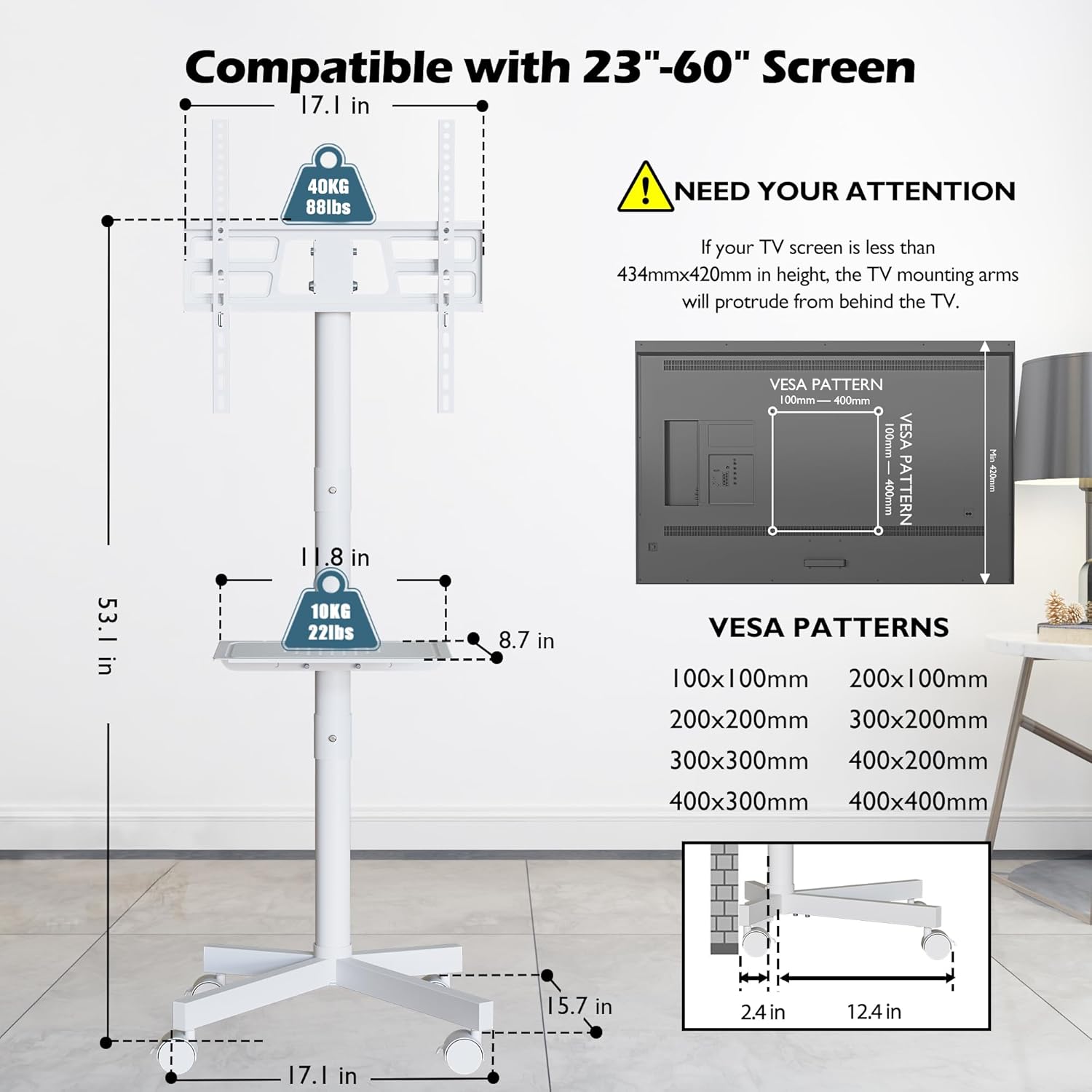
Thank you for choosing the BONTEC Mobile TV Stand. This manual provides detailed instructions for the safe and efficient assembly, operation, and maintenance of your new TV stand. Designed for versatility and stability, this stand accommodates most 23-60 inch LED, LCD, and OLED flat or curved TVs, supporting VESA patterns up to 400x400mm and a maximum weight of 88lbs. Its features include a tilt function for optimal viewing, durable 360° locking wheels for easy mobility, a space-saving low-profile design, an adjustable media shelf, and an integrated cable management system.
Setup Instructions
Please read all instructions carefully before beginning assembly. Ensure all parts are present and undamaged. Two people are recommended for assembly, especially when mounting the television.
Required Tools (Not Included):
- Phillips Head Screwdriver
- Wrench (if not provided with hardware)
Assembly Steps:
- Unpack and Verify Parts: Carefully remove all components from the packaging. Refer to the included parts list and hardware diagram to ensure all pieces are accounted for.
- Assemble the Base: Attach the support legs to the central pole base using the provided screws and tools. Ensure all connections are secure and stable.
- Install the Wheels: Screw the 360° locking wheels into the designated holes on the base. Tighten them firmly to ensure smooth movement and secure locking.
- Attach the Media Shelf: Slide the adjustable media shelf onto the central pole at your desired height. Secure it in place using the locking mechanism or screws as indicated in the diagram.
- Mount the TV Brackets: Attach the TV mounting brackets to the back of your television using the appropriate VESA screws and spacers from the 'Fitting Hardware Included' kit. Ensure the brackets are aligned with your TV's VESA pattern.
- Attach TV to Stand: With assistance, carefully lift the television and hook the mounted brackets onto the central pole's TV plate. Secure the TV using the safety locks or tightening screws as per the instructions to prevent accidental dislodgement.
- Cable Management: Utilize the integrated cable management clips along the central pole to route and organize your TV and device cables for a clean and tidy appearance.

Operating Instructions
Adjusting TV Height:
The TV mounting brackets offer two levels of height adjustment on the central pole. To adjust, loosen the securing bolts, carefully raise or lower the TV to the desired position, and re-tighten the bolts firmly. Ensure the TV is balanced before releasing.

Utilizing Tilt Function:
The TV stand features a tilt function allowing you to adjust the screen up to 10 degrees. This is useful for reducing glare or optimizing viewing angles. Gently push or pull the top or bottom of the TV to achieve the desired tilt. The mechanism is designed to hold the angle securely.

Mobility and Locking Wheels:
The stand is equipped with four 360° locking wheels for easy movement. To move the stand, unlock all four wheels. To secure the stand in a stationary position, press down on the locking lever on each wheel until it clicks into place.

Adjusting Media Shelf:
The media shelf can be adjusted to any height along the central pole. Loosen the shelf's securing mechanism, slide it to the desired position, and re-tighten to secure. This shelf is ideal for holding laptops, DVD players, gaming consoles, or soundbars.
Maintenance
- Cleaning: Wipe the stand with a soft, damp cloth. Avoid using harsh chemicals or abrasive cleaners that could damage the finish.
- Check Connections: Periodically check all screws and bolts to ensure they remain tight and secure, especially after moving the stand or adjusting the TV.
- Wheel Maintenance: Keep the wheels free of dust and debris to ensure smooth rolling. Lubricate if necessary.
Troubleshooting
- Stand is Wobbly: Ensure all assembly screws are fully tightened. Verify that the TV weight does not exceed the maximum capacity of 88lbs.
- Difficulty Moving Stand: Check that all four wheels are unlocked. Clear any obstructions or debris from around the wheels.
- TV Not Fitting Brackets: Confirm your TV's VESA pattern is within the supported range (100x100mm to 400x400mm). Ensure you are using the correct screws and spacers for your TV model.
- TV Tilts Too Easily/Not Holding Position: Check the tilt mechanism's tension. If adjustable, tighten it slightly.
Product Specifications
| Brand Name | BONTEC |
| Model Number | TC004-WH |
| Color | White |
| Material | Metal |
| Item Weight | 14.54 pounds |
| Package Dimensions | 17.6 x 10.75 x 5.55 inches |
| Mounting Type | Floor Mount |
| Movement Type | Tilt |
| Maximum Compatible TV Size | 60 Inches |
| Minimum Compatible TV Size | 23 Inches |
| Maximum TV Weight Capacity | 88 lbs |
| Max VESA Compatibility | 400x400mm |
| Maximum Tilt Angle | 10 Degrees |
Warranty Information
For information regarding the product warranty, please refer to the warranty card included in your product packaging or contact BONTEC customer support directly. Warranty terms and conditions may vary.
Customer Support
If you encounter any issues or have questions not covered in this manual, please contact BONTEC customer support for assistance. You can typically find contact information on the product packaging, the official BONTEC website, or through your retailer.


