
1. Introduction
The iScooter iX6 Electric Scooter is designed for adults seeking a powerful and reliable mode of transportation. Featuring 11-inch off-road tires, a robust 500W motor, and a long-range battery, it offers a comfortable and stable ride across various terrains. This manual provides essential information for the proper setup, operation, maintenance, and troubleshooting of your iX6 scooter to ensure a safe and enjoyable experience.

Image: The iScooter iX6 Electric Scooter, showcasing its robust design, alongside a compatible storage bag and additional shock absorbers.
2. Key Features
- Extended Range & Powerful Battery: Equipped with a 48V 17.5Ah battery, providing a maximum range of 50-60km on a single charge. The 500W motor ensures strong performance.
- All-Terrain Capability: Features 11-inch widened, thickened, anti-puncture, and anti-slip inflatable off-road tires for superior traction and a smooth ride on diverse surfaces.
- Advanced Suspension & Braking: Incorporates front and rear double spring shock absorbers for reduced bumpy sensations and enhanced comfort. Three braking systems (front + rear dual disc brakes + hidden electronic brakes) offer high braking efficiency.
- Enhanced Lighting System: Includes bright LED headlights, rear brake lights, colorful sidelights, and left/right turn lights for improved visibility and safety during night riding.
- Smart LCD Display & Diagnostics: A clear LCD meter displays speed, battery level, headlight status, cruise indicator, gear, and total mileage. Built-in fault self-detection helps identify issues via parameter codes.
- Adjustable Height & Foldable Design: The handlebar height is adjustable for rider comfort, and the scooter features a fast-fold mechanism for convenient storage and transport.
- NFC Card Switch: Offers a modern and secure NFC card unlocking system in addition to button control.

Image: An overview of the iX6 Electric Scooter's key specifications and features, including tire size, motor power, range, speed modes, battery capacity, suspension, and braking systems.
3. Setup Guide
3.1 Unboxing and Initial Assembly
- Carefully remove the scooter and all components from the packaging.
- Unfold the scooter by releasing the folding mechanism. Ensure the stem locks securely into place.
- Attach the handlebars if they are not pre-installed. Ensure all connections are firm.
- Inspect all screws and bolts for tightness. It is crucial to ensure all fasteners are properly secured before first use.
3.2 Charging the Battery
Before first use, fully charge the scooter's battery. The iX6 features a 48V 17.5Ah battery with fast charging capabilities.
- Locate the charging port, typically covered by a protective cap.
- Connect the charger to the scooter's charging port, then plug the charger into a standard power outlet.
- The charging indicator light on the charger will change (e.g., from red to green) when charging is complete. Full charge typically takes 7-9 hours.
- Do not overcharge the battery. Disconnect the charger once fully charged.

Image: Visual representation of the high-energy lithium battery, highlighting its capacity, range, and fast charging capability.
4. Operating Instructions
4.1 Powering On/Off and Unlocking
- To power on, press and hold the power button on the LCD display.
- The iX6 supports NFC card unlocking. Tap the NFC card to the designated area on the display to unlock the scooter.
- To power off, press and hold the power button again until the display turns off.

Image: Close-up of the scooter's handlebar and LCD display, illustrating the NFC card unlocking feature and various display indicators.
4.2 Speed Modes and Cruise Control
The iX6 offers three speed modes to suit different riding conditions:
- Mode 1: Approximately 10 KM/H
- Mode 2: Approximately 15 KM/H
- Mode 3: Approximately 25 KM/H (Maximum Speed)
To activate cruise control, reach your desired speed and hold the throttle in that position for a few seconds. The scooter will maintain the speed. To disengage, lightly press the brake lever or throttle.
4.3 Lighting System
Ensure proper visibility, especially during low-light conditions:
- Headlight: Press the headlight button on the handlebar to turn on/off the front LED light.
- Taillight & Brake Light: The taillight illuminates automatically when the scooter is on. It brightens when the brakes are applied.
- Sidelights & Turn Signals: Use the designated buttons on the handlebar to activate colorful sidelights and left/right turn signals for enhanced safety.

Image: Illustration of the scooter's comprehensive lighting system, including headlamp, taillight, and pedal ambient lights, designed for night visibility.
5. Maintenance
5.1 General Care
- Keep the scooter clean by wiping it with a damp cloth. Avoid using high-pressure water jets directly on electronic components.
- Store the scooter in a dry, cool place away from direct sunlight and extreme temperatures.
- Regularly check and tighten all screws and bolts, especially after initial rides, as vibrations can cause them to loosen.
5.2 Tire Maintenance
The 11-inch off-road pneumatic tires require proper inflation for optimal performance and longevity.
- Check tire pressure regularly (recommended pressure can be found on the tire sidewall or in specifications).
- Inspect tires for any signs of wear, punctures, or damage before each ride.
- If a flat tire occurs, professional assistance is recommended, as removing the wheel can be challenging.
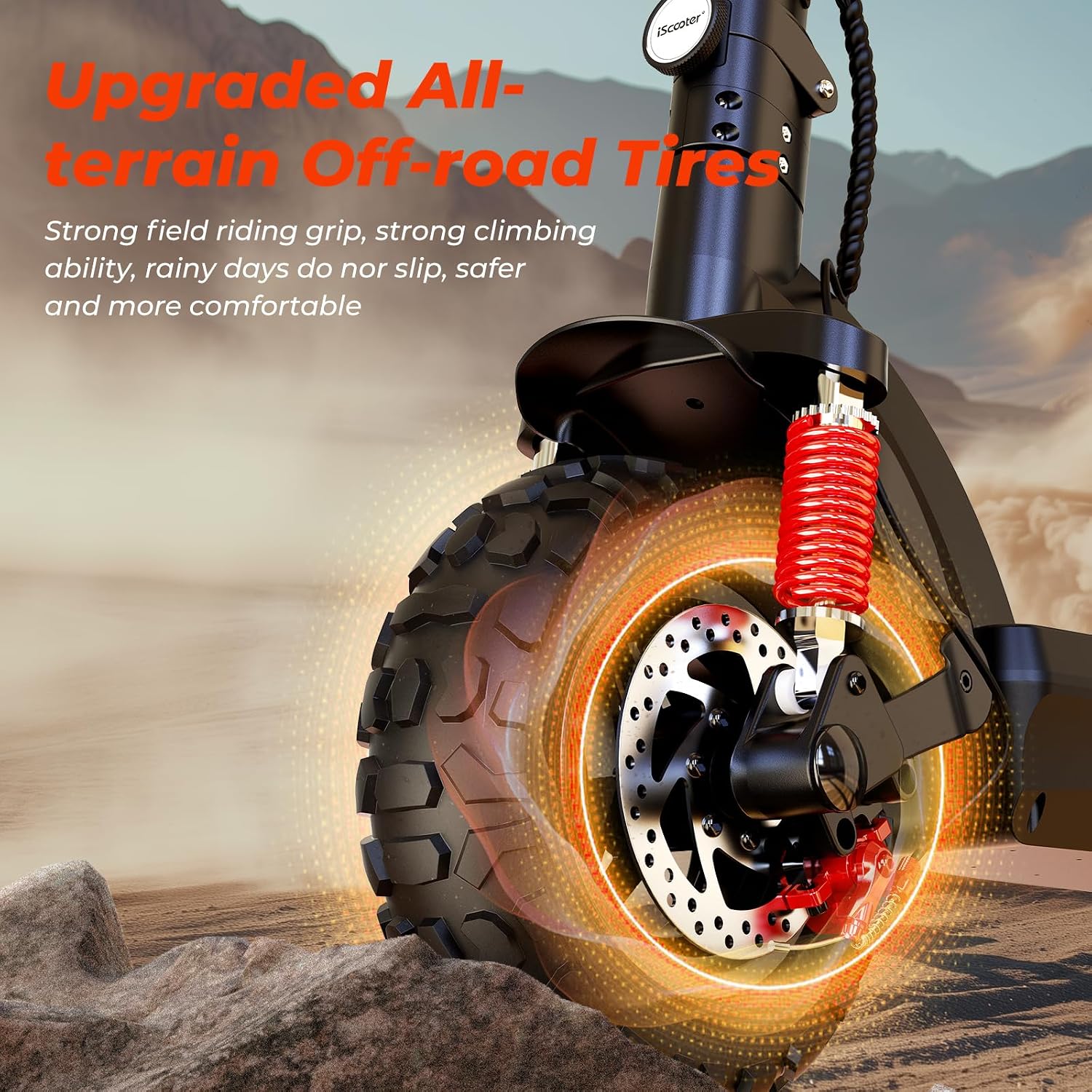
Image: Detailed view of the scooter's robust 11-inch off-road tire, emphasizing its design for enhanced handling and grip.
5.3 Brake System Maintenance
The iX6 features dual disc brakes and an electronic brake.
- Regularly check the brake levers for proper tension and responsiveness.
- Inspect brake pads for wear and replace them if necessary.
- Ensure the disc rotors are clean and free from oil or debris.

Image: Depiction of the scooter's four shock absorbers, illustrating their role in providing a smoother and more responsive ride.
6. Troubleshooting
6.1 Common Issues and Solutions
| Problem | Possible Cause | Solution |
|---|---|---|
| Scooter does not power on. | Low battery; loose connections; power button malfunction. | Charge the battery fully. Check all cable connections. Contact support if issue persists. |
| Reduced range or power. | Under-inflated tires; battery degradation; riding uphill frequently. | Check tire pressure. Ensure battery is fully charged. Adjust riding style. |
| Flat tire or difficulty with wheel. | Puncture; valve issue; loose wheel components. | Inflate tire to correct pressure. If punctured, seek professional repair. Ensure wheel bolts are tight. |
| Unusual noises during operation. | Loose components; debris in motor/wheel; worn bearings. | Inspect for loose parts and tighten. Clean any visible debris. If noise persists, consult a technician. |
6.2 Fault Self-Detection
The smart LCD meter has a built-in fault self-detection system. If an error occurs, a specific parameter code may be displayed. Refer to the scooter's digital display or contact customer support with the code for diagnosis.
7. Specifications
| Feature | Detail |
|---|---|
| Model Name | iX6 |
| Brand | iScooter |
| Motor Power | 500W |
| Battery | 48V 17.5Ah |
| Max Range | 50-60 KM |
| Charging Time | 7-9 Hours |
| Speed Modes | 10/15/25 KM/H |
| Tire Size | 11 Inches (Off-road Pneumatic) |
| Suspension | Dual (Front+Rear Double Spring Shock Absorbers) |
| Brake System | Front+Rear Dual Disc Brakes + Hidden Electronic Brake |
| Frame Material | Aluminium |
| Max Weight Capacity | 150 Kilograms |
| Product Dimensions (L x W x H) | 122 x 63 x 125 cm |
| Item Weight | 22.5 Kilograms |
| Special Features | Adjustable Height, Foldable Handlebar, NFC Card Switch |
8. Warranty and Support
For warranty information and customer support, please refer to the documentation included with your purchase or visit the official iScooter website. Keep your proof of purchase for any warranty claims.
If you encounter any issues not covered in this manual, please contact iScooter customer service for assistance.
9. Official Product Videos
No official product videos from the seller were found in the provided data that meet the embedding criteria (m3u8 format and creator_type: "Seller").