
1. Introduction
Thank you for choosing the SIRUI Aurora 85mm F1.4 Full Frame Auto Focus Lens. This high-performance telephoto prime lens is designed for Sony E-mount cameras, offering exceptional image quality, a fast aperture, and precise autofocus capabilities. This manual provides essential information for the proper setup, operation, and maintenance of your new lens.

Image 1.1: The SIRUI Aurora 85mm F1.4 Full Frame Auto Focus Lens.
2. Key Features
- Unparalleled Image Quality: Offers outstanding sharpness throughout the frame at F1.4, maintaining high resolution. Features aspherical, ED, and HRI glass for suppressed chromatic aberration and accurate color rendering.
- Ultra Fast Aperture: The f/1.4 fast aperture with fifteen-blade diaphragms ensures sufficient light in low-light conditions and produces beautiful bokeh.
- Fast, Smooth & Precise AF: Equipped with a step motor, supporting Eye AF and object tracking for enhanced accuracy and smooth autofocus performance.
- Ideal for Portrait Photography: The 85mm focal length is optimized for natural facial shots, providing a moderate distance between photographer and subject, and creamy bokeh.
- Super Lightweight Design: Weighing only 540g (1.2lbs), it is approximately 17% lighter than similar lenses, making it suitable for long-time handheld or gimbal use.
- Professional Lens Control: Includes an AF/MF focus mode switch, an AFL button, and an aperture ring with switchable click stops for flexible control.
3. Package Contents
Verify that all items are present in your package:
- SIRUI Aurora 85mm F1.4 Lens Body
- Lens Hood
- Storage Bag
- Lens Box
- Service Card & Warranty Card

Image 3.1: Visual representation of the SIRUI Aurora 85mm F1.4 lens and its included accessories.
4. Lens Overview
The SIRUI Aurora 85mm F1.4 lens features several controls for optimal photographic and videographic performance.

Image 4.1: Detailed view of the lens controls and optical elements.
4.1. AF/MF Switch Button
This switch allows you to quickly toggle between Autofocus (AF) and Manual Focus (MF) modes. In AF mode, the lens's STM silent motor provides fast and accurate focus, supporting human eye recognition. In MF mode, you have full manual control over focusing.
4.2. AFL Button
The Auto Focus Lock (AFL) button allows you to lock the focus while the button is pressed. This button also supports custom setting functions, which can be configured via your camera's menu. Note: Due to X-mount body limitations, this feature is only compatible with E/L/Z mounts.
4.3. Aperture Ring with Click ON/OFF Switch
The aperture ring allows you to adjust the lens's aperture. The Click ON/OFF switch enables you to engage or disengage the click stops on the aperture ring. Disengaging the click stops provides smooth, stepless aperture control, which is particularly useful for video recording to avoid audible clicks during adjustments.
5. Setup
5.1. Attaching the Lens
- Ensure your camera is turned off.
- Remove the rear lens cap and the camera body cap.
- Align the mounting index (red dot) on the lens with the mounting index on your camera body.
- Insert the lens into the camera mount and rotate it clockwise until it clicks into place.
5.2. Detaching the Lens
- Ensure your camera is turned off.
- While pressing the lens release button on the camera body, rotate the lens counter-clockwise until it stops.
- Remove the lens from the camera mount.
- Attach the rear lens cap to the lens and the body cap to the camera to protect them from dust.
5.3. Attaching the Lens Hood
Align the lens hood with the front of the lens and twist it clockwise until it locks securely. The lens hood helps to prevent flare and ghosting caused by stray light.
6. Operation
6.1. Focusing Modes (AF/MF)
Use the AF/MF switch on the lens barrel to select your desired focusing mode. In AF mode, the lens will automatically focus. In MF mode, rotate the focus ring to manually adjust the focus.

Image 6.1: The lens supports fast and accurate autofocus, including Eye AF and object tracking for moving subjects.
6.2. Aperture Control
Rotate the aperture ring to set your desired aperture value. The f/1.4 maximum aperture allows for excellent low-light performance and shallow depth of field. Use the Click ON/OFF switch to enable or disable click stops based on your preference for photography or videography.

Image 6.2: Demonstrates the dreamlike aperture blurring and bokeh achievable at F1.4.
6.3. Minimum Focusing Distance
The lens has a minimum focusing distance of 0.85m (2.79ft), allowing for close-up shots with good detail.
7. Image Quality & Performance
The SIRUI Aurora 85mm F1.4 lens is engineered for high-resolution image quality, delivering sharpness from the center to the corners of the frame, even at its widest aperture.

Image 7.1: Example of high-resolution image quality, showcasing detail at 200% zoom.
7.1. Portrait Photography
With its 85mm focal length, this lens is a classic choice for portrait photography, providing natural perspective and excellent subject isolation.

Image 7.2: The 85mm focal length is ideal for outdoor portraits and close-up shots.
8. Camera Compatibility (Sony E-Mount)
The SIRUI Aurora 85mm F1.4 lens is compatible with various Sony E-mount cameras. Refer to the table below for specific compatibility details regarding photo and video functions.
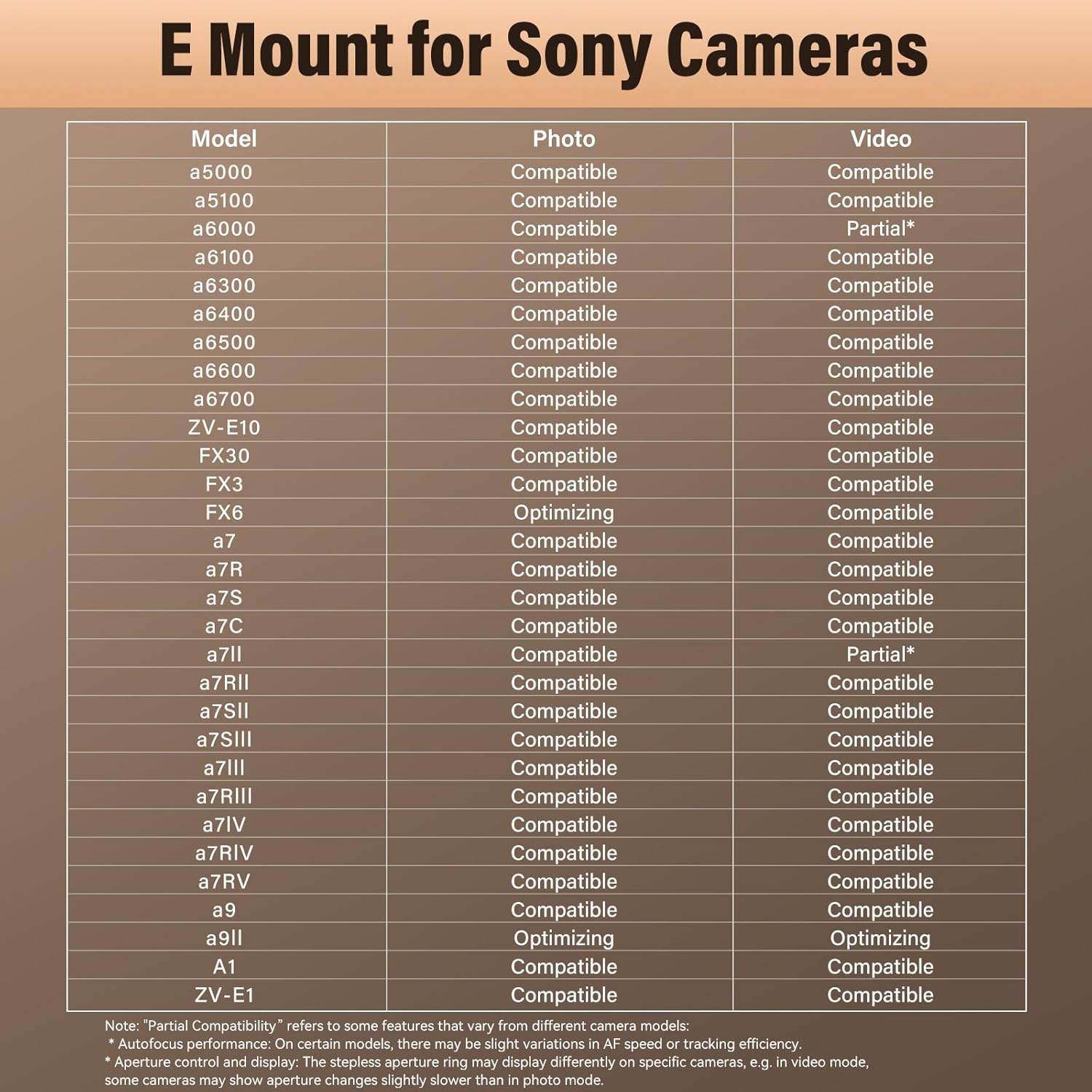
Image 8.1: Compatibility chart for SIRUI Aurora 85mm F1.4 with Sony E-mount cameras.
Note: "Partial Compatibility" refers to some features that vary from different camera models. Autofocus performance and aperture ring display may vary on specific cameras, especially in video mode.
9. Specifications
| Feature | Detail |
|---|---|
| Model | AU85-E-AM-LB |
| Focal Length | 85mm |
| Max Aperture | F1.4 |
| Min Aperture | F16 |
| Lens Type | Telephoto Prime |
| Compatible Mountings | Sony E |
| Focus Type | Auto Focus, Manual Focus |
| Lens Structure | 14 Elements in 9 Groups |
| Aperture Blades | 15 |
| Max Magnification | 1:8.68 or 0.1152x |
| Filter Thread | M67 x 0.75 |
| Max Diameter | 80.3mm / 3.2" |
| Focus Ring Diameter | 80.3mm / 3.2" |
| Len Format Coverage | Full Frame |
| Item Weight | 540 Grams |
| Image Stabilization | No image stabilization |
| Water Resistance Level | Waterproof |
10. Maintenance
10.1. Cleaning the Lens
- Use a blower brush to remove dust and loose particles from the lens surface.
- For smudges or fingerprints, use a clean microfiber cloth specifically designed for optics, along with a small amount of lens cleaning solution.
- Wipe gently in a circular motion from the center outwards.
- Avoid touching the glass elements directly with your fingers.
10.2. Storage
- Always attach the front and rear lens caps when the lens is not in use.
- Store the lens in a cool, dry place, away from direct sunlight and extreme temperatures.
- If storing for an extended period, consider using a dehumidifier or desiccant packs to prevent mold and mildew growth.
11. Troubleshooting
11.1. Lens Not Focusing
- Ensure the AF/MF switch on the lens is set to AF if you intend to use autofocus.
- Check camera settings to ensure autofocus is enabled and the correct focus mode is selected.
- Clean the lens contacts on both the lens and camera body.
11.2. Image Quality Issues (Softness, Aberrations)
- Ensure the lens is securely mounted to the camera body.
- Check for smudges or dust on the lens elements and clean as per maintenance instructions.
- Verify that the camera's shutter speed is appropriate for the lighting conditions to avoid motion blur.
11.3. Electronic Communication Errors
- Turn off the camera, remove the lens, and reattach it firmly.
- Clean the electronic contacts on both the lens and camera body with a clean, dry cloth.
12. Warranty & Support
12.1. Manufacturer's Warranty
This SIRUI Aurora 85mm F1.4 lens comes with a 3-Year Manufacturer's Warranty. Please refer to the included Service Card & Warranty Card for detailed terms and conditions.
12.2. Firmware Update
The latest firmware version for the Aurora 85mm lens is V1.0.7. For assistance with firmware updates or to obtain update instructions, please contact SIRUI customer support via email.
12.3. Customer Support
For any questions, technical support, or service inquiries, please visit the official SIRUI website or contact their customer service department. Keep your purchase receipt and warranty card handy when contacting support.
13. Product Videos
13.1. SIRUI AURORA 85mm Full-Frame F1.4 AF Overview
Video 13.1: An official overview of the SIRUI Aurora 85mm F1.4 Full-Frame Auto Focus Lens, highlighting its key features and capabilities.
13.2. Explore Unlimited Creativity with the SIRUI Aurora 85mm AF
Video 13.2: This video demonstrates the creative potential of the SIRUI Aurora 85mm F1.4 AF lens in various shooting scenarios.


