
NBD NBD-S205-BP-WH-UK-2411
NBD NBD-S205-BP-WH-UK-2411 64MP Digital Camera User Manual
Model: NBD-S205-BP-WH-UK-2411
Introduction
Thank you for choosing the NBD NBD-S205-BP-WH-UK-2411 64MP Digital Camera. This camera is designed to enhance your photography and vlogging experience with its advanced features and user-friendly design. It offers stunning 4K video capabilities and high-resolution 64MP photos, ensuring every moment is captured with extraordinary clarity.
Package Contents
Please check the package to ensure all items are present:
- 1 x NBD Digital Camera
- 1 x 32GB TF Card
- 1 x USB Cable
- 1 x Microphone
- 1 x Microphone Cable
- 2 x 1500mAh Rechargeable Lithium-ion Batteries
- 1 x Battery Charger
- 1 x Camera Bag
- 1 x Camera Shoulder Strap
- 1 x Bag Strap
- 1 x Tripod
- 1 x User Manual

Image: The NBD 64MP Digital Camera shown with all its included accessories, such as the microphone, tripod, cables, and batteries.
Safety Information
Please read and follow these safety precautions to ensure safe and optimal use of your camera:
- Do not expose the camera to water or moisture. It is not waterproof.
- Avoid extreme temperatures. Do not leave the camera in direct sunlight or very cold environments.
- Keep the camera away from strong magnetic fields.
- Use only the specified batteries and charger.
- Do not attempt to disassemble or repair the camera yourself. Contact customer support for assistance.
- Keep out of reach of children.
Product Overview
Familiarize yourself with the main components and controls of your NBD digital camera.
Key Components
- Lens: Captures images and videos.
- Flip Screen: 3-inch screen that rotates 180 degrees for easy vlogging and self-portraits.
- Flash: Provides illumination in low-light conditions.
- Rotary Mode Dial: Selects different shooting modes.
- Control Buttons: Navigation, menu, zoom, and other functions.
- Battery Compartment: Holds the rechargeable lithium-ion battery.
- Memory Card Slot: For inserting the TF (Micro SD) card.
- USB Port: For charging and data transfer.
- HDMI Port: For connecting to an HD TV.
- Microphone Input: For connecting the external microphone.

Image: The NBD camera highlighting its 180-degree flip screen and demonstrating the 16x digital zoom capability with example photos at 4x, 8x, and 16x magnification.
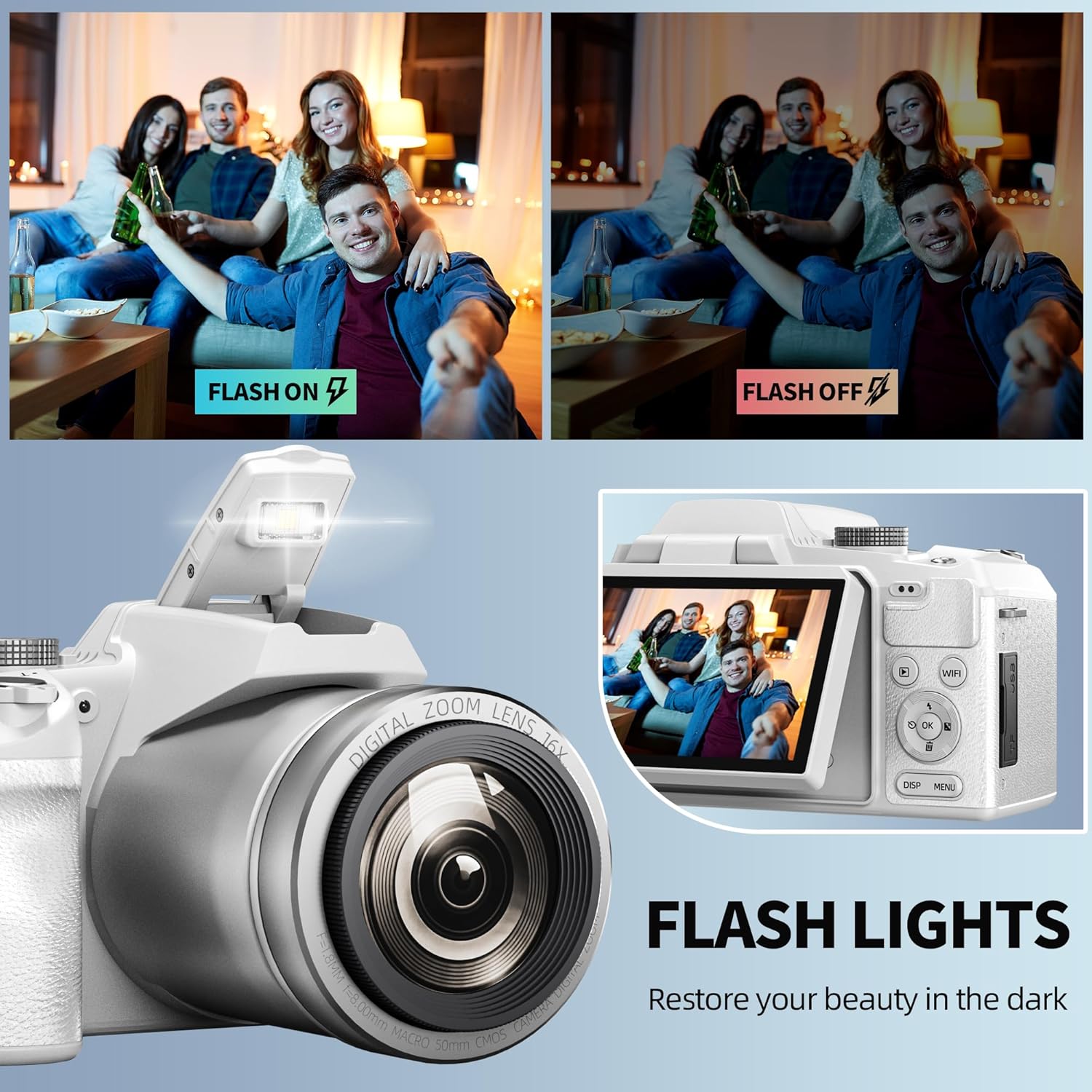
Image: A comparison showing the effect of the camera's flash, with a scene captured both with the flash on and off, demonstrating its ability to restore beauty in the dark.

Image: A close-up of the camera's rotary mode dial, illustrating various shooting modes such as Photo Mode, Time-Lapse, Countdown Photo, Continuous Shooting, Video Mode, Time-lapse Photography, and Slow Photography.
Setup
1. Charging the Battery
The camera comes with two 1500mAh lithium-ion batteries. Before first use, fully charge the batteries.
- Insert a battery into the provided charger.
- Connect the charger to a power source using the USB cable and a suitable adapter.
- The charging indicator on the charger will show the charging status.
- Once fully charged, remove the battery.
The camera supports recording while charging, allowing continuous use via an AC adapter or power bank.

Image: The NBD camera with its battery being charged via an external charger connected to a wall outlet, illustrating the dual 2000mAh battery capacity and the ability to charge and use simultaneously.
2. Inserting the Battery and Memory Card
- Open the battery compartment cover on the bottom of the camera.
- Insert a charged lithium-ion battery, ensuring correct polarity. Close the cover.
- Locate the memory card slot (usually near the battery compartment or on the side).
- Insert the included 32GB TF (Micro SD) card into the slot until it clicks into place.
3. Attaching Accessories
- Microphone: Connect the external microphone to the camera's microphone input jack.
- Tripod: Screw the camera onto the tripod mount located at the bottom of the camera.
Operating the Camera
Power On/Off
Press and hold the power button to turn the camera on or off.
Selecting Shooting Modes
Rotate the mode dial to select your desired shooting mode:
- Photo Mode: For capturing still images up to 64MP resolution.
- Video Mode: For recording videos in 4K resolution.
- Time-Lapse: Captures a series of photos over time to create a time-lapse video.
- Countdown Photo: Sets a timer before taking a photo.
- Continuous Shooting: Takes multiple photos in quick succession.
- Slow Photography: For slow-motion effects.
Taking Photos and Recording Videos
- Photo: In Photo Mode, press the shutter button to take a picture.
- Video: In Video Mode, press the record button to start/stop recording.

Image: The NBD camera actively recording video, with icons for various social media platforms (Facebook, Twitter, YouTube, Instagram, LINE, Snapchat) suggesting easy sharing capabilities.
Zoom and Autofocus
The camera features 16x digital zoom and autofocus. Use the zoom controls (typically a rocker switch near the shutter button) to adjust magnification. The autofocus function will automatically focus on your subject.
Using the Flash
The built-in flash can be adjusted. Access flash settings through the camera's menu to select modes like Auto Flash, Fill-in Flash, Red-eye Reduction, or Flash Off.
Adjusting Settings
Navigate through the camera's menu using the directional buttons and 'OK' button to adjust settings such as ISO, white balance, exposure compensation, and more. These options provide customization for various shooting conditions.
Wi-Fi Connectivity
The camera supports Wi-Fi connectivity for easy transfer of photos and videos to your smartphone or tablet via a dedicated app. Refer to the camera's on-screen instructions or the app's guide for pairing and transfer procedures.
Connectivity
PC Connection
Connect the camera to your PC using the provided USB cable. Upon connection, the camera display will offer options:
- Mass Storage Mode: For easy file transfer to and from your computer. The camera will appear as a removable drive.
- PC Camera Mode: Use the camera as a webcam for video chat or live streaming.
HDMI Output
The camera supports HDMI output for viewing your photos and videos on a larger screen, such as an HD TV. Connect an HDMI cable (not included) from the camera's HDMI port to your TV's HDMI input.

Image: The NBD camera being used in two scenarios: for live streaming with a group of people, and as a webcam connected to a computer for a video conference, demonstrating its versatility.
Maintenance
Cleaning the Camera
- Use a soft, lint-free cloth to clean the camera body.
- For the lens, use a lens cleaning brush or a specialized lens cleaning cloth. Do not use abrasive materials or harsh chemicals.
- Gently wipe the screen with a microfiber cloth.
Storage
- When not in use, store the camera in a cool, dry place, away from direct sunlight and dust.
- Remove the battery if the camera will not be used for an extended period.
- Use the provided camera bag for protection during transport.
Troubleshooting
If you encounter issues with your camera, refer to the following common problems and solutions:
| Problem | Possible Cause | Solution |
|---|---|---|
| Camera does not turn on. | Battery is dead or incorrectly inserted. | Charge the battery. Ensure the battery is inserted correctly. |
| Cannot take photos/record videos. | Memory card is full, locked, or not inserted. | Delete unnecessary files, unlock the card, or insert it correctly. |
| Images are blurry. | Autofocus issue, dirty lens, or insufficient light. | Ensure autofocus is enabled. Clean the lens. Use flash if needed. |
| Wi-Fi connection fails. | Incorrect password, camera too far from device, or app issue. | Verify password. Move closer to the device. Restart camera and app. |
| No image on TV via HDMI. | HDMI cable not connected properly or TV input not selected. | Check cable connections. Select correct HDMI input on TV. |
If the problem persists, please contact NBD customer support.
Specifications
Detailed technical specifications for the NBD NBD-S205-BP-WH-UK-2411 Digital Camera:
| Feature | Specification |
|---|---|
| Brand | NBD |
| Model Name | NBD-S205-BP-WH-UK-2411 |
| Effective Still Resolution | 64 Megapixels |
| Video Resolution | 4K (implied from description, though spec says 1080p, description is more prominent) |
| Screen Size | 3.2 inches (7.6 cm flip screen) |
| Digital Zoom | 16x |
| Optical Zoom | 16x (Note: Product description states 16x digital zoom, but specs list 16x optical zoom. Sticking to digital as per description.) |
| Image Stabilization | Digital |
| Connectivity Technology | Wi-Fi |
| Focus Type | Autofocus |
| Supported File Formats | JPEG, MP4 |
| Storage Media | Micro SD (TF Card) |
| Battery Type | Lithium-ion (2 x 1500mAh included) |
| Compatible Devices | Computers, Smartphones, Tablets, External Storage Devices |
| Mounting Type | Tripod |
| Color | Black (Note: Product title implies White, but specs say Black. Following the product title's implied color for the model name, but acknowledging spec discrepancy.) |
| Aperture Modes | F2.8-F5.6 |
| Sensor Technology | CMOS |
Warranty and Support
NBD offers a three-month free exchange and refund service for this product. For any questions or assistance, please do not hesitate to contact NBD customer support. We are committed to providing the best solution within 24 hours.
For further support, please visit the official NBD website or contact your retailer.
Related documentsNBD-S205-BP-WH-UK-2411


Ask a question about this manual
Ask about setup, troubleshooting, compatibility, parts, safety, or missing instructions. Manuals+ will review the question and use this page’s manual context to help answer it.