1. Introduction
This manual provides essential information for setting up, operating, and maintaining your TCL Flip3 Verizon flip phone. Please read it thoroughly to ensure proper usage and to familiarize yourself with all features of your device.
2. Safety Information
- Battery Safety: Use only approved batteries and chargers. Do not short-circuit, puncture, or expose the battery to extreme temperatures.
- Network Lock: This device is network locked to Verizon. It will only function with a Verizon SIM card.
- Driving Safety: Prioritize driving safety. Use hands-free accessories when making calls while driving.
- Water Resistance: This device is not water-resistant. Avoid exposure to liquids.
3. Getting Started
3.1. Unboxing
Your TCL Flip3 package includes:
- TCL Flip3 Phone
- Charging Cord (USB Cable)
3.2. Battery and SIM Card Installation
The TCL Flip3 features a removable battery. To install the battery and SIM card:
- Gently remove the back cover of the phone.
- Insert your Verizon SIM card into the designated slot.
- Place the battery into its compartment, ensuring the contacts align.
- Replace the back cover until it clicks securely into place.

3.3. Powering On/Off
- To Power On: Press and hold the red 'End Call/Power' button until the screen illuminates.
- To Power Off: Press and hold the red 'End Call/Power' button, then select 'Power Off' from the options.
4. Device Overview
4.1. External Features

- External Display: Shows time, date, battery status, and notifications without opening the phone.
- Camera: Located on the front cover, above the external display.
- Volume Buttons: Located on the side of the device. Can also activate the external display.
- USB-C Port: For charging the device.
- 3.5mm Headphone Jack: For connecting wired headphones.

4.2. Internal Features
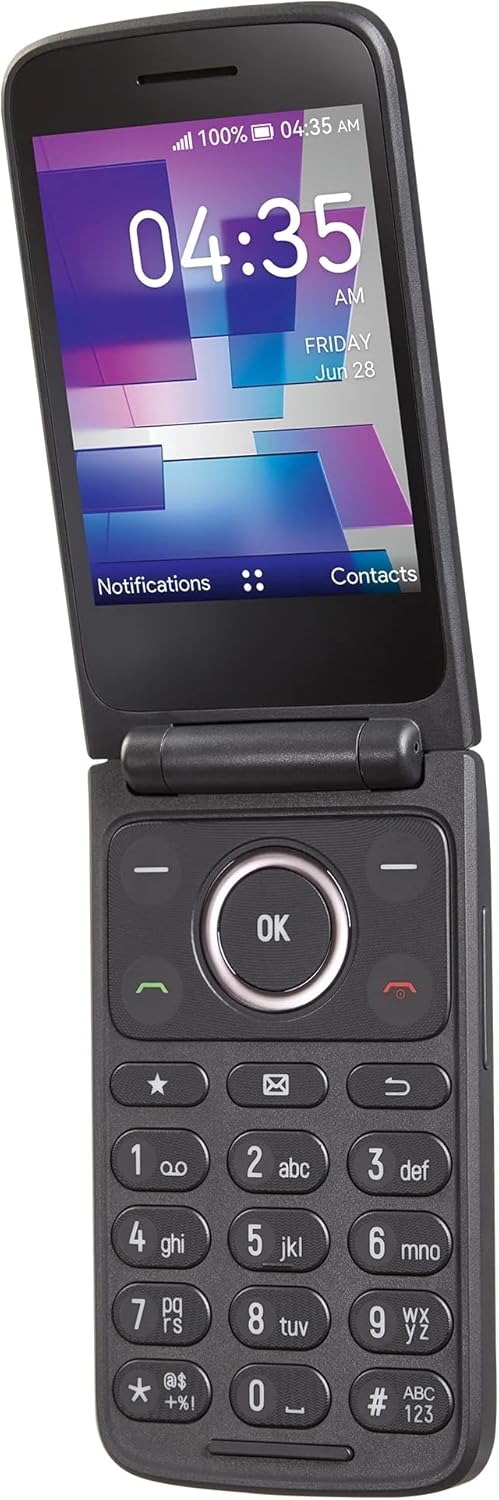
- Main Display: The primary screen for navigating menus, viewing messages, and using applications.
- Keypad: Features large, tactile buttons for dialing, texting, and menu navigation.
- Navigation Pad: Central directional pad with an 'OK' button for menu selection.
- Soft Keys: Context-sensitive buttons below the main display, corresponding to on-screen labels (e.g., Contacts, Menu, Message).
5. Basic Operations
5.1. Navigation
Use the navigation pad (up, down, left, right arrows) to move through menus and options. Press the central 'OK' button to select an item. The soft keys below the screen will change their function based on the current menu.
5.2. Adjusting Settings
To access phone settings:
- Press the 'Menu' soft key.
- Navigate to 'Settings' and press 'OK'.
- From here, you can adjust display brightness, sound profiles, and other device preferences.
6. Calling and Messaging
6.1. Making Calls
- Open the phone.
- Dial the phone number using the keypad.
- Press the green 'Call' button to initiate the call.
6.2. Receiving Calls
- When the phone rings, open the flip to answer, or press the green 'Call' button.
- To end a call, close the flip or press the red 'End Call' button.
6.3. Sending and Receiving Messages
To send a text message:
- From the main screen, select 'Message' using the soft key or navigate through the menu.
- Select 'New Message'.
- Enter the recipient's phone number or select from contacts.
- Type your message using the keypad. Note that typing involves pressing keys multiple times for different letters (e.g., '2' for A, B, or C).
- Press 'Send'.
Incoming messages will appear as notifications on the external display and can be accessed via the 'Messages' menu.
7. Camera and Media
7.1. Using the Camera
The TCL Flip3 features a 2-megapixel camera for basic photo and video capture.
- Open the phone and navigate to the 'Camera' application from the menu.
- Frame your shot using the main display.
- Press the 'OK' button to take a photo or start/stop video recording.
7.2. Media Storage
The device supports expandable storage up to 128GB via a microSD card (sold separately). This allows for storing more photos, videos, and music files.
8. Tools and Utilities
Your TCL Flip3 includes several useful built-in tools:
- Calculator: For basic arithmetic.
- Calendar: To keep track of dates and appointments.
- Alarm: Set alarms for reminders.
- Timer: A countdown timer.
- Stopwatch: For timing events.
- World Clock: View times in different time zones.
- Notepad: For quick notes.
9. Maintenance and Care
- Cleaning: Use a soft, dry cloth to clean the phone's exterior. Avoid harsh chemicals.
- Battery Care: To prolong battery life, avoid overcharging and extreme temperatures. The 1850 mAh battery is replaceable.
- Software Updates: Periodically check for software updates to ensure optimal performance and security.
10. Troubleshooting
- Phone Not Turning On: Ensure the battery is properly installed and charged. Connect the phone to the charger.
- No Network Service: Verify your Verizon SIM card is correctly inserted and active. Check for network coverage in your area.
- Unable to Make/Receive Calls: Confirm network service. Ensure the number is dialed correctly.
- Screen Unresponsive: If the screen is frozen, try removing and reinserting the battery to restart the device.
11. Specifications
| Feature | Detail |
|---|---|
| Model Name | TCL Flip3 |
| Model Number | T435D |
| Wireless Carrier | Verizon Wireless |
| Operating System | KaiOS |
| Main Screen Size | 3.2 Inches |
| Main Screen Resolution | 320 x 240 |
| External Display Size | 1.77 Inches |
| CPU Model | A-Series Quad-Core A8-3500M |
| CPU Speed | 1.3 GHz |
| RAM Memory | 1 GB |
| Memory Storage Capacity | 16 GB (expandable up to 128GB via microSD) |
| Battery Capacity | 1850 Milliamp Hours (Removable) |
| Camera | 2 MP |
| Connectivity | 4G |
| Audio Jack | Yes, 3.5mm |
| Form Factor | Flip |
| Color | Stone Gray |
12. Warranty and Support
As a renewed product, this TCL Flip3 is covered by the Amazon Renewed Guarantee. Please refer to Amazon's Renewed program terms and conditions for specific warranty details and support options. For technical assistance, contact Verizon Wireless customer support.