
Introduction
This manual provides essential instructions for the proper setup, operation, and maintenance of your Stalwart Electronic Safe with Digital Biometric Fingerprint Lock Box. Please read this manual thoroughly before using the safe to ensure optimal performance and security. Keep this manual for future reference.
Safety Information
- Always keep override keys in a secure location away from the safe. Do not store them inside the safe.
- Ensure the safe is mounted securely to prevent unauthorized removal.
- Replace batteries promptly when the low battery indicator appears to avoid being locked out.
- Avoid exposing the safe to extreme temperatures or humidity.
Package Contents
- Stalwart Electronic Safe (Model 65-FIN-25-GRY)
- Override Keys (2)
- AA Batteries (4)
- Mounting Hardware (Bolts)
- User Manual
Setup
1. Battery Installation
The safe requires 4 AA batteries for operation. The battery compartment is located on the inside of the safe door.
- Open the safe using one of the override keys. Insert the key into the keyhole, turn it clockwise, and rotate the handle to open the door.
- Locate the battery compartment cover on the inside of the door.
- Remove the cover and insert 4 new AA batteries, ensuring correct polarity (+/-).
- Replace the battery compartment cover.
 Image: Inside view of the safe, highlighting the battery compartment, override keys, secure deadbolts, and mounting hardware.
2. Initial Code Setup
Upon first use, you will need to set your personal access code.
- With the safe door open, press the red reset button located on the inside of the door, near the hinge. You will hear a beep.
- Within 5 seconds, enter a 3 to 8 digit code on the keypad.
- Press the '#' button to confirm. The safe will beep twice, indicating successful code setup.
- Test the new code with the door open before closing it.
3. Fingerprint Enrollment
The safe can store up to 32 unique fingerprints.
- With the safe door open, press the red reset button. You will hear a beep.
- Place your finger firmly on the fingerprint scanner. The safe will beep once.
- Lift your finger and place it again from a slightly different angle. Repeat this process 3-5 times until the safe beeps twice, indicating successful enrollment.
- To enroll additional fingerprints, repeat steps 1-3 for each finger.
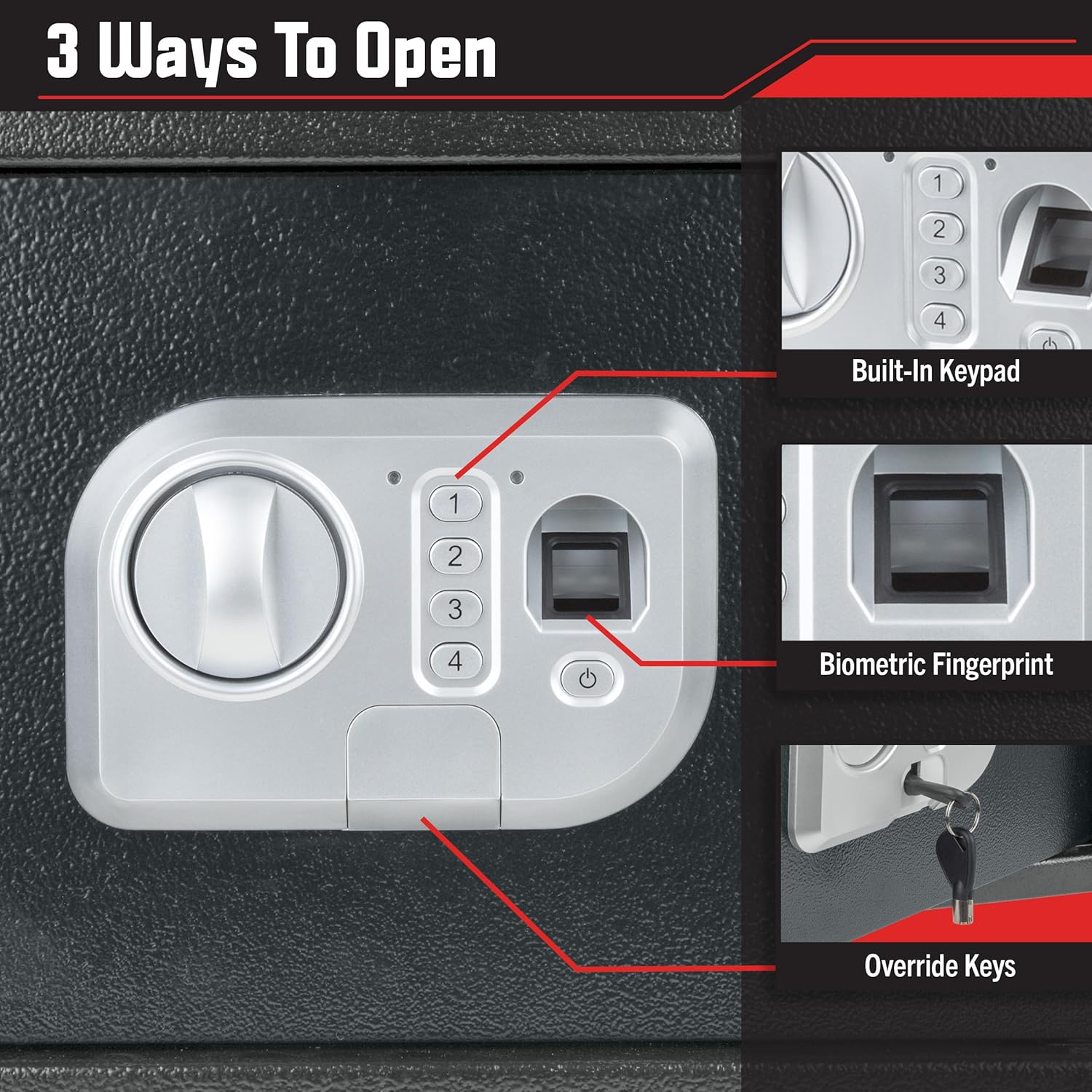 Image: The safe's access methods: built-in keypad, biometric fingerprint scanner, and override keyhole.
4. Mounting Instructions
For enhanced security, it is recommended to mount the safe to a wall or floor.
- Choose a suitable location for mounting.
- Open the safe door and locate the pre-drilled mounting holes on the back or bottom of the safe.
- Mark the drilling points on the wall or floor through the holes.
- Drill pilot holes using an appropriate drill bit for your surface.
- Align the safe with the drilled holes and secure it using the provided mounting hardware. Tighten all bolts firmly.
Operating Instructions
1. Opening with Keypad
- Enter your 3 to 8 digit personal code.
- Press the '#' button.
- The green light will illuminate, and you will hear a beep. Within 5 seconds, turn the handle clockwise to open the door.
2. Opening with Fingerprint
- Place your enrolled finger firmly on the fingerprint scanner.
- If the fingerprint is recognized, the green light will illuminate, and you will hear a beep. Within 5 seconds, turn the handle clockwise to open the door.
3. Opening with Override Key
Use the override key if you forget your code, if the batteries are dead, or if the electronic system malfunctions.
- Locate the keyhole cover on the control panel.
- Remove the cover.
- Insert one of the override keys into the keyhole and turn it clockwise.
- While holding the key turned, rotate the handle clockwise to open the door.
- Remove the key and replace the keyhole cover after use.
 Image: The safe being opened using an override key.
4. Changing User Code
- Open the safe door.
- Press the red reset button on the inside of the door. You will hear a beep.
- Enter your new 3 to 8 digit code.
- Press the '#' button to confirm. The safe will beep twice.
- Test the new code with the door open before closing it.
5. Alarm Function
If an incorrect code is entered three consecutive times, or an unauthorized fingerprint attempt is made multiple times, the safe will activate an alarm for approximately 60 seconds. To silence the alarm, enter the correct code, use an enrolled fingerprint, or use an override key.
Maintenance
1. Battery Replacement
When the low battery indicator light illuminates, replace all four AA batteries promptly. If batteries are completely depleted, use the override key to open the safe and replace them.
2. Cleaning
Wipe the safe's exterior with a soft, damp cloth. Avoid using abrasive cleaners or solvents that could damage the finish or electronic components.
Troubleshooting
| Problem | Possible Cause | Solution |
|---|---|---|
| Safe does not open with code/fingerprint. | Incorrect code/fingerprint, dead batteries, electronic malfunction. | Verify code, re-scan fingerprint, replace batteries, use override key. |
| Keypad does not respond. | Dead batteries. | Replace batteries using override key access. |
| Alarm sounds unexpectedly. | Multiple incorrect entries. | Enter correct code, use enrolled fingerprint, or override key to silence. |
| Door does not close properly. | Obstruction, misaligned bolts. | Check for obstructions, ensure safe is level and mounted correctly. |
Specifications
- Model: 65-FIN-25-GRY
- Material: Cold-Rolled Steel (Alloy Steel)
- Lock Type: Biometric (Fingerprint) and Digital Keypad
- External Dimensions: 13.8" (W) x 9.8" (D) x 9.8" (H)
- Interior Dimensions: 13.6" (W) x 7.3" (D) x 9.68" (H)
- Weight: Approximately 20.6 lbs
- Power: 4 x AA Batteries (included)
- Fingerprint Capacity: Up to 32 fingerprints
- Code Length: 3-8 digits
 Image: Detailed product dimensions for the safe.
Warranty and Support
For warranty information or technical support, please refer to the contact details provided with your purchase documentation or visit the official Stalwart website. Keep your purchase receipt as proof of purchase.