
1. Introduction
This manual provides essential information for the proper installation, operation, and maintenance of your Motobecane EP6 Mid Drive Ebike Motor. Please read this manual thoroughly before using the product to ensure safe and efficient performance. Retain this manual for future reference.
2. Product Overview
The Motobecane EP6 Mid Drive Ebike Motor delivers high-performance e-biking capabilities with 85Nm of torque. Designed for a smooth, intuitive, and natural ride, this 3kg drive unit incorporates intelligent sensors and efficient pedaling mechanics. It supports advanced features like FREE SHIFT and AUTO SHIFT when combined with the DEORE XT Di2 system. Extensive customization is available via the E-TUBE PROJECT Cyclist app through FINE TUNE mode, and it offers expanded connectivity via CAN and ACC ports. The motor provides various assist modes: Walk, Eco, Trail, and Boost, making it suitable for a wide range of riders.
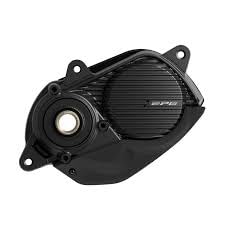
Figure 2.1: Front view of the Motobecane EP6 Mid Drive Ebike Motor. This image displays the compact design and mounting points of the motor unit.

Figure 2.2: Side view of the Motobecane EP6 Mid Drive Ebike Motor, showing the integrated cover and overall profile.
3. What's in the Box
Upon unpacking, please verify that all the following components are included:
- EP6 Mid Drive Ebike Motor Unit
- Motor Covers
- Mounting Hardware
Note: Controller and wiring harnesses are not included with this product and must be acquired separately.
4. Setup and Installation
The EP6 Mid Drive Motor is designed for straightforward installation. However, for optimal performance and safety, professional installation by a qualified ebike technician is highly recommended.
4.1 Pre-Installation Checklist
- Ensure your bicycle frame is compatible with mid-drive motor systems.
- Gather all necessary tools for installation.
- Confirm you have the required controller and wiring harnesses (not included).
4.2 Installation Steps (General Guidelines)
- Carefully remove the existing bottom bracket and crankset from your bicycle.
- Mount the EP6 motor unit into the bottom bracket shell, ensuring proper alignment.
- Secure the motor using the provided mounting hardware. Tighten all bolts to the manufacturer's specified torque settings.
- Install the motor covers.
- Connect the motor to your ebike's controller and battery system using compatible wiring harnesses.
- Perform a functional test to ensure all components are working correctly before riding.
Warning: Incorrect installation can lead to product damage, injury, or void the warranty. If you are unsure about any step, consult a professional.
5. Operating the EP6 Mid Drive Motor
The EP6 motor offers a range of assist modes and customization options to enhance your riding experience.
5.1 Assist Modes
The motor features the following assist modes, selectable via your ebike's display unit:
- Walk Mode: Provides gentle assistance for pushing the bicycle while walking.
- Eco Mode: Offers minimal assistance for maximum battery range.
- Trail Mode: Delivers balanced assistance suitable for varied terrain.
- Boost Mode: Provides maximum power assistance for challenging climbs or rapid acceleration.
5.2 Customization and Connectivity
The EP6 motor is Bluetooth compatible, allowing for extensive customization of settings through the E-TUBE PROJECT Cyclist app. This app enables FINE TUNE mode for personalized adjustments to motor characteristics.
For advanced drivetrain integration, the EP6 supports FREE SHIFT and AUTO SHIFT capabilities when paired with the new DEORE XT Di2 system, offering seamless gear changes.
6. Maintenance
Regular maintenance is crucial for the longevity and optimal performance of your EP6 Mid Drive Motor.
- Cleaning: Keep the motor unit clean from dirt, mud, and debris. Use a damp cloth; avoid high-pressure washing directly on the motor.
- Inspections: Periodically check all mounting bolts for tightness. Inspect cables and connectors for any signs of wear or damage.
- Professional Servicing: It is recommended to have your ebike and motor system professionally serviced at least once a year, or more frequently depending on usage and riding conditions.
- Storage: When storing your ebike for extended periods, ensure the motor is clean and dry. Follow battery manufacturer guidelines for battery storage.
7. Troubleshooting
If you encounter issues with your EP6 Mid Drive Motor, consider the following basic troubleshooting steps. For complex problems, consult a qualified ebike technician.
- Motor Not Engaging: Check if the battery is properly connected and charged. Ensure all electrical connections to the motor and controller are secure.
- Unusual Noises: Stop riding immediately. Inspect the motor area for any loose components, debris, or signs of physical damage.
- Reduced Assistance: Verify the selected assist mode. Check battery charge level. If using the E-TUBE PROJECT Cyclist app, ensure settings are configured as desired.
- Error Codes: If your ebike display shows an error code, refer to your ebike's display manual or consult a technician for specific diagnostics.
8. Specifications
| Brand | Motobecane |
| Model Name | EP6 (shimep6) |
| Item Model Number | ep6 |
| Maximum Torque | 85 Nm |
| Horsepower | 250 Watts |
| Weight | 3 kg |
| Voltage | 12 Millivolts |
| Assist Modes | Walk, Eco, Trail, Boost |
| Connectivity | CAN, ACC ports, Bluetooth (E-TUBE PROJECT Cyclist app) |
| Compatibility | DEORE XT Di2 (for FREE SHIFT/AUTO SHIFT) |
9. Warranty and Support
This product is supplied as a brand new unit without retail packaging. For specific warranty information, please contact your point of purchase or the seller directly. As a product from a small business brand, support details may vary.
For technical assistance or further inquiries, please reach out to the authorized dealer or service center where you purchased the product.