
Introduction
The NGTeco Cloud Time Clock TC2 is an advanced attendance management system designed for small to medium-sized businesses. It offers remote access via app and web, dual-band WiFi connectivity (2.4GHz & 5GHz), and upgraded fingerprint recognition technology. With flexible shift management and secure AWS cloud storage, it provides a reliable solution for tracking employee attendance.
What's in the Box
Upon unboxing your NGTeco Cloud Time Clock TC2, you will find the following items:
- NGTeco Cloud Time Clock TC2 Device
- Quick Start Guide (for app usage)
- Detailed User Manual
- Mounting Template (for wall installation)
- Power Adapter
- Set of Screws and Wall Plugs
- Wall Mounting Bracket
- RFID Cards (for verification, additional cards can be purchased from NGTeco's online store)

Image: The NGTeco Cloud Time Clock TC2 device shown with its included accessories, including the power adapter, mounting hardware, and RFID cards.
Video: An unboxing video for the NGTeco TC2 Cloud Time Clock, detailing all components included in the package.
Setup Instructions
The NGTeco Cloud Time Clock TC2 offers both desktop and wall-mount installation options.
Desktop Setup
Simply place the device on a flat surface. The anti-slip protection on the back ensures stability.
Wall Mount Installation
- Measure 1.2 meters from the floor and attach the provided mounting template to the wall at this height.
- Drill holes at the marked positions on the template.
- Insert the screws into the drilled holes.
- Mount the bracket onto the screws.
- Secure the TC2 device onto the bracket.

Image: The NGTeco Cloud Time Clock TC2 placed on a desktop, demonstrating its compact size and stable design.
Video: A quick setup guide for the TC2 Cloud Time Clock, demonstrating both desktop and wall-mount installation.
Power and Network Connection
Connect the device to a power source using the provided DC 12-Volt adapter. The device also features a built-in 2000mAh battery for up to 6 hours of standby time during power outages, ensuring data integrity.
For network connectivity, the TC2 supports both 2.4GHz and 5GHz Wi-Fi, as well as an Ethernet LAN port for a stable internet connection.
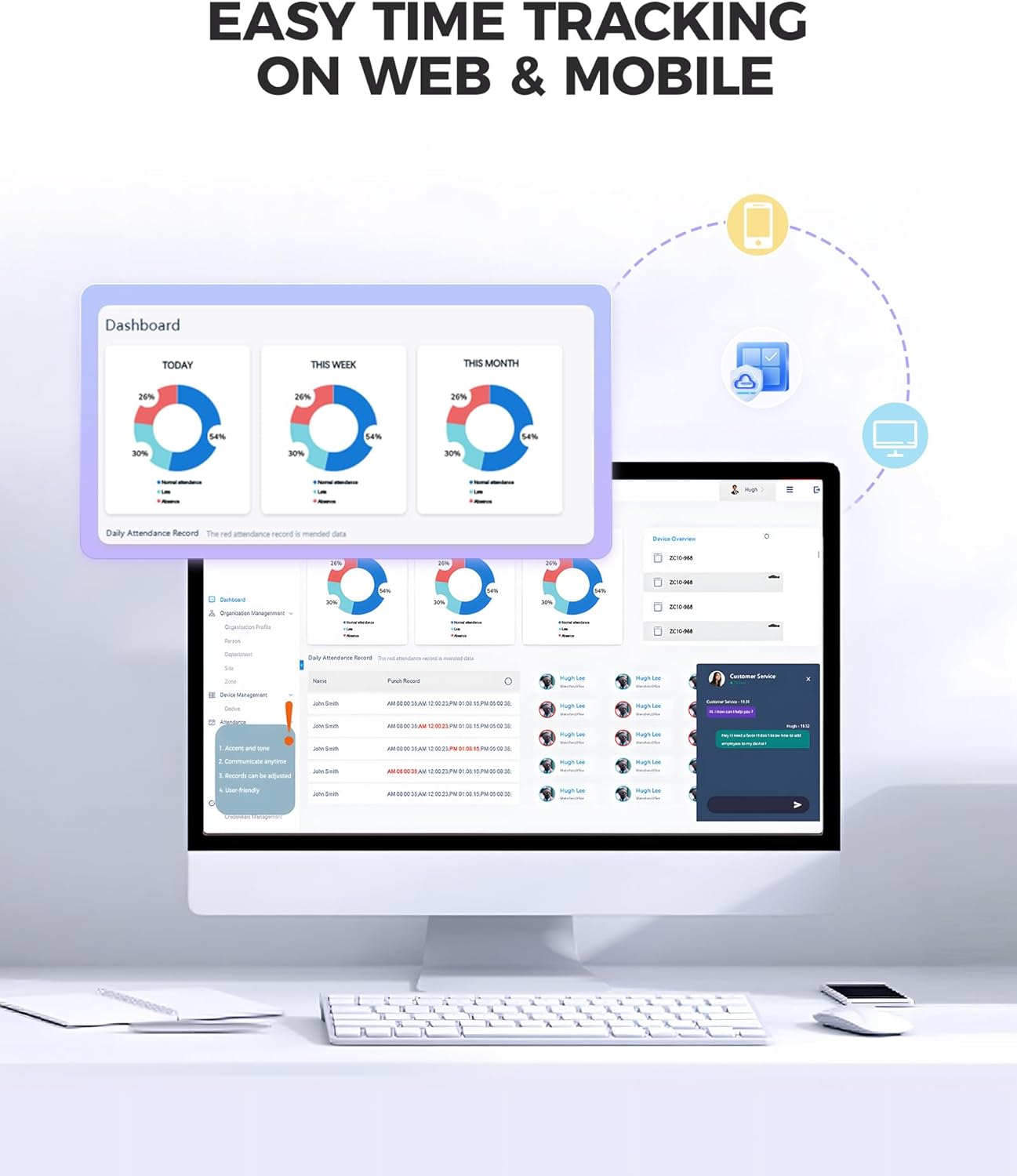
Image: Rear view of the NGTeco Cloud Time Clock TC2, highlighting the DC 12-Volt power port and the Ethernet LAN port.
Operating Instructions
The NGTeco Cloud Time Clock TC2 is managed entirely through its dedicated mobile app and web portal, eliminating the need for a physical keyboard on the device itself.
Employee Registration and Verification
Employees can clock in or out using upgraded fingerprint recognition technology or RFID cards. The system ensures fast and accurate verification.

Image: Close-up of the NGTeco Cloud Time Clock TC2, highlighting the fingerprint sensor and RFID card reader for employee verification.
Remote Access and Management
The NGTeco Office app and web portal allow managers to:
- Monitor clock-ins and track attendance from anywhere.
- Generate detailed attendance reports.
- Customize shifts (fixed, flexible, overnight) to fit business needs.
- Manage employee information and schedules.

Image: Screenshot of the NGTeco Office app interface, demonstrating remote management capabilities for attendance and employee data.
Video: An overview of the NGTeco Cloud-Based WiFi Time Clock with its accompanying software and app, showcasing its features.
Key Features
- Remote Access via APP & Web: Control your attendance system from anywhere with the easy-to-use app and web portal. Monitor clock-ins, track attendance, and generate reports anytime, anywhere.
- 2.4GHz & 5GHz Dual Bands WiFi: Ensures fast, reliable connections for seamless performance.
- Upgraded Fingerprint Recognition Technology: Experience faster, more accurate fingerprint scanning for quick clock-ins/outs.
- Flexible Shifts to Fit Your Business: Customize shifts for various needs, including fixed, flexible, and overnight schedules.
- AWS Cloud for Secure Data Privacy: Your data is stored securely with end-to-end encryption on US servers, compliant with data protection standards.
- 2000mAh Battery for Power Outage Protection: Keeps the time clock working during power outages, protecting attendance data.
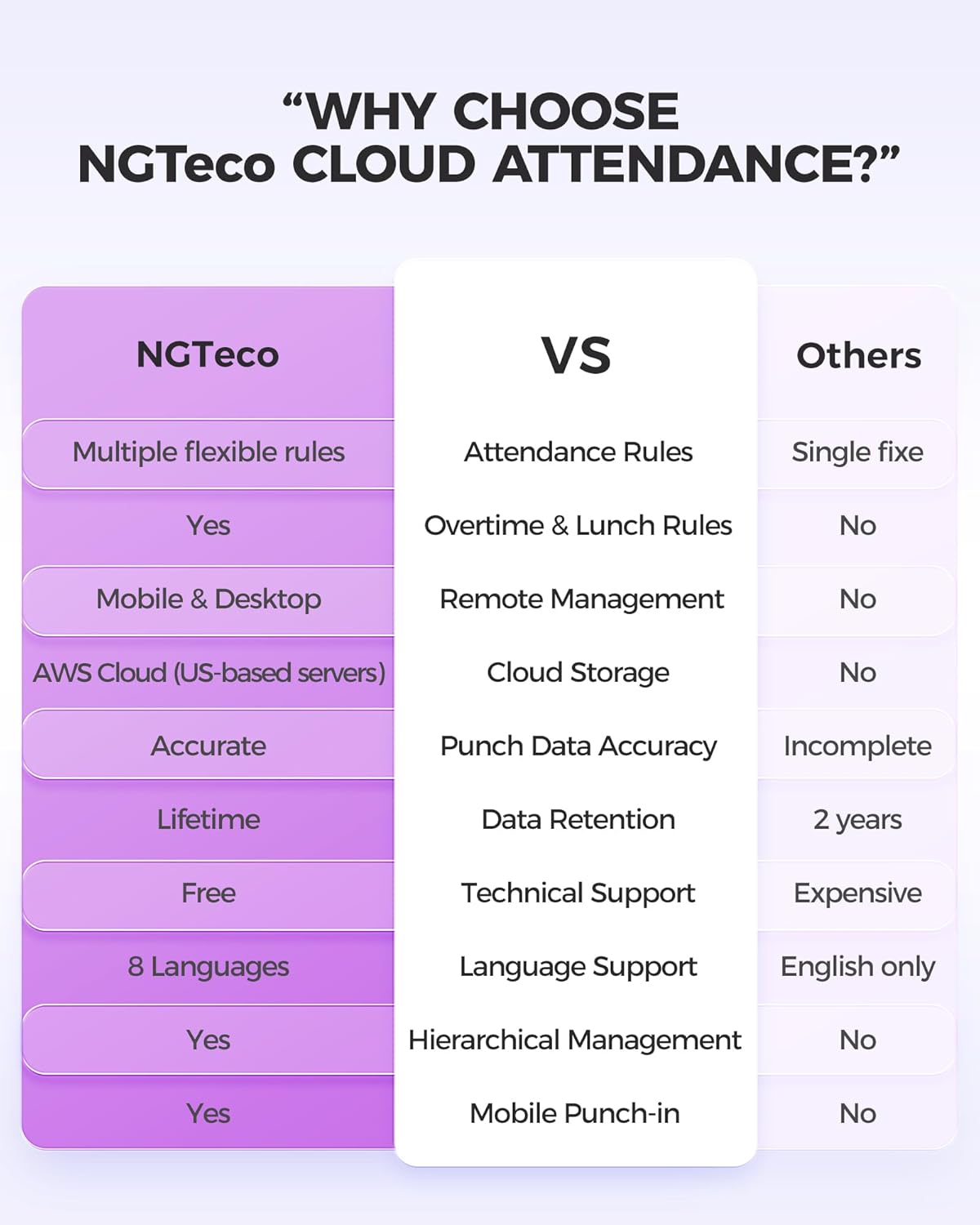
Image: A visual summary of the NGTeco Cloud Time Clock TC2's key features, including dual-band WiFi, cloud software, and flexible scheduling.
Video: A comparison video highlighting the advantages of the TC2 Cloud Time Clock over traditional time clocks.
Maintenance
- Cleaning: Regularly wipe the device with a soft, dry cloth. Avoid abrasive cleaners or solvents.
- Software Updates: Ensure your NGTeco Office app and device firmware are always up-to-date for optimal performance and security. Updates are typically managed through the app.
- Fingerprint Sensor Care: Keep the fingerprint sensor clean and dry to ensure accurate readings.
Troubleshooting
Common Issues and Solutions
| Issue | Solution |
|---|---|
| Device not powering on | Ensure the power adapter is securely connected to both the device and a working power outlet. Check the on/off switch at the back of the device. |
| Wi-Fi connectivity issues | Verify your Wi-Fi password. Ensure the device is within range of your router. Try restarting both the device and your router. Check if your router supports 2.4GHz or 5GHz bands. |
| Fingerprint recognition failure | Ensure your finger is clean and dry. Try re-registering your fingerprint through the NGTeco Office app. |
| Data loss during power outage | The device has a built-in battery to prevent data loss. Ensure the on/off button at the back is in the "on" position to utilize the battery backup. Data is also securely stored in the AWS cloud. |
| App not connecting to device | Ensure Bluetooth is enabled on your mobile phone during initial setup. Verify both the device and your phone are connected to the internet. |
Specifications
| Feature | Detail |
|---|---|
| Brand | NGTeco |
| Model | TC2 |
| Connectivity | 2.4GHz & 5GHz Dual Bands WiFi, Ethernet (LAN Port) |
| Verification Methods | Fingerprint, RFID Card |
| Power Source | Corded Electric, Built-in 2000mAh Lithium Ion Battery |
| Battery Life (Standby) | Up to 6 hours |
| Dimensions | 3.6"W x 5.2"H |
| Weight | 8 ounces |
| Material | Acrylonitrile Butadiene Styrene (ABS) |
| Mounting Type | Tabletop & Wall Mount |
| Cloud Storage | AWS Cloud (US servers) |
| Supported Languages | English, Spanish, German, French, Italian (App and software support multi-language interface - 8 languages) |
Warranty and Support
NGTeco provides comprehensive support for the TC2 Cloud Time Clock:
- Warranty: Includes a 1-year warranty.
- Lifetime Technical Support: Free lifetime technical support is available Monday–Friday, 6 AM–6 PM EST.
- U.S.-Based Service: Access to U.S.-based service for all your inquiries and assistance needs.
- Remote 1V1 Video Teaching: For configuration assistance.
- Professional Guidance: On using the NGTeco Office Cloud.

Image: A team of customer support representatives, symbolizing NGTeco's commitment to providing assistance.

