
1. Introduction
This manual provides detailed instructions for the installation, operation, and maintenance of your eXtremeRate RISE4 Plus MAX RMB Back Paddles Kit. This kit enhances your PlayStation 5 controller by adding remappable metal back buttons, adjustable clicky trigger stops, and rubberized grips. It is compatible with PS5 controller models BDM-030, BDM-040, and BDM-050.
Please read these instructions carefully before beginning installation to ensure proper functionality and to avoid damage to your controller.

Image: The eXtremeRate RISE4 Plus MAX RMB Back Paddles Kit integrated into a PS5 controller.
2. Compatibility Check
Before installation, it is crucial to verify your PS5 controller's BDM model. This kit is only compatible with BDM-030, BDM-040, and BDM-050 models. Incorrect model identification can lead to incompatibility and potential damage.
How to Identify Your Controller's BDM Model:
- Visual Inspection: Examine the internal structure of your controller's triggers. Different BDM models have distinct internal designs.
- Software Check: Connect your controller to a PC using a data cable and use the eXtremeRate BDM checker tool.
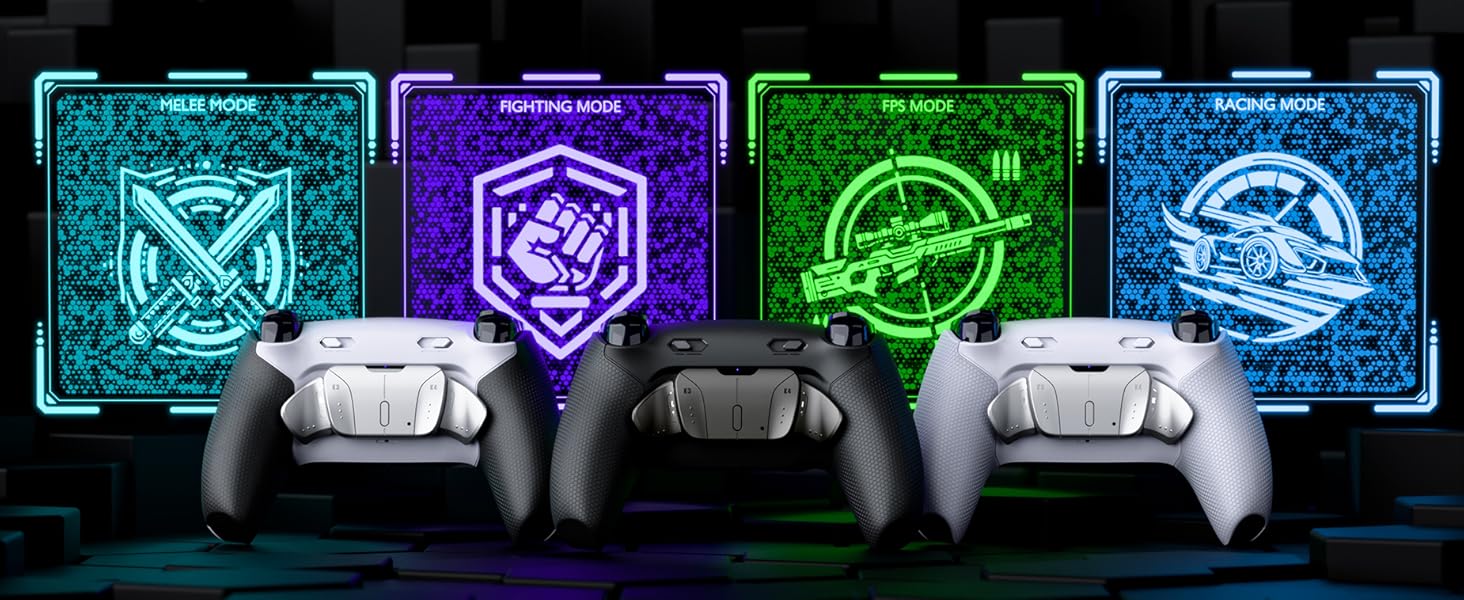
Image: Steps to check your PS5 controller's BDM model using a software tool on a PC.
For a visual guide on checking your controller's BDM model, please refer to the following video:
Video: Official eXtremeRate guide on how to check your PS5 controller's BDM model.
3. Setup and Installation
The installation of the eXtremeRate RISE4 Plus MAX RMB Kit requires disassembling your PS5 controller. This process involves small components and delicate connections. If you are not comfortable with electronic modifications, professional installation is recommended.
Kit Components:
The kit includes all necessary parts for the modification:

Image: All components included in the eXtremeRate RISE4 Plus MAX RMB Back Paddles Kit.
Installation Process:
A detailed step-by-step video guide is available to assist with the installation. Soldering is required only if you wish to remap the L3 and R3 stick click buttons; otherwise, it is not necessary for basic back paddle functionality.
- Disassemble your PS5 controller carefully.
- Install the RISE4 Plus MAX remap board and flexible cables according to the video instructions.
- Attach the metal back paddles and trigger stop mechanisms.
- Reassemble the controller, ensuring all connections are secure.
For comprehensive installation instructions, please watch the official eXtremeRate installation video:
Video: Official eXtremeRate installation guide for the RISE4 Plus MAX RMB Remap Kit.
4. Operating Instructions
Button Remapping:
The kit features 4 ergonomic programmable metal back paddles (K1, K2, K3, K4) that can be mapped to any of the 15 standard controller buttons (X, O, Triangle, Square, Up, Down, Left, Right, L1, L2, R1, R2, L3, R3, and Touchpad Buttons). This allows for simplified combination presses and improved control.
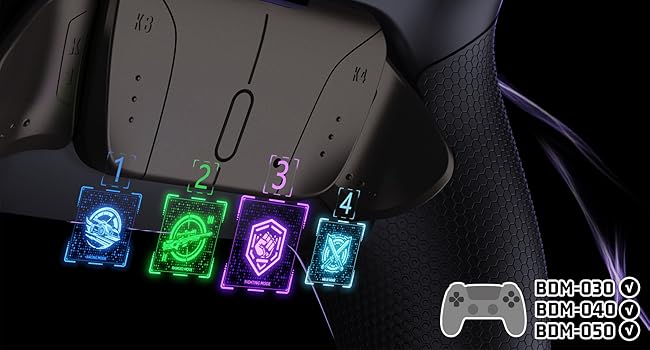
Image: The 4 programmable back paddles and their profile indicators.
Switching Gaming Profiles:
You can assign up to 4 distinct gaming profiles, each with its own button mapping configuration. These profiles can be switched on the fly to adapt to different games or in-game situations.
Adjustable Trigger Stops:
The clicky trigger stop mechanism allows you to switch between two trigger modes:
- Adaptive Trigger Mode: Provides the full range of motion for triggers, ideal for racing games or actions requiring variable input.
- Clicky Trigger Mode: Reduces trigger travel distance to a minimal click, enabling rapid firing in first-person shooters and other fast-paced games.

Image: Visual representation of the adaptive (7mm travel) and clicky (1.5mm travel) trigger modes.
Rubberized Grips:
The integrated rubberized grips provide enhanced comfort and a secure hold during extended gaming sessions.

Image: Detailed view of the tidal-hexagon textured rubberized grips for improved handling.
5. Maintenance
To ensure the longevity and optimal performance of your eXtremeRate RISE4 Plus MAX RMB Kit, follow these maintenance guidelines:
- Cleaning: Use a soft, dry cloth to wipe down the controller and back paddles. Avoid abrasive cleaners or solvents that could damage the finish or electronic components.
- Storage: Store the controller in a clean, dry environment away from extreme temperatures and direct sunlight.
- Handling: Handle the controller with care. Avoid dropping it or applying excessive force to the back paddles or trigger stops.
- Inspection: Periodically inspect the back paddles and trigger mechanisms for any signs of wear or damage.
6. Troubleshooting
If you encounter issues with your eXtremeRate RISE4 Plus MAX RMB Kit, consider the following troubleshooting steps:
| Problem | Possible Cause | Solution |
|---|---|---|
| Back paddles not responding | Incorrect installation of flex cables or remap board. | Re-open the controller and carefully check all connections as per the installation video. Ensure flex cables are fully seated. |
| Accidental button presses from back paddles | Paddles are sensitive or grip style causes unintended activation. | Adjust your grip. Some users adapt to the paddle placement over time. |
| Trigger stops not functioning correctly | Improper installation of the trigger stop mechanism. | Verify the trigger stop components are correctly aligned and secured during reassembly. |
| Controller not recognized after installation | Loose internal connections or incorrect BDM model. | Double-check all internal ribbon cables and ensure your controller's BDM model is compatible. |
7. Specifications
- Model Name: RISE4 Plus MAX
- Model Number: HKCPFJ001M2
- Brand: eXtremeRate
- Compatible Devices: PlayStation 5 Controller (BDM-030, BDM-040, BDM-050)
- Controller Type: Gamepad Accessory
- Button Quantity: 4 remappable back buttons
- Additional Features: Ergonomic design, clicky trigger stops, rubberized grip
- Item Weight: 40 g
- Item Dimensions: 5.91 x 3.54 x 0.59 inches
8. Warranty and Support
eXtremeRate products are designed for quality and performance. For warranty information, product support, or technical assistance, please visit the official eXtremeRate website or contact their customer service directly. Keep your proof of purchase for warranty claims.
Online Resources:
- Official eXtremeRate Store: eXtremeRate Store on Amazon