1. Introduction
This manual provides instructions for the installation, operation, and maintenance of the ATOTO AC-FCR04W 1080P Front Camera. This device is designed to record video footage from the front of your vehicle, offering features such as high-definition recording, wide-angle view, enhanced night vision, and loop recording capabilities. It is compatible with specific ATOTO S8 series head units.

Image 1.1: Overview of AC-FCR04W Camera Capabilities
2. Product Features and Operation
2.1 Night Vision with WDR Technology
The AC-FCR04W camera incorporates Night Vision with Wide Dynamic Range (WDR) technology. This feature allows the camera to capture clear details, such as license plates and road signs, even in challenging low-light conditions. Strong Light Suppression further enhances image and video clarity by reducing glare distortions from bright lights.
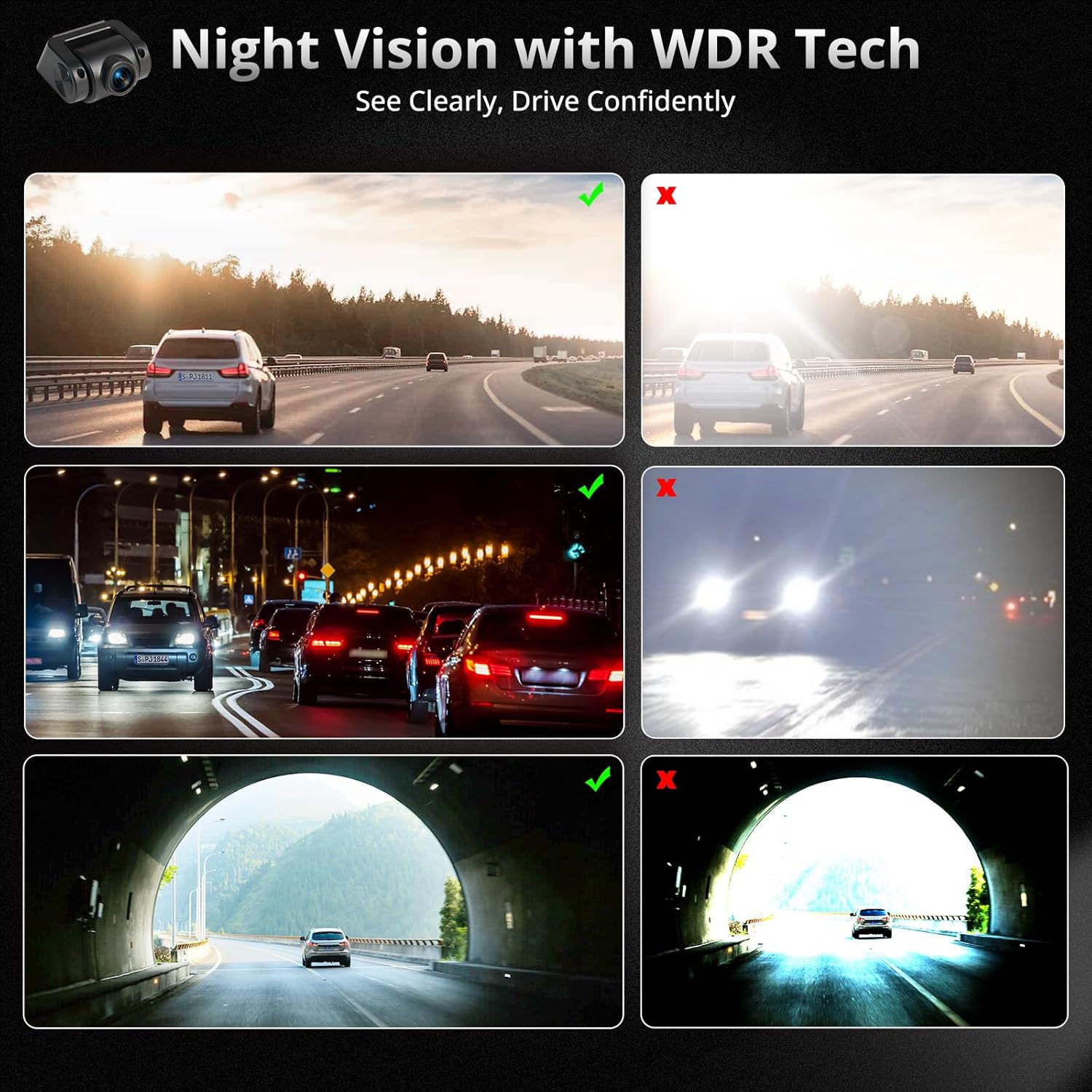
Image 2.1: Night Vision with WDR Technology in various lighting conditions.

Image 2.2: Enhanced detail capture in diverse lighting environments.
2.2 150° Wide Angle View
The camera provides a 150-degree wide-angle field of view, which helps to minimize blind spots and capture a broader perspective of the road ahead. This wider coverage can be beneficial for recording events and monitoring surroundings.
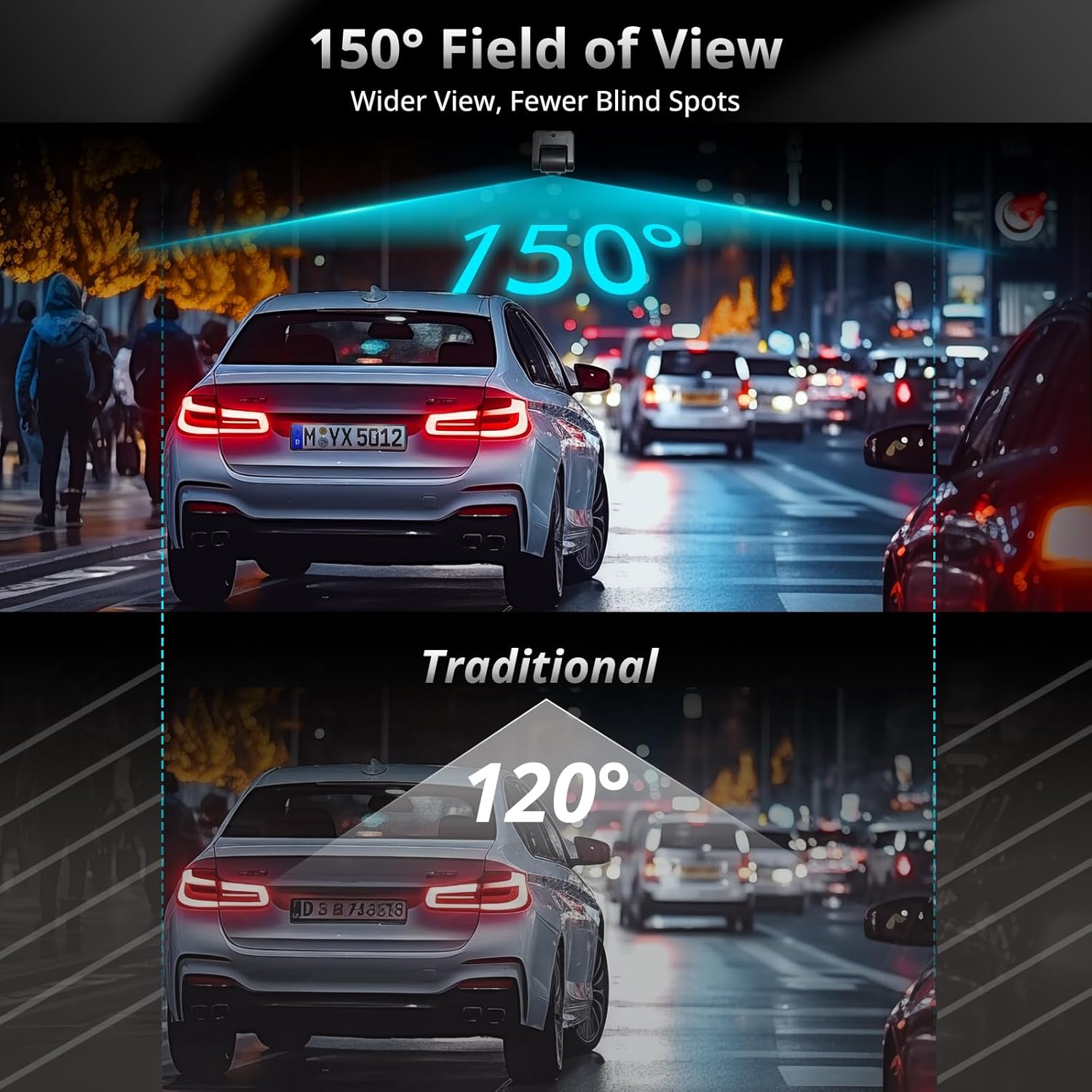
Image 2.3: Comparison of 150° Wide Angle View vs. Traditional View.
2.3 Loop Recording and Storage
The AC-FCR04W supports loop recording, which automatically overwrites the oldest files when the storage card is full. This ensures continuous recording without the need for manual deletion. The camera supports a maximum of 128GB TF (microSD) card (not included) for extensive storage capacity.

Image 2.4: Auto Loop Recording in operation.

Image 2.5: Continuous recording features.
2.4 Manual Video Locking
The camera allows for manual video locking, which protects important footage from being overwritten during loop recording. This feature is useful for preserving specific events or incidents.

Image 2.6: Manual Video Locking function.
3. Compatibility and Integration
3.1 ATOTO S8 Series Head Unit Compatibility
The AC-FCR04W front camera is specifically designed for use with ATOTO S8 MS, S8 PN, and S8 UN series car stereos. When connected to an ATOTO S8 UN, S8G2A74MS, or S8G2094MS head unit, the camera supports both recording and shooting functions. For S8 PN or S8G2B74MS head units, the camera provides front-view monitoring only.

Image 3.1: Compatibility with ATOTO S8 MS/PN/UN Head Units.

Image 3.2: Camera functions across different ATOTO S8 Head Units.
3.2 Easy Operation
Once installed and connected to a compatible ATOTO head unit, the camera can be easily accessed and operated via the pre-installed DVR App on the head unit's interface.

Image 3.3: Accessing the camera via the DVR App.
4. Installation
4.1 Installation Steps
The AC-FCR04W front camera is designed for straightforward installation. Connect the camera to your compatible ATOTO S8 MS, UN, or PN car stereo. Ensure proper routing of the extension cable to avoid interference with vehicle operations.
- Identify a suitable mounting location on your vehicle's front windshield, typically near the rearview mirror, ensuring a clear view of the road.
- Clean the mounting surface thoroughly.
- Securely attach the camera using the provided adhesive or mounting mechanism.
- Connect the camera to the ATOTO head unit using the supplied 3.5m (11.5ft) extension cable.
- Route the cable neatly along the vehicle's interior to the head unit, avoiding airbags or other safety components.
- Ensure the camera is powered correctly (Accessory/Ignition (+) and Chassis Ground (-)).
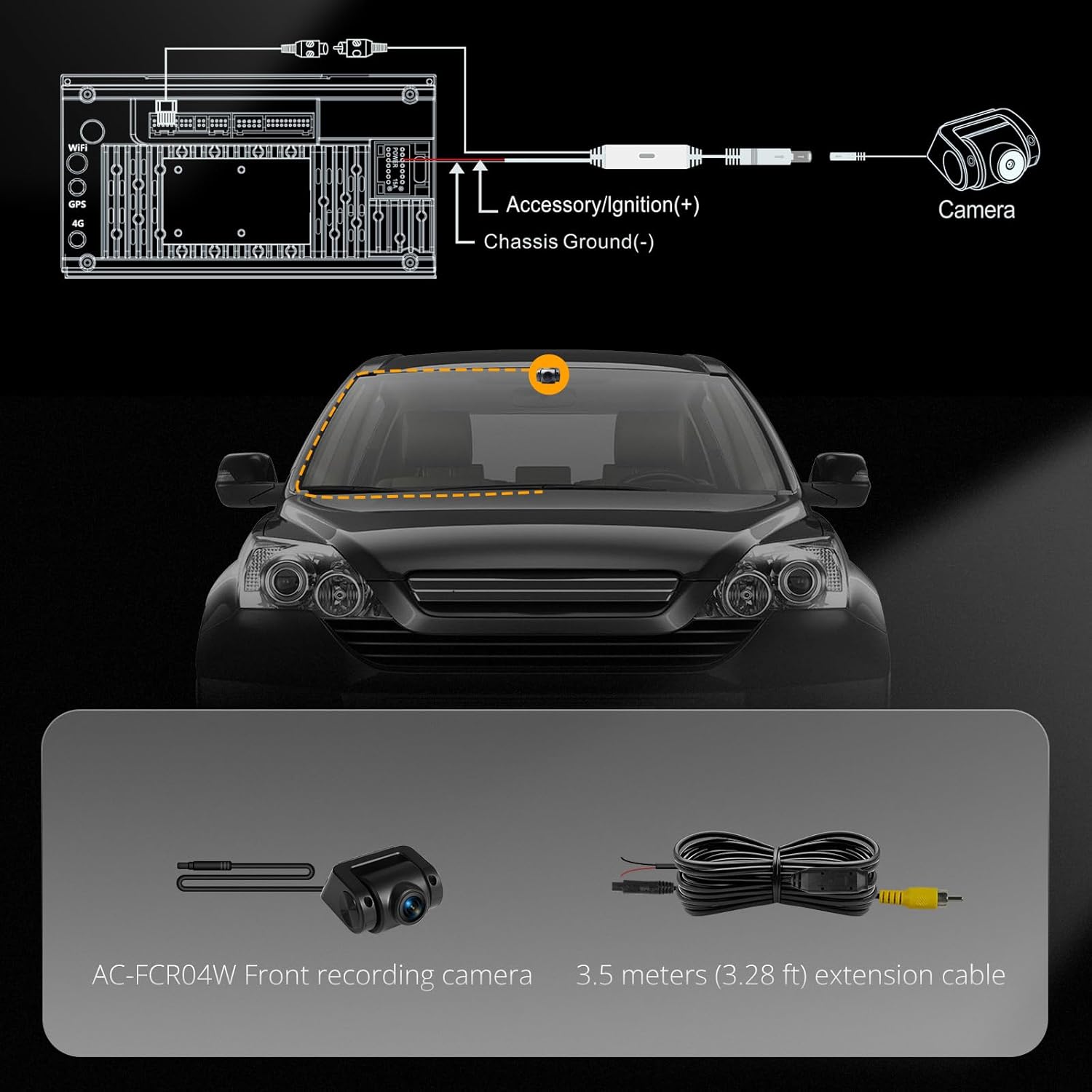
Image 4.1: Installation Diagram and Included Components.
4.2 Included Components
- AC-FCR04W Front Recording Camera
- Extension Cable (3.5m/11.5ft)
5. Maintenance
To ensure optimal performance and longevity of your ATOTO AC-FCR04W camera, follow these maintenance guidelines:
- Cleaning the Lens: Regularly clean the camera lens with a soft, lint-free cloth to remove dust, dirt, or smudges that may affect video quality. Avoid using abrasive cleaners.
- Cable Inspection: Periodically check the extension cable for any signs of wear, damage, or loose connections. Ensure all connections are secure.
- Software Updates: Keep your ATOTO head unit's firmware and the DVR App updated to ensure compatibility and access to the latest features and improvements.
- Storage Card Management: Format the TF card periodically (e.g., once a month) to maintain optimal recording performance and prevent data corruption. Back up any important footage before formatting.
6. Troubleshooting
If you encounter issues with your ATOTO AC-FCR04W camera, consider the following troubleshooting steps:
- No Image/Video Display:
- Ensure the camera is correctly connected to the ATOTO head unit.
- Verify that the head unit is powered on and the DVR App is launched.
- Check the camera's power connections (Accessory/Ignition and Ground).
- Poor Video Quality:
- Clean the camera lens.
- Ensure the camera is securely mounted and not vibrating.
- Check the video resolution settings in the DVR App.
- Recording Issues:
- Ensure a compatible TF card is inserted and properly formatted.
- Check if the TF card is full; if so, the loop recording should overwrite old files, but a full card might cause issues if not properly managed.
- Verify the recording settings in the DVR App.
- Compatibility Issues:
- Confirm your ATOTO head unit model is listed as compatible (S8 MS/PN/UN series).
- Note that S8 PN models only support front-view monitoring, not recording or shooting.
If problems persist after attempting these steps, please contact ATOTO customer support for further assistance.
7. Specifications
| Feature | Specification |
|---|---|
| Model Name | AC-FCR04W |
| Video Capture Resolution | HD 1080P |
| Field Of View | 150 Degrees |
| Special Features | 135° Wide View, 3-frame HDR and noise reduction, HD 1080P, Supports AHD, TVI, and CVBS outputs |
| Connectivity Technology | Powerline |
| Product Dimensions | 1.97 x 1.57 x 1.18 inches |
| Item Weight | 5.6 ounces |
| Color | Black |
| Mounting Type | Ceiling (typically mounted on windshield) |
| Vehicle Service Type | Vehicles Installed with S8 MS/UN/PN Series |
8. Warranty and Customer Support
8.1 Product Care
The ATOTO AC-FCR04W camera comes with 12 months of product care from the date of purchase. Please refer to the package for detailed warranty information and terms.
8.2 Customer Support
For any questions, technical assistance, or warranty claims, please contact the ATOTO customer care team. Contact details are typically provided in the product packaging. You can also seek support via your order center or through the official ATOTO website.


