
Introduction
Thank you for choosing the Marsyu Smartwatch E03. This manual provides detailed instructions on how to set up, operate, and maintain your smartwatch. The E03 is designed to help you monitor your health, track your fitness activities, and stay connected. It features advanced health monitoring functions such as ECG and HRV, 24-hour blood pressure, SpO2, and heart rate tracking, comprehensive sleep analysis, and over 110 sport modes. With its 1.39-inch HD touchscreen, Bluetooth call capabilities, and IP67 water resistance, the Marsyu E03 is a versatile companion for your daily life.
What's in the Box
Please check the contents of your package. If any items are missing or damaged, please contact customer support.
- 1 x Marsyu Smartwatch E03 with Silicone Strap
- 1 x Magnetic Charging Cable
- 1 x User Manual
Product Overview
Familiarize yourself with the components of your Marsyu Smartwatch E03.

Image Description: A front view of the Marsyu Smartwatch E03, showcasing its round display and black silicone strap. The watch face is active, displaying time and other data.

Image Description: This image highlights the 1.39-inch HD touchscreen and the rotating crown on the side of the Marsyu Smartwatch E03, indicating touch sensitivity and physical control options.
Setup
1. Charging the Smartwatch
Before first use, fully charge your Marsyu Smartwatch E03.
- Connect the magnetic charging cable to the charging points on the back of the watch.
- Plug the USB end of the cable into a standard USB power adapter (5V/1A recommended) or a computer's USB port.
- The watch display will show a charging indicator.
- A full charge takes approximately 2.5 hours.
- Once fully charged, the watch can operate for 3 to 7 days, depending on usage.
2. App Installation and Pairing
To unlock the full potential of your smartwatch, download and install the companion application on your smartphone.
- Download the App: Search for "Band" (or similar name if specified in the watch's initial setup screen) in your smartphone's app store (Google Play Store for Android, Apple App Store for iOS). The app is compatible with Android 5.0 and later, and iOS 9.0 and later.
- Install and Open: Install the app and open it. Follow any on-screen prompts to grant necessary permissions.
- Enable Bluetooth: Ensure Bluetooth is enabled on your smartphone.
- Pair the Device: In the app, navigate to the device management section (usually labeled "Device," "My Watch," or similar). Select "Add Device" or "Scan for Devices."
- Select Your Watch: Your smartwatch (e.g., "E03" or "Marsyu Smartwatch") should appear in the list of discoverable devices. Tap on it to initiate pairing.
- Confirm Pairing: A pairing request may appear on both your phone and the watch. Confirm the pairing on both devices.
- Complete Setup: Once paired, follow the app's instructions to complete your profile and synchronize data.
Operating Instructions
1. Basic Navigation
- Touchscreen: Swipe left/right, up/down to navigate through menus and functions. Tap to select.
- Rotating Crown: Rotate the crown to scroll through menus or change watch faces. Press the crown to return to the home screen or confirm selections.
- Wake Screen: Raise your wrist or press the rotating crown to wake the screen.
2. Health Monitoring
The Marsyu E03 offers comprehensive health tracking features. For accurate readings, ensure the watch is worn snugly on your wrist, about one finger's width from your wrist bone.
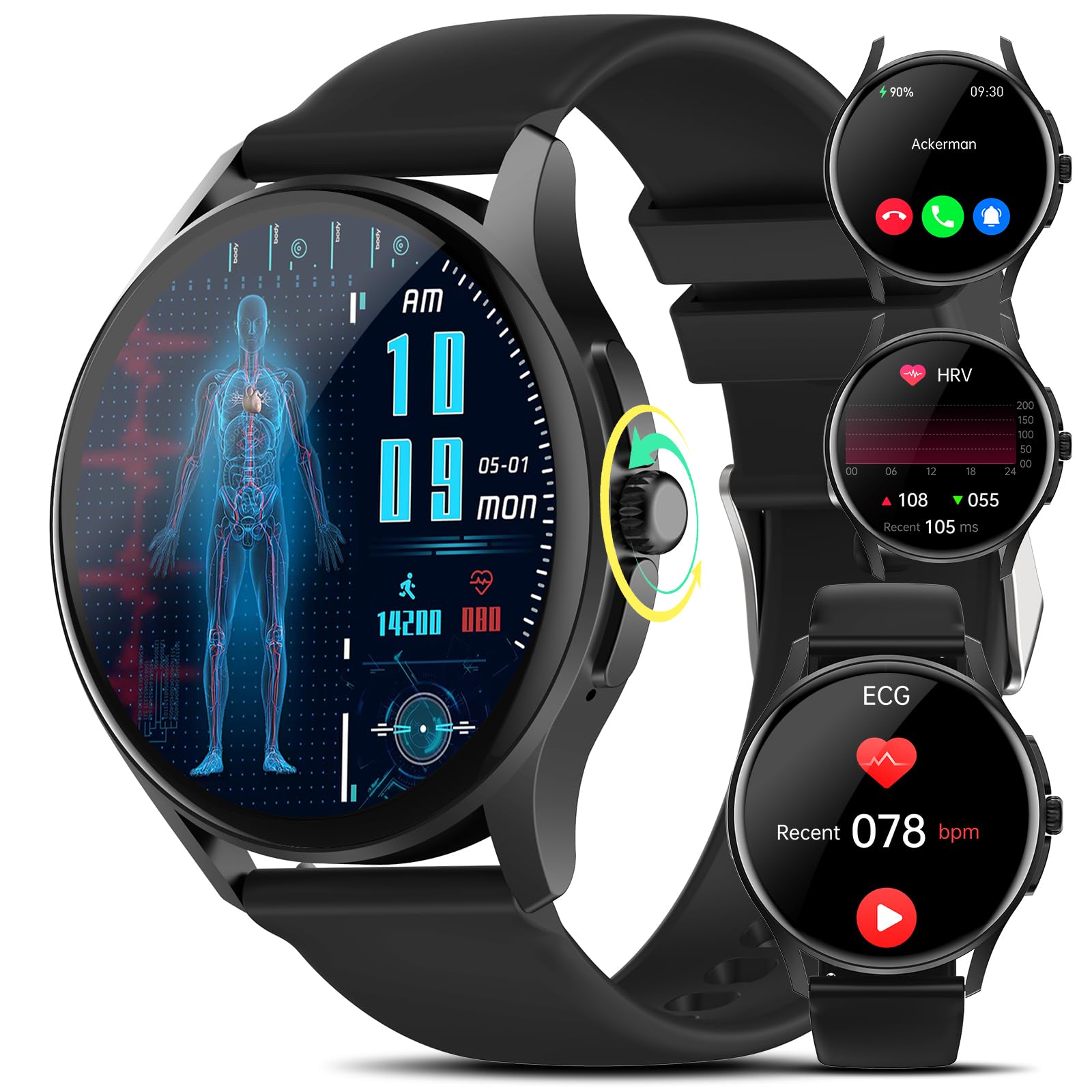
Image Description: This image illustrates the ECG and HRV monitoring capabilities of the Marsyu Smartwatch E03. It shows the watch displaying an ECG reading of 78 bpm and an HRV Lorentz analysis on a connected smartphone screen.
- ECG (Electrocardiogram) & HRV (Heart Rate Variability):
- To take an ECG reading, navigate to the ECG function on the watch. Place your finger on the micro-electric sensor located on the side of the watch. Remain still during the measurement.
- The watch will record your heart's electrical activity. The companion app provides a detailed electrocardiogram and HRV analysis, helping to detect potential heart rhythm issues and assess heart health.
- Heart Rate (HR): The watch continuously monitors your heart rate 24 hours a day. View real-time data on the watch or detailed trends in the app.
- Blood Oxygen (SpO2): Measure your blood oxygen saturation levels. Navigate to the SpO2 function and remain still for an accurate reading.
- Blood Pressure (BP): The watch tracks your blood pressure. For best results, take readings at rest and at consistent times.
- Sleep Monitoring: The E03 automatically monitors your sleep quality between 10:00 PM and 8:00 AM. It tracks deep sleep, shallow sleep, and awake time, providing a detailed analysis in the app to help you understand your sleep patterns.

Image Description: This image shows the Marsyu Smartwatch E03's sleep tracking feature, with a person sleeping and the watch displaying sleep data. It also highlights 24/7 monitoring for Heart Rate, Blood Oxygen (SpO2), and Blood Pressure.
3. Sport Modes and Activity Tracking
The Marsyu E03 supports over 110 sport modes to track your workouts.

Image Description: This image displays the Marsyu Smartwatch E03's interface for tracking outdoor runs, showing steps, distance, and calories. It also features icons representing over 110 sport modes and highlights its IP67 waterproof rating.
- Activity Tracking: The built-in gravity sensor accurately tracks your steps, distance covered, and calories burned throughout the day.
- Sport Modes: Select your desired sport mode from the watch's menu (e.g., walking, running, cycling, basketball, football, badminton). The watch will record specific data for that activity.
- Water Resistance: The IP67 waterproof design means the watch is resistant to splashes, rain, and sweat. It can withstand immersion in water up to 1 meter for 30 minutes. Note: Not suitable for hot water, diving, or high-pressure water activities.
4. Bluetooth Calls and Smart Notifications
With Bluetooth 5.0 connectivity, your Marsyu E03 allows you to manage calls and receive notifications directly on your wrist.

Image Description: This image demonstrates the Bluetooth 5.1 connectivity of the Marsyu Smartwatch E03, showing how to answer calls, make calls using a dial pad, and receive message notifications from apps like Facebook and WhatsApp.
- Making/Receiving Calls: Once paired, you can answer incoming calls, dial numbers, and view call records directly from the watch. The watch has a built-in microphone.
- Notifications: Receive alerts for messages from various applications (e.g., SMS, WhatsApp, Facebook) directly on your watch screen. Ensure app notifications are enabled in your phone's settings and the companion app.
- AI Voice Assistant: Access your smartphone's voice assistant through the watch for hands-free control.
5. Other Functions
The Marsyu E03 includes a variety of additional features to enhance your daily experience.

Image Description: This image showcases the multi-functional capabilities of the Marsyu Smartwatch E03, with icons representing features such as Find Phone, Alarm Clock, Music Control, Timer, Women's Health, Camera Control, Step Count, Brightness Adjustment, Calculator, Sedentary Reminder, and Breathing Exercises.
- Find Phone: Use your watch to locate your paired smartphone.
- Alarm Clock: Set alarms through the app, and the watch will vibrate to alert you.
- Music Control: Control music playback on your smartphone (play, pause, skip tracks) directly from your watch.
- Timer & Stopwatch: Access timing functions for various activities.
- Remote Camera Control: Use your watch as a remote shutter button for your smartphone's camera.
- Sedentary Reminder: Receive alerts to move if you've been inactive for too long.
- Breathing Exercises: Guided breathing sessions to help you relax.
- Weather Forecast: View current weather conditions and forecasts.
- Calculator & Games: Basic utility and entertainment features.
- Women's Health Management: Track menstrual cycles and related data.
- Brightness Adjustment: Adjust screen brightness for optimal visibility.
Maintenance
Proper care will extend the life and performance of your Marsyu Smartwatch E03.
- Cleaning: Regularly clean the watch screen and strap with a soft, dry cloth. If necessary, use a slightly damp cloth for the strap. Avoid harsh chemicals or abrasive materials.
- Charging: Use only the provided magnetic charging cable. Ensure the charging contacts are clean and dry before charging.
- Water Exposure: While IP67 water-resistant, avoid prolonged immersion, hot water, or exposure to steam. Dry the watch thoroughly if it gets wet.
- Storage: Store the watch in a cool, dry place when not in use. Avoid extreme temperatures.
- Avoid Impacts: Protect the watch from strong impacts or drops, which can damage the screen or internal components.
Troubleshooting
If you encounter issues with your Marsyu Smartwatch E03, refer to the following common solutions.
| Problem | Solution |
|---|---|
| Watch does not turn on | Ensure the watch is fully charged. Connect it to the charger for at least 30 minutes. |
| Cannot pair with smartphone |
|
| Inaccurate health data |
|
| Notifications not received |
|
| Short battery life |
|
Specifications
Key technical specifications for the Marsyu Smartwatch E03.
| Feature | Detail |
|---|---|
| Model Name | E03 |
| Brand | Marsyu |
| Screen Size | 1.39 Inches |
| Display Type | TFT |
| Resolution | 360 x 360 pixels |
| Max Brightness | 450 NITS |
| Connectivity Technology | Bluetooth 5.0 |
| Battery Capacity | 230 mAh (Lithium-ion) |
| Charging Time | Approx. 2.5 hours |
| Average Battery Life | 3-7 days (depending on usage) |
| Water Resistance Level | IP67 (up to 1 meter for 30 minutes) |
| Compatible Operating Systems | Android 5.0 and above, iOS 9.0 and above |
| Control Type | TFT Touchscreen and Rotating Encoder |
| Supported Applications | ECG, Bluetooth calls, smart voice assistant, sleep, blood pressure, heart rate, SpO2, stress, MET, HRV, stopwatch, flashlight, countdown, step counting, calories, distance, training mode, alarm, sedentary reminder, raise hand to light screen, remote photography, weather, calculator, games. |
| GPS Functionality | No built-in GPS (uses smartphone GPS for tracking) |
| Dimensions | 15 x 8 x 2 centimeters (packaging dimensions) |
| Band Width | 22 Millimeters |
Warranty Information
The Marsyu Smartwatch E03 comes with a Limited Warranty. Please refer to the warranty card included in your package or contact the retailer for specific terms and conditions. This warranty typically covers manufacturing defects but may not cover damage caused by misuse, accidents, or unauthorized modifications.
Support
For further assistance, technical support, or inquiries regarding your Marsyu Smartwatch E03, please contact the seller or refer to the official Marsyu website for contact information.