
X-PRO MC-L001
X-PRO Orion 200 Gas Moped Instruction Manual
Model: MC-L001
Product Overview
The X-PRO Orion 200 is an adult gas street moped designed for efficient and reliable transportation. It features a powerful 168.9cc engine, 14-inch wheels for enhanced stability, and modern LED headlights and turn signals for improved safety. This manual provides essential information for assembly, operation, maintenance, and troubleshooting.

Image: The X-PRO Orion 200 Gas Moped, showcasing its design and features.
Safety Information
Always wear a helmet and appropriate safety gear when operating the moped. Familiarize yourself with local traffic laws and regulations. Do not operate the moped under the influence of alcohol or drugs. Perform pre-ride inspections as outlined in this manual.
- Ensure all lights and signals are functional before each ride.
- Check tire pressure and brake functionality regularly.
- Maintain a safe distance from other vehicles.
- Avoid sudden maneuvers and excessive speed.
Setup and Initial Assembly
The X-PRO Orion 200 moped requires some assembly upon arrival. Components requiring assembly include the rear shock, handlebar, wheels, brakes, hub odometer counter, and battery. It is recommended to follow the detailed assembly instructions provided with the product packaging.
Important: The Manufacturer Statement of Origin (MSO) and Bill of Sale paperwork will be sent to you by separate mail. Retain these documents for registration purposes.

Image: The X-PRO Orion 200 Moped as it arrives in its shipping box, indicating the need for assembly.
Operating Instructions
Engine Operation
The moped is equipped with a powerful 168.9cc engine. To start, ensure the fuel valve is open and the ignition key is in the 'ON' position. Use the electric starter button. For cold starts, the choke may be required. Refer to the specific starting procedure detailed in your physical manual.
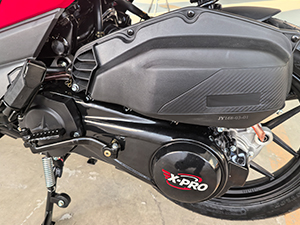
Image: A detailed view of the 168.9cc engine and drivetrain components of the X-PRO Orion 200 moped.
USB Charging Port
The moped includes a convenient USB charging port, allowing riders to charge various devices such as smartphones or tablets while on the go. Locate the USB port, typically near the handlebars or dashboard, and connect your device using a compatible USB cable.
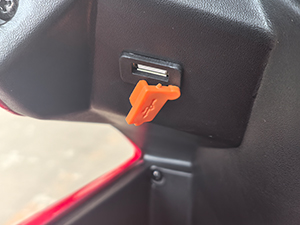
Image: A close-up view of the integrated USB charging port on the X-PRO Orion 200 moped, designed for convenient device charging.
Lighting System
The X-PRO Orion 200 is equipped with LED headlights and turn signal lights for enhanced visibility and safety. Operate the headlight switch for low or high beam. Use the turn signal switch to indicate turns. Ensure all lights are clean and functional before each ride.
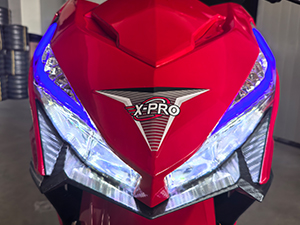
Image: The front view of the X-PRO Orion 200 moped, highlighting its bright LED headlights and turn signals.
Braking System
The moped features a disc braking system for reliable stopping power. Familiarize yourself with the front and rear brake levers. Apply both brakes smoothly and gradually for optimal control. Regularly inspect brake pads and fluid levels.
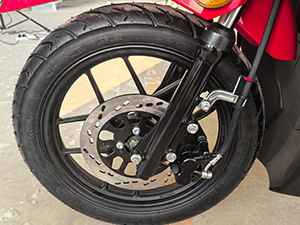
Image: A close-up view of the front wheel and disc brake assembly on the X-PRO Orion 200 moped, showing the braking mechanism.
Maintenance
Regular maintenance is crucial for the longevity and safe operation of your X-PRO Orion 200 moped. Adhere to the maintenance schedule outlined in your comprehensive user manual.
- Tire Pressure: Check tire pressure weekly. The moped features 14-inch wheels; refer to the tire sidewall for recommended pressure.
- Oil Changes: Perform oil changes according to the manufacturer's recommendations, typically after the first 300 miles and then every 1000-1500 miles.
- Brake Inspection: Inspect brake pads and fluid levels monthly. Adjust or replace as necessary.
- Chain/Belt Maintenance: If applicable, inspect and lubricate the drive chain or belt regularly.
- Battery Care: Ensure battery terminals are clean and secure. If the moped is stored for extended periods, consider using a trickle charger.
- General Cleaning: Keep the moped clean to prevent corrosion and maintain its appearance.
Troubleshooting
This section provides solutions to common issues you might encounter with your X-PRO Orion 200 moped.
| Problem | Possible Cause | Solution |
|---|---|---|
| Engine does not start | No fuel, battery low, spark plug issue, kill switch engaged. | Check fuel level, charge battery, inspect spark plug, disengage kill switch. |
| Engine stalls frequently | Improper idle adjustment, clogged fuel filter, carburetor issue. | Adjust idle speed, clean/replace fuel filter, consult a qualified technician for carburetor issues. |
| Lights not working | Blown fuse, faulty bulb, wiring issue. | Check fuses, replace bulbs, inspect wiring connections. |
| Brakes feel spongy | Air in brake lines, low brake fluid, worn brake pads. | Bleed brake lines, top up brake fluid, replace brake pads. |
Specifications
| Feature | Detail |
|---|---|
| Brand | X-PRO |
| Model Name | MC-L001 |
| Engine Displacement | 168.9cc |
| Color | Blue |
| Age Range (Description) | Adult |
| Special Feature | Headlight, USB Charger |
| Weight Limit | 265 Pounds |
| Product Dimensions | 74.8"L x 28.7"W x 44"H |
| Wheel Material | Alloy Steel |
| Frame Material | Alloy Steel |
| Handlebar Type | Adjustable |
| Wheel Size | 14 Inches |
| Wheel Type | Caster |
| Suspension Type | Dual Suspension |
| Brake Style | Disc |
| Material | Plastic (body components) |
Warranty and Support
The X-PRO Orion 200 moped comes with a limited warranty. Please refer to your purchase documentation for specific terms and conditions. The manufacturer provides a 1-month warranty.
For technical support, parts, or service inquiries, please contact X-PRO customer service. They maintain a stock of parts and offer professional technical support to ensure your vehicle lasts long-term.
You can find contact information on the official X-PRO website or through your purchase platform.
Ask a question about this manual
Ask about setup, troubleshooting, compatibility, parts, safety, or missing instructions. Manuals+ will review the question and use this page’s manual context to help answer it.