Product Overview
This LED lighting kit is designed to enhance your LEGO 10333 Lord of The Rings Barad-Dur Dark Tower model, bringing it to life with dynamic illumination. The kit includes a variety of lights and accessories to highlight key features, such as the Eye of Sauron, lava flows, and interior details.

Image: The Light My Bricks LED Lighting Kit for the LEGO 10333 Barad-Dur model, showcasing the illuminated tower.
Key Features
- Dynamic Illumination: Features 29 expertly placed brick lights, including eight for lava flows and eleven flickering lights for torches and candles, to energize your Dark Tower display.
- Iconic Eye of Sauron: Four large flickering Astro LED lights create the menacing glow of the Eye of Sauron.
- Comprehensive Components: Includes 14 Astro Lights, 17 Astro Effects Lights, 3 Meteor Lights, 4 Touch Plates, 7 Docks, 8 Belts, a Flux Converter, 9 Accessories, and 43 Assorted Bricks.
- User-Friendly Installation: Simple 3D installation guide suitable for all skill levels, allowing for lighting during or after model construction without electronics experience.
- Seamless Integration: Ultra-slim 0.16mm flat cables fit discreetly between and underneath LEGO bricks, preserving structure and clutch power.
- Optimized Power: Engineered for efficiency, using up to 50% less power than standard kits without compromising brightness.
- Enhanced Safety: Fully enclosed circuitry with smart fuses in every component for surge and thermal protection.

Image: A comparison highlighting the superior features of Light My Bricks, such as circuit protection, built-in safety, and user experience, compared to other lighting kits.
Kit Components
The Light My Bricks LED Lighting Kit for LEGO 10333 Barad-Dur includes the following:
- 14 x Astro Lights
- 17 x Astro Effects Lights
- 3 x Meteor Lights
- 4 x Touch Plates
- 7 x Docks
- 8 x Belts
- 1 x Flux Converter
- 9 x Accessories
- 43 x Assorted Bricks

Image: A visual representation of the various components included in the Light My Bricks kit, such as different types of lights, cables, and connection boards.
Setup & Installation
Installation is designed to be straightforward, whether you are lighting your LEGO model during its construction or after it has been fully assembled. No prior electronics experience is required.
- Access the 3D Installation Guide: Scan the QR code provided on the light kit box to access the detailed 3D instructions. These step-by-step guides ensure a smooth setup.
- Prepare Components: Identify the various lights, cables, and connection boards. The ultra-slim flat cables (0.16mm thick) are designed to fit seamlessly between and underneath LEGO bricks without causing gaps or affecting clutch power.
- Integrate Lights: Follow the 3D guide to strategically place each light. For example, eight lights are designated for the base to simulate lava flows, and eleven flickering lights are for torches and candles. The four large flickering Astro LED lights are specifically for the Eye of Sauron.
- Connect Components: Use the provided docks and belts to connect the lights to the flux converter. Cable connectors feature reverse polarity, allowing for easy connection in any orientation.
- Power Up: Once all connections are secure, plug your light kit into any USB power bank or a USB wall adapter.
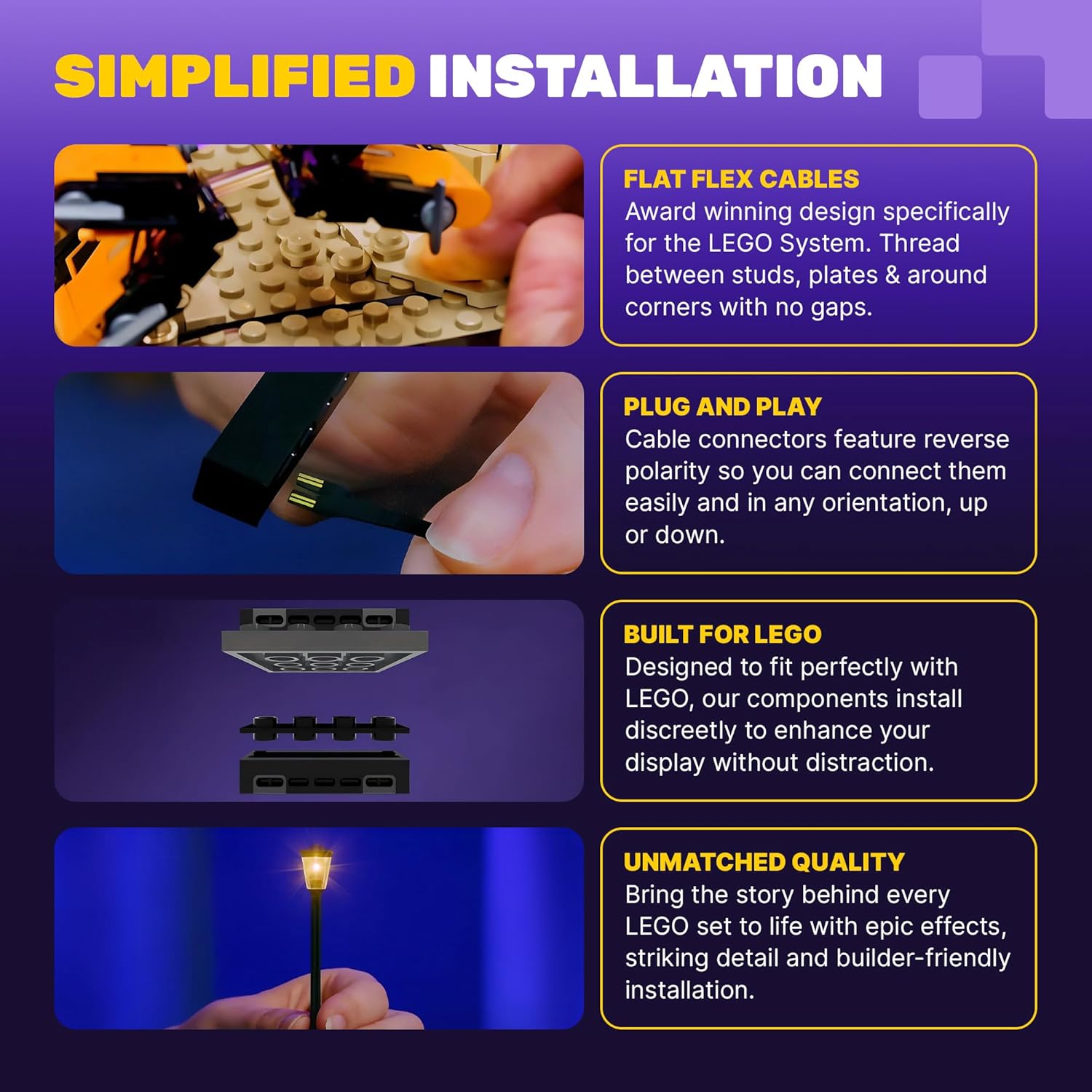
Image: Visual guide demonstrating simplified installation steps, highlighting flat flex cables, plug-and-play connectors, and LEGO-compatible design.

Image: A close-up showing the ultra-slim 0.16mm cables designed for gap-free fit within LEGO structures, contrasting with traditional bulky wires.
Operation
Once powered, the LED lights will illuminate your LEGO Barad-Dur model. The kit is designed for continuous display, providing a captivating visual experience.
- Dynamic Effects: Observe the flickering effects of the Astro LED lights, particularly those simulating the Eye of Sauron and the torches/candles, adding realism to your display.
- Power Source: The kit operates via a standard USB connection. Ensure a stable power supply for optimal performance.
Video: An official demonstration video from Light My Bricks showcasing the illuminated LEGO Barad-Dur model with the LED lighting kit installed, highlighting the dynamic lighting effects.
Maintenance
To ensure the longevity and optimal performance of your lighting kit, follow these maintenance guidelines:
- Cleaning: Gently dust the lights and cables with a soft, dry cloth. Avoid using liquid cleaners directly on electrical components.
- Cable Management: Ensure cables are not pinched or excessively bent, as this can damage the internal wiring.
- Storage: If disassembling the kit for storage, carefully disconnect components and store them in a dry, cool place away from direct sunlight.
- Power Source: Always use a compatible USB power source. Disconnect power when the model is not in use for extended periods.
Troubleshooting
If you encounter any issues with your lighting kit, please refer to the following common solutions:
- Lights Not Illuminating:
- Check all cable connections to ensure they are securely plugged into the correct ports on the docks and flux converter.
- Verify that the USB power source is functioning correctly and providing adequate power. Try a different USB port or power bank.
- Inspect cables for any visible damage or kinks.
- Flickering or Dim Lights (unexpectedly):
- Ensure the power source is stable. Fluctuations in power can affect light performance.
- Check for loose connections.
- If only specific lights are affected, inspect those individual light components and their connections.
- Overheating:
- The kit is designed with smart fuses for thermal protection. If components feel excessively hot, disconnect power immediately.
- Ensure proper ventilation around the model and power components.
For further assistance, please consult the official Light My Bricks support resources.
Product Specifications
| Attribute | Detail |
|---|---|
| Product Dimensions | 5.5 x 4 x 2.7 inches |
| Item Weight | 7.7 ounces |
| ASIN | B0DKRR17D5 |
| Item Model Number | 2.0lotrbaraddur-10333 |
| Manufacturer Recommended Age | 12 years and up |
| Manufacturer | Light My Bricks |
Safety Information
Warning: Choking Hazard - small parts. Not for children under 3 years.
Always handle electrical components with care. Ensure all connections are secure before applying power. Do not modify the components in any way not specified by the manufacturer.
Warranty and Support
For any questions, technical support, or warranty inquiries regarding your Light My Bricks LED Lighting Kit, please visit the official Light My Bricks website or contact their customer service. Detailed instructions and support resources are available to assist you with your product.


