
1. Introduction
The Wouxun KG-Q10H is a quad-band handheld amateur radio designed for reliable communication across multiple frequency bands. This device features a superheterodyne receiver and is capable of transmitting on the 1.25 meter, 2 meter, 6 meter, and 70cm amateur bands. It also offers extensive reception capabilities, including 50-54 MHz, 108-174 MHz, 220-225 MHz, 320-480 MHz, 714-999 MHz, and airband frequencies in AM mode.
Key features include a NOAA weather mode with alerts, a built-in commercial FM radio, 999 programmable memory channels, and simultaneous dual-channel receive and transmission with up to 6 Watts of output power. The KG-Q10H is rated IP67 for dust and water protection, making it suitable for various environments.
2. Package Contents
Verify that all items listed below are present in your product package:
- Wouxun KG-Q10H Quad Band Handheld Amateur Radio
- 3000mAh Battery Pack
- Two Antennas (one for 2m/70cm, one for 6m/1.25m)
- Charging Dock
- Belt Clip
- Wrist Strap
- Owner's Manual

Image 2.1: Contents of the Wouxun KG-Q10H package, including the radio, battery, antennas, charging dock, belt clip, wrist strap, and manual.
3. Product Overview
3.1 Front Panel and Display
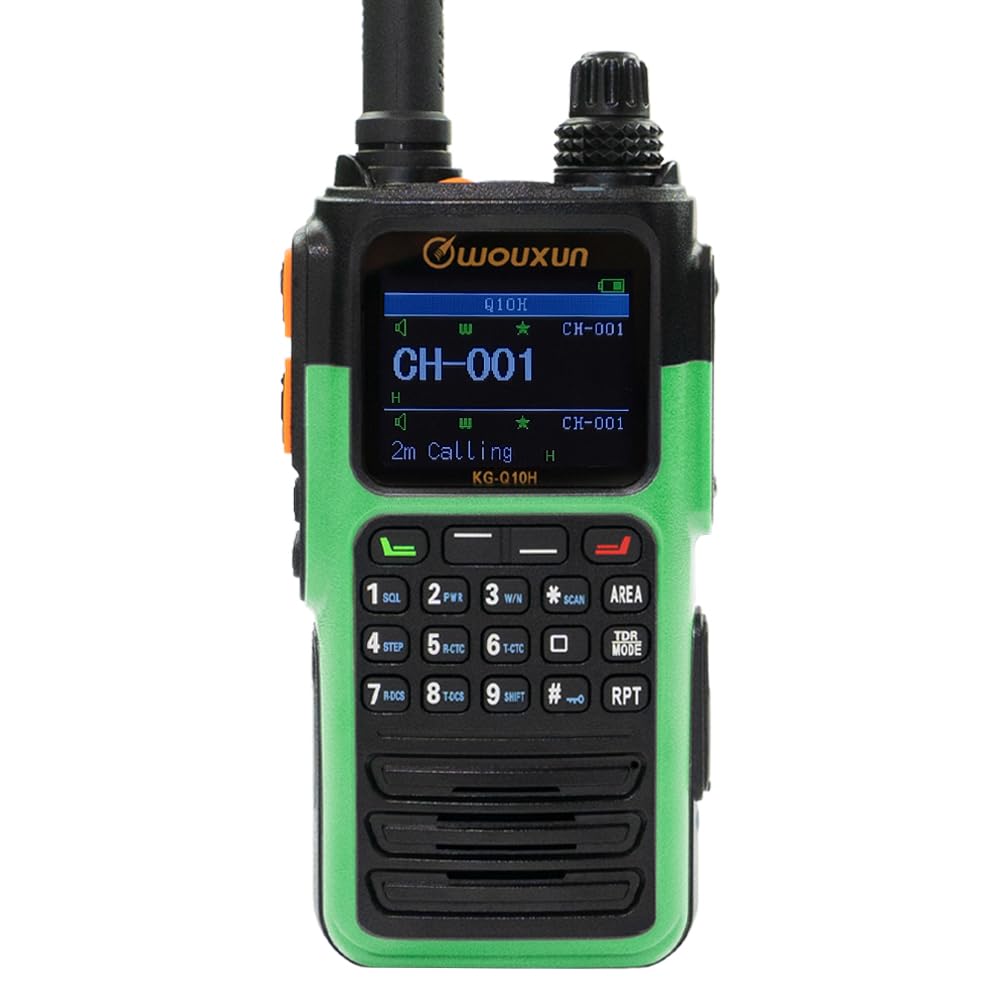
Image 3.1: Front view of the Wouxun KG-Q10H, showing the full-color dual-channel display, keypad, and function buttons.
The front panel features a full-color dual-channel display, which can be customized with 14 different themes, including four user-customizable options. Below the display is a numeric keypad and dedicated function buttons for various operations such as SQL (Squelch), PWR (Power/High/Low), W/N (Wide/Narrow), SCAN, AREA, STEP, R-CTC, T-CTC, TDR MODE, R-DCS, T-DCS, SHIFT, and RPT (Repeater).
3.2 Side and Top Controls
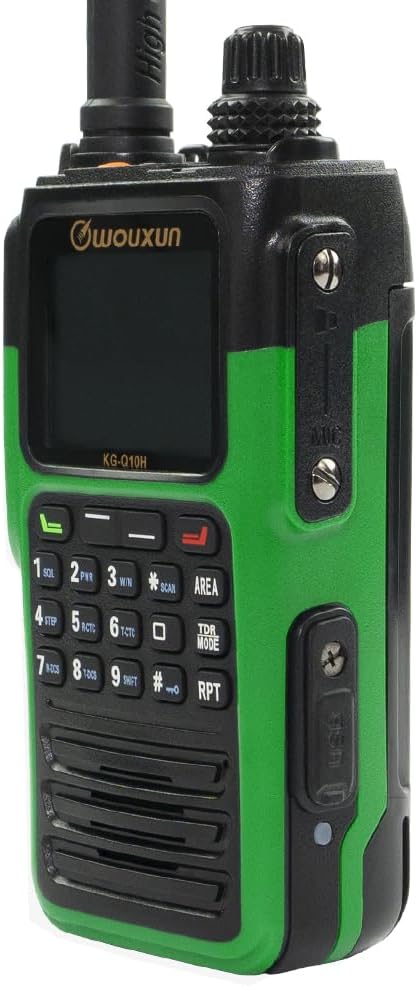
Image 3.2: Side view of the Wouxun KG-Q10H, highlighting the Push-To-Talk (PTT) buttons and microphone/speaker jacks.
The radio includes two programmable side keys and a top key, each capable of two functions. The two PTT (Push-To-Talk) keys are also configurable. The on/off/volume and channel knobs are conveniently stacked at the top for easy access and control. A built-in USB-C charging port is located on the side for direct charging.
3.3 Rear Panel

Image 3.3: Rear view of the Wouxun KG-Q10H, showing the battery compartment and contacts.
The rear panel houses the battery compartment and contacts for secure battery attachment and connection to the charging dock.
3.4 Keypad Detail

Image 3.4: Detailed view of the Wouxun KG-Q10H keypad, showing individual buttons and their secondary functions.
The keypad provides direct access to numerical input for frequencies and channels, along with various function shortcuts. The Menu key offers access to two distinct menus for configuration.
4. Setup
4.1 Battery Installation
- Align the 3000mAh battery pack with the battery compartment on the rear of the radio.
- Slide the battery pack into place until it clicks securely. Ensure the battery release latch is engaged.
4.2 Antenna Attachment
The KG-Q10H comes with two antennas. Select the appropriate antenna for your desired operating bands:
- Short Antenna: For 2 meters (144-148 MHz) and 70 centimeters (430-450 MHz).
- Longer Antenna: For 6 meters (50-54 MHz) and 1.25 meters (220-225 MHz).
- Screw the chosen antenna clockwise onto the antenna connector at the top of the radio until it is finger-tight. Do not overtighten.
4.3 Initial Charging
Before first use, fully charge the battery. The radio can be charged using the included charging dock or directly via the built-in USB-C port.
- Using the Charging Dock: Place the radio with the battery installed into the charging dock. Ensure the charging contacts align. Connect the charging dock to a power source using the provided adapter.
- Using USB-C: Connect a USB-C cable to the port on the side of the radio and to a compatible USB power adapter.
The charging indicator on the radio or dock will show the charging status. A full charge typically takes several hours.
5. Operating Instructions
5.1 Power On/Off and Volume Control
- To power on, rotate the top-left knob clockwise until a click is heard and the display illuminates.
- To power off, rotate the same knob counter-clockwise until a click is heard and the display turns off.
- Adjust the volume by rotating the same knob after the radio is powered on.
5.2 Channel and Frequency Modes
The KG-Q10H supports both Channel Mode (memory channels) and Frequency Mode (VFO). Use the dedicated buttons or menu options to switch between these modes. Frequencies can be entered directly via the keypad in Frequency Mode, or selected from programmed channels in Channel Mode.
5.3 Transmission and Reception
- To transmit, press and hold one of the PTT buttons on the side of the radio. Speak clearly into the microphone. Release the PTT button to stop transmitting and return to receive mode.
- The radio supports simultaneous dual-channel receive, allowing monitoring of two frequencies or channels concurrently.
5.4 Special Features
- NOAA Weather Mode: Access dedicated NOAA weather channels and receive weather alerts.
- Commercial FM Radio: Tune into standard FM broadcast stations.
- GPS Location Data Display: When enabled, the radio can display its own GPS location and the location of other compatible Q series radios transmitting their GPS data.
- Cross Band Repeat: Utilize the radio to repeat signals between different frequency bands.
- CTCSS/DCS Tones: Configure Continuous Tone-Coded Squelch System (CTCSS) or Digital Coded Squelch (DCS) for selective calling. The radio supports tone scan.
- Scanning Functions: Includes channel scan, frequency scan, and priority channel scan.
- Call Functions: Supports Group Call, All Call, and Select Call, along with DTMF (Dual-Tone Multi-Frequency) support and incoming caller ID display.
- Programmable Keys: Customize the functions of the two side keys and the top key for quick access to frequently used features.
6. Maintenance
6.1 Water and Dust Protection
The Wouxun KG-Q10H is rated IP67, indicating it is protected against dust ingress and can withstand immersion in water up to 1 meter for 30 minutes. Ensure all port covers (e.g., USB-C, accessory jacks) are securely closed to maintain water resistance.
6.2 Battery Care
- Avoid fully discharging the battery frequently to prolong its lifespan.
- Store the radio and battery in a cool, dry place when not in use for extended periods.
- Use only the original Wouxun battery and charging accessories.
6.3 Cleaning
Clean the radio's exterior with a soft, damp cloth. Do not use harsh chemicals or abrasive cleaners. Ensure the radio is powered off and all ports are sealed before cleaning.
7. Troubleshooting
If you encounter issues with your KG-Q10H, consider the following common troubleshooting steps:
- Radio not powering on: Check if the battery is properly installed and fully charged. Ensure the power/volume knob is rotated clockwise.
- No signal or poor reception: Verify the antenna is securely attached and the correct antenna for the band is being used. Check the selected frequency or channel. Ensure you are within range of a repeater or other radio.
- Programming difficulties: The radio is fully programmable via its keypad, but for complex configurations or channel management, PC programming software is recommended. Refer to the full user manual for detailed programming instructions.
- Audio issues: Adjust the volume knob. Check squelch settings. Ensure the microphone and speaker are not obstructed.
For more detailed troubleshooting or persistent issues, consult the comprehensive user manual or contact Wouxun customer support.
8. Specifications
| Feature | Specification |
|---|---|
| Model | KG-Q10H |
| Frequency Range (Transmit) | 1.25m, 2m, 6m, 70cm amateur bands |
| Frequency Range (Receive) | 50-54 MHz, 108-174 MHz, 220-225 MHz, 320-480 MHz, 714-999 MHz, Airband (AM) |
| Number of Channels | 999 |
| Output Power | Up to 6 Watts |
| Battery Capacity | 3000mAh Li-Ion |
| Water Resistance | IP67 |
| Dimensions (D x W x H) | 8"D x 8"W x 3"H (Product Dimensions) |
| Item Weight | 1.6 Pounds |
| Special Features | NOAA Weather Alert, GPS Location Data Display, Cross Band Repeat, Full-Color Display, USB-C Charging |
9. Warranty Information
The Wouxun KG-Q10H Quad Band Handheld Amateur Radio is covered by a 1-Year Manufacturer Warranty from the date of purchase. This warranty covers defects in materials and workmanship under normal use. Please retain your proof of purchase for warranty claims. For specific terms and conditions, refer to the warranty card included in your package or contact Wouxun customer service.
10. Support
For additional support, detailed operational guides, or technical assistance, please refer to the complete user manual provided with your product. You may also visit the official Wouxun website or contact their customer service department for further inquiries.


