
Introduction
The LifePro BioRecover Go Light Therapy Knee Brace is an advanced, portable device designed to provide targeted red light and near-infrared light therapy for pain relief, stiffness, and accelerated recovery. This manual will guide you through the proper setup, operation, and maintenance of your device to ensure optimal performance and safety.
Safety Information
Please read all safety warnings and instructions carefully before using this product. Failure to do so may result in injury or damage to the device.
- Do not use the device if you have open wounds, infections, or severe skin conditions in the treatment area.
- Consult a healthcare professional before use if you are pregnant, have a pacemaker, or any other medical conditions.
- Avoid direct eye exposure to the LED lights. Use protective eyewear if necessary.
- Keep the device dry and away from water or excessive moisture.
- Do not attempt to disassemble or repair the device yourself. Contact customer support for assistance.
- Keep out of reach of children and pets.
What's Included
Your LifePro BioRecover Go package includes the following items:
- Battery/Controller
- Short extension strap
- Long extension strap
- USB-C Charging Cable
- Storage Bag
- User Manual (this document)

This image displays the LifePro Red Light Therapy Knee Brace, highlighting its application on the knee with an X-ray like overlay showing light penetration. Also shown is a woman wearing the brace on her shoulder, demonstrating its versatility. The detachable control unit is prominently featured.
Setup
Follow these steps to set up your LifePro BioRecover Go device:
- Charge the Controller: Before first use, fully charge the detachable controller using the provided USB-C charging cable. Connect the cable to the controller and a suitable USB power source. The indicator light will show charging status.
- Attach the Controller: Align the magnetic contact points on the controller with the corresponding points on the knee brace. The controller will snap securely into place.
- Position the Brace: Place the brace around your knee, shoulder, or other desired body part. Ensure the LED lights are directly over the area you wish to treat.
- Secure the Straps: Use the adjustable Velcro straps to secure the brace comfortably but firmly. If needed, attach the short or long extension straps for a better fit on larger areas.

A woman holds the LifePro Red Light Therapy Knee Brace, with text indicating adjustable irradiance and three levels of recovery (66 MW/CM2, 96 MW/CM2, 116 MW/CM2), allowing users to customize their therapy intensity.
Operating Instructions
Once the brace is set up, follow these steps to begin your therapy session:
- Power On: Press and hold the power button on the controller for a few seconds until the display illuminates.
- Select Time: Use the timer button to cycle through desired session durations (e.g., 10, 20, 30 minutes).
- Choose Mode: Press the mode button to select your preferred therapy mode:
- Red Light Mode (660nm): Primarily for skin health and surface issues.
- NIR Invisible Light Mode (850nm): For deep tissue repair, muscle, and joint recovery.
- Combined Mode: Utilizes both red and near-infrared lights for comprehensive therapy.
- Pulsating Mode (10 Hz): Delivers light in pulses, which some users find beneficial for certain conditions.
- Adjust Intensity: Use the intensity buttons to select from three intensity levels (66 MW/CM2, 96 MW/CM2, 116 MW/CM2) to suit your comfort and therapeutic needs.
- Start Session: The device will automatically begin the session once settings are selected. The timer will count down.
- End Session: The device will automatically turn off once the selected time has elapsed. You can manually turn it off by pressing and holding the power button.

This image focuses on a woman using the LifePro Red Light Therapy Knee Brace, with a clear view of the control panel. Text details the four available therapy modes: Red Light (660nm for skin health), NIR Invisible Light (850nm for deep tissue repair), Combined Mode, and Pulsating Mode (10 Hz), all powered by triple chip LEDs.
Key Features and Benefits
The LifePro BioRecover Go offers a range of features designed to enhance your recovery and well-being:
- Dual Therapy for Enhanced Recovery: Experience the benefits of red light therapy combined with near-infrared light, which work together to boost circulation, support skin health, and aid in muscle recovery. Ideal for athletes and individuals experiencing joint stiffness.
- Deep Tissue Relief: Utilize triple chip LEDs 660 nm red light and 850 nm near-infrared light to penetrate deeply into muscles, easing pain and enhancing tissue recovery. Ideal for post-exercise relaxation and ongoing comfort.
- Customizable Settings: Choose from three intensity levels and two modes—continuous or 10 Hz pulsed light—to tailor your knee red light therapy experience. Simple controls allow for personalized treatment sessions.
- Convenience On-the-Go: Features a built-in USB-C rechargeable battery, making this red light knee therapy device convenient for use at home or while traveling. Enjoy effective light therapy wherever you are.
- Versatile, Adjustable Design: This red light therapy brace features adjustable Velcro straps for a comfortable fit on both knees and shoulders, enhancing its utility. Perfectly tailored to support a range of body sizes, it ensures comfort and effectiveness in your daily recovery and wellness activities.

A woman is shown holding the LifePro Red Light Therapy Knee Brace, which features numerous red LED lights. Accompanying text highlights the advanced benefits of targeted red light therapy, including soothing sore knees, reducing inflammation, and promoting faster recovery, with corresponding illustrative icons.

This image shows the LifePro Red Light Therapy device being used on both a man's knee and a woman's shoulder, emphasizing its adjustable design for targeting pain and accelerating healing in various body areas.
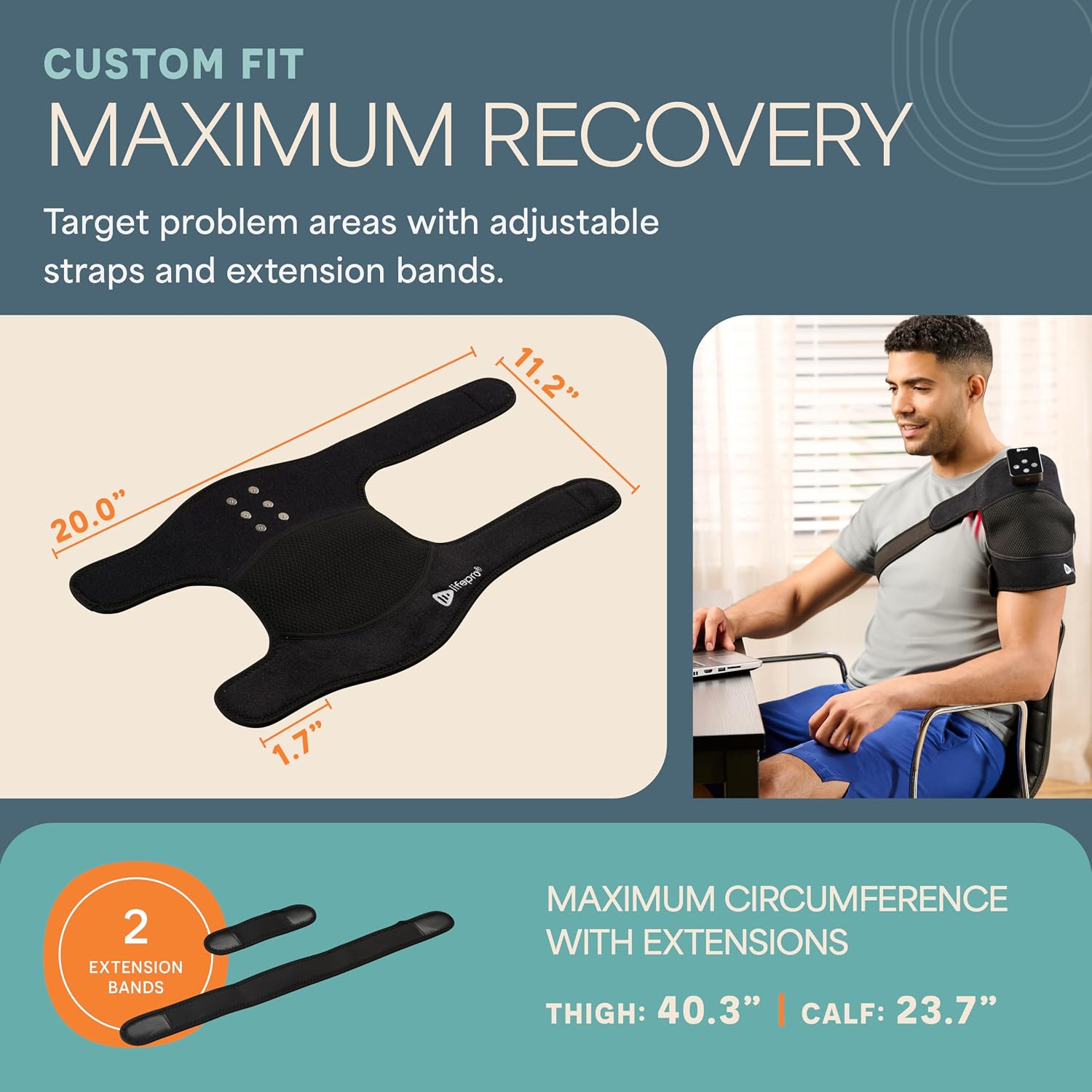
A man is shown using the LifePro Red Light Therapy device on his shoulder, emphasizing its battery-powered, wireless design for convenient recovery and an easy-to-use control panel.
Maintenance
Proper care and maintenance will extend the life of your LifePro BioRecover Go:
- Cleaning: Wipe the device and brace with a soft, damp cloth after each use. Do not use abrasive cleaners or immerse the device in water.
- Storage: Store the device in its provided storage bag in a cool, dry place away from direct sunlight and extreme temperatures.
- Battery Care: To prolong battery life, avoid fully discharging the battery frequently. Charge it regularly, even if not in use for extended periods.
Troubleshooting
If you encounter any issues with your LifePro BioRecover Go, refer to the following common problems and solutions:
| Problem | Possible Cause | Solution |
|---|---|---|
| Device does not turn on | Low battery; Controller not properly attached | Charge the controller fully; Re-attach the controller ensuring magnetic connection. |
| Lights are dim or flickering | Low battery; Incorrect intensity setting | Charge the controller; Increase the intensity level. |
| Brace feels uncomfortable | Straps too tight; Incorrect positioning | Adjust strap tension; Re-position the brace for a comfortable fit, using extension straps if needed. |
If the problem persists, please contact LifePro customer support for further assistance.
Specifications
| Feature | Detail |
|---|---|
| Brand | LifePro |
| Model Name | BioRecover |
| Part Number | LP-BRCVG-BLK |
| Light Wavelengths | 660nm (Red Light), 850nm (Near-Infrared Light) |
| Intensity Levels | 3 (66 MW/CM2, 96 MW/CM2, 116 MW/CM2) |
| Modes | Red Light, NIR, Combined, Pulsating (10 Hz) |
| Power Source | Rechargeable USB-C Battery/Controller |
| Material | Neoprene |
| Item Weight | 0.59 Pounds |
| Dimensions (LxWxH) | 21.65 x 20 x 11.2 inches |
| Included Components | Battery/Controller, Short extension strap, Long extension strap, USB-C Charging Cable, Storage Bag, User Manual |
Warranty and Support
LifePro stands behind the quality of its products. Your LifePro BioRecover Go Light Therapy Knee Brace comes with a manufacturer's warranty covering defects in materials and workmanship. Please refer to the warranty card included in your package for specific terms and conditions.
For technical support, troubleshooting assistance, or warranty claims, please contact LifePro customer service:
- Website: www.lifeprofitness.com
- Email: support@lifeprofitness.com
- Phone: 1-800-360-6004
Our support team is available to assist you with any questions or concerns you may have regarding your device.