
1. Introduction
Thank you for choosing the FLYBIRD Squat & Rowing Machine. This versatile fitness equipment is designed to provide a comprehensive full-body workout, targeting your glutes, legs, core, arms, and back. With its adjustable resistance levels, customizable settings, and compact foldable design, it is an ideal solution for effective home workouts. This manual provides essential information for safe assembly, operation, maintenance, and troubleshooting to ensure you get the most out of your new machine.

Image 1.1: A user demonstrating the FLYBIRD Squat and Rowing Machine in use.
2. Important Safety Information
Before using the FLYBIRD Squat & Rowing Machine, please read all instructions carefully. Keep this manual for future reference. Failure to follow these safety guidelines may result in injury or damage to the equipment.
General Safety Precautions:
- Consult your physician before starting any new exercise program, especially if you have pre-existing health conditions.
- Keep children and pets away from the machine during operation.
- Place the machine on a flat, stable surface with adequate clearance around it (at least 2 feet).
- Inspect the machine for loose parts, damage, or wear before each use. Do not use if damaged.
- Wear appropriate athletic footwear and clothing during workouts.
- Do not exceed the maximum user weight capacity of 330 lbs (150 kg).
- Stop exercising immediately if you feel faint, dizzy, or experience pain.
- Ensure all adjustment knobs and pins are securely fastened before and during your workout.
- Do not modify the machine in any way. Use only manufacturer-approved replacement parts.
3. Package Contents
Carefully unpack all components and verify that you have received all the items listed below. If any parts are missing or damaged, please contact customer support immediately.
- Main Frame Assembly
- Seat Assembly
- Handlebar Assembly with LCD Monitor
- Foot Pedals (pre-attached or separate)
- Resistance Bands (pre-attached)
- Hardware Kit (bolts, washers, nuts, tools)
- User Manual
4. Setup and Assembly
Follow these steps to assemble your FLYBIRD Squat & Rowing Machine. It is recommended to have two people for assembly.
Step-by-Step Assembly:
- Unpack and Prepare: Remove all components from the packaging. Lay them out on a clean, flat surface. Ensure all packing materials are removed.
- Attach Stabilizer Bases: Secure the front and rear stabilizer bases to the main frame using the provided bolts and washers. Ensure they are tightened securely.
- Install Seat Assembly: Slide the seat assembly onto the main frame rail. Ensure it clicks into place or is secured with the appropriate pin/knob.
- Attach Handlebar Assembly: Insert the handlebar assembly into the designated slot on the main frame. Secure it with the locking pin or knob. Ensure the LCD monitor cable is not pinched.
- Connect Resistance Bands: Verify that the resistance bands are properly attached to both the foot pedal mechanism and the main frame.
- Final Check: Before first use, double-check all bolts, nuts, and pins to ensure they are securely tightened. Test all adjustable components for proper function.
Folding and Unfolding:
The FLYBIRD Squat & Rowing Machine features a compact, foldable design for easy storage.
- To Fold: Locate the folding knob/pin (usually near the base or main hinge). Pull or unscrew the knob to release the locking mechanism. Carefully fold the machine upwards until it locks into its upright, folded position.
- To Unfold: Release the locking mechanism that holds the machine in its folded position. Gently lower the machine until it fully extends and locks into its operational position. Ensure it is stable before use.

Image 4.1: The compact and foldable design of the machine, showing its dimensions when folded.
5. Operating Instructions
This section details how to use your FLYBIRD Squat & Rowing Machine effectively and safely.
Adjusting Resistance Levels:
The machine offers 4 adjustable resistance levels, with each level adding approximately 25 lbs of resistance, up to a total of 100 lbs. To adjust the resistance, simply add or remove the resistance bands located at the base of the machine. Ensure bands are securely attached before starting your workout.

Image 5.1: Detail of the adjustable resistance bands, each adding 25 lbs.
Adjusting Seat and Handlebar Positions:
Customize your workout for optimal comfort and effectiveness by adjusting the seat and handlebar positions.
- Seat Positions: The machine features 5 adjustable seat positions. To adjust, locate the seat adjustment knob/pin, pull it out, slide the seat to your desired position, and release the knob to lock it in place.
- Handlebar Heights: There are 4 adjustable handlebar heights. To adjust, locate the handlebar adjustment knob/pin, pull it out, raise or lower the handlebars to your preferred height, and release the knob to lock.

Image 5.2: Visual guide for adjusting seat and handlebar positions.
Using the LCD Monitor:
The built-in LCD monitor tracks your exercise data to help you monitor progress.
- Functions: The monitor typically displays Time, Scan (cycles through all metrics), Count (repetitions), Calories (estimated), and RPM (revolutions per minute).
- Operation: Press the 'MODE' button to cycle through display functions. Press and hold 'RESET' to clear all data.

Image 5.3: The LCD monitor interface, showing various tracked metrics.
Exercise Techniques:
The FLYBIRD machine supports both squatting and rowing movements, as well as additional exercises with resistance bands.
- Squatting: The machine assists in maintaining proper squat form, minimizing knee and joint strain. It supports adjustable squat angles of 30°, 60°, and 120° to maximize glute engagement. Focus on pushing through your heels and keeping your back straight.
- Rowing: Engage your core, arms, and back by performing rowing motions with the handlebars. Pull the handles towards your chest while extending your legs.
- Resistance Band Exercises: The integrated resistance bands can be used for various full-body exercises, such as bicep curls, tricep extensions, shoulder presses, and leg extensions, by detaching them from the foot pedals and using them independently.

Image 5.4: Illustration of proper squatting form and adjustable angles.

Image 5.5: Overview of muscle groups targeted by the machine's compound movements.
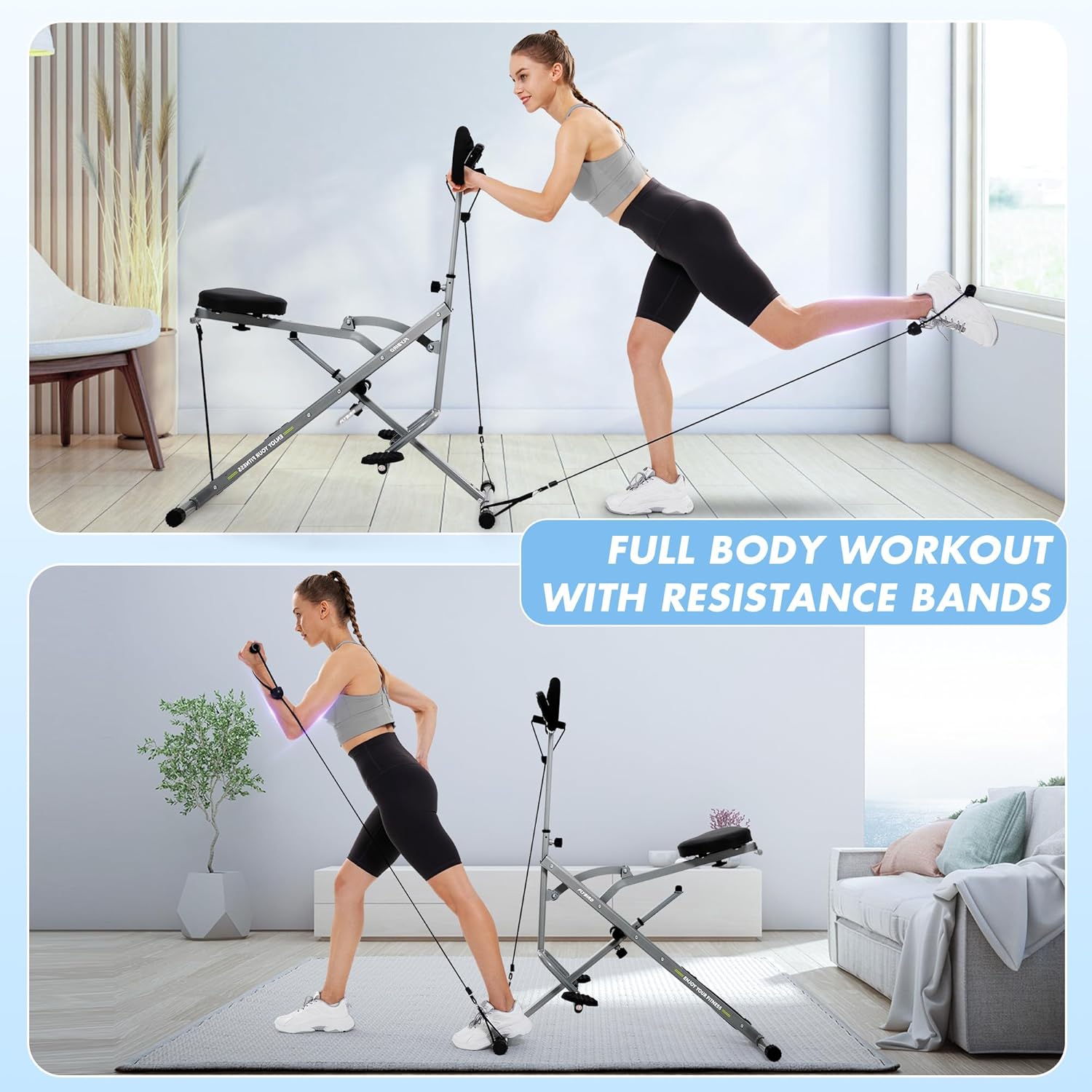
Image 5.6: Examples of full-body exercises utilizing the machine's resistance bands.
6. Maintenance and Care
Regular maintenance will prolong the life of your FLYBIRD Squat & Rowing Machine and ensure safe operation.
Cleaning:
- Wipe down the machine with a damp cloth after each use to remove sweat and dust.
- Do not use abrasive cleaners or solvents, as they may damage the finish.
- Keep the LCD monitor dry.
Inspection:
- Periodically check all bolts, nuts, and connections to ensure they are tight. Tighten if necessary.
- Inspect resistance bands for any signs of wear, fraying, or damage. Replace if necessary.
- Check the seat and handlebar adjustment mechanisms for smooth operation.
Storage:
- Store the machine in a clean, dry environment, away from extreme temperatures and direct sunlight.
- Utilize the foldable design for compact storage under a bed, in a closet, or in a corner.
7. Troubleshooting
If you encounter any issues with your FLYBIRD Squat & Rowing Machine, refer to the following common problems and solutions.
| Problem | Possible Cause | Solution |
|---|---|---|
| Machine is unstable or wobbly. | Loose bolts or uneven surface. | Ensure all assembly bolts are tightened. Place the machine on a flat, level surface. |
| Resistance feels too low/high. | Incorrect number of resistance bands attached. | Adjust the number of resistance bands to match your desired intensity. Ensure they are properly hooked. |
| LCD monitor not displaying data. | Batteries are dead or incorrectly installed; loose connection. | Replace batteries (usually AAA). Check the connection cable from the sensor to the monitor. Ensure the sensor is properly aligned. |
| Squeaking or grinding noise during use. | Loose parts; lack of lubrication on moving parts. | Check and tighten all bolts. Apply a small amount of silicone-based lubricant to pivot points if necessary (avoiding resistance bands). |
If the problem persists after attempting these solutions, please contact FLYBIRD customer support.
8. Product Specifications
| Feature | Detail |
|---|---|
| Brand | FLYBIRD |
| Model Name | Squat Machine |
| Color | Gray |
| Material | Alloy Steel |
| Resistance Mechanism | Resistant Band |
| Adjustable Resistance Levels | 4 levels (up to 100 lbs total) |
| Product Dimensions (LxWxH) | 37"D x 17.1"W x 42.9"H |
| Maximum Weight Recommendation | 330 Pounds |
| Seat Positions | 5 adjustable positions |
| Handle Heights | 4 adjustable heights |
| Display Type | LED (LCD Monitor) |
| Metrics Measured | Time, Scan, Count, Calories, RPM |
| Power Source | Manual |
| Foldable Design | Yes |
9. Warranty and Customer Support
FLYBIRD is committed to providing high-quality products and excellent customer service. For specific warranty details regarding your Squat & Rowing Machine, please refer to the warranty card included in your package or visit the official FLYBIRD website.
Customer Support:
If you have any questions, concerns, or require assistance with assembly, operation, or troubleshooting, please do not hesitate to contact our customer support team. Please have your product model name and purchase information ready when contacting support.
- Website: Visit the FLYBIRD Store on Amazon
- Email: Refer to your product packaging or official website for contact email.
- Phone: Refer to your product packaging or official website for contact phone number.