
1. Introduction
This manual provides detailed instructions for the safe and effective operation of the Godox Litemons LP1200Bi 120W Bi-Color LED Light Panel. Please read this manual thoroughly before use to ensure optimal performance and to prevent damage to the product or injury to yourself or others. Keep this manual for future reference.
The Godox Litemons LP1200Bi is a versatile 120W bi-color LED light panel designed for professional photography and videography. It offers adjustable color temperature from 2800K to 6500K and brightness control from 0% to 100%.
2. Safety Precautions
- Do not disassemble or modify the product.
- Keep the product dry. Do not handle with wet hands or immerse in water.
- Do not use in the presence of flammable gases or liquids.
- Ensure the power supply voltage matches the product's requirements.
- Unplug the power cord during thunderstorms or when not in use for extended periods.
- Avoid direct eye exposure to the LED light.
- Keep out of reach of children.
3. Package Contents
Verify that all items are included in your package:
- Godox Litemons LP1200Bi LED Light Panel
- Power Adapter
- Power Cable
- Carry Case
- User Manual (this document)
4. Product Overview
The Godox Litemons LP1200Bi features a robust design with intuitive controls. Key components include the LED panel, control interface, and mounting bracket.

Figure 4.1: Front view of the LP1200Bi LED Light Panel with barn doors open.
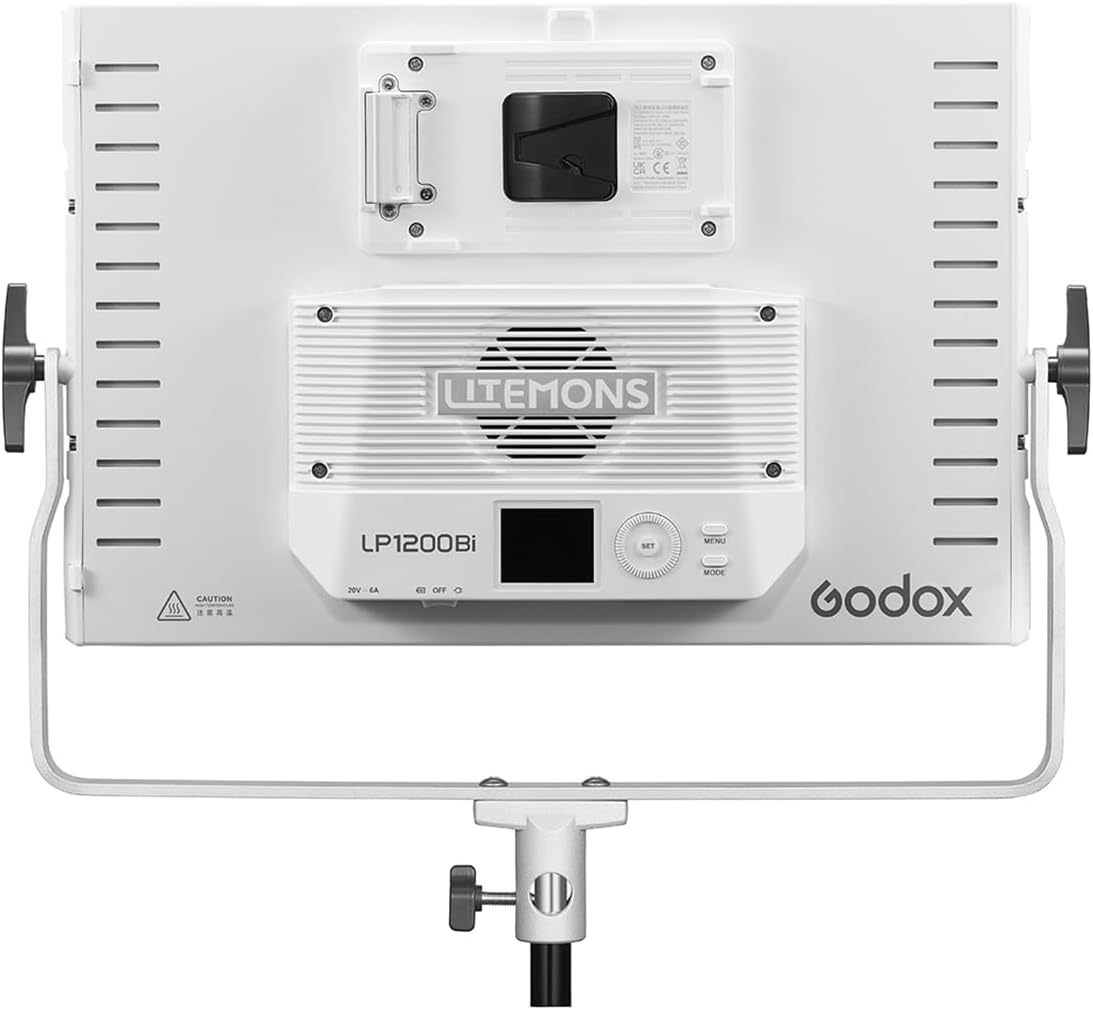
Figure 4.2: Rear view of the LP1200Bi, highlighting the control panel and V-mount battery plate.
4.1 Components
- LED Panel: Provides bi-color illumination.
- Control Panel: Features an LCD screen, SET button, MENU button, and adjustment dial for brightness and color temperature.
- V-Mount Battery Plate: For optional V-mount battery power (battery not included).
- Yoke Bracket: 360-degree rotatable for flexible positioning and stand mounting.
- Barn Doors: Adjustable light shaping accessories (may be integrated or optional).
5. Setup
5.1 Mounting the Light Panel
- Attach the LP1200Bi to a compatible light stand using the integrated yoke bracket. Ensure the mounting knob is securely tightened.
- Adjust the angle of the light panel by loosening the side locking knobs on the yoke, positioning the panel, and then re-tightening the knobs.

Figure 5.1: LP1200Bi mounted on a light stand, demonstrating the yoke's adjustability.
5.2 Powering the Light Panel
The LP1200Bi can be powered by either AC power or an optional V-mount battery.
5.2.1 AC Power
- Connect the power adapter to the DC input port on the rear of the light panel.
- Connect the power cable to the power adapter.
- Plug the power cable into a suitable AC power outlet.
5.2.2 V-Mount Battery Power (Optional)
- Ensure the light panel is turned off.
- Align a charged V-mount battery with the V-mount plate on the rear of the light panel.
- Slide the battery down until it clicks securely into place.
- To remove, press the release button on the V-mount plate and slide the battery upwards.
6. Operating Instructions
6.1 Power On/Off
Locate the power switch on the rear control panel. Flip the switch to the "ON" position to power on the light. Flip to "OFF" to power off.
6.2 Adjusting Brightness
- Once powered on, the LCD screen will display the current brightness and color temperature settings.
- Rotate the adjustment dial to increase or decrease the brightness level from 0% to 100%.
6.3 Adjusting Color Temperature
- Press the "SET" button to switch the adjustment mode to color temperature. The color temperature value on the LCD screen will typically blink or be highlighted.
- Rotate the adjustment dial to change the color temperature from 2800K (warm) to 6500K (cool).
- Press "SET" again to confirm the selection or switch back to brightness adjustment.
6.4 Using the Godox Light App (Bluetooth Control)
The LP1200Bi supports control via the Godox Light App for enhanced flexibility.
- Download the "Godox Light" app from your device's app store.
- Ensure Bluetooth is enabled on your mobile device.
- Power on the LP1200Bi.
- Open the Godox Light app and follow the in-app instructions to search for and connect to your LP1200Bi.
- Once connected, you can adjust brightness, color temperature, and other settings directly from the app.
7. Maintenance
7.1 Cleaning
- Always power off and unplug the light panel before cleaning.
- Use a soft, dry cloth to wipe the exterior of the light panel.
- For stubborn dirt, a slightly damp cloth with mild detergent can be used, followed by a dry cloth.
- Do not use harsh chemicals, solvents, or abrasive cleaners.
7.2 Storage
- Store the light panel in its included carry case when not in use to protect it from dust and physical damage.
- Store in a cool, dry place, away from direct sunlight and extreme temperatures.
- If using V-mount batteries, remove them from the light panel before long-term storage.
8. Troubleshooting
| Problem | Possible Cause | Solution |
|---|---|---|
| Light does not turn on. | No power supply; loose connection; faulty power adapter/battery. | Check power cable and adapter connections. Ensure AC outlet is functional. If using battery, check battery charge and connection. Try a different power source if available. |
| Brightness/Color Temperature cannot be adjusted. | Control panel locked; faulty dial/button. | Ensure no lock function is active (refer to advanced settings if applicable). Try pressing the SET button to switch modes. Restart the device. |
| Light flickers or is unstable. | Unstable power supply; overheating; internal fault. | Ensure stable power source. Allow the unit to cool down if it has been running for a long time. If problem persists, contact customer support. |
| Godox Light App cannot connect. | Bluetooth off; app issues; light not in pairing mode. | Ensure Bluetooth is enabled on your device. Restart the app and the light. Check app permissions. Refer to the app's help section for specific pairing instructions. |
9. Specifications
| Feature | Detail |
|---|---|
| Model | LP1200Bi |
| Power Output | 120W |
| Color Temperature Range | 2800K - 6500K |
| Brightness Adjustment | 0% - 100% |
| CRI/TLCI | 96 |
| Power Supply | AC Power Adapter (included), V-Mount Battery (optional) |
| Dimensions | 18.5 x 15 x 4 inches (Product) |
| Weight | 8.92 pounds (Item) |
| Control Method | On-board controls, Godox Light App (Bluetooth) |
10. Warranty and Support
Godox products are designed and manufactured to the highest quality standards. For warranty information and technical support, please refer to the official Godox website or contact your local distributor.
Please retain your proof of purchase for warranty claims.
For further assistance, you may visit the GODOX Store on Amazon.