
1. Product Overview
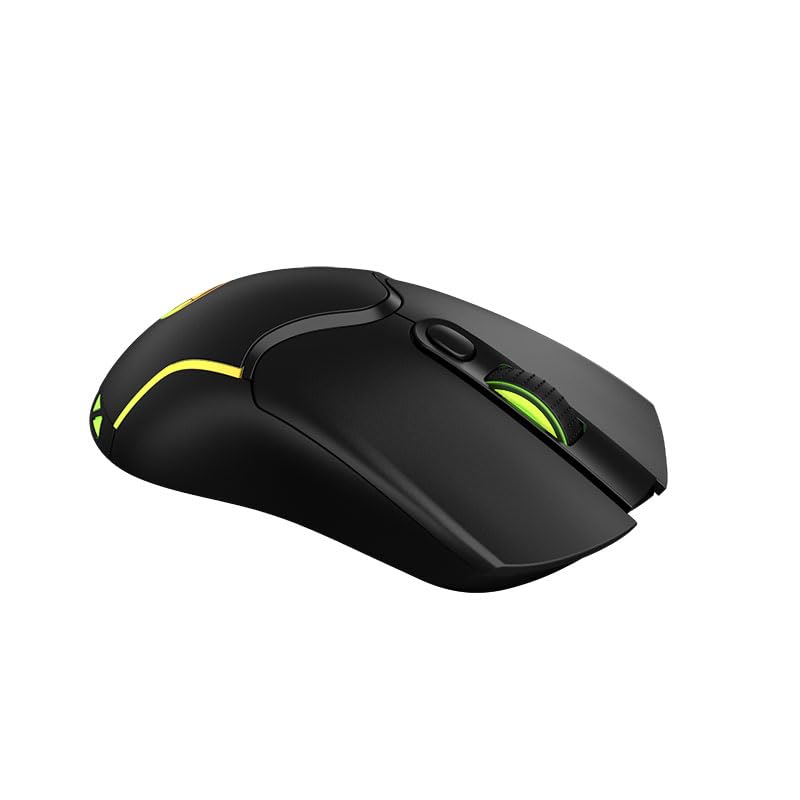
The Xtrike Me GM-217 Wired Gaming Mouse is designed to enhance your gaming experience with its responsive optical sensor and customizable features. It features 7 different flowing light colors to create a vibrant gaming atmosphere. The 3D non-slip rubber material design ensures a reliable grip for both gaming and web browsing. Weighing approximately 68 grams, its slim and durable casing allows for flexible movement during intense gaming sessions.
Key features include:
- 7 different flowing mouse light colors for a vibrant gaming environment.
- 3D non-slip rubber material design for reliable grip during gaming and web browsing.
- Slim and durable structure for flexible movement in intense gaming.
- Optical sensor with 6 programmable buttons.
- Adjustable DPI settings: 1200-1800-2400-3600.
- Switch lifespan of 3 million clicks.
- 125 Hz polling rate.
2. Setup Instructions
The Xtrike Me GM-217 mouse is a plug-and-play device, requiring no additional drivers for basic functionality on supported operating systems.
- Unpack the mouse from its packaging.
- Locate an available USB 2.0 port on your computer (PC, laptop, or tablet).
- Insert the USB connector of the mouse into the USB port.
- Your operating system should automatically detect and install the necessary drivers. The mouse will be ready for use within a few seconds.

3. Operating Your Mouse
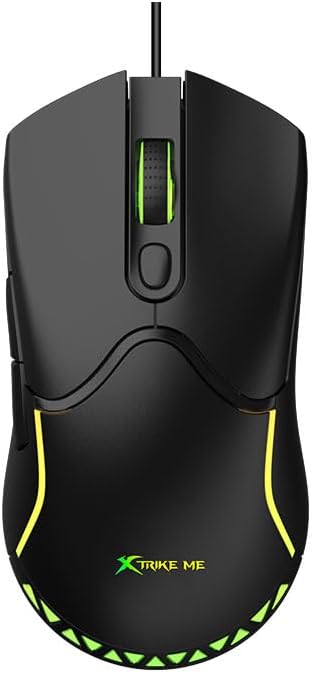
The GM-217 mouse features 6 buttons and adjustable DPI settings for precise control.
Button Functions:
- Left Click Button: Standard primary action.
- Right Click Button: Standard secondary action (context menu).
- Scroll Wheel: Scrolls up and down. Can also be pressed for a middle-click function.
- DPI Button: Cycles through DPI settings (1200/1800/2400/3600).
- Forward Button: Navigates forward in web browsers or applications.
- Backward Button: Navigates backward in web browsers or applications.
DPI Adjustment:
Press the DPI button (usually located behind the scroll wheel) to cycle through the available DPI settings: 1200, 1800, 2400, and 3600 DPI. Each press will change the sensitivity, allowing you to adapt to different gaming or work scenarios.
LED Lighting:
The mouse features 7 different flowing LED light colors that automatically cycle, adding aesthetic appeal to your setup. There is no manual control for changing or turning off the LED colors; they operate automatically when the mouse is powered.

4. Care and Maintenance
To ensure the longevity and optimal performance of your Xtrike Me GM-217 mouse, follow these maintenance guidelines:
- Cleaning: Use a soft, dry cloth to wipe the surface of the mouse. For stubborn dirt, slightly dampen the cloth with water or a mild cleaning solution. Avoid using harsh chemicals or abrasive materials.
- Sensor Care: Keep the optical sensor on the underside of the mouse clean and free from dust or debris. Use a cotton swab or compressed air if necessary.
- Cable Management: Avoid sharp bends or excessive pulling on the USB cable to prevent damage.
- Storage: When not in use, store the mouse in a clean, dry environment away from extreme temperatures.
5. Troubleshooting
If you encounter issues with your Xtrike Me GM-217 mouse, refer to the following common troubleshooting steps:
- Mouse Not Responding:
- Ensure the USB cable is securely plugged into a working USB port on your computer.
- Try plugging the mouse into a different USB port.
- Restart your computer.
- Erratic Cursor Movement:
- Clean the optical sensor on the underside of the mouse.
- Ensure you are using the mouse on a clean, non-reflective, and uniform surface. Mouse pads are recommended.
- Check for any software conflicts or outdated drivers on your operating system.
- Buttons Not Working:
- Verify that no debris is lodged under the buttons.
- Test the mouse on another computer to rule out system-specific issues.
- LED Lights Not On:
- Ensure the mouse is properly connected to a powered USB port.
- The LED lights are automatic and should illuminate upon connection. If not, try a different USB port or computer.
6. Technical Specifications
| Feature | Specification |
|---|---|
| Brand | Xtrike Me |
| Model Number | XT-GM-217 |
| Color | Black |
| Connectivity Technology | USB 2.0 (Wired) |
| Movement Detection Technology | Optical |
| Number of Buttons | 6 |
| DPI Settings | 1200 / 1800 / 2400 / 3600 |
| Switch Rating | 3 million clicks |
| Polling Rate | 125 Hz |
| Backlight | 7 flowing colors (automatic) |
| Operating Voltage | 5V |
| Operating Current | 50 mA |
| Cable Length | 1.5 meters (approx. 5 ft) |
| Compatible Devices | PC, Tablet, Laptop |
| Operating Systems | Windows XP or newer |
| Material | Plastic, Rubber |
| Included Components | USB Cable |
| Batteries Required | No |
| Country of Origin | China |
7. Warranty Information
This Xtrike Me GM-217 Wired Gaming Mouse is covered by the Xtrike Me Standard Warranty. Please refer to the warranty card included with your product or visit the official Xtrike Me website for detailed terms and conditions regarding warranty coverage, duration, and claims procedures.
8. Customer Support
For further assistance, technical support, or inquiries regarding your Xtrike Me GM-217 Wired Gaming Mouse, please contact your retailer or the manufacturer directly. Contact information can typically be found on the product packaging or the official Xtrike Me website.

