
Introduction
Welcome to the user manual for your JONR ED12 Pro Cordless Wet Dry Vacuum Cleaner. This appliance is designed to provide efficient and thorough cleaning for various hard floor surfaces, combining vacuuming and mopping functionalities. Please read this manual carefully before operating the device to ensure safe and optimal performance. Keep this manual for future reference.
Safety Information
Always follow basic safety precautions when using electrical appliances to reduce the risk of fire, electric shock, or injury.
- Do not use outdoors or on wet surfaces.
- Do not allow to be used as a toy. Close attention is necessary when used by or near children.
- Use only as described in this manual. Use only manufacturer's recommended attachments.
- Do not use with damaged cord or plug. If appliance is not working as it should, has been dropped, damaged, left outdoors, or dropped into water, return it to a service center.
- Do not pull or carry by cord, use cord as a handle, close a door on cord, or pull cord around sharp edges or corners. Do not run appliance over cord. Keep cord away from heated surfaces.
- Do not unplug by pulling on cord. To unplug, grasp the plug, not the cord.
- Do not handle plug or appliance with wet hands.
- Do not put any object into openings. Do not use with any opening blocked; keep free of dust, lint, hair, and anything that may reduce air flow.
- Keep hair, loose clothing, fingers, and all parts of body away from openings and moving parts.
- Turn off all controls before unplugging.
- Use extra care when cleaning on stairs.
- Do not use to pick up flammable or combustible liquids, such as gasoline, or use in areas where they may be present.
- Do not pick up anything that is burning or smoking, such as cigarettes, matches, or hot ashes.
- Do not use without filter in place.
- Prevent unintentional starting. Ensure the switch is in the OFF-position before connecting to battery pack, picking up or carrying the appliance.
- Recharge only with the charger specified by the manufacturer.
Product Overview and Components
Familiarize yourself with the main components of your JONR ED12 Pro.

This image displays the JONR ED12 Pro Cordless Wet Dry Vacuum Cleaner, showcasing its sleek upright design. Visible components include the clean water tank, dirty water tank, main body with handle, and the power brush head. Alongside the main unit, accessories such as a cleaning brush, an extra roller brush, and the charging dock are also shown.
- Main Unit: Comprises the handle, motor, clean water tank, dirty water tank, and the main body.
- Power Brush Head: Equipped with a roller brush for effective cleaning and a sawtooth scraper to prevent hair tangling.
- Charging Dock: Used for charging the vacuum and for the self-cleaning function.
- Clean Water Tank: Holds fresh water and cleaning solution.
- Dirty Water Tank: Collects dirty water and debris.
- Roller Brush: The primary cleaning component that scrubs and mops the floor.
- Filter: Prevents debris from entering the motor.
- Digital Display: Provides real-time information on battery level, mode, and alerts.
- Voice Guidance System: Provides audible prompts and alerts during operation.
Setup
- Unpacking: Carefully remove all components from the packaging. Retain packaging for future storage or transport.
- Assembly:
- Insert the handle into the main unit until it clicks into place.
- Ensure the clean water tank and dirty water tank are securely installed.
- Charging:
- Place the main unit onto the charging dock.
- Connect the power adapter to the charging dock and plug it into a power outlet.
- The digital display will indicate charging status. Fully charge the device before first use (approximately 4-5 hours).
- Filling the Clean Water Tank:
- Remove the clean water tank from the main unit.
- Open the tank cap and fill with clean tap water. For optimal cleaning, you may add a small amount of manufacturer-approved cleaning solution (do not exceed the MAX fill line).
- Close the cap securely and reattach the tank to the main unit.
Operating Instructions
Your JONR ED12 Pro is designed for ease of use.
Starting and Modes
- Power On: Press the power button on the handle to turn on the device. The digital display will light up.
- Mode Selection:
- Auto Mode: (Default) The vacuum automatically adjusts suction power and water flow based on the detected dirt level. Ideal for light to medium dirt.
- MAX Mode (Suction Mode): Press the mode button to activate MAX mode for stubborn stains and heavy debris. This mode provides maximum suction power.

Figure 2: Visual representation of Auto Mode for light dirt and Suction Mode for stubborn stains. This image illustrates the two primary cleaning modes: Auto Mode, suitable for general light dirt, and Suction Mode (MAX Mode), designed for tackling more stubborn stains and heavier spills. The vacuum cleaner is shown in action on different types of messes, demonstrating its versatility.
- Voice Guidance: The device provides voice prompts for various statuses (e.g., low battery, tank full). To switch voice guidance languages, press and hold the voice button for 3 seconds.

Figure 3: The voice guidance feature and how to switch between six supported languages. This image highlights the voice guidance system, which provides helpful audio cues for various operational states, such as low battery or a full sewage tank. It also shows the button to press for 3 seconds to switch between the six available languages, enhancing user convenience.
- Digital Display: The integrated LED display provides real-time information, including battery status, current cleaning mode, and important alerts. This allows for easy monitoring of the device's performance and status.

Figure 4: The LED display providing real-time operational information. This image showcases the vacuum cleaner's LED display, which provides clear and immediate feedback on the device's status. Users can easily see the battery level, the active cleaning mode (Auto or MAX), and receive important alerts, ensuring a smooth and informed cleaning experience.
Cleaning Performance
- Wet & Dry Cleaning: The JONR ED12 Pro vacuums and washes simultaneously, effectively handling pet hair, pet food, large debris, milk, ketchup, and egg spills.
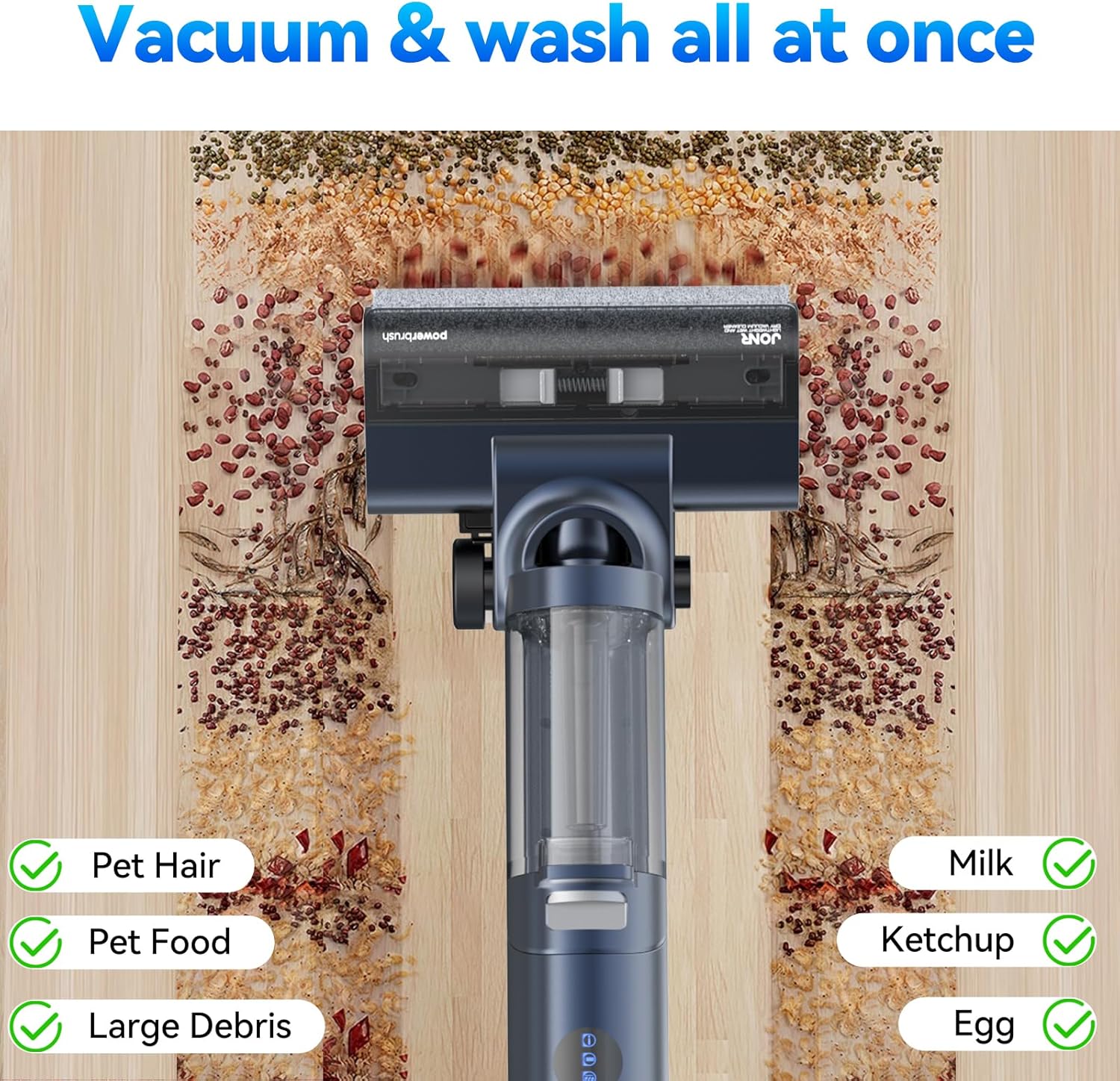
Figure 5: The vacuum's ability to clean various wet and dry messes simultaneously. This image demonstrates the JONR ED12 Pro's capability to vacuum and wash simultaneously, effectively cleaning up common household messes such as pet hair, pet food, large debris, milk, ketchup, and egg spills, leaving the floor clean in one pass.
- Edge Cleaning: The unique welt cleaning shape design allows the vacuum to fit into gaps as small as 5mm, ensuring thorough cleaning along edges and baseboards, minimizing dirt remaining.

Figure 6: The specialized design for effective edge cleaning, reaching within 5mm of walls. This image illustrates the vacuum cleaner's "welt cleaning shape design," which enables it to clean very close to edges and walls, specifically fitting into gaps as small as 5mm. This design ensures comprehensive cleaning, leaving no dirt behind in hard-to-reach areas.

Figure 7: Detailed view of the triple welt cleaning design for superior edge cleaning. This image provides a closer look at the "triple welt cleaning design," emphasizing its effectiveness in cleaning along edges and corners. It shows the brush head reaching very close to the wall, ensuring no spots are missed during cleaning.
- Tangle-Free Roller Brush: The power brush head features a sawtooth scraper that effectively prevents hair from tangling around the roller, ensuring consistent cleaning performance.

Figure 8: The sawtooth scraper mechanism designed to prevent hair tangling on the roller brush. This image highlights the innovative sawtooth scraper integrated into the power brush head. This feature is designed to effectively cut and prevent hair from tangling around the roller brush, maintaining optimal cleaning efficiency and reducing manual cleaning of the brush.

Figure 9: The 40 water outlet system for even water release and the sawtooth scraper. This image details the brush head's design, showing the 40 water outlets that ensure even water distribution for effective cleaning. It also reiterates the presence of the sawtooth scraper, which actively works to prevent hair from tangling on the roller brush, improving overall performance and reducing maintenance.
- Self-Standing Design: The vacuum can stand upright independently, pausing cleaning when standing, offering convenience during breaks.

Figure 10: The self-standing feature of the JONR ED12 Pro, allowing it to pause cleaning when upright. This image demonstrates the self-standing design of the vacuum cleaner. When placed in an upright position, the unit can stand on its own, automatically pausing the cleaning operation. This feature provides convenience for users who need to take a break during cleaning or move obstacles.
Product Video
This video provides a comprehensive overview of the JONR ED12 Pro Cordless Wet Dry Vacuum Cleaner. It demonstrates key features such as its wet and dry cleaning capabilities, edge cleaning, tangle-free roller brush, and self-cleaning functions, offering a visual guide to its operation and benefits.
Maintenance
Regular maintenance ensures the longevity and optimal performance of your JONR ED12 Pro.
Self-Cleaning System
- Initiating Self-Cleaning: After each use, place the vacuum back on the charging dock. Ensure the clean water tank has sufficient water. Press the self-cleaning button on the handle to start the cycle.

Figure 11: The heated hot water self-cleaning process at 70°C (158°F). This image illustrates the heated hot water self-cleaning function, showing the roller brush being thoroughly cleaned with water heated to 70°C (158°F). This process ensures deep cleaning of the brush, removing dirt and debris without manual scrubbing.

Figure 12: Hot water soaking and self-cleaning at 158°F. This image further emphasizes the hot water self-cleaning feature, showing the brush soaking in 158°F hot water. This high-temperature cleaning effectively removes oil residue and deep-seated dirt from the roller brush, eliminating the need for manual scrubbing.
- Hot Air Drying: After the self-cleaning cycle, the device will automatically initiate a hot air drying process for the roller brush. This prevents odor and mold growth.
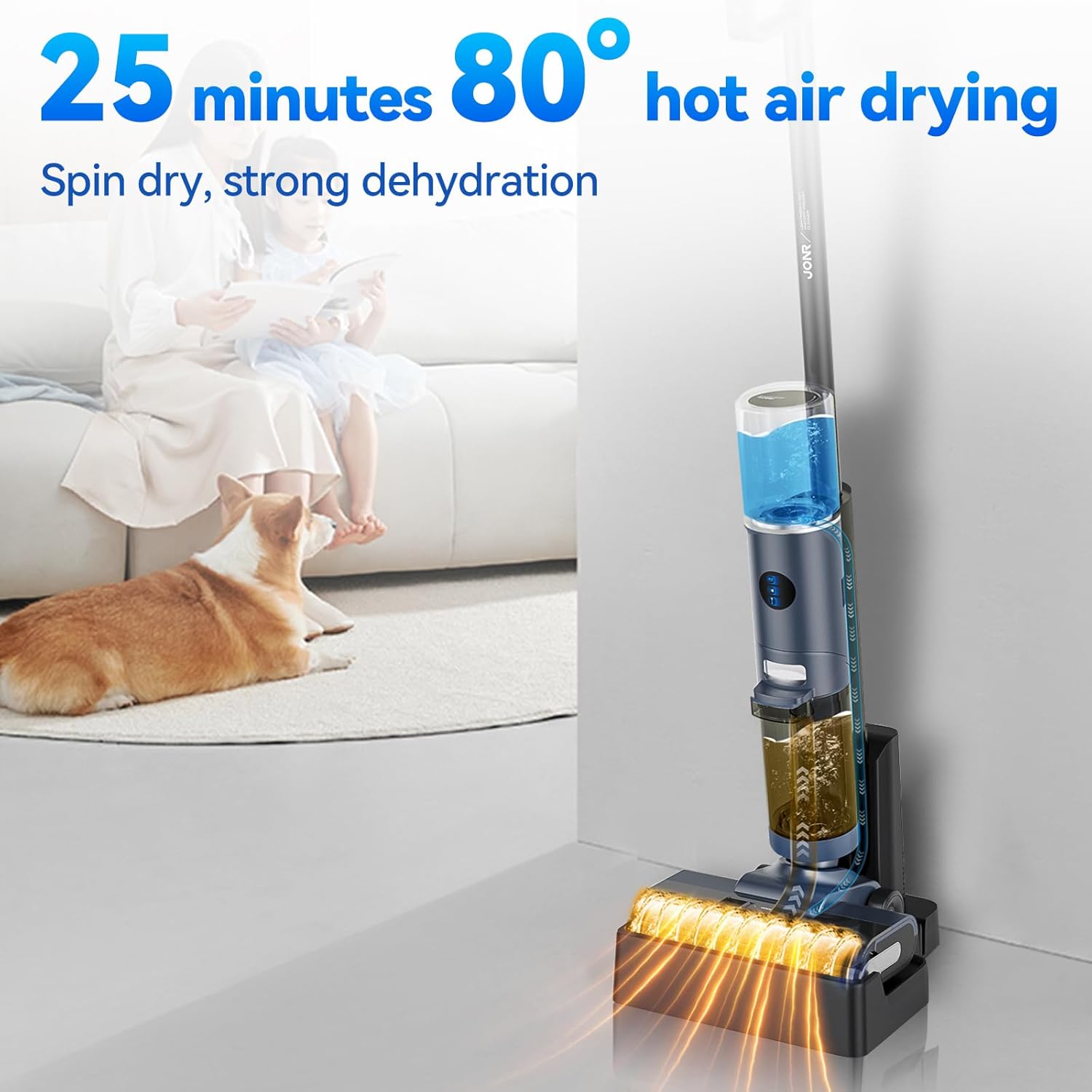
Figure 13: The 25-minute hot air drying system at 80°C (176°F). This image illustrates the hot air drying system, which operates for 25 minutes at 80°C (176°F). This process effectively dries the roller brush after self-cleaning, preventing the growth of mold and odors, and extending the lifespan of the mop components.

Figure 14: Hot air drying at 176°F to prevent odor and mold growth. This image provides another view of the hot air drying process, highlighting its function in preventing odor and mold growth. The brush is shown being dried at 176°F, which is crucial for maintaining hygiene and extending the life of the vacuum's components.
Manual Cleaning
- Emptying the Dirty Water Tank: After each use, or when the "sewage tank is full" voice prompt is heard, remove and empty the dirty water tank. Rinse it thoroughly with clean water.
- Cleaning the Roller Brush: While the self-cleaning function is effective, occasionally remove the roller brush for a deeper manual clean, especially if visible debris remains. Use the provided cleaning brush.
- Cleaning the Filter: Remove the filter and rinse it under running water. Allow it to air dry completely before reinserting.
- Wiping the Main Unit: Use a damp cloth to wipe down the exterior of the main unit and the charging dock.
Troubleshooting
Refer to this section for common issues and their solutions.
| Problem | Possible Cause | Solution |
|---|---|---|
| Device does not turn on. | Low battery; not charged. | Place on charging dock and ensure it is fully charged. |
| Poor suction/cleaning performance. | Dirty water tank full; clean water tank empty; clogged roller brush/filter. | Empty dirty water tank; refill clean water tank; clean roller brush and filter. |
| Voice prompt "sewage tank is full". | Dirty water tank is full. | Empty and rinse the dirty water tank. |
| Unpleasant odor from device. | Roller brush not dried properly; dirty water tank not cleaned. | Run self-cleaning and hot air drying cycle; thoroughly clean dirty water tank and roller brush. |
| Water leakage. | Tanks not properly installed; damaged seals. | Ensure tanks are securely latched; contact customer support if seals are damaged. |
Specifications
Technical specifications for the JONR ED12 Pro.
- Model: JONR ED12 Pro
- Brand: JONR
- Runtime: Up to 30 minutes
- Battery Life: Approximately 25 minutes (actual usage)
- Form Factor: Upright
- Item Weight: 8.1 pounds
- Product Dimensions: 21.65 x 13.38 x 12.91 inches
- Indoor/Outdoor Usage: Indoor
- Number of Power Levels: 1 (with Auto and MAX modes)
- Batteries: 1 Lithium Ion battery (included)
- Motor Speed: 66000r/min (High-speed motor for adequate cleaning suction power)

Figure 15: Illustration of the high-speed motor providing strong suction. This image visually represents the high-speed motor, operating at 66,000 revolutions per minute (r/min). This powerful motor is crucial for generating adequate cleaning suction power, ensuring efficient removal of dirt and debris from various hard floor surfaces.
Warranty and Support
For warranty information and customer support, please refer to the warranty card included with your product or visit the official JONR website.
Visit the JONR Store on Amazon


