
1. Introduction
This manual provides essential information for the safe and efficient operation of your QUANSHENG UV-K6 UV-K5(8) 5W Dual-Band Two-Way Radio. Please read this manual thoroughly before using the device to ensure proper function and to prevent damage. Keep this manual for future reference.
2. Product Overview
The QUANSHENG UV-K6 UV-K5(8) is a versatile 5W dual-band two-way radio designed for reliable communication. It supports UHF and VHF frequencies, features Type-C charging, and includes advanced functions like DTMF and NOAA weather alerts.
Key Features:
- Dual-Band Transmitting & Receiving (VHF/UHF)
- AM/FM Aviation Band Receiving
- NOAA Emergency Weather Receiver
- DTMF Functionality
- 200 Programmable Channels
- Type-C USB Charging
- Multi-Scan and Emergency Alert Functions
- CHIRP Software Support for easy programming
- Power-on Password Protection
- 10-Group Scrambler
- Cross-band Intercom
- Wireless Radio Replication
Radio Components:
Familiarize yourself with the various parts of your radio:
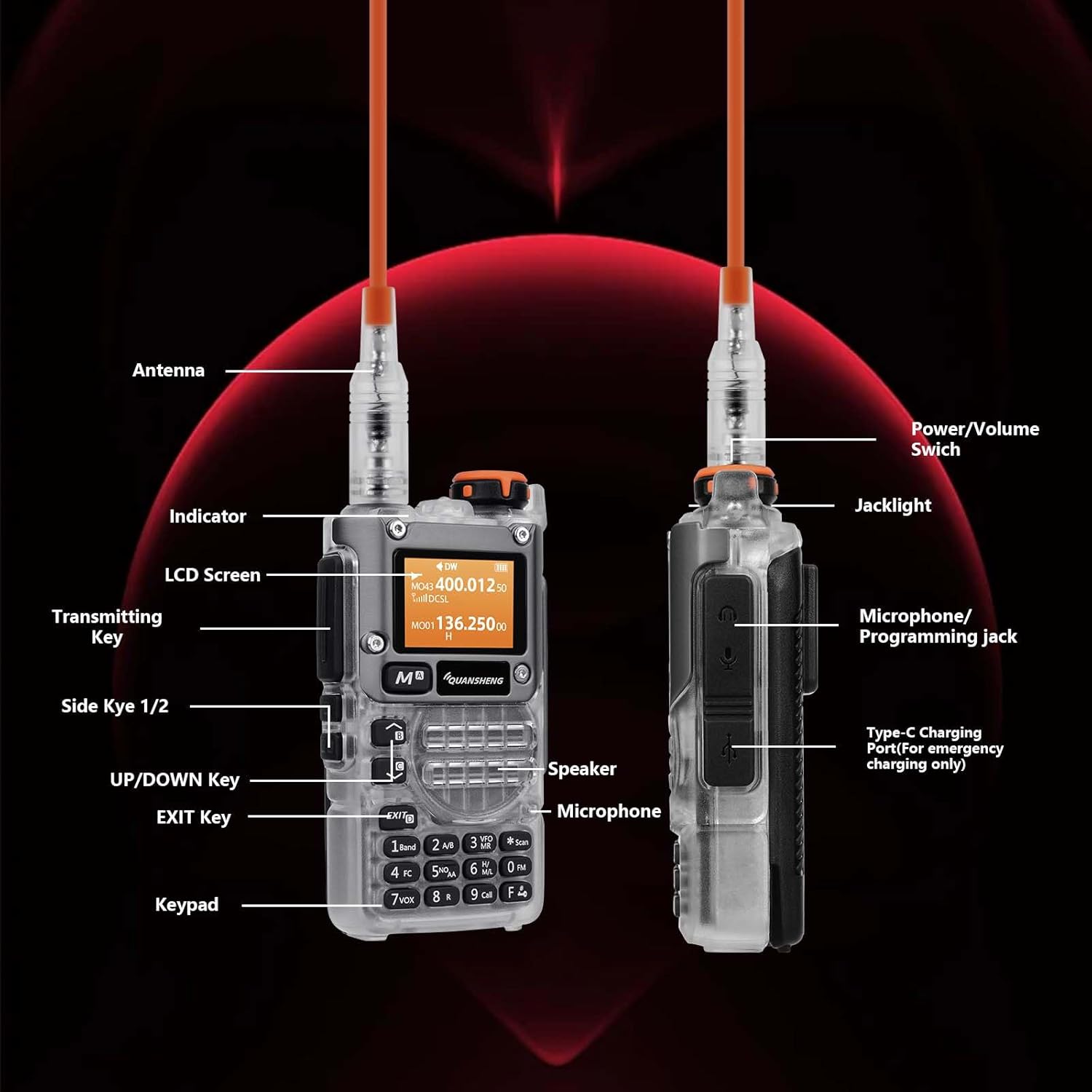
Figure 1: Labeled diagram of the QUANSHENG UV-K5(8) radio components. Key parts include the Antenna, Indicator LED, LCD Screen, Transmitting Key (PTT), Side Keys 1 & 2, UP/DOWN Key, EXIT Key, Keypad, Power/Volume Switch, Jacklight, Microphone/Programming Jack, Speaker, Microphone, and Type-C Charging Port.
- Antenna: For transmitting and receiving signals.
- Power/Volume Switch: Turns the radio on/off and adjusts volume.
- Jacklight: Built-in flashlight.
- Indicator: LED light indicating status (e.g., transmitting, receiving, charging).
- LCD Screen: Displays frequency, channel, and other operational information.
- Transmitting Key (PTT): Press to transmit, release to receive.
- Side Keys 1 & 2: Programmable function keys.
- UP/DOWN Key: Navigates menus and adjusts frequencies/channels.
- EXIT Key: Exits menus or functions.
- Keypad: For direct frequency input, channel selection, and menu navigation.
- Microphone/Programming Jack: Connects external microphone/earpiece or programming cable.
- Speaker: Outputs received audio.
- Microphone: For voice input during transmission.
- Type-C Charging Port: For charging the radio's battery.
3. Setup
3.1 Battery Installation and Charging
- Install Battery: Ensure the included 9V battery is correctly inserted into the battery compartment on the back of the radio. Align the battery contacts with the radio's terminals and slide the battery into place until it clicks securely.
- Attach Antenna: Screw the antenna clockwise onto the connector at the top of the radio until it is finger-tight. Do not overtighten.
- Initial Charge: Before first use, fully charge the radio. Connect the Type-C USB cable to the charging port on the side of the radio and plug the other end into a compatible USB power adapter (not included) or a computer USB port. The indicator light will show charging status.

Figure 2: The QUANSHENG UV-K5(8) radio with its Type-C charging cable connected, illustrating the charging process.
3.2 Powering On/Off
To power on the radio, rotate the Power/Volume switch clockwise. The LCD screen will illuminate, and you will hear a power-on tone. To power off, rotate the switch counter-clockwise until it clicks.
4. Operating Instructions
4.1 Basic Communication
- Select Frequency/Channel: Use the UP/DOWN keys or the keypad to enter the desired frequency or select a pre-programmed channel.
- Adjust Volume: Rotate the Power/Volume switch to adjust the listening volume.
- Transmit: To speak, press and hold the Transmitting Key (PTT) on the side of the radio. Speak clearly into the microphone. Release the PTT key to stop transmitting and return to receive mode.
- Receive: When not transmitting, the radio is in receive mode. You will hear incoming transmissions through the speaker.
4.2 NOAA Weather Alerts
The radio includes a NOAA Emergency Weather Receiver. To activate or monitor NOAA weather channels, refer to the radio's menu system. Specific instructions for accessing NOAA alerts can be found in the detailed menu guide (not included in this basic manual, refer to full manufacturer documentation).
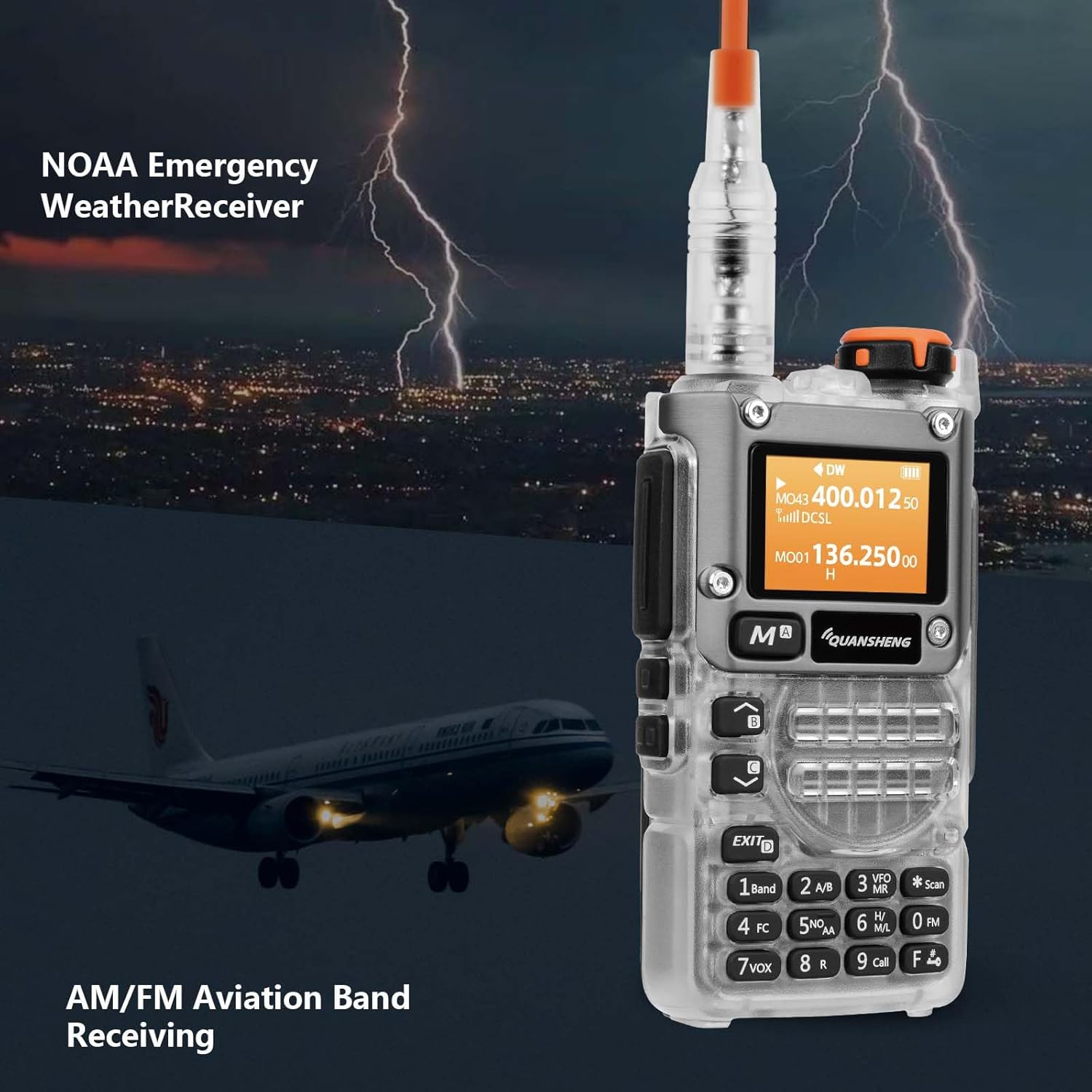
Figure 3: The radio's display showing NOAA Emergency Weather Receiver and AM/FM Aviation Band Receiving capabilities, with a background depicting a storm and an airplane.
4.3 AM/FM Aviation Band Receiving
The QUANSHENG UV-K5(8) can receive signals on the AM/FM aviation band. Access this feature through the radio's mode or band selection menu. This allows monitoring of air traffic communications.
4.4 Advanced Functions
The radio supports various advanced functions accessible via the menu system and programmable side keys:
- DTMF: Dual-Tone Multi-Frequency signaling for various control applications.
- Multi-Scan: Scans through frequencies or channels to find active transmissions.
- Emergency Alert: Activates an alarm or transmits an emergency signal.
- CHIRP Support: The radio is compatible with CHIRP software for computer-based programming of channels and settings.
- Wireless Radio Replication: Allows cloning settings from one radio to another wirelessly.
- Power-on Password: Set a password to prevent unauthorized use.
- CTCSS/DCS: Continuous Tone-Coded Squelch System / Digital Coded Squelch for filtering unwanted signals.

Figure 4: Visual representation of key features including Multi-Band Transmitting, NOAA, Fast Copy, AM/FM Aviation, Power-on Password, Frog Sound Tail Signal, Cross-band Intercom, Wireless Radio Replication, and CHIRP support.

Figure 5: Icons illustrating additional functions such as 10-Group Scrambler, DTMF, FM Radio, Emergency Alert, Multi-Scan, Type-C Charger, One Key Call Channel, CTCSS/DCS, 200 Channels, and Jacklight.
5. Maintenance
5.1 Cleaning
Wipe the radio's surface with a soft, damp cloth. Do not use harsh chemicals or abrasive cleaners. Ensure the charging port and microphone/speaker areas are free of dust and debris.
5.2 Battery Care
- Avoid fully discharging the battery frequently.
- Charge the battery in a cool, dry environment.
- If storing the radio for an extended period, charge the battery to approximately 50% and remove it from the radio if possible.
5.3 Storage
Store the radio in a dry, cool place away from direct sunlight and extreme temperatures. Keep it away from strong magnetic fields and corrosive substances.
6. Troubleshooting
| Problem | Possible Cause | Solution |
|---|---|---|
| Radio does not power on. | Battery is depleted or not properly installed. | Ensure battery is fully charged and correctly seated. |
| Cannot transmit or receive. | Incorrect frequency/channel, antenna not attached, or out of range. | Verify frequency/channel settings. Check antenna connection. Move closer to the other radio or repeater. |
| Poor audio quality or static. | Weak signal, interference, or incorrect squelch setting. | Adjust squelch level. Move to an area with better signal. Check antenna. |
| Battery drains quickly. | High power transmission, frequent use, or aging battery. | Use lower power settings when possible. Consider replacing the battery if it's old. |
7. Specifications
| Feature | Detail |
|---|---|
| Brand | QUANSHENG |
| Model Number | UV-K5(8) |
| Number of Channels | 200 |
| Frequency Range (TX) | 144-148 MHz (VHF), 430-450 MHz (UHF) |
| Frequency Range (RX) | AM(RX), FM(RX), 108-135.9975 MHz, 136-173.9975 MHz, 174-349.9975 MHz, 350-399.9975 MHz, 400-469.9975 MHz, 470-599.9975 MHz |
| Maximum Talk Range | 5 Kilometers (approx. 3.1 miles) |
| Special Features | DTMF, NOAA Alerts, Type-C Charging, Jacklight |
| Battery Type | 1x 9V battery (included) |
| Compatible Devices | Other Quansheng two-way radios (same frequency), USB-C chargers, headphones, earpieces |
| Included Components | Type-C charging capability, 1x 9V battery |

Figure 6: Detailed list of multi-band transmitting (TX) and receiving (RX) frequencies supported by the QUANSHENG UV-K5(8) radio.
8. Warranty Information
For detailed warranty information, please refer to the warranty card included with your product or visit the official QUANSHENG website. Warranty terms and conditions may vary by region and retailer.
9. Support
If you encounter any issues or require further assistance with your QUANSHENG UV-K6 UV-K5(8) radio, please contact QUANSHENG customer service or your authorized dealer. You may also find additional resources and FAQs on the official QUANSHENG website.
Website: www.quansheng.com (Example link, please verify official website)


