
1. Introduction
This manual provides essential information for the safe and efficient operation of your iScooter Electric Scooter, Model T4. Designed for adults, this high-performance electric scooter features an 800W motor, capable of reaching speeds up to 28 MPH, and offers a range of 28 miles on a single charge. It is equipped with 10-inch off-road pneumatic tires and dual shock absorbers for a smooth ride across various terrains. Enhanced safety features include dual disc brakes, electronic brakes, dual headlights, taillights, and turn signals. The scooter also boasts a foldable design for easy storage and portability, and smart app connectivity for advanced control and monitoring.

Figure 1.1: iScooter Electric Scooter Model T4 with accompanying smartphone app interface.
2. Setup
2.1 Unboxing and Component Check
Carefully remove all components from the packaging. Verify that all items listed below are present. If any items are missing or damaged, please contact customer support immediately.

Figure 2.1: The iX4 electric scooter, charger, and tool bag are included in the package.
- iX4 Electric Scooter
- Charger
- Tool Bag (includes necessary wrenches and hex keys)
- User Manual (this document)
2.2 Assembly
The iScooter T4 comes largely pre-assembled. The primary assembly step involves unfolding the scooter and securing the handlebar stem.
- Unfold the Scooter: Gently lift the handlebar stem until it clicks into place. Ensure the folding mechanism is fully engaged.
- Secure the Handlebar Stem: Locate the red locking clamp on the handlebar stem. Close the clamp firmly to secure the stem in its upright position. Ensure there is no wobble.
- Handlebar Adjustment: The handlebar height can be adjusted for rider comfort. Loosen the quick-release clamp on the upper part of the stem, adjust to the desired height, and firmly re-tighten the clamp.
Video 2.1: This video demonstrates the unboxing and initial assembly steps for the iX4 Electric Scooter, including unfolding and securing the handlebar stem.
3. Operating Instructions
3.1 Power On/Off and Key Start
To power on the scooter, insert the key into the ignition and turn it to the 'ON' position. The display will illuminate. To power off, turn the key to the 'OFF' position and remove it.
Video 3.1: This segment of the installation guide demonstrates how to power on the scooter using the key and activate the display and lights.
3.2 Controls and Display
The iScooter T4 features an intuitive multi-function LED dashboard and accessible controls for a seamless riding experience.
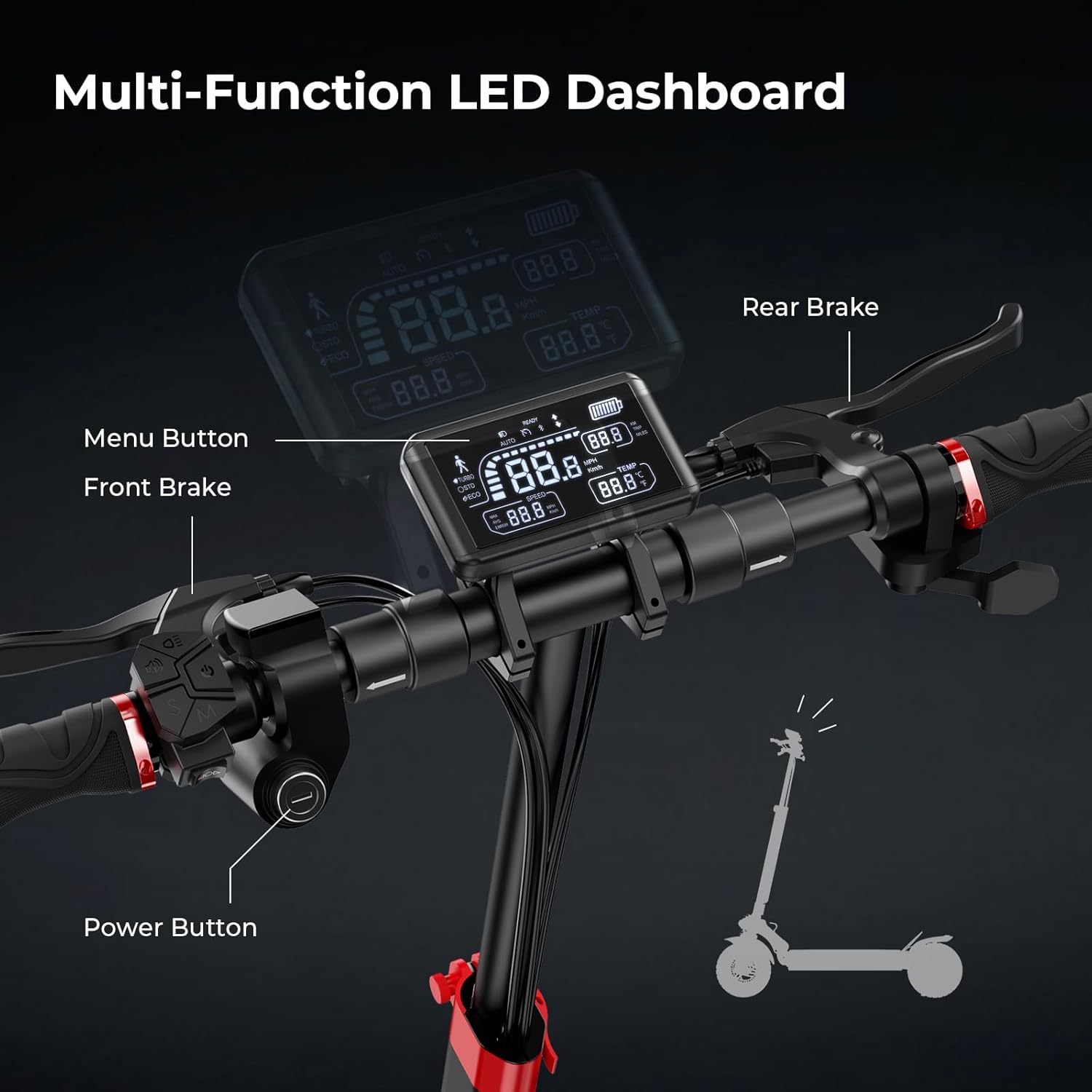
Figure 3.1: Overview of the multi-function LED dashboard, power button, menu button, front brake, and rear brake controls.
- Power Button: Located on the left handlebar, used to turn the scooter on/off (after key ignition).
- Menu Button: Cycles through display information and settings.
- Throttle: Right-hand grip, controls acceleration.
- Brake Levers: Separate levers for front and rear disc brakes, providing responsive stopping power.
- LED Dashboard: Displays current speed, battery level, riding mode, and other vital information.
3.3 Riding Modes
The scooter offers multiple riding modes to suit different preferences and conditions:
- Walking Mode: Low speed, ideal for navigating crowded areas or pushing the scooter.
- Normal Mode: Standard speed and power for everyday commuting.
- Sport Mode: Maximum speed and acceleration for exhilarating rides.
- Cruise Control: Maintain a constant speed without holding the throttle. Activate via the smart app.
3.4 Smart App Connectivity
Enhance your riding experience by connecting your iScooter T4 to the dedicated smart app. The app allows you to monitor real-time data, adjust settings, and control various functions.
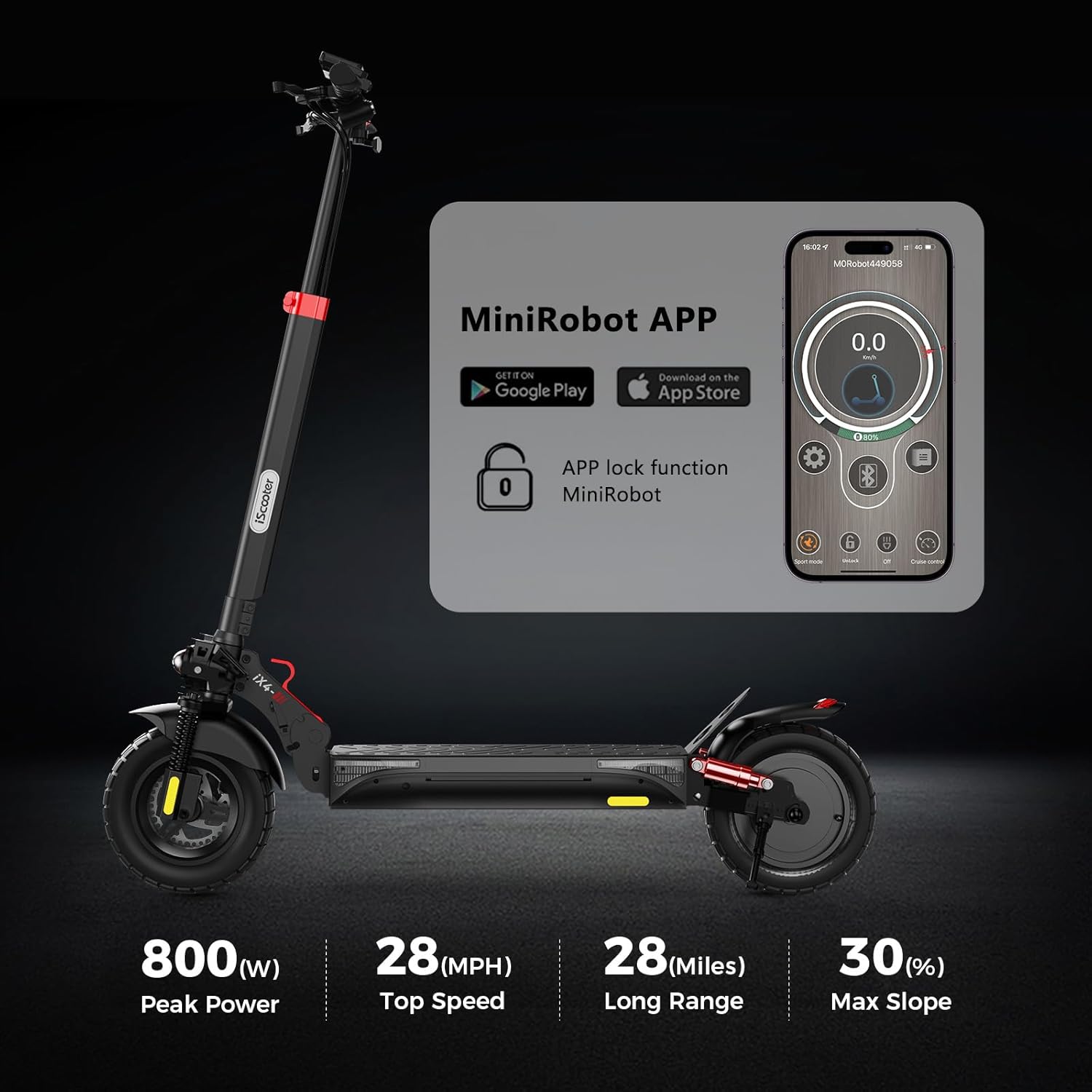
Figure 3.2: The MiniRobot APP allows you to control various features and monitor your iScooter.
- Download: Scan the QR code in the quick start guide or search for "MiniRobot" on your app store.
- Connect: Enable Bluetooth on your smartphone and open the app. Follow the on-screen instructions to pair with your scooter.
- Features: The app provides access to speed control, riding mode selection, cruise control settings, mileage tracking, battery status, and more.
Video 3.2: This video demonstrates the process of connecting the iX4 Electric Scooter to its smart app and controlling various functions.
4. Charging Operation
Proper charging ensures optimal battery life and performance. The iScooter T4 is equipped with a 48V15Ah battery, providing a maximum range of 28 miles.
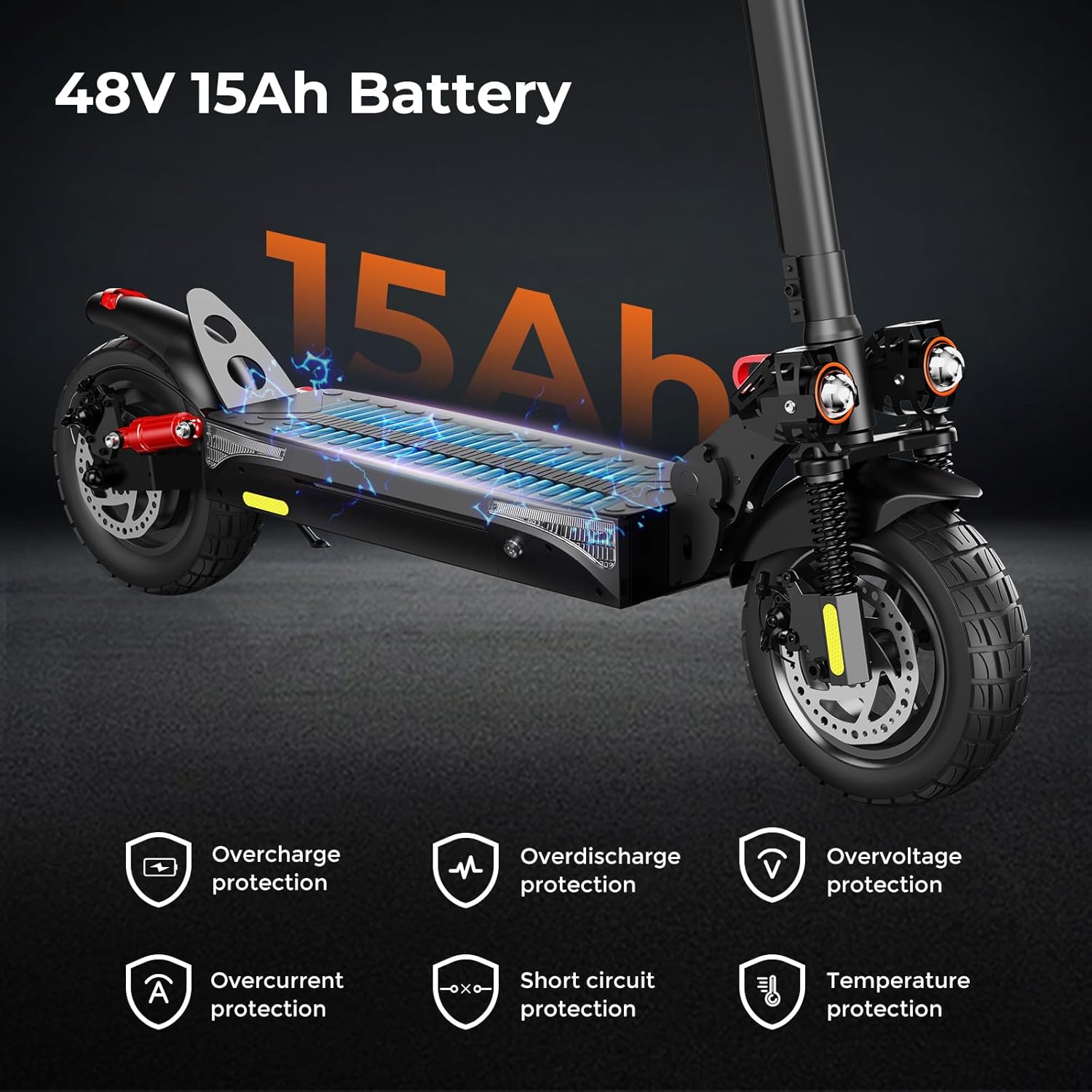
Figure 4.1: The 48V 15Ah battery features multiple protection mechanisms including overcharge, overdischarge, overvoltage, overcurrent, short circuit, and temperature protection.
- Locate Charging Port: The charging port is typically located on the side of the scooter's deck.
- Connect Charger: Plug the charger into a standard wall outlet, then connect the charging cable to the scooter's charging port.
- Charging Indicator: The charger will typically have an indicator light (e.g., red for charging, green for fully charged).
- Disconnect: Once fully charged, disconnect the charger from the scooter first, then from the wall outlet.
Video 4.1: This video demonstrates the correct procedure for charging the iX4 Electric Scooter.
5. Maintenance
Regular maintenance is crucial for the longevity and safe operation of your iScooter T4.
5.1 Tire Care
The 10-inch off-road pneumatic tires provide excellent traction and shock absorption. Regularly check tire pressure and for any signs of wear or damage.

Figure 5.1: Close-up view of the 10-inch off-road pneumatic tires, designed for various terrains.
5.2 Brake Inspection
Inspect the front and rear disc brakes regularly for proper function. Ensure brake levers are responsive and brake pads are not excessively worn.
5.3 General Cleaning and Storage
Clean the scooter with a damp cloth. Avoid using high-pressure water. When storing, especially for extended periods, ensure the battery is partially charged (around 50-70%) and store in a cool, dry place.
5.4 Folding for Storage
The iScooter T4 features a convenient folding mechanism for compact storage and transport.
- Unlock Folding Mechanism: Locate the red folding key/lever near the base of the handlebar stem. Disengage the lock.
- Fold Down Stem: Gently fold the handlebar stem downwards until it latches onto the rear fender.
- Secure: Ensure the stem is securely latched to prevent accidental unfolding.
Video 5.1: This video demonstrates the folding and unfolding process of the iX4 Electric Scooter for easy storage and portability.
6. Troubleshooting
This section addresses common issues you might encounter with your iScooter T4.
| Problem | Possible Cause | Solution |
|---|---|---|
| Scooter does not power on | Battery low or dead; Key not fully turned; Loose connections | Charge battery; Ensure key is fully engaged; Check all visible connections. |
| Reduced speed or range | Low battery; Overload (rider weight); Tire pressure low; Riding mode setting | Fully charge battery; Ensure rider weight is within limits; Inflate tires to recommended pressure; Check riding mode in app/display. |
| Brakes not responsive | Worn brake pads; Loose brake cables; Air in hydraulic system (if applicable) | Inspect and replace brake pads; Adjust brake cable tension; Consult a professional for hydraulic brake issues. |
| App connection issues | Bluetooth off; App not updated; Scooter not powered on | Ensure Bluetooth is enabled; Update app to latest version; Power on scooter before attempting to connect. |
For issues not listed here or if solutions do not resolve the problem, please contact iScooter customer support.
7. Specifications
Detailed technical specifications for the iScooter T4 Electric Scooter.
- Brand: iScooter
- Model Name: T4
- Color: Black
- Motor: 800W
- Top Speed: 28 MPH
- Battery: 48V15Ah
- Maximum Distance Range: 28 Miles
- Weight Limit: 330 Pounds
- Wheel Size: 10 Inches
- Wheel Type: Solid (Honeycomb Pneumatic Off-Road Tires)
- Frame Material: Aluminum
- Suspension Type: Dual Rigid (Front and Rear Dual Shock Absorbers)
- Brake Style: Front and rear disc brakes, with built-in electronic brakes
- Special Features: Dual Headlights, Turn Signal and Ambient Light, Height-adjustable Handlebar, Smart APP Connectivity
- Included Components: iX4 electric scooter, charger, tool bag
8. Warranty and Support
8.1 Warranty Information
iScooter provides a One-year warranty for the E-scooter and a 180-day warranty for specific parts such as the motor and battery. This warranty is non-transferable after the product’s initial sale. iScooter offers a 7-day no-reason return policy, provided there is no human damage and no stains. If shipping damage occurs, please contact customer support and provide photo or video proof.
8.2 Customer Support
For any questions, issues, or warranty claims, please contact iScooter customer service:
- Email: vip.support@iscooterglobal.com
- Phone: +1 (855) 916-2366
iScooter is committed to providing quality items and service to ensure your satisfaction.