
1. Introduction
This manual provides detailed instructions for the safe and efficient operation of your BAOFENG K5Plus GPS AM/FM Two-Way Radio. Please read this manual thoroughly before using the device to ensure proper functionality and to prevent damage.
2. Safety Information
- Do not operate the radio in explosive atmospheres (e.g., flammable gases, dust particles, metallic powders).
- Do not expose the radio to direct sunlight for extended periods or place it near heating appliances.
- Use only BAOFENG approved batteries and chargers. Using unapproved accessories may cause damage or injury.
- Keep the radio away from medical devices to avoid interference.
- Do not disassemble or modify the radio. Repairs should only be performed by qualified technicians.
- Ensure the antenna is properly connected before transmitting to prevent damage to the radio.
3. Package Contents
Verify that all items are present in your package:
- 1 x BAOFENG K5Plus Portable Radio
- 1 x 2500mAh Li-ion Battery
- 1 x Standard Antenna
- 1 x Type-C Cable
- 1 x Belt Clip
- 1 x Lanyard
- 1 x Product Manual (this document)
- 1 x 18.89in Tactical Antenna
4. Product Overview
The BAOFENG K5Plus is a versatile two-way radio featuring a 1.77-inch TFT large screen, full keyboard, and fully open menu operation. It includes a built-in input method for editing channel names and supports various advanced functions such as GPS, DTMF, NOAA weather reception, and multiple scanning modes.
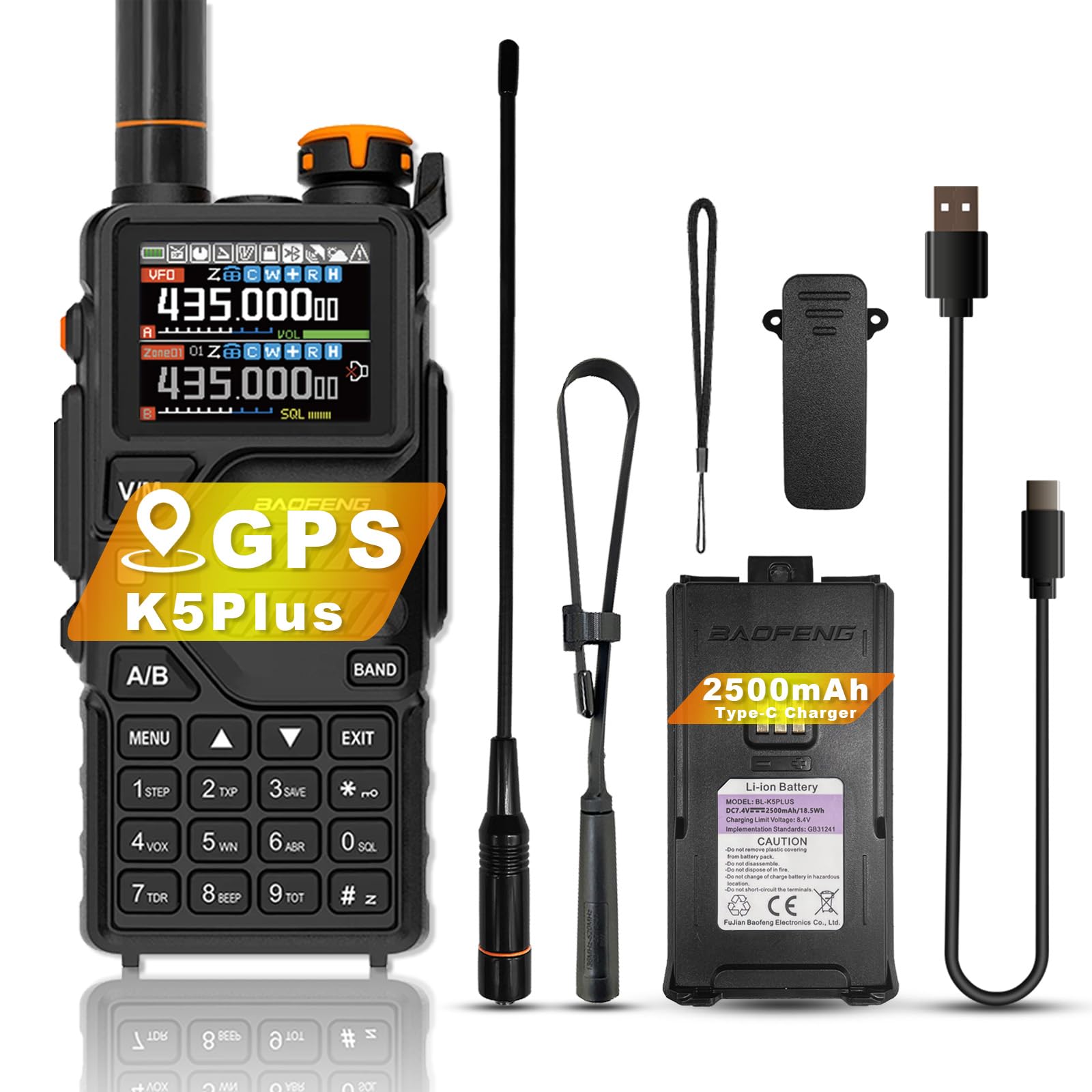
Image: Front view of the BAOFENG K5Plus radio, showing its display, keypad, and antenna.
5. Setup
5.1 Battery Installation and Charging
- Ensure the radio is powered OFF.
- Align the battery pack with the battery compartment on the back of the radio and slide it into place until it clicks securely.
- To charge, plug the Type-C USB cable into the Type-C USB charging port on the battery pack.
- Connect the other end of the Type-C USB cable to a wall power outlet adapter (not included) or a compatible USB power source.
- An empty battery typically takes approximately 4 hours to fully charge. The battery meter on the LCD will indicate the charging status.
5.2 Antenna Installation
Screw the desired antenna (standard or 18.89in tactical antenna) clockwise onto the antenna connector on top of the radio until it is finger-tight. Do not overtighten.
5.3 Belt Clip and Lanyard Attachment
Attach the belt clip to the designated slot on the back of the radio for convenient carrying. The lanyard can be attached to the loop on the top side of the radio for added security.
6. Operating Instructions
6.1 Power On/Off and Volume Control
- To power ON, rotate the power/volume knob clockwise until you hear a click.
- To adjust volume, continue rotating the knob.
- To power OFF, rotate the knob counter-clockwise until you hear a click.
6.2 Frequency Range
The BAOFENG K5Plus supports the following frequency bands:
- F1: 136-174MHz (RX / TX)
- F2: 220-260MHz (RX / TX)
- F3: 400-520MHz (RX), 400-480MHz (TX)
- F4: AM: 108-136MHz (RX)
- F5: Police: 350-390MHz (RX)
- F6: FM: 65-108MHz (RX)
6.3 Channel Management
The radio supports up to 640 named memory channels across 10 zones. Use the menu system to store, recall, and edit channel names. The built-in input method allows for direct channel name editing via the keypad.
6.4 GPS Function
The optional GPS function allows for location sharing and requesting location information. This feature requires hardware support and operates as a DTMF calling application.
- Setting Call Codes: Refer to the "Signaling Calls" section in the menu for setting call codes, call names, and local IDs.
- Operation: Ensure radios are on the same frequency/channel and main frequency band for GPS location information exchange.
- GPS Mode Limitation: In GPS mode, you can only view location information. Voice intercom requires exiting GPS mode.
- Menu Settings: Access the position system menu to set system time, GPS on/off, time zone, and GPS mode.
- Quick Access: Press and hold the designated key to view, share, and request location information.

Image: The radio's display showing the GPS information menu with options like 'my position', 'share position', and 'request position'.
6.5 DTMF (Dual-Tone Multi-Frequency)
DTMF is an in-band signaling method using dual sinusoidal signals for various applications, including calling and control functions. The K5Plus supports DTMF encoder and manual dial functions.
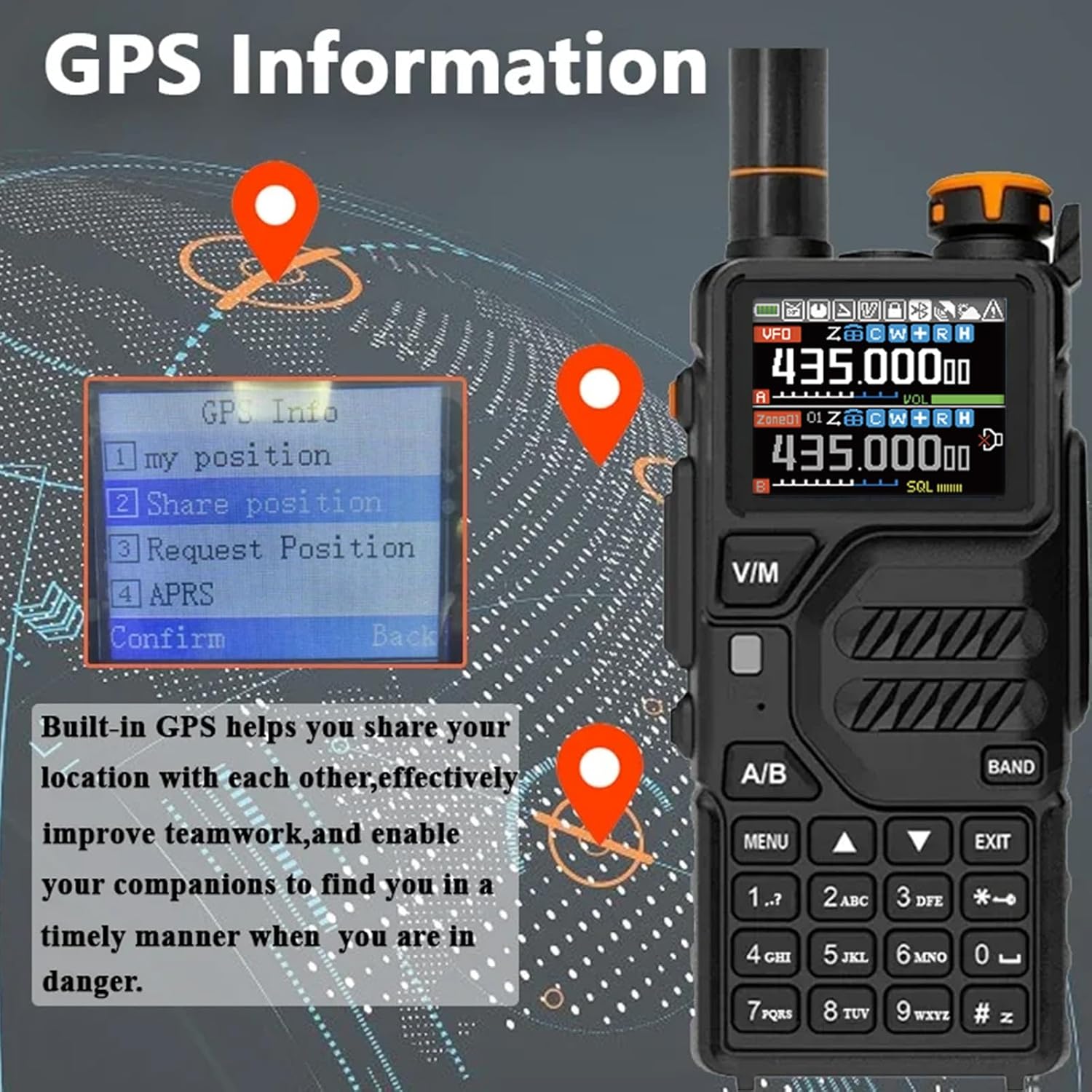
Image: Multiple BAOFENG K5Plus radios demonstrating DTMF communication, indicating support for DMR call mode and interconnection.
6.6 NOAA Weather Forecast
The radio can receive 10 America NOAA weather forecast channels, providing real-time weather updates for the United States and Canada.

Image: The radio displaying a weather forecast icon, with background images of people engaged in outdoor activities, highlighting the utility of NOAA weather alerts.
6.7 Scanning Function
The K5Plus offers multiple scanning methods to find active frequencies or channels:
- Channel Scanning: Scans through programmed memory channels.
- Frequency Scanning: Scans a specified frequency range.
- Subtone Scanning: Detects CTCSS/DCS subtone codes on an active frequency.

Image: A visual representation of the radio's scanning function, showing a radar-like scan pattern and the radio displaying different frequencies.
6.8 VOX (Voice Activated Transmit)
VOX allows for hands-free operation by automatically transmitting when it detects your voice. Adjust the VOX sensitivity in the menu to suit your environment.
6.9 Squelch Adjustment
The radio features ten (10) levels of squelch adjustment. Squelch suppresses weak signals or background noise when no transmission is present. Adjust to a level that eliminates noise without blocking desired signals.
6.10 One-Touch Search Frequency
This feature allows for quick searching of active frequencies with a single button press.
6.11 Cross Band Reception
The K5Plus supports cross-band reception, allowing it to receive signals on one band while transmitting on another.
6.12 HD Voice and Noise Reduction
The radio incorporates INC Noise Reduction Technology to effectively reduce background noise, enhancing voice clarity during transmissions and receptions.

Image: A close-up of the radio's microphone and speaker area, with sound wave graphics indicating HD Voice and noise reduction technology.
7. Maintenance
7.1 Cleaning
Clean the radio's surface with a soft, damp cloth. Do not use harsh chemicals or abrasive cleaners. Ensure all ports are dry before use.
7.2 Battery Care
To maximize battery life, avoid fully discharging the battery frequently. Store the radio and battery in a cool, dry place when not in use for extended periods. Recharge the battery at least once every three months.
7.3 Water Resistance
The BAOFENG K5Plus has an IP45 rating, meaning it is rain-proof and protected against water jets from any direction. However, it is not water resistant for submersion. Avoid submerging the radio in water.

Image: The radio with water droplets on its surface, illustrating its IP45 rain-proof capability.
8. Troubleshooting
- No Power: Check battery charge level and ensure it is properly installed.
- Cannot Transmit/Receive: Verify frequency settings, antenna connection, and ensure you are not in GPS-only mode. Check squelch level.
- Poor Audio Quality: Adjust volume, check antenna, ensure noise reduction is not overly aggressive, and confirm both radios are on the same frequency/subtone.
- GPS Not Working: Ensure GPS function is enabled in the menu and that radios are on the same main frequency band.
9. Specifications
| Feature | Specification |
|---|---|
| Brand | BAOFENG |
| Model Number | K5Plus |
| Number of Channels | 640 |
| Frequency Range | 136-174MHz, 220-260MHz, 400-520MHz, 108-136MHz (AM RX), 350-390MHz (Police RX), 65-108MHz (FM RX) |
| Talking Range Maximum | 6.21 Miles (approx. 10 km) |
| Voltage | 3.7 Volts (DC) |
| Product Dimensions (D x W x H) | 1.57" x 2.54" x 4.92" (40mm x 64.5mm x 125mm) |
| Item Weight | 16.93 Ounces (approx. 480g) |
| Battery Average Life | 48 Hours |
| Water Resistance Level | Not Water Resistant (IP45 Rain-proof) |
| Special Features | GPS Function, DTMF, NOAA Weather, Type-C USB Charging, One-Touch Search Frequency, VOX, CTCSS/DCS, Cross Band Reception, Noise Reduction |
10. Warranty and Support
This product comes with a 1-year warranty provided only through "Shiqun Electronics Co., Ltd". For warranty claims or technical support, please contact your retailer or the manufacturer directly with your purchase details.


