
1. Introduction
Thank you for choosing the CAMCAMP Solar Security Camera System. This comprehensive wireless security solution is designed to provide reliable surveillance for your home or property. Featuring a 10-inch IPS monitor, 4MP solar-powered cameras, and a 500GB HDD for local storage, this system offers continuous monitoring with easy setup and operation. Please read this manual thoroughly before installation and use to ensure optimal performance and safety.
2. Product Overview
The CAMCAMP Solar Security Camera System is an all-in-one surveillance solution that combines ease of use with advanced features. The system includes a dedicated 10-inch monitor (non-touchscreen) for direct viewing and a 500GB hard drive for local video storage, eliminating the need for monthly fees. The cameras are solar-powered with built-in 8000mAh batteries, ensuring continuous operation without external power sources.
Key features include:
- Integrated Monitor & NVR: A 10-inch IPS monitor with a pre-installed 500GB HDD for a plug-and-play experience.
- Solar Charging & Battery: Cameras are equipped with integrated solar panels and 8000mAh batteries for wire-free, continuous power.
- Smart Detection: Advanced PIR sensors reduce false alarms from non-human movements.
- High-Resolution Video: Capture ultra-clear 4MP video day and night.
- Color Night Vision: Bright spotlights enable color recording in low-light conditions, with up to 30 feet of night vision.
- Expandable System: Supports up to 10 cameras, allowing for future expansion.
- Two-Way Audio: Communicate with visitors or deter intruders directly through the cameras.
- Weatherproof Design: IP66 rated outdoor bullet cameras withstand various weather conditions.
- Wireless Connectivity: 100% wireless design for easy installation. The system operates on a private wireless protocol, and the monitor can optionally connect to home WiFi for remote access via the "CloudEye 365" app.
- Voice Assistant Compatibility: Works with Alexa for convenient voice control.

Figure 2.1: Overview of the CAMCAMP Solar Security Camera System, showing the monitor, cameras, and hard drive.
3. Package Contents
Please check the package contents upon receipt to ensure all items are present and undamaged:
- 1x 10" Monitor NVR with 500GB HDD
- 4x Solar Security Cameras
- 1x Power Adapter for NVR
- 1x USB Mouse
- 1x User Manual

Figure 3.1: Visual representation of the complete package contents.
4. Setup
The CAMCAMP system is designed for quick and easy setup. The cameras and monitor are pre-paired at the factory, allowing for immediate use.
4.1 Initial Camera Charging
Before first use, it is recommended to fully charge the solar cameras for approximately 5 hours using a USB-C cable. This ensures the built-in battery has sufficient charge to begin operation, especially if solar conditions are not immediately optimal.
4.2 System Power-Up
- Connect the power adapter to the NVR monitor and plug it into a power outlet.
- The monitor will power on automatically.
- Ensure the solar cameras are powered on. They will automatically connect to the NVR monitor.
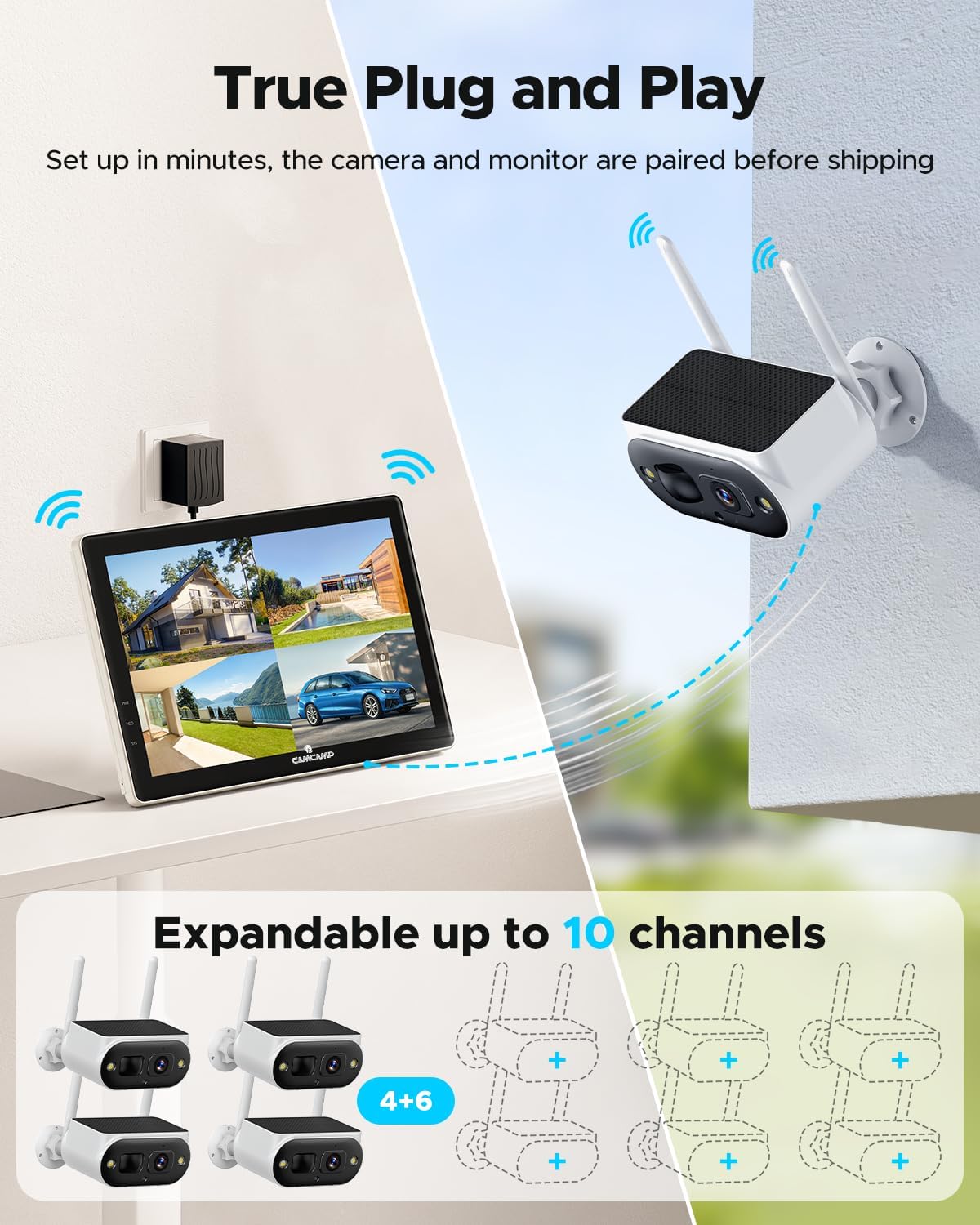
Figure 4.1: The system is pre-paired for true plug-and-play functionality.
4.3 Camera Installation
The cameras are 100% wireless, offering flexible placement. Choose a location with good sunlight exposure for optimal solar charging and a clear view of the area you wish to monitor.
- Mount the camera securely using the provided mounting base and hardware.
- Adjust the camera angle to cover the desired surveillance area.

Figure 4.2: Easy self-installation without complex wiring.
4.4 Remote Access Setup (Optional)
To view live feeds and receive alerts on your mobile device, connect the NVR monitor to your home WiFi network or directly to your router via an Ethernet cable.
- Download and install the "CloudEye 365" app from your device's app store (supports Android and iOS).
- Follow the in-app instructions to add your CAMCAMP system.

Figure 4.3: Easily share access and view footage remotely via the CloudEye 365 app.
5. Operating the System
5.1 Viewing Live Feed
You can view the live feed directly on the 10-inch NVR monitor or remotely via the "CloudEye 365" app.
- On Monitor: The monitor displays live feeds from all connected cameras. You can switch between single-camera view and multi-camera view.
- Via App: Open the "CloudEye 365" app on your smartphone or tablet to access live streaming from anywhere.
Video 5.1: Demonstration of the CAMCAMP Solar Security Camera System, showing setup and live view on the monitor and via the mobile app.
5.2 Recording Modes
The system supports various recording modes to suit your needs:
- Motion Record: Records only when motion is detected by the PIR sensor, saving storage space.
- 24/7 Record: Continuous recording for comprehensive coverage.
All recordings are stored on the pre-installed 500GB HDD. Cloud storage is an optional paid service.

Figure 5.1: Recommended recording modes for efficient storage management.
5.3 Smart Detection & Alerts
The cameras feature advanced PIR sensors to accurately detect human movement and minimize false alarms from pets, insects, or environmental factors. When motion is detected, the system can send instant alerts to your mobile device via the "CloudEye 365" app.

Figure 5.2: Smart detection and instant alerts keep you informed of activity.
5.4 Two-Way Audio
Utilize the built-in microphone and speaker on the cameras to engage in two-way conversations. This feature allows you to speak with visitors, delivery personnel, or deter unwanted individuals.
5.5 Night Vision
The cameras provide clear visibility even in complete darkness:
- Color Night Vision: With bright spotlights, the cameras can record in full color at night, providing more detailed visual information.
- Infrared Night Vision: Standard black and white night vision for discreet monitoring.
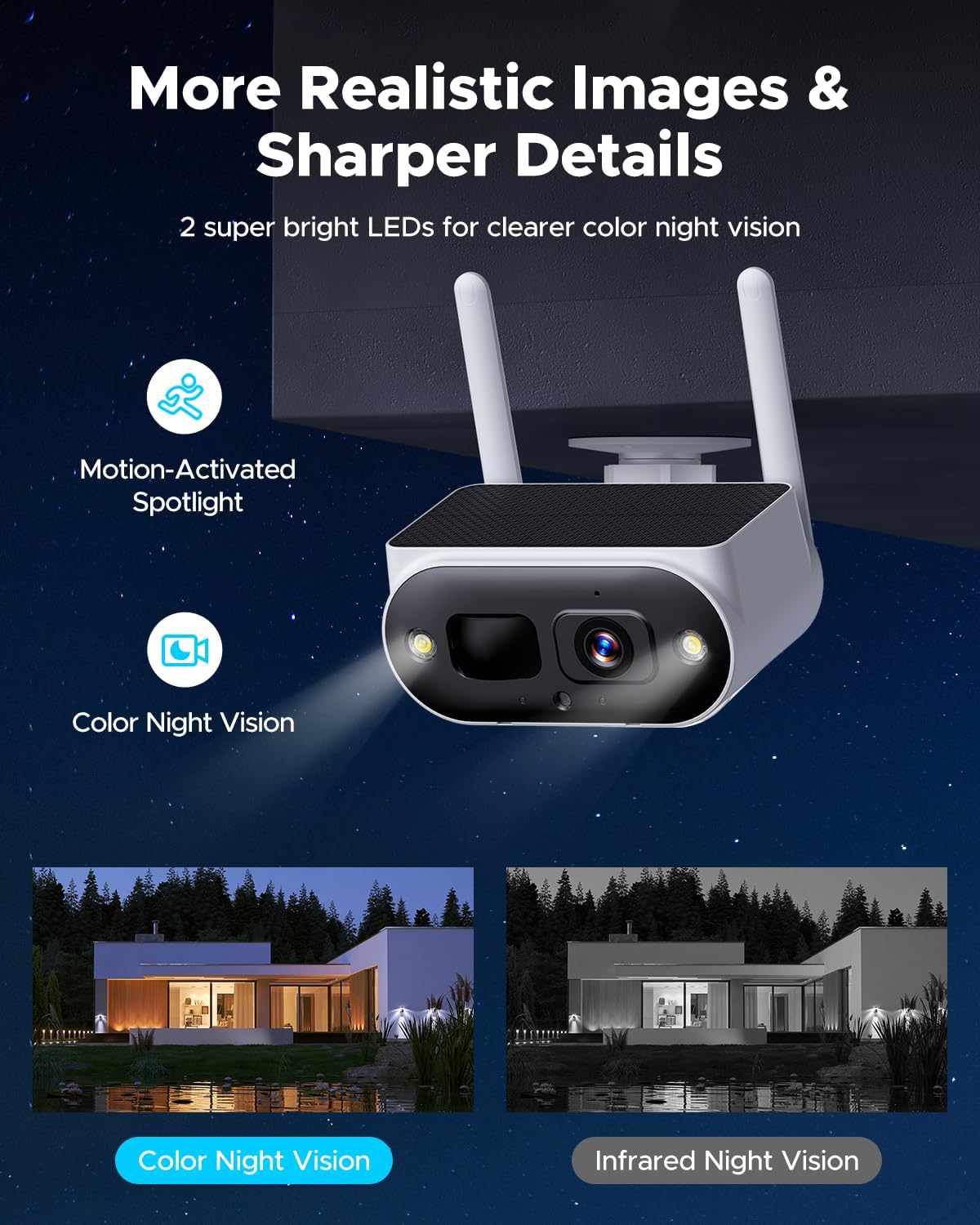
Figure 5.3: Clear details captured day and night with advanced night vision capabilities.
5.6 Privacy Protection
You can customize privacy areas within the camera's field of view to exclude specific zones from recording, ensuring personal privacy.

Figure 5.4: Customize privacy areas to protect sensitive zones.
5.7 Voice Assistant Integration
The system is compatible with Alexa. You can use voice commands to view camera footage on compatible smart displays (e.g., Echo Show).
Figure 5.5: Easy self-installation without complex wiring.
6. Maintenance
6.1 Solar Panel Care
To ensure optimal charging efficiency, regularly clean the solar panels on the cameras. Dust, dirt, and debris can reduce the panel's ability to convert sunlight into energy. Use a soft, damp cloth to gently wipe the surface.
6.2 Battery Management
The built-in batteries are designed for long-term use. In areas with prolonged periods of low sunlight, the camera battery might deplete. If this occurs, you can temporarily charge the camera using a USB-C cable. Ensure the camera is placed in a location that receives adequate sunlight for continuous charging.
6.3 General Cleaning
Clean the camera lenses and the NVR monitor screen periodically with a soft, lint-free cloth to maintain clear image quality and display visibility. Avoid using harsh chemicals or abrasive materials.
7. Troubleshooting
If you encounter issues with your CAMCAMP Solar Security Camera System, please refer to the following common problems and solutions:
| Problem | Possible Cause | Solution |
|---|---|---|
| Camera not connecting to NVR. | Out of range; interference; camera off. | Move camera closer to NVR; check for obstructions; ensure camera is powered on and fully charged. |
| False alarms from motion detection. | PIR sensor triggered by non-human objects. | Adjust PIR sensitivity in app settings; reposition camera to avoid busy areas with foliage or pets. |
| Camera battery not charging. | Insufficient sunlight; dirty solar panel. | Relocate camera to a sunnier spot; clean the solar panel surface. |
| No remote viewing via app. | NVR not connected to internet; app not configured. | Ensure NVR is connected to home WiFi/Ethernet; verify app settings and account login. |
| System freezing or unresponsive. | Software glitch; hardware issue. | Restart the NVR monitor; if issue persists, contact customer support. |
If the problem persists after trying these solutions, please contact CAMCAMP customer support for further assistance.
8. Specifications
Detailed technical specifications for the CAMCAMP Solar Security Camera System:
| Feature | Specification |
|---|---|
| Model Name | SC50 Solar Security Camera System |
| Brand | Camcamp |
| Power Source | Solar Powered/Battery Powered/Corded Electric |
| Video Capture Resolution | 1440p (4MP) |
| Number of Channels | 10 (Expandable) |
| Night Vision Range | 30 Feet |
| Frame Rate | 30 fps |
| Item Dimensions (L x W x H) | 9.84 x 1.18 x 6.69 inches |
| Item Weight | 7.24 pounds |
| Batteries | 2 Lithium Ion batteries required (included) |
| Low Light Technology | Night Color |
| Control Method | App |
| Connectivity Technology | Wireless |
| Special Features | 10 Inch IPS Monitor, 100% Wire-Free, 10CH Expandable, Integrated Solar Panel, PIR Human Detection |
| Compatible Devices | Cameras, Laptop, Personal Computers, Smartphone, Tablet, Television |
| IP Rating | IP66 (Waterproof and Dustproof) |
9. Warranty and Support
CAMCAMP is committed to providing high-quality products and excellent customer service. Your CAMCAMP Solar Security Camera System comes with the following:
- 12-Month Replacement: Only replacement, no repair.
- 30-Day Money Back Guarantee: If you are not satisfied with your purchase.
- Lifetime Professional Technical Support: Dedicated support for any technical inquiries or assistance you may need.
For support, please refer to the contact information provided in the product packaging or visit the official CAMCAMP website.

Figure 9.1: CAMCAMP's commitment to customer satisfaction and support.