
1. Introduction
Thank you for choosing the MOKiN 10000mAh 30W Portable Power Bank. This device is designed to provide reliable and fast charging for your electronic devices on the go. Please read this manual carefully to ensure proper use, optimal performance, and longevity of your power bank.

Image: The MOKiN 10000mAh 30W Portable Power Bank, showcasing its compact design, built-in USB-C cable, and digital battery display.
What's Included:
- 1 x MOKiN 10000mAh Portable Power Bank (Model: MOPB0203)
- 1 x User Manual
2. Product Overview
Key Features:
- High Capacity: 10,000mAh battery for multiple device charges.
- Fast Charging: Upgraded PD 3.0 protocol with 30W Max output for rapid charging.
- Integrated Cables: Built-in USB-C and iOS cables for convenience.
- Multiple Outputs: Two built-in cables (USB-C, iOS) and two ports (USB-A, USB-C) allow charging up to four devices simultaneously.
- Digital Display: Smart digital display shows battery level with 1% accuracy.
- Compact & Portable: Lightweight design (7.8 ounces) for easy travel.
- Advanced Safety: Features overcharge, overvoltage, overcurrent, short-circuit, and overtemperature protection.
Components:
The MOKiN Portable Power Bank features a sleek design with integrated cables and a clear digital display.

Image: A close-up view of the power bank's digital display, indicating 98% charge remaining.

Image: The power bank demonstrating its built-in USB-C cable, connected to a smartphone for charging, highlighting its hands-free and portable design.
- Digital Display: Shows current battery percentage.
- Built-in USB-C Cable: For charging USB-C compatible devices.
- Built-in iOS Cable: For charging iOS devices.
- USB-C Input/Output Port: For recharging the power bank or charging devices.
- USB-A Output Port: For charging devices using a separate USB-A cable.
- Power Button: To check battery level or initiate charging.
3. Setup
Initial Charging of the Power Bank:
Before first use, fully charge your MOKiN Portable Power Bank. This ensures optimal battery performance and accuracy of the digital display.
- Connect a USB-C charging cable to the power bank's USB-C Input/Output port.
- Connect the other end of the cable to a compatible wall charger (a 30W PD charger is recommended for fastest charging).
- The digital display will show the charging progress. The power bank is fully charged when the display shows 100%.
Recharging the power bank to 100% typically takes approximately 3 hours with a suitable fast charger.
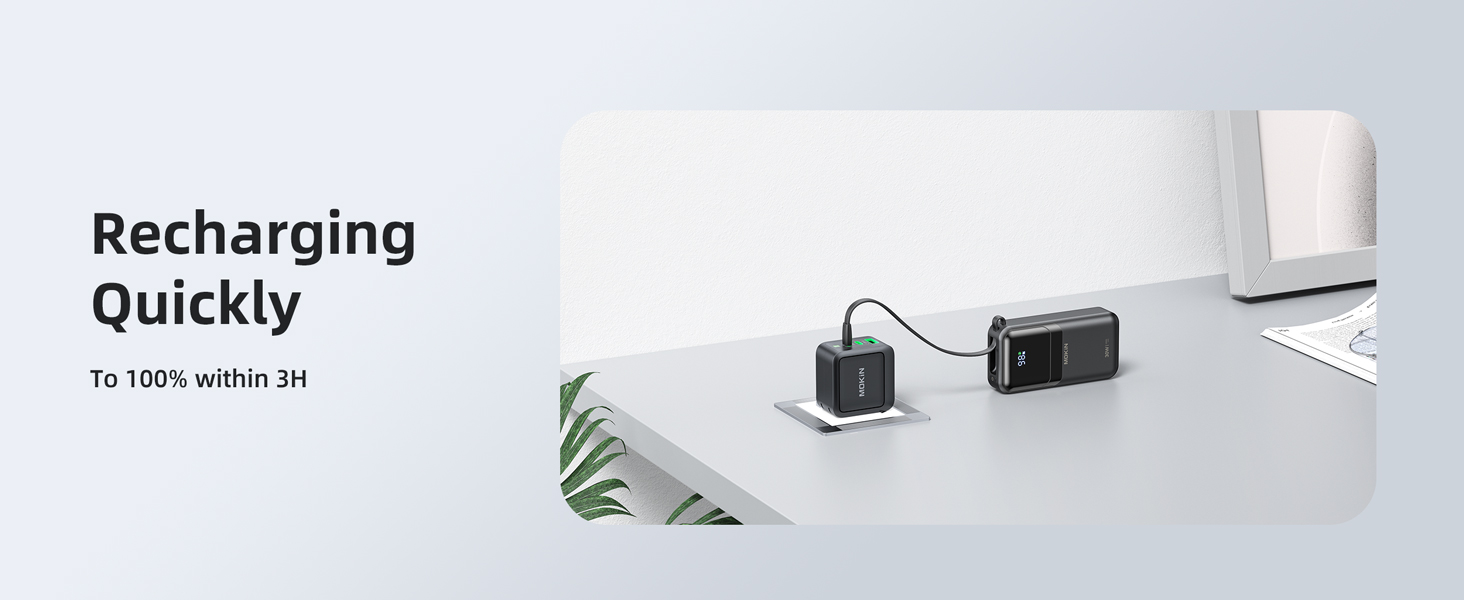
Image: The MOKiN power bank connected to a wall adapter for recharging, illustrating the quick recharge capability.
4. Operating Instructions
Checking Battery Level:
Press the power button once to activate the digital display and view the current battery percentage.
Charging Your Devices:
The MOKiN power bank can charge up to four devices simultaneously using its built-in cables and ports.

Image: The MOKiN power bank connected to an iPhone, illustrating its 30W Max fast charging capability.
- Using Built-in Cables:
- Pull out the integrated USB-C or iOS cable.
- Connect the appropriate cable directly to your device's charging port.
- Charging will begin automatically. If not, press the power button once.
- Using USB-C Port:
- Connect your device's USB-C to USB-C cable to the power bank's USB-C Input/Output port.
- Connect the other end to your device.
- Using USB-A Port:
- Connect your device's USB-A charging cable to the power bank's USB-A Output port.
- Connect the other end to your device.
The power bank is compatible with a wide range of devices, including:
- iOS Devices: iPhone 15/14/13 series, iPad Pro, Apple Watch.
- Android Devices: Samsung Galaxy S24/S23/S22/S21 series, Google Pixel, Huawei Mate 60 Pro+.
- Other Devices: Wireless earbuds charging cases (e.g., AirPods Pro, SONY WF), and other USB-powered gadgets.

Image: An illustration showing the MOKiN power bank's compatibility with iOS devices (iPhone, iPad, Apple Watch), Android devices (Samsung Galaxy, Huawei), and wireless earbuds.

Image: The MOKiN power bank simultaneously charging an iPad, iPhone, Apple Watch, and AirPods, demonstrating its multi-output capability.
5. Maintenance
- Cleaning: Wipe the power bank with a soft, dry cloth. Avoid using harsh chemicals or abrasive materials.
- Storage: Store the power bank in a cool, dry place away from direct sunlight and extreme temperatures.
- Battery Care: To prolong battery life, fully charge and discharge the power bank at least once every three months if not in regular use.
- Avoid Impact: Do not drop or subject the power bank to strong impacts.
6. Troubleshooting
| Problem | Possible Cause | Solution |
|---|---|---|
| Power bank not charging devices. | Low battery, loose connection, incompatible device, safety protection activated. | Ensure power bank is charged. Check cable connections. Press power button to activate. Verify device compatibility. If safety protection (overcurrent, short-circuit) is active, disconnect devices and restart. |
| Power bank not recharging. | Faulty charging cable/adapter, loose connection, power bank fault. | Try a different USB-C cable and wall adapter. Ensure connections are secure. If issue persists, contact customer support. |
| Digital display shows incorrect battery level or drops suddenly. | Battery calibration issue. | Fully discharge the power bank until it turns off, then fully recharge it to 100%. This can help recalibrate the battery indicator. If the problem persists, contact customer support. |
| Slow charging speed. | Device not supporting fast charging, using a non-fast charging port/cable, multiple devices charging simultaneously. | Ensure your device supports PD 30W fast charging. Use the built-in USB-C cable or the USB-C port for fastest charging. Charging multiple devices simultaneously may reduce individual charging speeds. |
| Power bank becomes warm during use. | Normal operation during fast charging, or overtemperature protection. | It is normal for the power bank to become slightly warm during fast charging. If it becomes excessively hot, disconnect all devices and allow it to cool down. The NTC temperature protection will prevent overheating. |
7. Specifications
| Feature | Specification |
|---|---|
| Model Number | MOPB0203 |
| Battery Capacity | 10000 Milliamp Hours |
| Product Dimensions | 4.45 x 1.34 x 2.64 inches |
| Item Weight | 7.8 ounces |
| Input/Output Ports | 2* Built-in Cables (iOS + Type C), USB Type C (Input/Output), USB Type A (Output) |
| Max Output Power | 30W |
| Special Features | Built-in Cables, Digital Display, Fast Charging, Lightweight, Pocket Size |
| Color | Black |
| Manufacturer | C-Smartlink Information Technology Co.,Ltd. |
8. Safety Information
- Do not disassemble, modify, or repair the device.
- Do not expose to fire, water, or extreme temperatures (above 60°C/140°F or below 0°C/32°F).
- Keep out of reach of children.
- Do not use if the power bank is damaged or swollen.
- This power bank is airline-approved for carry-on luggage. Please check with your airline for specific regulations.
- Note: This power bank does not feature a magnetic design.
9. Warranty and Support
Your MOKiN Portable Power Bank comes with an 18-month warranty from the date of purchase. If you encounter any issues or have questions, please contact our customer support team.
For assistance, please reach out to our friendly 24/7 customer support via the contact information provided with your purchase or on the imokin brand store on Amazon.