Introduction
The Humminbird XPLORE 10 is a state-of-the-art GPS Fish Finder designed to provide anglers with unparalleled clarity and control on the water. This control head unit, when paired with a compatible transducer (not included), offers advanced sonar capabilities, precise navigation, and seamless integration with other marine electronics. Its intuitive touchscreen and keypad interface ensure ease of use, allowing you to focus on finding and catching fish.

Image: The Humminbird XPLORE 10 display unit, showcasing its high-definition screen with split views of MEGA Side Imaging+ sonar data and detailed LakeMaster mapping. The intuitive interface with both touchscreen and physical buttons is visible on the right side of the unit.
Setup and Installation
This section outlines the steps for setting up your XPLORE 10 control head unit. Please note that this product is the control head only; a compatible transducer and mounting hardware for the transducer are sold separately and are required for full sonar functionality.
1. Mounting the Control Head
The XPLORE 10 comes with a mounting bracket for secure installation on your boat's dash or a suitable flat surface. Ensure the chosen location provides clear visibility, easy access to controls, and protection from excessive vibration or direct impact.
- Position the mounting bracket and mark the drill holes.
- Drill pilot holes as per the bracket specifications.
- Secure the bracket using appropriate marine-grade fasteners.
- Attach the XPLORE 10 control head to the mounted bracket, ensuring it clicks securely into place.

Image: A side profile of the Humminbird XPLORE 10 unit, highlighting its robust design and the integrated mounting points for secure attachment to a boat's console or dash.

Image: An angled side view of the Humminbird XPLORE 10, demonstrating how the unit sits on its adjustable mounting bracket, allowing for optimal viewing angles.
2. Power and Accessory Connections
Connect the included power adapter to the unit and to a suitable 12V DC power source on your boat. Ensure all connections are secure and waterproof.
- Power: Connect the power cable to the designated port on the back of the unit.
- Transducer (Optional, not included): If using a compatible transducer, connect its cable to the appropriate sonar port.
- Ethernet (Optional): For One-Boat Network integration with Minn Kota trolling motors, Cannon products, or other Humminbird units, connect an Ethernet cable to the Ethernet port.
- NMEA 2000 (Optional): For NMEA 2000 networking, connect the appropriate cable to the NMEA 2000 port.
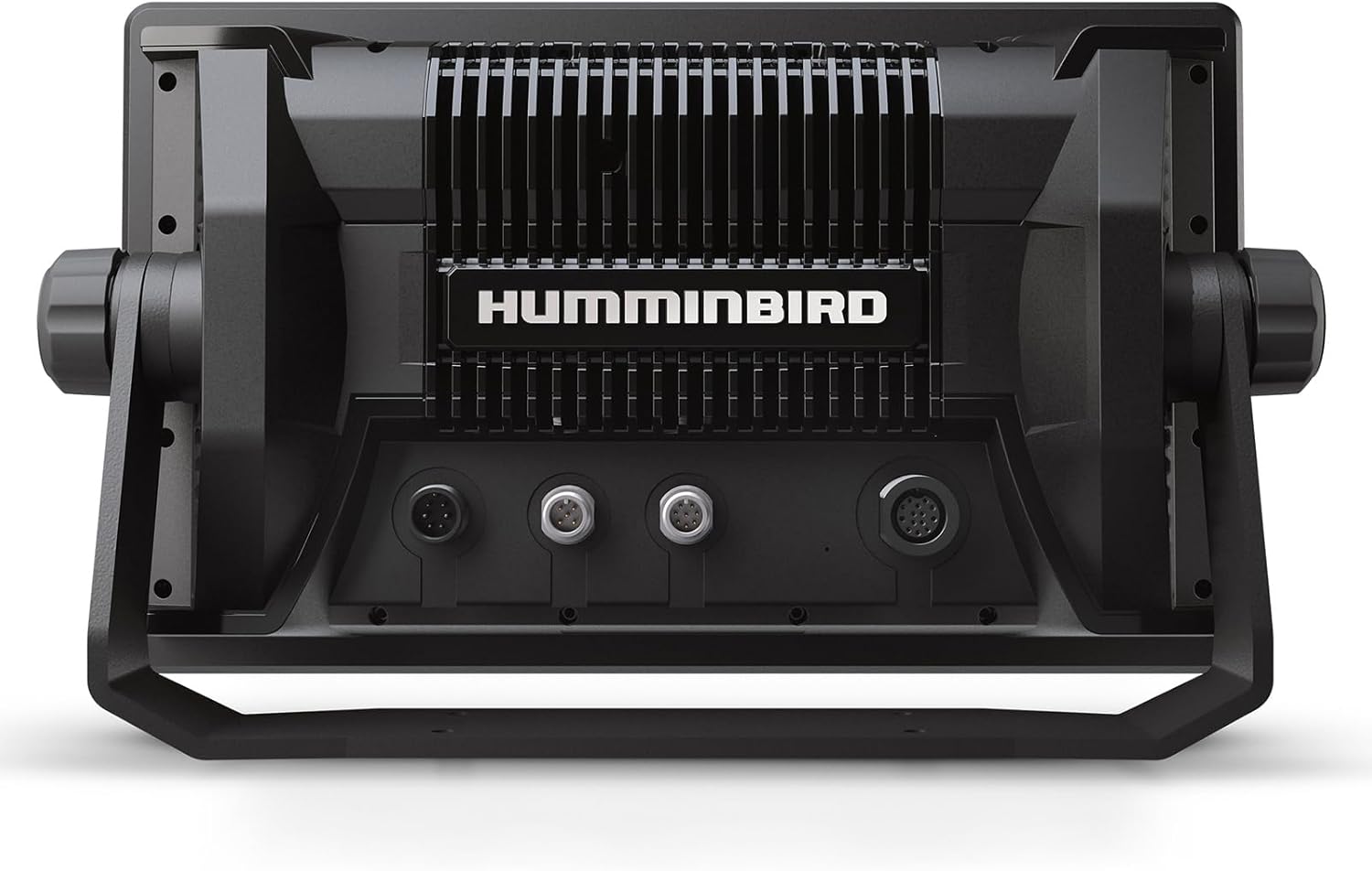
Image: The rear view of the Humminbird XPLORE 10 control head, clearly showing the various input ports for power, transducer, Ethernet, and NMEA 2000 connections, along with the heat sink for optimal performance.
Operating Instructions
The XPLORE 10 features a user-friendly interface combining a responsive touchscreen with tactile keypad controls, allowing for versatile operation in various conditions.
1. Powering On and Initial Setup
- Press and hold the Power button to turn the unit on.
- Follow the on-screen prompts for initial setup, including language, time zone, and unit preferences.
2. Sonar Functionality
The XPLORE 10 supports advanced sonar technologies for detailed underwater views:
- MEGA Side Imaging+: Provides crystal-clear, high-resolution views up to 200 feet on either side of your boat, ideal for identifying structure and fish.
- MEGA Down Imaging+: Offers detailed, high-frequency views directly below your boat, with up to 200 feet of depth coverage.
- Dual Spectrum CHIRP Sonar: Delivers excellent target separation and clear returns for traditional 2D sonar, enhancing fish detection and structure clarity.
3. Navigation and Mapping
Utilize the integrated GPS and mapping features for precise navigation:
- Built-in Humminbird Basemap: Access detailed charts covering over 10,000 lakes and coastal waters, including terrain, markers, hazards, and marina locations.
- LakeMaster and CoastMaster VX Map Card: The unit is compatible with these map cards for enhanced detail in US and Canada regions.
- Waypoint Management: Sync up to 10,000 waypoints with custom colors and icons, and manage them via the unit or a connected smartphone.
- AutoChart Live: Create real-time custom maps of your fishing spots, mapping depth contours, bottom hardness, and vegetation. The unit includes eight hours of built-in recording time for this feature.
4. One-Boat Network Integration
The XPLORE 10 seamlessly integrates with Minn Kota and Cannon products via the One-Boat Network:
- Control Minn Kota trolling motors directly from the XPLORE 10, including Advanced GPS navigation features.
- Deploy shallow water anchors and control other compatible Cannon products.
- High-speed Ethernet connectivity allows for multiple device connections within the network.
5. Bluetooth Connectivity
Connect your smartphone via Bluetooth for wireless anchor control and to receive notifications directly on your XPLORE 10 display.
Video: An introductory overview of the Humminbird XPLORE Series Fish Finders, highlighting key features such as advanced sonar, navigation, and seamless integration with other marine devices. This video provides a visual demonstration of the unit's capabilities in a real-world fishing environment.
Maintenance
Proper maintenance ensures the longevity and optimal performance of your Humminbird XPLORE 10.
- Cleaning: Gently wipe the screen and unit housing with a soft, damp cloth. Avoid abrasive cleaners or solvents that could damage the display or finish.
- Protection: Use the included unit cover (
 ) when the unit is not in use or during transport to protect the screen and controls from dust, scratches, and UV exposure.
 - Connections: Periodically inspect all cable connections for corrosion or damage. Ensure they are clean and securely fastened.
- Software Updates: Check the official Humminbird website periodically for software updates. Keeping your unit's software current ensures access to the latest features and performance enhancements.
Troubleshooting
This section provides basic troubleshooting steps for common issues. For more complex problems, refer to the comprehensive user manual available on the Humminbird website or contact customer support.
- Unit does not power on: Check all power cable connections. Ensure the power source (boat battery) is adequately charged and providing sufficient voltage. Inspect the fuse in the power cable.
- No sonar readings: Verify that a compatible transducer is properly connected to the unit and correctly installed on your boat. Check transducer cable for damage. Ensure sonar is enabled in the unit's settings.
- GPS signal loss: Ensure the unit has a clear view of the sky. Move away from large metallic objects or other electronics that might interfere with the GPS signal.
- Screen unresponsive/frozen: Try a soft reset by turning the unit off and then on again. If the issue persists, consult the full manual for instructions on a hard reset (note: a hard reset may erase custom settings).
Specifications
| Feature | Specification |
|---|---|
| Brand | Humminbird |
| Model Name | XPLORE |
| Part Number | 412010-1CHO |
| Power Source | Corded Electric |
| Screen Size | 10 inches |
| Display Type | Color TFT |
| Maximum Measuring Depth | 200 Feet (Sonar dependent on transducer) |
| Color | Black |
| Material | Plastic |
| Included Components | Control head; Power adapter; Unit cover; Mounting bracket |
| Item Package Dimensions | 16 x 11 x 10.75 inches |
| Package Weight | 4.76 Kilograms |
| UPC | 082324058684 |
Warranty and Support
Manufacturer's Warranty
The Humminbird XPLORE 10 GPS Fish Finder Head Unit is covered by a 2-year manufacturer's warranty. This warranty typically covers defects in materials and workmanship under normal use. Please retain your proof of purchase for warranty claims.
Customer Support
For detailed product information, software updates, additional troubleshooting guides, or to contact customer service, please visit the official Humminbird website. You can also find FAQs and community forums for further assistance.
Online Resources: www.humminbird.com


