
RUXINGX CS5 PRO
RUXINGX Fitness Tracker Watch User Manual
Model: CS5 PRO
1. Introduction
Thank you for choosing the RUXINGX Fitness Tracker Watch. This device is designed to help you monitor your health and fitness activities, receive notifications, and manage your daily routine with ease. This manual provides detailed instructions on how to set up, operate, and maintain your new smartwatch.

Image: The RUXINGX Fitness Tracker Watch in black with a navy blue strap, accompanied by three additional silicone straps in burgundy, starlight, and black, showcasing the watch's versatility and customizable appearance.
2. What's in the Box
Upon opening your RUXINGX Fitness Tracker Watch package, please verify that all the following items are included:
- 1 x RUXINGX Fitness Tracker Watch
- 1 x Navy Blue Silicone Strap
- 1 x Black Silicone Strap
- 1 x Starlight Silicone Strap
- 1 x Burgundy Silicone Strap
- 1 x USB Charging Cable
- 1 x User Manual (this document)

Image: A close-up view of the RUXINGX Fitness Tracker Watch body, highlighting its ultra-thin (10mm) and ultra-light (14.5g) design, alongside four silicone straps in navy blue, burgundy, black, and starlight colors, demonstrating the variety of styles available.
3. Setup Guide
3.1 Charging the Device
Before first use, fully charge your RUXINGX Fitness Tracker Watch.
- Connect the magnetic charging cable to the charging contacts on the back of the watch.
- Plug the USB end of the cable into a standard USB power adapter (5V/1A recommended) or a computer's USB port.
- The watch screen will display a charging indicator. A full charge typically takes 1.5 to 2 hours.

Image: The RUXINGX Fitness Tracker Watch displaying a "Fully charged" notification, illustrating its 7-day battery life, 1.5-hour quick charge time, and 300mAh battery capacity. Product dimensions are also shown.
3.2 App Installation and Pairing
To unlock the full potential of your smartwatch, download and install the companion application on your smartphone.
- Scan the QR code provided in the quick start guide (or search for the app name in your phone's app store).
- Install the application on your Android (4.4+) or iOS (9.0+) device.
- Open the app and follow the on-screen instructions to create an account or log in.
- Enable Bluetooth on your smartphone.
- In the app, navigate to the "Device" or "My Device" section and select "Add Device".
- Choose your RUXINGX Fitness Tracker Watch from the list of available Bluetooth devices.
- Confirm the pairing request on both your watch and smartphone.

Image: A person wearing the RUXINGX Fitness Tracker Watch, which displays an incoming call notification. The image also shows icons for various social media and messaging apps, indicating the watch's compatibility with iOS 9.0+ and Android 4.4+ for receiving notifications.
3.3 Attaching the Straps
Your watch comes with multiple interchangeable straps. To attach a strap:
- Locate the quick-release pins on each strap.
- Align one end of the pin with the lug hole on the watch body.
- Slide the quick-release lever to retract the pin, then insert the other end into the opposite lug hole.
- Release the lever to secure the strap. Gently pull on the strap to ensure it is properly attached.
4. Operating Instructions
4.1 Basic Navigation
- Touch Screen: Swipe up, down, left, or right to navigate through menus and screens. Tap to select an option.
- Side Button: Press the side button to return to the home screen or wake the device.
4.2 Health Tracking
The RUXINGX Fitness Tracker Watch provides comprehensive health monitoring features.
- Heart Rate Monitoring: The watch continuously monitors your heart rate 24/7. View real-time data on the watch or detailed historical data in the app.
- Blood Oxygen (SpO2) Monitoring: Measure your blood oxygen levels. Note: This feature is for reference only and not intended for medical diagnosis.
- Sleep Monitoring: Automatically tracks your sleep patterns, including deep sleep, light sleep, and awake times. Review your sleep quality analysis in the app.
- Women's Health Tracking: For female users, the watch can help record and predict menstrual cycles, providing timely reminders.

Image: Three RUXINGX Fitness Tracker Watches displaying different health metrics: heart rate (078 bpm), menstrual period tracking, and SpO2 testing. Below, a timeline illustrates menstrual cycle tracking with period, predicted ovulation, and predicted fertile window.

Image: A person sleeping with the RUXINGX Fitness Tracker Watch on their wrist, alongside a smartphone displaying detailed sleep quality analysis, including deep sleep, light sleep, and awake durations, and breathing exercises to aid sleep.
4.3 Activity Tracking
Track your daily activities and workouts with precision.
- Daily Activity: Monitors steps taken, distance covered, and calories burned throughout the day.
- Sports Modes: Choose from over 20 sports modes, including walking, running, cycling, basketball, football, and more. During a workout, the watch records real-time data such as heart rate, duration, and calories.
- GPS Tracking: When connected to your phone, the watch can utilize your phone's GPS to map your outdoor exercise routes.
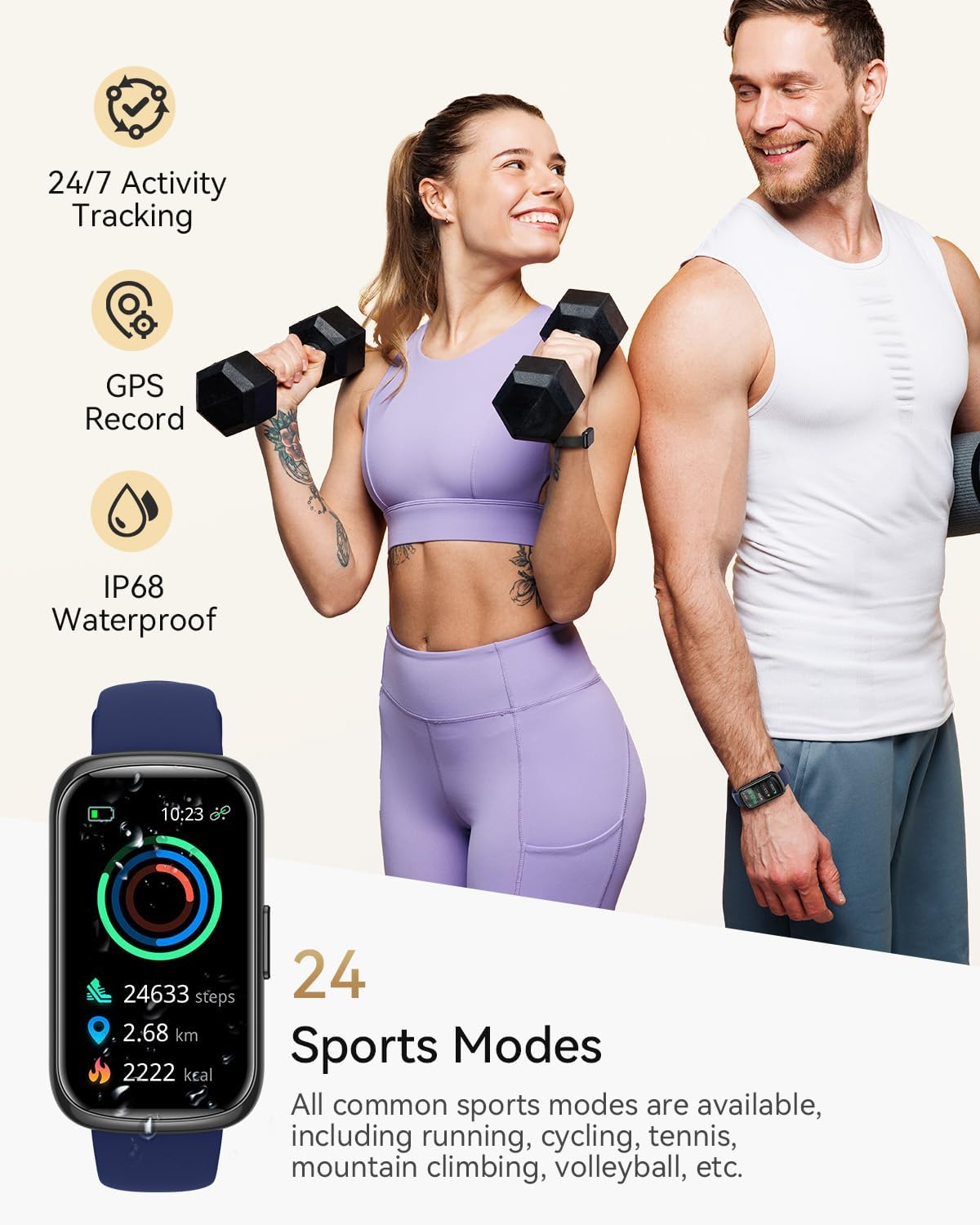
Image: Two individuals exercising, with the RUXINGX Fitness Tracker Watch displaying activity metrics like steps, distance, and calories. Icons indicate 24/7 activity tracking, GPS record, and IP68 waterproof rating, along with a list of 24 sports modes.
4.4 Notifications
Stay connected by receiving notifications directly on your wrist.
- Call Reminders: Receive alerts for incoming calls. Note: The watch does not support answering calls directly.
- Message Notifications: Get real-time alerts for text messages and notifications from various social media applications (e.g., WhatsApp, Facebook, Instagram, TikTok, Snapchat, LinkedIn). You can view the full content of messages on the watch. Note: Replying to messages is not supported.
4.5 Watch Faces and Customization
Personalize your watch to match your style.
- Pre-installed Dials: Choose from over 200 watch dial designs available in the companion app.
- Custom Dials: Upload your favorite photos to create personalized watch faces.

Image: The RUXINGX Fitness Tracker Watch displaying a custom watch face with a cat image. A smartphone screen shows the companion app interface for selecting from over 200 watch dials and customizing DIY wallpapers with various data widgets.
4.6 Other Useful Functions
The watch includes several convenient features to enhance your daily life:
- Sedentary Reminder: Alerts you when you've been inactive for too long.
- Alarm: Set alarms directly from the watch or app.
- Weather Forecast: Get real-time weather updates.
- Music Control: Control music playback on your smartphone (play, pause, skip tracks).
- Shake to Take Picture: Use your watch as a remote shutter for your phone's camera.
- Find Phone/Watch: Locate your paired phone or watch if misplaced.
- Drinking Reminder: Prompts you to drink water at set intervals.
- Breathing Training: Guided breathing exercises for relaxation.
5. Maintenance
Proper maintenance ensures the longevity and optimal performance of your smartwatch.
- Cleaning: Regularly wipe the watch screen and strap with a soft, dry cloth. For stubborn dirt, use a slightly damp cloth and then dry thoroughly. Avoid harsh chemicals or abrasive materials.
- Water Resistance: The watch is IP68 waterproof, meaning it is resistant to dust and can withstand immersion in water up to 1.5 meters for 30 minutes. It is suitable for daily use, hand washing, and light rain. However, it is not recommended for hot showers, saunas, or diving, as steam and hot water can damage the seals.
- Storage: Store the watch in a cool, dry place when not in use. Avoid extreme temperatures.
6. Troubleshooting
If you encounter issues with your RUXINGX Fitness Tracker Watch, please refer to the following common solutions:
| Problem | Possible Solution |
|---|---|
| Watch does not turn on or charge. | Ensure the charging cable is securely connected to both the watch and the power source. Try a different USB port or power adapter. Allow the watch to charge for at least 30 minutes before attempting to turn it on. If the battery is completely drained, it may take a few minutes for the charging indicator to appear. |
| Cannot pair the watch with the app. | Ensure Bluetooth is enabled on your phone and the watch is within range. Restart both your phone and the watch. Check if the app has necessary permissions (location, Bluetooth). If previously paired, try unpairing and re-pairing the device. |
| Notifications are not received. | Verify that the watch is successfully paired with the app. Check notification permissions for the app on your phone. Ensure the specific app notifications are enabled within the companion app settings. Keep the app running in the background. |
| Inaccurate activity/health data. | Ensure the watch is worn snugly on your wrist, about one finger's width above the wrist bone. Avoid excessive movement during heart rate or SpO2 measurements. For step counting, ensure your arm movements are natural. Calibrate the watch in the app if a calibration option is available. |
| App language/translation issues. | Ensure your phone's system language is set to English. Check for app updates, as developers often release fixes for translation issues. |
If the problem persists after trying these solutions, please contact customer support.
7. Specifications
| Feature | Detail |
|---|---|
| Model Number | CS5 PRO |
| Screen Size | 1.47 Inches |
| Battery Capacity | 300 mAh (Lithium Polymer) |
| Charging Time | Approx. 1.5 hours |
| Battery Life | Up to 7 days (typical usage) |
| Connectivity | Bluetooth |
| Operating System Compatibility | Android 4.4 & iOS 9.0 or above |
| Water Resistance | IP68 |
| Item Weight | 4.2 ounces |
| Package Dimensions | 10.47 x 2.95 x 0.67 inches |
| Manufacturer | RUXINGX |
| Special Features | Lightweight, Multisport Tracker, Weather Forecast, Text Messaging, Activity Tracker, Heart Rate Monitor, Sleep Tracker, SpO2 Monitor, Women's Health |
Image: The RUXINGX Fitness Tracker Watch displaying a vibrant watch face, highlighting its 1.47-inch Ultra HD screen with 172x320 resolution and brightness adjustment. The image also includes detailed product dimensions for the watch body and strap lengths.
8. Warranty and Customer Support
RUXINGX is committed to providing high-quality products and excellent customer service.
- Warranty Information: Please refer to the warranty card included in your product packaging for specific warranty terms and conditions.
- Customer Service: If you have any questions, concerns, or require assistance with your RUXINGX Fitness Tracker Watch, please do not hesitate to contact our professional customer support team. We aim to resolve any issues within 24 hours.
- Contact Information: For support, please visit the RUXINGX store on Amazon or refer to the contact details provided on our official website or product packaging.
Ask a question about this manual
Ask about setup, troubleshooting, compatibility, parts, safety, or missing instructions. Manuals+ will review the question and use this page’s manual context to help answer it.