
1. Introduction
This manual provides essential information for the proper installation, configuration, and operation of your XMARTO Wire-Free PTZ Solar Home Security Camera System. This system includes 4-set 2K 4MP QHD cameras and a 4K 10CH expandable Wi-Fi 6 NVR, designed for reliable all-weather surveillance with solar charging capabilities. Please read this manual thoroughly before use to ensure optimal performance and safety.

Image: Overview of the XMARTO Wire-Free PTZ Solar Home Security Camera System, highlighting its key features like wire-free installation, pan-tilt-zoom, solar battery power, smart AI detection, IP66 rating, 2-way audio, no monthly fees, and Wi-Fi 6 connectivity.
2. System Setup
2.1 Unpacking and Initial Inspection
Carefully unpack all components and verify that all items listed in the packaging contents are present and undamaged. If any items are missing or damaged, contact customer support immediately.
2.2 Wireless Installation
The system is designed for wire-free installation, eliminating the need for Ethernet or power cables for the cameras. Each camera is powered by an 8700mAh automotive-grade rechargeable battery and an all-weather charge solar panel. An extra-long 10ft USB Type-C cable is provided for flexible solar panel placement.

Image: Diagram illustrating the wire-free installation of the solar security camera system, showing the camera and solar panel mounted on a building without visible cables, emphasizing no Ethernet or power cable requirements.
2.3 NVR Connection and Camera Pairing
The NVR features a built-in Wi-Fi 6 router, providing a dedicated network for the cameras. This ensures a stable connection and avoids loading your home Wi-Fi network. The NVR can manage up to 10 cameras simultaneously.

Image: An aerial view demonstrating the NVR with its integrated Wi-Fi 6 router, showing how it connects to multiple cameras around a property, providing a dedicated and long-range wireless network.
For initial setup, connect the NVR to a monitor via HDMI. The cameras are typically pre-paired to the NVR. If re-pairing is needed, refer to the on-screen NVR menu for camera management options.

Image: The standalone NVR connected to a monitor via HDMI, displaying a multi-camera view, indicating its capability to view, record, and manage up to 10 cameras simultaneously.
3. Operating Instructions
3.1 Remote Viewing and Sharing
Access live feeds and recorded footage from anywhere using the WallPixel App on your smartphone (iPhone/iPad, Android), or via PC/Mac. The system supports sharing among multiple users and simultaneous viewing on up to 8 devices.

Image: Depicts global remote viewing and sharing capabilities, showing users on different continents accessing camera feeds from their smartphones and tablets, with options for iPhone/iPad, Android, Mac, PC, Monitor/TV, and Alexa integration.
3.2 Pan-Tilt-Zoom (PTZ) Control
Control the camera's horizontal pan (360°) and vertical tilt (90°) directly from the WallPixel App or the NVR interface. This allows you to navigate the camera to view the entire area. The 8x digital zoom feature helps in observing finer details.
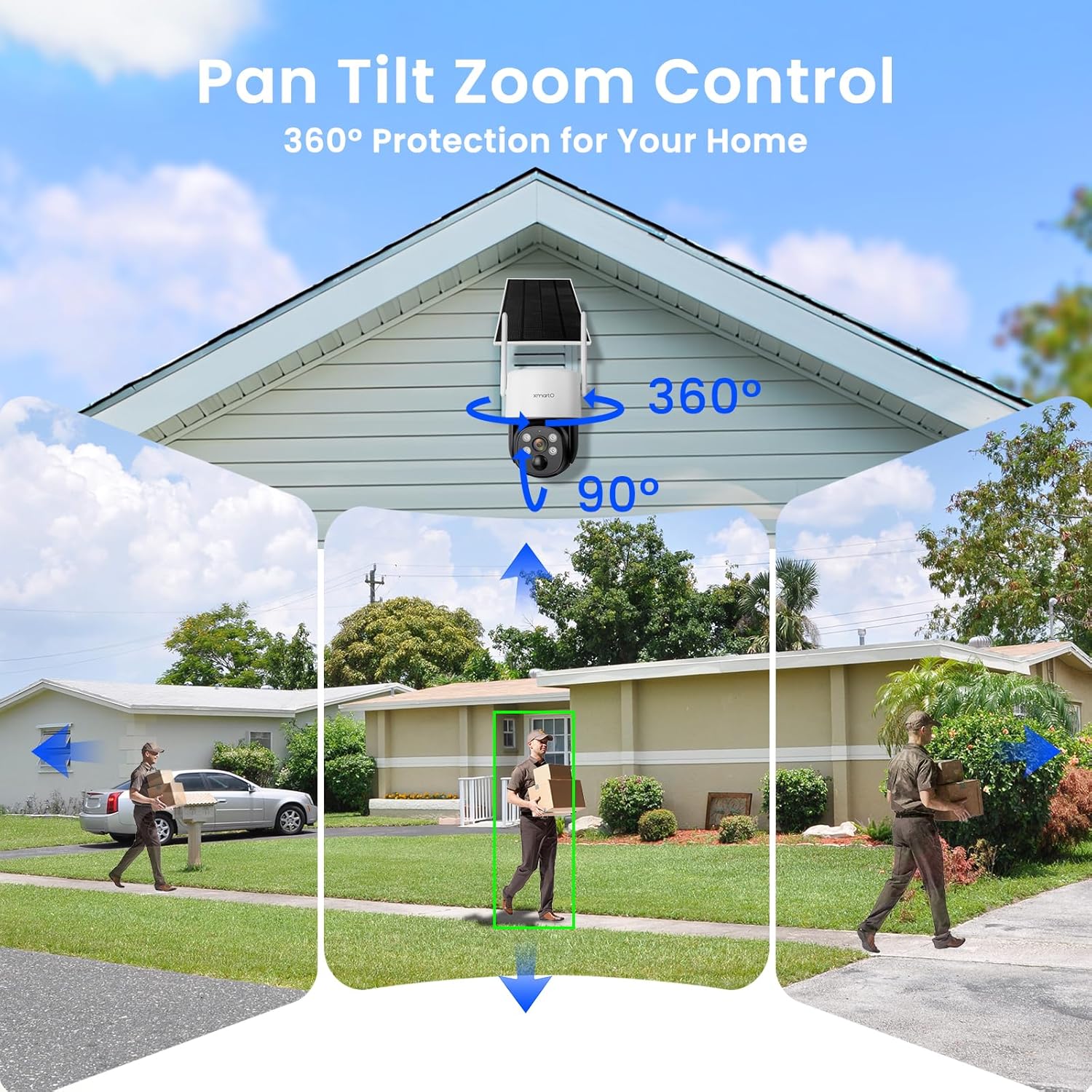
Image: Illustrates the Pan-Tilt-Zoom functionality of the camera, showing a 360-degree horizontal rotation and 90-degree vertical tilt, with examples of the camera tracking a person walking across a lawn.
3.3 Motion Detection and Alerts
The cameras feature PIR thermal sensors and humanoid detection to minimize false alerts. When people, animals, or vehicles are detected, the system sends instant app notifications and email alerts.

Image: Shows the PIR Human Detection feature in action, with green boxes highlighting detected humans and a dog in a driveway, alongside a smartphone displaying an alert notification.
3.4 Night Vision Modes
The 4MP QHD cameras provide clear video footage day and night. They offer both infrared (IR) night vision and color night vision with the help of IR LEDs and spotlights.

Image: Compares day and night video quality, showing a golden retriever in a backyard. The top image shows black and white infrared night vision (IR LEDs on), and the bottom image shows full-color night vision (Spotlight on).
3.5 Two-Way Audio
Utilize the built-in two-way audio feature to communicate with visitors or deter intruders. You can hear and speak through the phone app, and activate a siren alarm if necessary.

Image: A delivery person at a front door, with a speech bubble indicating two-way audio communication and a phone screen showing app controls for intercom and siren alarm.
3.6 Storage Options
The NVR supports a SATA hard drive up to 6TB for local video storage. Additionally, you have the option to subscribe to AWS Cloud storage via the WallPixel App for video backup.

Image: Illustrates the storage options: NVR pre-installed with a 64GB SD card, support for up to 6TB HDD (not included), and cloud storage subscription options.
3.7 Smart AI Playback
Review recorded footage efficiently with Smart AI Playback, which helps in quickly locating events of interest.

Image: A monitor displaying the Smart AI Playback interface, showing multiple camera feeds with detected motion events highlighted, allowing for quick review of specific incidents.
4. Maintenance
4.1 All-Weather Solar Charging
The XMARTO solar cameras utilize All-Weather-Charge technology, ensuring continuous power supply to the cameras even during rainy or snowy conditions. This trickle-charge system keeps the 8700mAh automotive-grade rechargeable batteries charged.

Image: A collage demonstrating the 'All-Weather-Charge' technology, showing solar panels charging cameras under various weather conditions including sunny, rainy, snowy, and windy days, ensuring continuous operation.
4.2 Weatherproof Design
The cameras are rated IP66 weatherproof, designed to withstand various outdoor elements, making them suitable for both indoor and outdoor use.

Image: An XMARTO solar camera mounted under an eave during rainfall, illustrating its IP66 weatherproof rating and non-stop solar charging capability for outdoor use.
4.3 General Care
Regularly check the solar panels for any obstructions (e.g., leaves, dirt) that might reduce charging efficiency. Clean the camera lenses with a soft, damp cloth to ensure clear image quality. Avoid using harsh chemicals.
5. Troubleshooting
If you encounter issues with your XMARTO security system, consider the following general troubleshooting steps:
- No Power/Camera Offline: Ensure the solar panel is receiving adequate sunlight and is free from obstructions. Check battery levels in the app. If the issue persists, try recharging the camera directly via USB-C if possible.
- Poor Wi-Fi Connection: Verify the NVR's placement for optimal signal strength to all cameras. Ensure no large metal objects or thick walls are blocking the signal path.
- No Video/Black Screen: Check all cable connections to the NVR and monitor. Restart the NVR and cameras.
- False Motion Alerts: Adjust the motion detection sensitivity settings in the WallPixel App. Ensure the detection zones are configured correctly to avoid triggering by irrelevant movements.
- Unable to Access Remotely: Confirm your NVR is connected to the internet and your smartphone has a stable network connection. Check app permissions and ensure the app is updated to the latest version.
For more detailed troubleshooting or persistent issues, please refer to the support section or contact XMARTO customer service.
6. Specifications
| Feature | Detail |
|---|---|
| Brand | xmartO |
| Model | WNP810-W6 |
| Connectivity Technology | Wired, Wireless |
| Video Capture Resolution | 2K, 4K |
| Number of Channels | 10 |
| Compatible Devices | WiFi Cameras |
| Signal Format | Digital |
| Recording Mode | Motion detection, Continuous, Schedule |
| Optical Sensor Technology | CMOS |
| Hardware Interface | 802.11 ac/b/g/n (Wi-Fi 6) |
| Lens Type | Wide Angle |
| Video Input | RJ45 |
| Video Compression | H.265+ HEVC (Saves 75% storage space compared to H.264) |

Image: Comparison of H.264 and H.265+ HEVC compression, showing H.265+ provides clearer video while saving 75% storage space.
7. Warranty and Support
XMARTO is committed to providing reliable security solutions and customer satisfaction.
- 30-Day Money Back Guarantee: Enjoy a 30-day money-back guarantee and free returns.
- 1-Year Limited Warranty: Your product is covered by a 1-year limited warranty.
- 24/7 Online Support: Access 24/7 online support for personalized assistance.
For support, please visit the official XMARTO website or contact their customer service directly. Your privacy is safeguarded with double-layer, bank-level encryption and US-based AWS servers, ensuring your videos are accessible only by you.

Image: Details on after-sales support, including a 30-day money-back guarantee, 1-year limited warranty, and 24/7 online support.


