
1. Introduction
Thank you for choosing the Ensenior 20'' Low Profile Ceiling Fan with Light. This modern fandelier combines efficient air circulation with versatile LED lighting, designed to enhance comfort and ambiance in various indoor spaces such as bedrooms, kitchens, living rooms, and home offices. This manual provides essential information for safe installation, operation, and maintenance of your new ceiling fan.
2. Safety Information
Please read all instructions carefully before beginning installation. Failure to follow these instructions could result in electric shock, fire, or serious personal injury.
- Always disconnect power at the main circuit breaker before installation or servicing.
- Ensure all electrical connections comply with local codes and ordinances, as well as the National Electrical Code (NEC).
- If you are unfamiliar with electrical wiring, consult a qualified electrician.
- Mount the fan only to an outlet box marked "Acceptable for Fan Support of 35 lbs (15.9 kg) or less" and use the mounting screws provided with the outlet box.
- Do not bend the fan blades when installing or cleaning.
- Avoid placing objects in the path of the fan blades.
- This product is designed for indoor use only.
3. Package Contents
Carefully unpack all components and ensure all items are present and undamaged. If any parts are missing or damaged, contact Ensenior customer support.

Image: Overview of the Ensenior ceiling fan components, including the main motor unit, fan blades, light ring, and remote control.
- Main Motor Unit
- Fan Blades (ABS material)
- LED Light Ring (Linkable LEDs)
- Remote Control
- Mounting Bracket
- Hardware Pack (screws, wire nuts, etc.)
- User Manual

Image: Detailed view of the fan's metal frame, linkable LEDs, acrylic lampshade, and ABS fan blades, highlighting the robust construction.
4. Setup and Installation
Follow these steps for proper installation of your ceiling fan. It is recommended to have two people for installation.
- Prepare the Mounting Bracket: Secure the mounting bracket to the ceiling electrical box. Ensure the electrical box is properly secured and rated for fan support.
Video: This official seller video demonstrates the initial steps of ceiling fan installation, including securing the mounting bracket.
- Assemble the Fan Body:
- Connect the elbows to the canopy. Ensure the power supply connector and standard connectors are properly aligned and secured.
- Insert the LED strips into the corresponding ports on the elbows. Re-slide the metal sheet in the opposite direction to secure the LED strip.
- Assemble the fan blades and install them to the fixture. Lock the cover anticlockwise to secure.

Image: Visual guide for assembling the fan, showing how to connect elbows, insert LED strips, and attach fan blades.
- Connect Electrical Wires: Carefully connect the fan's wires to the household wiring according to the wiring diagram in the full user manual. Typically, black to black, white to white, and green/ground to ground.
Video: This official seller video provides a visual guide for connecting the electrical wires during installation.
- Mount the Fan: Lift the assembled fan and connect it to the mounting bracket. Secure the fan to the bracket using the provided screws.
Video: This official seller video illustrates the final steps of mounting the fan to the ceiling bracket.
- Restore Power: Once installation is complete, restore power at the main circuit breaker.
5. Operating Instructions
Your Ensenior ceiling fan offers multiple control options for convenience and customization.
5.1 Remote Control & APP Control
The fan can be controlled via the included remote control or through a dedicated mobile application. Both methods allow for comprehensive control over fan speed, light settings, and special functions.

Image: The remote control and mobile application interface for controlling the Ensenior ceiling fan.
Video: This official seller video demonstrates the various features and controls of the Ensenior Low Profile Ceiling Fan with lights and Remote.
5.2 Fan Speed Settings
The fan offers 6 adjustable wind speeds to suit your comfort needs, from a gentle breeze to strong airflow.

Image: Illustration of the 6 wind speed settings, ranging from soft wind to cool wind.
5.3 Reversible Airflow
Utilize the reversible airflow feature for year-round comfort. In summer, the fan rotates counter-clockwise to create a downward airflow, providing a cooling effect. In winter, it rotates clockwise to create an upward airflow, circulating warm air trapped near the ceiling.
5.4 Light Settings: 3CCT Colors & Stepless Dimming
Customize your lighting with a wide range of color temperatures (3000K-6500K) and stepless dimming (8% to 100% brightness). This allows you to set the perfect mood for any occasion.

Image: Demonstrates the adjustable color temperatures (3000K Warm White, 4000K Clear White, 6500K Cool White) and stepless dimming feature.
5.5 Memory Function & Nightlight Mode
The memory function saves your preferred light settings, so the fan will recall them when turned on again. The unique "one-button night light" mode provides a soft, low-brightness (8%) 3000K warm light, ideal for nighttime use without harsh illumination.
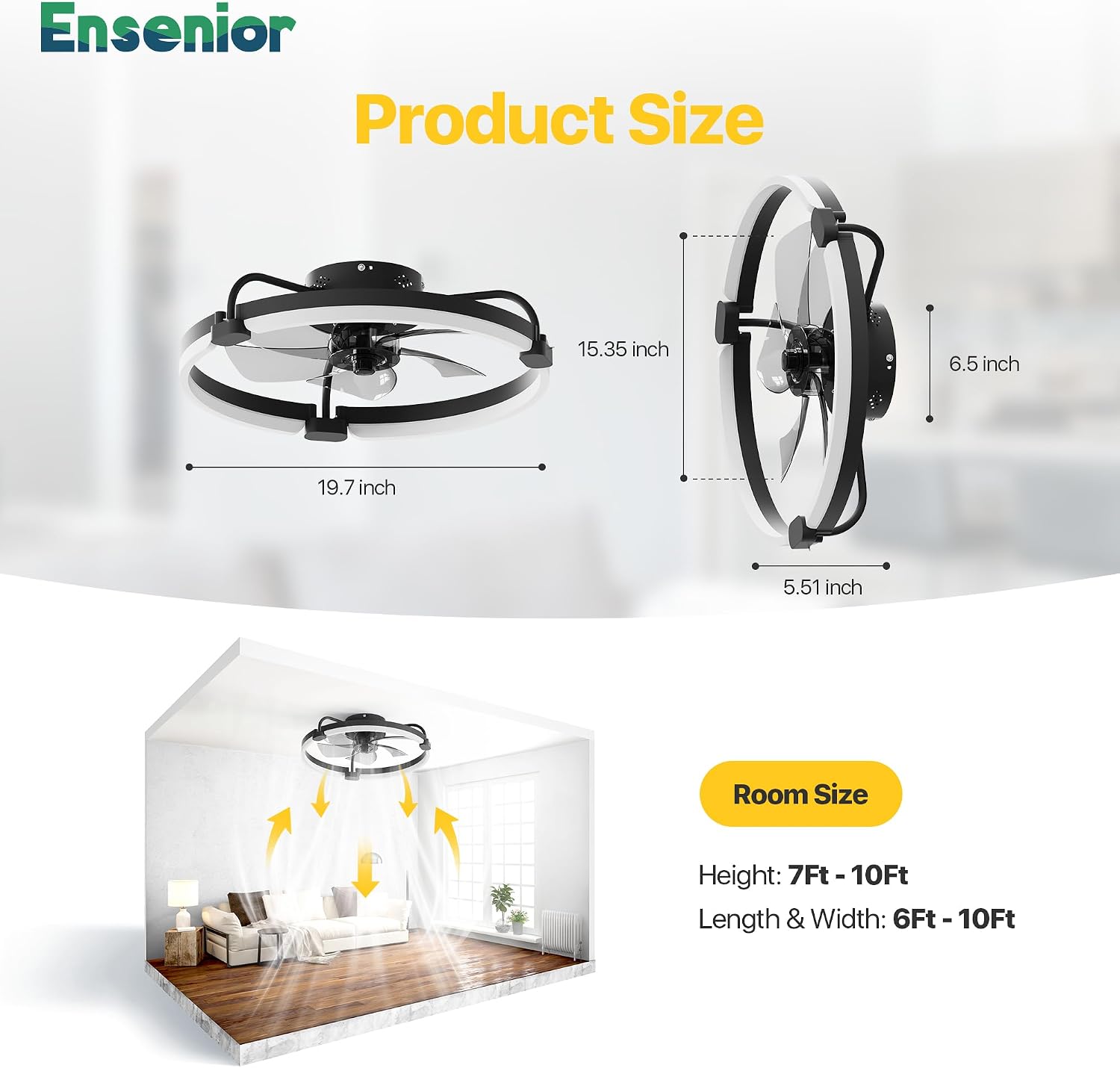
Image: Illustrates the ultra-quiet operation and the nightlight mode (3000K color in 8% brightness).
5.6 Timer Setting
Set a timer for the fan to automatically turn off after a specified duration, providing convenience and energy saving.
6. Maintenance
Regular maintenance ensures optimal performance and longevity of your ceiling fan.
- Cleaning: To avoid damage to the finish, clean the fan with a soft, damp cloth. Do not use abrasive cleaners or solvents.
- Blade Cleaning: The ABS fan blades can be wiped clean with a soft cloth.
- Tighten Screws: Periodically check and tighten all screws on the fan and mounting bracket to ensure secure operation.
- No Lubrication Needed: The fan's pure DC motor is permanently lubricated and does not require oiling.
7. Troubleshooting
If you experience issues with your fan, refer to the following common problems and solutions. For persistent issues, contact customer support.
| Problem | Possible Cause | Solution |
|---|---|---|
| Fan does not start. | No power to the fan; Loose wire connections; Remote control battery low. | Check circuit breaker and wall switch; Verify all wire connections are secure; Replace remote control batteries. |
| Light does not work. | Loose wire connection to light kit; LED strip issue. | Check light kit wiring; Contact customer support if LED strip is faulty. |
| Fan wobbles. | Loose fan blades; Improper mounting; Unbalanced blades. | Ensure all blade screws are tight; Verify mounting bracket is securely fastened; Use balancing kit if necessary. |
| Remote control not working. | Batteries dead or incorrectly installed; Remote not paired. | Replace batteries, ensuring correct polarity; Refer to full manual for remote pairing instructions. |
8. Specifications
- Brand: Ensenior
- Model Name: Ceiling Fan with Light
- Item Model Number: WF1-20I-3CCT-01-BL-A01
- Size: 20 Inch
- Color: Black
- Material: Aluminum, Metal, Acrylic
- Product Dimensions: 19.7"L x 19.7"W x 5.51"H
- Power Source: AC/DC
- Voltage: 120 Volts (AC)
- Wattage: 40 watts
- Brightness: 2520 Lumen
- Efficiency: 63 lumen/watt
- Light Source Type: LED
- Color Temperature: 3000K-6500K (Stepless Dimmable)
- Control Method: App, Remote Control
- Special Features: Remote Controlled, LED Light, Timer, App Operable, Reversible Airflow, Memory Function, Nightlight Mode
- Item Weight: 6.71 pounds
- Country of Origin: China
- UPC: 769044676526
9. Warranty & Support
Your Ensenior 20'' Low Profile Ceiling Fan with Light comes with a 3-year warranty. For any questions, technical assistance, or warranty claims, please contact Ensenior customer support. Our team is dedicated to providing top-notch support for a hassle-free experience.
Choose Ensenior, enjoy superior!