
Introduction
Thank you for choosing the HWWR D30T Mini Portable Bluetooth Karaoke Speaker. This device is designed to provide an enjoyable audio experience with its portable design, dual wireless microphones, and interactive features like voice changing modes and party lights. This manual will guide you through the setup, operation, and maintenance of your new karaoke machine.

Image: The HWWR D30T Mini Portable Bluetooth Karaoke Speaker, showcasing its compact design, two wireless microphones, and vibrant LED lighting.
What's in the Box
- 1 x HWWR D30T Karaoke Speaker
- 2 x Wireless Microphones
- 1 x USB Type-C Charging Cable
- 1 x User Manual
Product Overview
Speaker Controls & Ports

Image: The top panel of the speaker with control buttons and a wireless microphone, illustrating ease of operation.
- Power/Play/Pause Button (M): Short press to switch Bluetooth, U disk, TF card, or AUX mode. Long press to power on/off. Double press to play/pause music.
- Volume +/- Buttons: Short press to adjust speaker volume. Long press for previous/next song.
- Light Button: Short press to cycle through light modes.
- Vocal Removal Button: One-touch vocal removal feature.
- Voice Change Button: Short press to switch between voice modes.
- Ports (Rear/Side): USB port, TF card slot, AUX input, USB Type-C charging port.
Microphone Controls
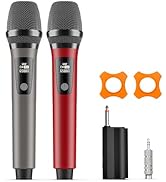
Image: Two wireless microphones with clearly labeled buttons for power, volume, and voice effects.
- Power Button: Long press to turn on/off. Short press to switch between reverb/music/mic volume. Double press to play/pause.
- Volume +/- Buttons: Short press to adjust microphone volume. In reverb mode, short press to adjust reverb.
- Magic Voice Button: Short press to switch to Magic Voice. Double press to turn on/off original sound. Long press to turn off the microphone.
Setup
1. Charging the Device
Before first use, fully charge the karaoke speaker and microphones. Use the provided USB Type-C cable to connect the speaker to a compatible USB power adapter (not included). The speaker has a 4500mAh battery, providing over 12 hours of playtime on a full charge, with a charging time of approximately 3 hours.
2. Power On/Off
- Speaker: Long press the Power/Play/Pause button (M) on the speaker to turn it on or off.
- Microphones: Long press the Power button on each microphone to turn it on or off. The microphones will automatically pair with the speaker.
Operating Instructions
1. Bluetooth Connection
The HWWR D30T uses Bluetooth 5.3 for stable and fast connections up to 30 meters. Once the speaker is powered on, it will automatically enter Bluetooth pairing mode. Enable Bluetooth on your smartphone, tablet, or other device and select 'HWWR D30T' from the list of available devices to connect.

Image: Visual representation of the Bluetooth 5.3 connectivity range, highlighting the 30-meter playback distance.
2. Microphone Usage
- Adjusting Volume: Use the +/- buttons on the microphone to control its volume.
- Voice Changing Modes: Short press the Magic Voice button on the microphone to cycle through five unique voice modes: Original, KTV, Goddess, Magic, and Baby Voice.
- One-Touch Vocal Removal: Double press the Magic Voice button on the microphone to remove the original vocals from a song, allowing you to sing along.

Image: A visual demonstrating the original voice elimination and fun voice effects, enhancing the karaoke experience.
3. Music Playback (TF Card / USB)
Insert a TF card or USB drive with your favorite music files into the corresponding slot on the speaker. The speaker will automatically detect and play the music. Use the Mode button on the speaker to switch between input sources.

Image: The karaoke machine highlighting its support for TF card and USB playback, making it easy to use and set up.
4. Party Lights
The speaker features multicolor LED lights that can be adjusted. Short press the Light button on the speaker to cycle through different lighting modes and create a party atmosphere.

Image: The karaoke machine displaying its multicolor light shows, perfect for enhancing any party or gathering.
Maintenance
To ensure the longevity of your HWWR D30T karaoke speaker, follow these maintenance guidelines:
- Keep the device dry and away from moisture.
- Clean the exterior with a soft, dry cloth. Do not use harsh chemicals or abrasive cleaners.
- Store the device in a cool, dry place when not in use.
- Avoid dropping or subjecting the device to strong impacts.
Troubleshooting
| Problem | Solution |
|---|---|
| No sound from speaker | Ensure the speaker is powered on and charged. Check volume levels on both the speaker and your connected device. Verify Bluetooth connection or correct input mode (TF/USB/AUX). |
| Microphone not working | Ensure microphones are powered on and charged. They should automatically pair with the speaker. If not, try restarting both the speaker and microphones. |
| Bluetooth pairing issues | Make sure the speaker is in Bluetooth mode. Turn off Bluetooth on other nearby devices to avoid interference. Try forgetting the device on your phone and re-pairing. |
| Sound distortion/feedback | Reduce microphone volume or move the microphone further away from the speaker to prevent feedback. Ensure no obstructions are blocking the microphone or speaker. |
Specifications
- Model: D30T
- Brand: HWWR
- Item Weight: 3.97 pounds
- Product Dimensions: 4 x 7 x 6 inches
- Power Source: Battery Powered (4500mAh)
- Playtime: Over 12 hours
- Charging Time: Approximately 3 hours
- Bluetooth Version: 5.3
- Wireless Microphone Range: Up to 30 meters
- Speaker Count: 1
- Connector Type: USB Type C, TF Card, AUX
- Special Feature: Mini karaoke machine, LED Party Lights, Voice Changing Modes, One-Touch Vocal Removal
Warranty and Support
HWWR is committed to providing high-quality products. This HWWR D30T karaoke speaker comes with a 12-month warranty for any quality-related problems.
For any questions or issues regarding your product, please do not hesitate to contact our support team. We are dedicated to assisting you.
Video: Official product overview of the Mini Karaoke Machine by Voijump-US (Seller).
Video: Detailed demonstration of the HWWR Karaoke machine D30T by HWWR Direct (Seller).