
1. Introduction and Overview
The DONGKER DPS310 is a high-precision atmospheric pressure sensor module designed for accurate measurement of pressure and temperature. Its advanced capabilities make it suitable for applications requiring precise altitude determination, environmental monitoring, and integration into sensitive robotic systems like drones.
This sensor offers exceptional accuracy, capable of detecting height changes with a precision of up to ±0.02 meters in high-precision mode. It also includes an integrated temperature sensor, providing reliable temperature readings. The module supports both I2C and SPI communication protocols, ensuring flexible integration into various microcontroller projects.

Image 1.1: Top view of the DONGKER DPS310 Atmospheric Pressure Sensor Module, showing the main components and pin headers.
2. Key Features
- High-Precision Pressure Sensing: Measures atmospheric pressure from 300 to 1200 hPa with an accuracy of up to ±0.002 hPa (±0.02 m) in high-precision mode. Absolute accuracy is ±1 hPa.
- Integrated Temperature Sensor: Features a built-in temperature sensor with an accuracy of ±0.5 °C.
- Flexible Communication: Supports both I2C and SPI interfaces for easy integration with microcontrollers.
- Wide Operating Range: Operates reliably within a pressure range of 300 to 1200 hPa and a temperature range of -40 to +85 °C.
- Altitude Measurement: Enables precise altitude determination with 1-meter absolute accuracy and 2-centimeter accuracy for changes in altitude.
- Noise Reduction: Includes a built-in low-pass filter to minimize noise in readings, especially when performing multiple measurements.
3. Specifications
| Parameter | Value |
|---|---|
| Operating Voltage | DC 3.3V - 5V |
| Pressure Range | 300 - 1200 hPa |
| Temperature Range | -40 to +85 °C |
| Pressure Accuracy (High-Precision) | ±0.002 hPa (±0.02 m) |
| Absolute Pressure Accuracy | ±1 hPa |
| Temperature Accuracy | ±0.5 °C |
| Communication Interfaces | I2C, SPI |
| Default I2C Address | 0x77 |
| Module Dimensions | 26mm x 18mm |
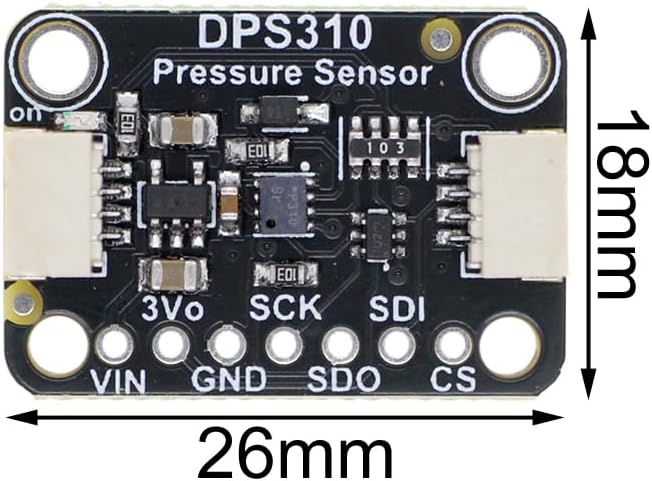
Image 3.1: The DONGKER DPS310 module with its physical dimensions of 26mm by 18mm clearly indicated.
4. Package Contents
The DONGKER DPS310 Atmospheric Pressure Sensor Module package typically includes:
- 1x DPS310 Atmospheric Pressure Sensor Module
- 1x Pin Header (for optional soldering)
5. Setup and Connection
Before connecting the DPS310 module, ensure your development board (e.g., Arduino, Raspberry Pi) is powered off.
5.1 Pinout Description

Image 5.1: Close-up top view of the DPS310 module, highlighting the pin labels for connection.
| Pin | Description |
|---|---|
| VIN | Power Supply Input (3.3V - 5V DC) |
| GND | Ground |
| 3Vo | 3.3V Output (Regulated) |
| SCK | SPI Clock / I2C SCL |
| SDI | SPI Data In / I2C SDA |
| SDO | SPI Data Out |
| CS | SPI Chip Select |
5.2 I2C Connection
For I2C communication, connect the following pins:
- VIN to 3.3V or 5V power supply of your microcontroller.
- GND to Ground of your microcontroller.
- SCK to SCL (Serial Clock) pin of your microcontroller.
- SDI to SDA (Serial Data) pin of your microcontroller.
The default I2C address for the DPS310 is 0x77.

Image 5.2: Back view of the DPS310 module, indicating the default I2C address (0x77) and logic voltage range (3-5VDC).
5.3 SPI Connection
For SPI communication, connect the following pins:
- VIN to 3.3V or 5V power supply of your microcontroller.
- GND to Ground of your microcontroller.
- SCK to SCK (Serial Clock) pin of your microcontroller.
- SDI to MOSI (Master Out Slave In) pin of your microcontroller.
- SDO to MISO (Master In Slave Out) pin of your microcontroller.
- CS to CS (Chip Select) pin of your microcontroller.
After making physical connections, power on your microcontroller and proceed with software setup.
6. Operation
To operate the DPS310 sensor, you will typically use a microcontroller and a suitable library. Many open-source libraries are available for DPS310 sensors, compatible with platforms like Arduino or ESP32.
6.1 Software Initialization
- Install Library: Download and install a DPS310 sensor library for your chosen development environment.
- Include Library: In your code, include the necessary library header files.
- Initialize Sensor: Create an instance of the sensor object and call its initialization function. This typically involves specifying the communication interface (I2C or SPI) and, for I2C, the address.
6.2 Reading Data
Once initialized, you can read pressure and temperature data from the sensor:
- Read Pressure: Use the library's function to read the current atmospheric pressure in hPa.
- Read Temperature: Use the library's function to read the current temperature in °C.
- High-Precision Mode: For the lowest noise and highest accuracy, configure the sensor to perform multiple measurements and enable the built-in low-pass filter through the library functions. Refer to the specific library documentation for details on setting oversampling rates and filter options.
The sensor's output can be used for various purposes, such as calculating altitude, monitoring weather patterns, or providing environmental data for automated systems.
7. Maintenance
The DONGKER DPS310 Atmospheric Pressure Sensor Module is a robust electronic component, but proper handling and care will ensure its longevity and reliable performance.
- Environmental Protection: Keep the module away from excessive moisture, dust, and corrosive substances.
- Temperature Control: Operate and store the module within its specified temperature range of -40 to +85 °C. Avoid sudden and extreme temperature changes.
- Physical Handling: Handle the module by its edges to avoid touching the sensitive sensor components or solder joints. Avoid applying excessive force or bending the PCB.
- Power Supply: Ensure a stable power supply within the specified 3.3V-5V range to prevent damage.
8. Troubleshooting
If you encounter issues with your DPS310 module, consider the following troubleshooting steps:
- No Readings or Incorrect Values:
- Verify all physical connections (VIN, GND, data lines) are secure and correctly wired according to the chosen interface (I2C/SPI).
- Check the power supply voltage to ensure it is within the 3.3V-5V range.
- Confirm the I2C address (0x77) is correctly specified in your code if using I2C.
- Ensure the correct sensor library is installed and initialized properly.
- Test with a simple example sketch to isolate the issue.
- Communication Errors:
- For I2C, check for bus conflicts with other devices on the same bus.
- For SPI, ensure the Chip Select (CS) pin is correctly toggled by your microcontroller.
- Verify pull-up resistors are correctly implemented on I2C lines if your microcontroller or development board does not provide them internally.
- Unstable Readings:
- Ensure the module is not exposed to direct airflow or rapid temperature changes, which can affect readings.
- Implement the sensor's built-in low-pass filter and increase oversampling rates in your code for smoother data.
- Check for electrical noise in your system; proper grounding and shielding can help.
9. Warranty and Support
DONGKER products are designed for reliability and performance. For any questions, technical assistance, or support regarding your DPS310 Atmospheric Pressure Sensor Module, please refer to the seller's contact information or the official DONGKER support channels. Please retain your proof of purchase for warranty claims, if applicable.