
1. Introduction
This manual provides detailed instructions for the installation, operation, and maintenance of your SILENTWARE Air 100 White Midi Tower PC Case. Please read this guide thoroughly before beginning assembly to ensure proper setup and optimal performance of your system.
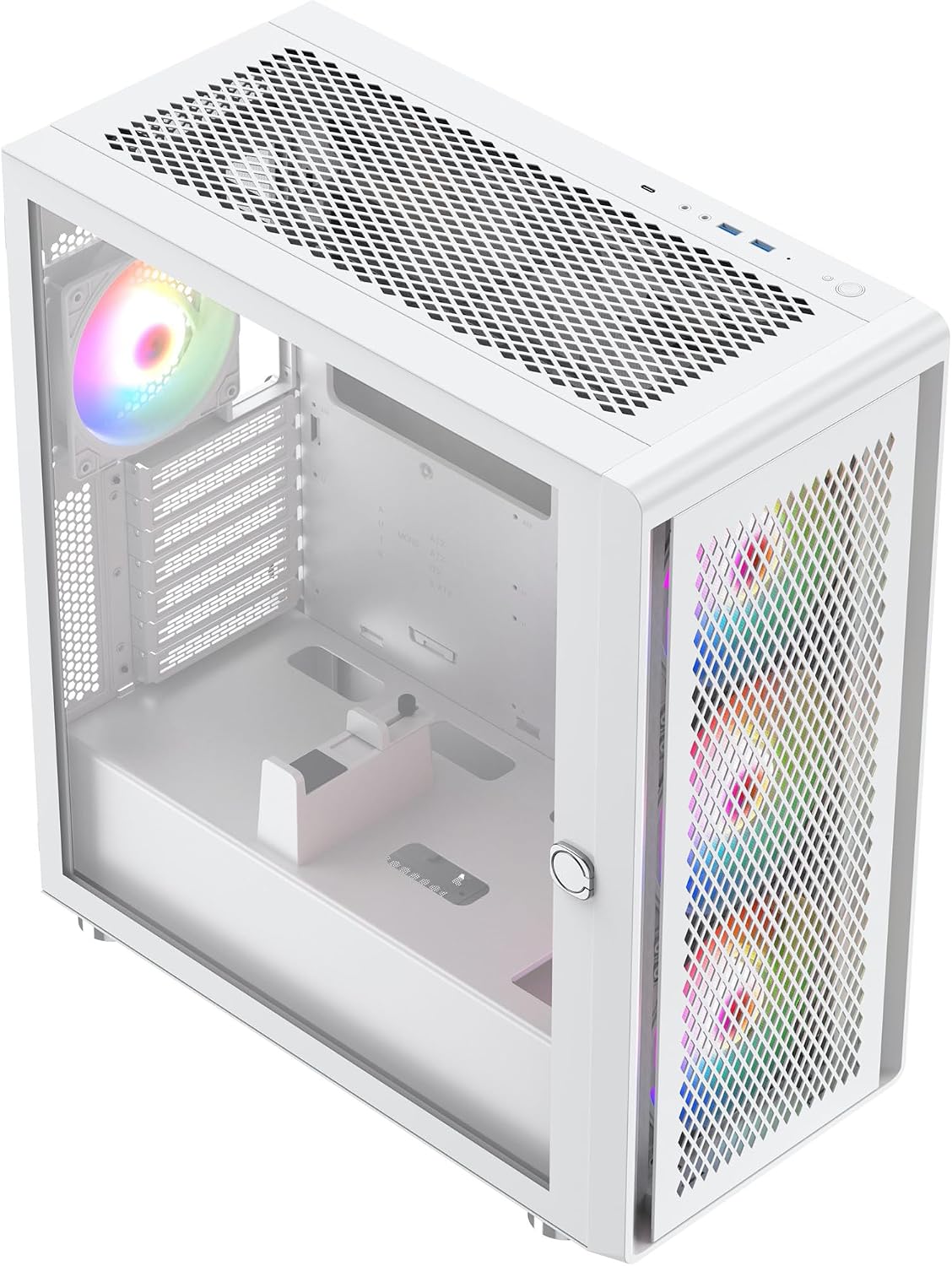
Figure 1: SILENTWARE Air 100 White Midi Tower PC Case (Angled View)
2. Setup and Component Installation
The SILENTWARE Air 100 is designed for maximum airflow and simplified PC assembly. Follow these steps for installing your components.
2.1 Case Overview and Access
The case features a metallic mesh front panel and a tempered glass side panel for easy access and component visibility. The side panel can be opened for installation.

Figure 2: Interior View with Open Side Panel
2.2 Motherboard Installation
The Air 100 supports E-ATX (up to 370mm wide), ATX, mATX, and ITX motherboards. Install standoffs as required for your motherboard size, then secure the motherboard with screws.

Figure 3: Motherboard Tray Area
2.3 Storage Device Installation
The case provides space for up to two 2.5-inch SSDs and two 3.5-inch HDDs. Mount these drives in the designated bays located behind the motherboard tray and in the PSU shroud area.

Figure 4: Drive Bays and Cable Management Area
2.4 Graphics Card (GPU) Installation
The Air 100 supports GPUs up to 383mm in length. Install your graphics card into the appropriate PCIe slot on your motherboard and secure it. An adjustable GPU support is included for larger cards.
2.5 Power Supply Unit (PSU) Installation
Install your ATX power supply in the bottom-mounted shroud. Ensure all necessary cables are routed through the cable management cutouts before securing the PSU.
2.6 Cooling System Installation
The case comes with four pre-installed 120mm A-RGB fans (three front, one rear) for excellent ventilation. It supports liquid cooling radiators up to 360mm at the front and top, and 120mm at the rear. CPU coolers up to 174mm in height are compatible.
3. Operating Instructions
3.1 Power On
After all components are installed and connected, ensure the power supply switch is in the 'ON' position. Press the power button on the front I/O panel to start your system.

Figure 5: Front I/O Panel
3.2 ARGB Fan Control
The pre-installed A-RGB fans feature 3-pin A-RGB connectors and 4-pin fan control. These can be connected to your motherboard for synchronized lighting effects and fan speed adjustments directly from your motherboard's software. The daisy-chain connections simplify wiring, eliminating the need for additional adapters or controllers.
4. Maintenance
4.1 Cleaning
Regular cleaning helps maintain optimal airflow and component longevity. Use compressed air to clear dust from the metallic mesh front panel, top panel, and any dust filters. Wipe the tempered glass side panel with a soft, lint-free cloth and a mild glass cleaner.
4.2 Airflow Optimization
Ensure that no cables or components obstruct the airflow paths within the case. Periodically check fan operation to ensure they are spinning freely and quietly.
5. Troubleshooting
5.1 Fans Not Spinning / ARGB Not Lighting Up
- Check all fan and ARGB connections to the motherboard or controller.
- Ensure the motherboard's fan headers are enabled in the BIOS/UEFI.
- Verify that the motherboard's ARGB software is correctly installed and configured.
5.2 No Power
- Confirm the power supply is switched on and properly connected to the wall outlet.
- Check all internal power connections (24-pin ATX, 8-pin CPU, PCIe power, SATA power).
- Ensure the front panel power button cable is correctly connected to the motherboard.
6. Specifications
| Feature | Specification |
|---|---|
| Brand | SILENTWARE |
| Model Name | Air 100 |
| Color | White |
| Case Type | Midi Tower |
| Material | Alloy Steel |
| Motherboard Compatibility | E-ATX (up to 370mm), ATX, mATX, ITX |
| GPU Length Support | Up to 383 mm |
| CPU Cooler Height Support | Up to 174 mm |
| Radiator Support (Front) | 360mm, 280mm, 240mm, 120mm |
| Radiator Support (Top) | 360mm, 280mm, 240mm, 120mm |
| Radiator Support (Rear) | 120mm |
| Pre-installed Fans | 4x 120mm A-RGB (3 front, 1 rear) |
| Fan Size | 120 Millimeters |
| Storage Bays | 2x 2.5" SSD, 2x 3.5" HDD |
| Power Supply Mounting | Bottom Mount (ATX) |
| Front I/O Ports | 2x USB, Audio Jacks |
| Special Features | Tempered glass side panel, Adjustable GPU support, Silent PWM fans with hydro bearing |
7. Warranty Information
This product comes with a 2-year availability for spare parts. For specific warranty terms and conditions, please refer to the documentation provided with your purchase or contact SILENTWARE customer support.
8. Customer Support
If you encounter any issues or have questions not covered in this manual, please contact SILENTWARE customer support through their official website or the retailer where the product was purchased. Please have your product model (Air 100) and purchase information ready when contacting support.