
1. Introduction
Thank you for choosing the iKF Solo Pro Wireless Bluetooth Headphones. This manual provides essential information for setting up, operating, and maintaining your headphones to ensure optimal performance and longevity. Please read this manual thoroughly before use and retain it for future reference.
2. Safety Information
- Do not expose the headphones to extreme temperatures, humidity, or corrosive substances.
- Avoid dropping or subjecting the headphones to strong impacts.
- Do not disassemble or attempt to repair the headphones yourself. This may void the warranty and cause damage.
- Clean the headphones with a soft, dry cloth. Do not use liquid cleaners.
- Prolonged listening at high volumes may cause hearing damage. Adjust volume to a safe level.
- Keep out of reach of children.
3. Package Contents
Verify that all items are present in the package:
- iKF Solo Pro Wireless Bluetooth Headphones
- USB-C Charging Cable
- 3.5mm Audio Cable
- User Manual (this document)
4. Product Overview
Familiarize yourself with the components and controls of your iKF Solo Pro headphones.

A front-angle view of the iKF Solo Pro wireless headphones in BlackRed, showcasing the earcups and headband.
Controls and Ports:
- Power Button: Press and hold to power on/off.
- Volume Up/Next Track Button: Short press for volume up, long press for next track.
- Volume Down/Previous Track Button: Short press for volume down, long press for previous track.
- Multi-function Button (MFB): Play/pause, answer/end calls, activate voice assistant.
- ANC/Transparent Mode Button: Toggle between Active Noise Cancellation, Transparent Mode, and Normal Mode.
- USB-C Charging Port: For charging the headphones.
- 3.5mm Audio Jack: For wired connection.
- LED Indicator: Displays power, pairing, and charging status.
5. Setup
5.1 Charging the Headphones
Before first use, fully charge your headphones.
- Connect the USB-C charging cable to the USB-C port on the headphones.
- Connect the other end of the cable to a USB power adapter (not included) or a computer's USB port.
- The LED indicator will show charging status (e.g., red for charging, blue for fully charged).
- A full charge typically takes approximately 2 hours.
5.2 Bluetooth Pairing
To connect your headphones to a device:
- Ensure the headphones are charged and powered off.
- Press and hold the Power button until the LED indicator flashes blue and red alternately, indicating pairing mode.
- On your device (smartphone, tablet, laptop), enable Bluetooth and search for new devices.
- Select "iKF Solo Pro" from the list of available devices.
- Once connected, the LED indicator will flash blue slowly or remain solid blue.
5.3 iKF-APP Installation and Customization
Enhance your listening experience by downloading the iKF-APP.
- Scan the QR code in the quick start guide or search for "iKF" in your device's app store.
- Install the iKF-APP and open it.
- Ensure your headphones are paired via Bluetooth to your device. The app should automatically detect them.
- Within the app, you can adjust noise cancellation levels, EQ settings, sound modes (Pop, Rock, Classical), monitor battery, and customize button functions.
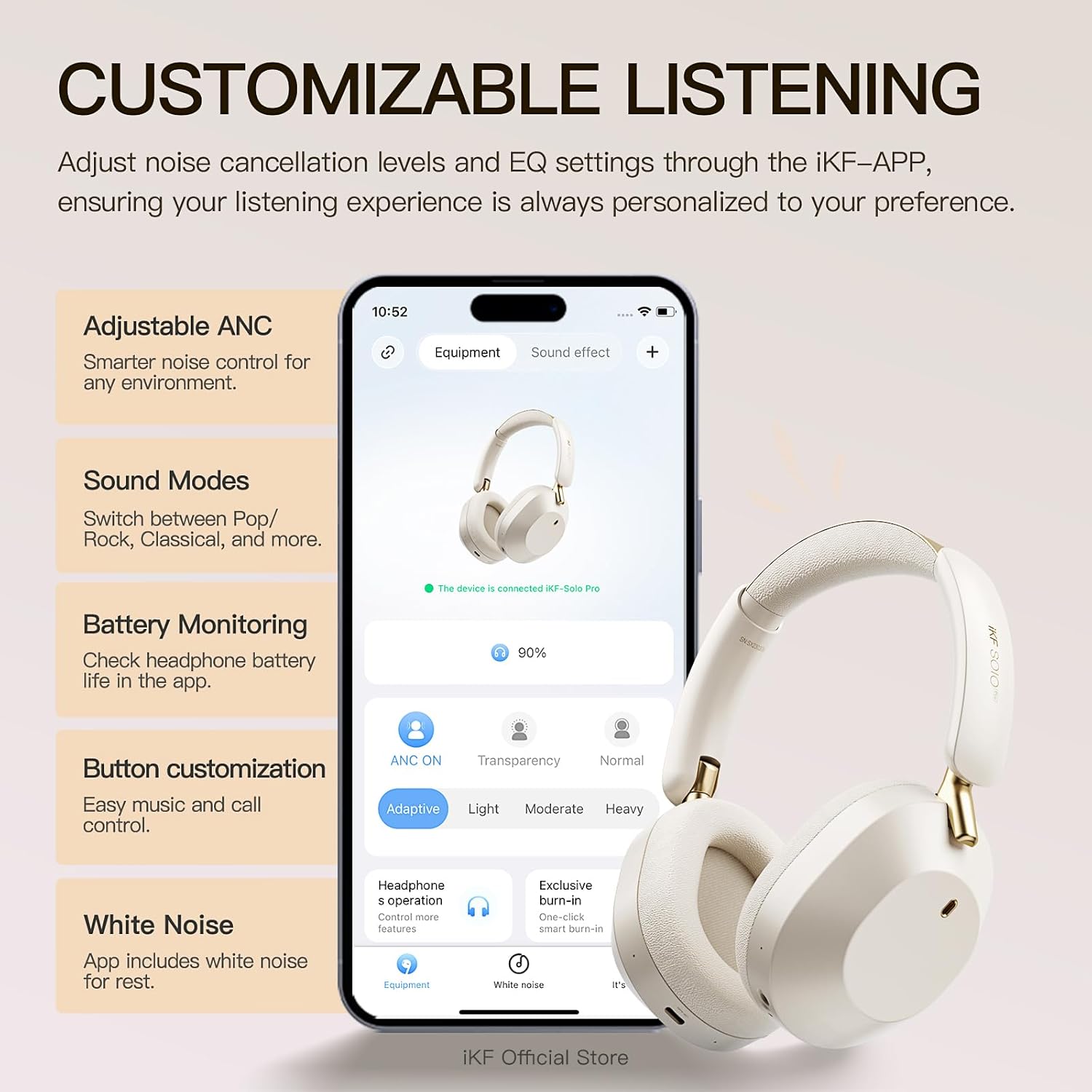
A visual showing the iKF Solo Pro headphones alongside a smartphone displaying the iKF-APP interface, illustrating options for adjusting ANC levels, sound modes, and button customization.
5.4 Multipoint Connection
The iKF Solo Pro supports simultaneous connection to two devices.
- Pair the headphones with the first device as described in section 5.2.
- Disable Bluetooth on the first device.
- Put the headphones back into pairing mode and pair them with the second device.
- Re-enable Bluetooth on the first device. The headphones should automatically connect to both devices.
- Audio will switch between devices based on which one is actively playing content or receiving a call.

A composite image detailing the comfort fit with soft earcups, the Type-C port for wired connection, and the capability for simultaneous connection to two devices.
6. Operating Instructions
6.1 Power On/Off
- Power On: Press and hold the Power button for approximately 3 seconds until the LED indicator lights up.
- Power Off: Press and hold the Power button for approximately 3 seconds until the LED indicator turns off.
6.2 Music Playback
- Play/Pause: Short press the MFB.
- Volume Up: Short press the Volume Up button.
- Volume Down: Short press the Volume Down button.
- Next Track: Long press the Volume Up button.
- Previous Track: Long press the Volume Down button.
6.3 Call Management
- Answer/End Call: Short press the MFB.
- Reject Call: Long press the MFB.
- Activate Voice Assistant: Double-press the MFB.
6.4 Noise Control Modes
The iKF Solo Pro features Adaptive Active Noise Cancellation (ANC) and Transparent Mode.

An image illustrating the iKF Solo Pro headphones with a visual representation of 54dB noise reduction, highlighting the Adaptive Noise Cancellation feature.
- Toggle Modes: Short press the ANC/Transparent Mode button to cycle through: Active Noise Cancellation (ANC) → Transparent Mode → Normal Mode.
- Active Noise Cancellation: Reduces external ambient noise for an immersive listening experience.
- Transparent Mode: Allows you to hear your surroundings clearly without removing the headphones, facilitating conversations or awareness of your environment.

A person wearing iKF Solo Pro headphones, with sound waves indicating the transparent mode for easy conversations without removing the headphones.
6.5 Spatial Audio with Head Tracking
Experience immersive audio that adapts to your head movements.
- Spatial Audio provides a three-dimensional sound experience, ideal for movies, games, and music.
- Head tracking technology ensures the sound stage remains fixed relative to your device, creating a more realistic and engaging audio environment.
- This feature is typically enabled and managed through the iKF-APP or your connected device's audio settings.

A graphic depicting the iKF Solo Pro headphones on a head, with concentric circles indicating 360-degree head tracking technology for spatial audio.
6.6 Wired Connection
You can use the headphones with a wired connection even if the battery is depleted.
- Connect one end of the 3.5mm audio cable to the 3.5mm audio jack on the headphones.
- Connect the other end to the 3.5mm audio output of your device.
- Note that some advanced features like ANC or Spatial Audio may be limited or unavailable in wired mode without power.
7. Maintenance
7.1 Cleaning
- Wipe the headphones with a soft, dry, lint-free cloth.
- Do not use abrasive cleaners, alcohol, or chemical solvents.
- Avoid getting moisture into any openings.
7.2 Storage
- Store the headphones in a cool, dry place, away from direct sunlight and extreme temperatures.
- If storing for an extended period, charge the headphones periodically to maintain battery health.
8. Troubleshooting
If you encounter issues with your iKF Solo Pro headphones, refer to the following common problems and solutions:
| Problem | Possible Solution |
|---|---|
| Headphones do not power on. | Ensure the headphones are fully charged. Connect to a power source and try again. |
| Cannot pair with device. | Ensure headphones are in pairing mode (flashing blue/red). Turn off and on Bluetooth on your device. Forget previous pairings and try again. Ensure headphones are within range. |
| No sound or low volume. | Check volume levels on both headphones and connected device. Ensure headphones are properly paired. Try another audio source. |
| ANC not working effectively. | Ensure ANC mode is activated. Adjust headphone fit to ensure a good seal around your ears. |
| Intermittent connection. | Ensure no obstructions between headphones and device. Move closer to the device. Avoid strong electromagnetic interference. |
| Headphones not charging. | Check the USB-C cable and power adapter. Try a different cable or power source. Ensure the charging port is clean. |
If the issue persists after trying these solutions, please contact customer support.
9. Specifications
Technical specifications for the iKF Solo Pro Wireless Bluetooth Headphones:
| Feature | Detail |
|---|---|
| Model Name | iKF Solo Pro |
| Noise Control | Adaptive Active Noise Cancellation (up to 54dB) |
| Connectivity Technology | Bluetooth 5.0, Wired (3.5mm) |
| Audio Driver Type | 40mm Silk Diaphragm Dynamic Driver |
| Frequency Range | 20 Hz to 20,000 Hz |
| Impedance | 16 Ohm |
| Battery Life (ANC Off) | Up to 140 hours |
| Battery Life (ANC On) | Up to 95 hours |
| Charging Time | Approximately 2 hours |
| Charging Port | USB-C |
| Control Method | Button Control, Touch Control |
| Compatible Devices | Android devices, Laptops, Smart Watch, Tablets, iPhone/iPad/Macbook |
| Material | Metal, Plastic |
| Item Weight | 1.6 Pounds (approx. 0.73 kg) |

An image highlighting the extended battery life of the iKF Solo Pro headphones, indicating 140 hours of playback with ANC off and 95 hours with ANC on.
10. Warranty and Support
10.1 Warranty Information
Your iKF Solo Pro headphones are covered by a manufacturer's warranty against defects in materials and workmanship. The specific terms and duration of the warranty may vary by region and retailer. Please refer to the warranty card included with your product or contact your point of purchase for detailed information.
The warranty does not cover damage caused by:
- Accident, abuse, misuse, or improper operation.
- Unauthorized repair or modification.
- Failure to follow operating instructions.
- Normal wear and tear.
10.2 Customer Support
For technical assistance, warranty claims, or general inquiries, please contact iKF customer support through the following channels:
- Website: Visit the official iKF website for support resources and contact forms.
- Email: Refer to your product packaging or the iKF website for the customer support email address.
- iKF-APP: The iKF-APP may include a direct support feature.
When contacting support, please have your product model (iKF Solo Pro) and proof of purchase readily available.
