
ARCCAPTAIN MIG250
ARCCAPTAIN 250A MIG Welder User Manual
Model: MIG250
Brand: ARCCAPTAIN
Product Overview
The ARCCAPTAIN 250A MIG Welder is a versatile 6-in-1 welding machine designed for various welding tasks. It supports Gas MIG, Flux Core MIG, Lift TIG, MMA (Stick), Spot Welding, and Spool Gun applications. This machine is suitable for welding mild steel, carbon steel, stainless steel, and aluminum.
Equipped with a fully digital MCU and high-integrity circuit design, it ensures stable and high-performance welding. Intelligent fan control aids heat dissipation, extending the machine's lifespan. Special functions like adaptive crater, burn-back adjustment, and pre-flow/post-flow enhance welding efficiency.
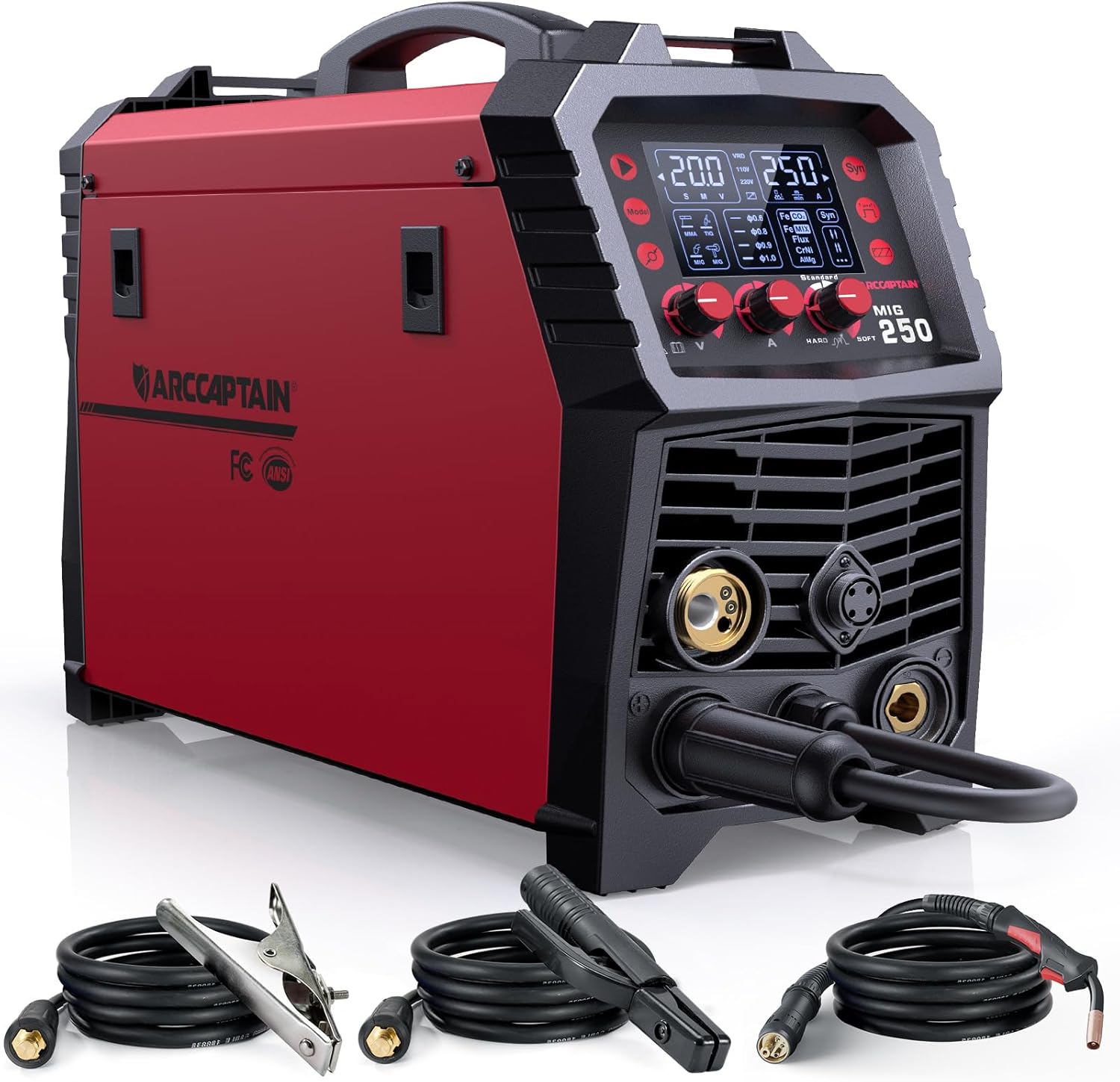
Image: The ARCCAPTAIN 250A MIG Welder, showcasing its compact design and included accessories such as the MIG torch, earth clamp, and stick holder.
Key Features
- 6-in-1 Welding Capability: Supports Gas MIG, Flux Core MIG, Lift TIG, MMA, Spot, and Spool Gun welding modes.
- Digital Control: Features a fully digital MCU for enhanced welding stability and performance.
- Synergic & Manual MIG: Offers automatic parameter matching for beginners and full manual control for experienced users.
- Safety Protection: Includes VRD, over current, over voltage, over-load, and overheating protection.
- Wide Material Compatibility: Capable of welding mild steel, carbon steel, stainless steel, and aluminum.

Image: Visual representation of the six welding processes supported by the ARCCAPTAIN 250A MIG Welder.
Package Contents
Upon unboxing, verify that all components are present:
- 1 × ARCCAPTAIN MIG250 MIG Welder Machine
- 1 × 10 ft MIG Torch
- 1 × 10 ft Earth Clamp
- 1 × 10 ft Stick Holder
- 2 × Contact Tips (.030" & .035")
- 3 × Wire Feed Rollers (K & V)
- 1 × 10 ft Gas Hose
- 1 × 220V to 110V Wire Adapter
- 1 × User Manual

Image: A comprehensive list and visual representation of all items included in the ARCCAPTAIN MIG250 Welder package.
Setup Instructions
1. Power Connection
Ensure the welder is connected to an appropriate power source (110V or 220V) using the provided adapter if necessary. Always ensure the machine is off before connecting or disconnecting power.
2. Connecting Welding Cables
Connect the MIG torch, earth clamp, and stick holder to their respective ports on the front panel of the welder. Ensure connections are secure.

Image: Illustrations detailing how to connect cables for MIG Gas, Flux Cored, Spot, DC Stick/MMA, Lift TIG, and Spool Gun welding modes.
3. Gas Connection (for Gas MIG)
If performing Gas MIG welding, connect the gas hose to the welder and to your gas cylinder regulator. Ensure all connections are leak-free.
4. Wire Installation
Open the wire feed compartment. Install the appropriate welding wire spool and thread the wire through the feed rollers. Select the correct wire feed roller (K or V) and contact tip based on your wire type and diameter.

Image: An internal view of the welder, highlighting the built-in LED light for visibility during wire feed setup.
Operating Instructions
General Operation
The ARCCAPTAIN 250A features a large LED display for easy parameter adjustment. Turn the machine on and select your desired welding mode (MIG, TIG, MMA, etc.).

Image: The control panel of the welder, illustrating the synergic MIG welding interface with options for wire diameter and gas/material selection.
Synergic MIG Mode
For ease of use, especially for beginners, select the Synergic (Syn) mode. Press the "SYN" button, then choose the wire diameter and gas/material type. The machine will automatically recommend the appropriate current and wire feeding speed. You can fine-tune these settings based on your welding preference.
Manual MIG Mode
For professional users requiring more control, switch to Manual MIG mode to set welding current and wire feed speed independently.
Welding Parameters
Refer to the following tables for recommended welding parameters for various materials and processes:
MIG Welding Parameters

Image: A detailed chart outlining recommended voltage, current, and wire feed speed settings for various MIG welding applications, including gasless steel, solid steel, stainless steel, and aluminum.
Stick & TIG Welding Parameters

Image: A table providing recommended current and material thickness guidelines for Stick (MMA) and Lift TIG welding on steel and stainless steel.
Video Demonstration: ARCCAPTAIN 250A MIG Welder Overview
Video: An official overview of the ARCCAPTAIN 250A MIG Welder, demonstrating its 6-in-1 capabilities and key features.
Maintenance
Regular maintenance ensures the longevity and optimal performance of your welding machine.
- Cleaning: Periodically clean the exterior of the machine with a dry cloth. Use compressed air to clear dust and debris from ventilation openings.
- Torch and Cable Inspection: Regularly inspect the MIG torch, earth clamp, and stick holder for wear, damage, or loose connections. Replace worn parts as needed.
- Wire Feed System: Keep the wire feed rollers clean and free of debris. Ensure the contact tip is not clogged and replace it if it shows signs of excessive wear.
- Storage: Store the welder in a clean, dry environment, away from excessive dust and moisture.
Troubleshooting
If you encounter issues with your ARCCAPTAIN 250A MIG Welder, refer to the following common troubleshooting steps:
| Problem | Possible Cause | Solution |
|---|---|---|
| No power | Loose power connection, tripped circuit breaker, machine fault. | Check power cable, wall outlet, and circuit breaker. Ensure the machine is fully powered on (wait for screen to turn off and fan to stop after initial power-up). |
| Poor arc stability | Incorrect parameters, poor ground connection, worn contact tip, wrong wire feed speed. | Adjust welding parameters according to the manual. Ensure earth clamp has good contact. Replace contact tip. Adjust wire feed speed. |
| Wire feeding issues | Incorrect wire spool installation, clogged liner, wrong drive roller tension, incorrect drive roller type. | Re-install wire spool correctly. Clean or replace torch liner. Adjust drive roller tension. Ensure correct drive roller for wire type. |
| Overheating protection activated | Exceeding duty cycle, poor ventilation. | Allow the machine to cool down. Ensure adequate ventilation around the welder. Reduce continuous welding time. |
Specifications
| Feature | Detail |
|---|---|
| Manufacturer | ARCCAPTAIN |
| Part Number | MIG250 |
| Item Weight | 20.5 pounds |
| Product Dimensions | 14.9 x 5.3 x 9.7 inches |
| Country of Origin | China |
| Item Model Number | MIG250 |
| Color | Red+black |
| Material | ABS+Metal |
| Pattern | MIG Welder 250A |
| Power Source | DC |
| Voltage | 220 Volts (with 110V adapter included) |

Image: A visual representation of the welder's dimensions and its lightweight nature (20.5 lbs).
Safety Information
Your safety is paramount. The ARCCAPTAIN 250A MIG Welder incorporates several safety features:
- VRD (Voltage Reduction Device): Reduces open-circuit voltage for increased safety.
- Over Current Protection: Prevents damage from excessive current.
- Over Voltage Protection: Safeguards against voltage spikes.
- Over-Load Protection: Protects the machine from excessive load.
- Overheating Protection: Automatically shuts down the machine if it exceeds safe operating temperatures.
Important Note: DO NOT power on the machine until the screen turns off and the fan stops working after initial connection or a power cycle. This indicates the internal systems are ready.

Image: Icons representing the various safety protections built into the ARCCAPTAIN MIG250 Welder.
Warranty and Support
ARCCAPTAIN stands behind the quality of its products. For warranty information, technical support, or to purchase replacement parts and accessories, please visit the official ARCCAPTAIN website or contact their customer service department. Keep your purchase receipt for warranty claims.
For additional resources and product information, you may visit the ARCCAPTAIN Store on Amazon.
Related documentsMIG250


Ask a question about this manual
Ask about setup, troubleshooting, compatibility, parts, safety, or missing instructions. Manuals+ will review the question and use this page’s manual context to help answer it.