
BOSGAME E2 3550H 16+512G
BOSGAME E2 Mini PC User Manual
Model: E2 3550H 16+512G
1. Introduction
Welcome to the user manual for your BOSGAME E2 Mini PC. This compact and powerful device is designed for a wide range of applications, from business and office tasks to multimedia entertainment and light gaming. Featuring an AMD Ryzen 5 3550H processor, 16GB DDR4 RAM, and a 512GB PCIe 3.0 SSD, the E2 Mini PC delivers reliable performance in a small form factor. This manual provides essential information for setting up, operating, maintaining, and troubleshooting your device.

Image: The BOSGAME E2 Mini PC, showcasing its compact design and front ports including USB and USB-C.
2. Package Contents
Please verify that all items listed below are included in your package. If any items are missing or damaged, please contact customer support.
- BOSGAME E2 Mini PC
- Power Adapter
- VESA Mount with Screws
- HDMI Cable
- User Manual (this document)

Image: All components included in the BOSGAME E2 Mini PC package, neatly arranged.
3. Product Features
The BOSGAME E2 Mini PC is engineered with advanced components to provide a robust computing experience.
- Powerful Processor: Equipped with an AMD Ryzen 5 3550H processor (4 Cores, 8 Threads, up to 3.7 GHz boost frequency) for efficient multitasking and performance.
- High-Speed Memory: Features 16GB (2x8G) DDR4 2400MHz RAM, expandable up to 32GB, ensuring smooth operation of multiple applications.
- Fast Storage: Includes a 512GB M.2 2280 NVMe PCIe 3.0 x4 SSD for rapid boot times and quick data access. Note: Does not support additional 2.5-inch HDDs.
- Triple Display Support: Connect up to three 4K@60Hz displays simultaneously via two HDMI 2.0 ports and one Type-C port.
- Versatile Connectivity: Supports Wi-Fi 5, Bluetooth 5.2, and Gigabit Ethernet (RJ45) for reliable network and peripheral connections.
- Multiple Ports: Includes 3x USB 3.2, 1x USB 2.0, 1x RJ45, 2x HDMI 2.0, 1x Type-C, and a 3.5mm audio jack.
- Operating System: Pre-installed with Windows 11 Pro and compatible with Ubuntu.

Image: Visual representation of the AMD Ryzen 5 3550H processor, highlighting its 4 cores, 8 threads, 3.70 GHz max boost clock, and 25W TDP.

Image: The BOSGAME E2 Mini PC connected to three monitors, demonstrating its triple display capability for work and entertainment.
4. Setup Guide
Follow these steps to set up your BOSGAME E2 Mini PC for the first time.
- Connect to Power: Plug the power adapter into the DC-IN port on the back of the Mini PC, then connect the adapter to a power outlet.
- Connect Display: Use the provided HDMI cable to connect your monitor or TV to one of the HDMI ports on the Mini PC. Alternatively, use a USB-C to DisplayPort/HDMI cable for the Type-C port.
- Connect Peripherals: Plug in your USB keyboard and mouse into the available USB ports.
- Network Connection:
- Wired: Connect an Ethernet cable from your router or modem to the RJ45 LAN port on the Mini PC.
- Wireless: The Mini PC will automatically detect available Wi-Fi networks upon boot-up. You can connect to your preferred network through the operating system settings.
- Power On: Press the power button located on the front of the Mini PC. The power indicator light will illuminate.
- Initial Setup: Follow the on-screen instructions to complete the Windows 11 Pro initial setup, including language, region, and user account creation.

Image: Detailed view of the BOSGAME E2 Mini PC's front and rear interface displays, showing USB, USB-C, Audio Jack, Power button on the front, and LAN, USB, HDMI, and DC ports on the rear.
5. Operating Instructions
5.1 Power Management
- Power On: Press the power button once.
- Shut Down: Click the Start button in Windows, then select Power > Shut down.
- Restart: Click the Start button in Windows, then select Power > Restart.
- Sleep: Click the Start button in Windows, then select Power > Sleep.
5.2 Display Configuration
The BOSGAME E2 supports up to three independent displays.
- Connect your monitors to the available HDMI and Type-C ports.
- In Windows, right-click on the desktop and select "Display settings" to configure display modes (Extend, Duplicate, or Second screen only) and resolutions.
5.3 Network and Bluetooth
- Wi-Fi: Access Wi-Fi settings from the Windows taskbar network icon to connect to available wireless networks.
- Ethernet: The wired connection will typically be active automatically once an Ethernet cable is plugged in.
- Bluetooth: To pair Bluetooth devices, go to Windows Settings > Bluetooth & devices, and turn on Bluetooth. Select "Add device" to pair new devices.
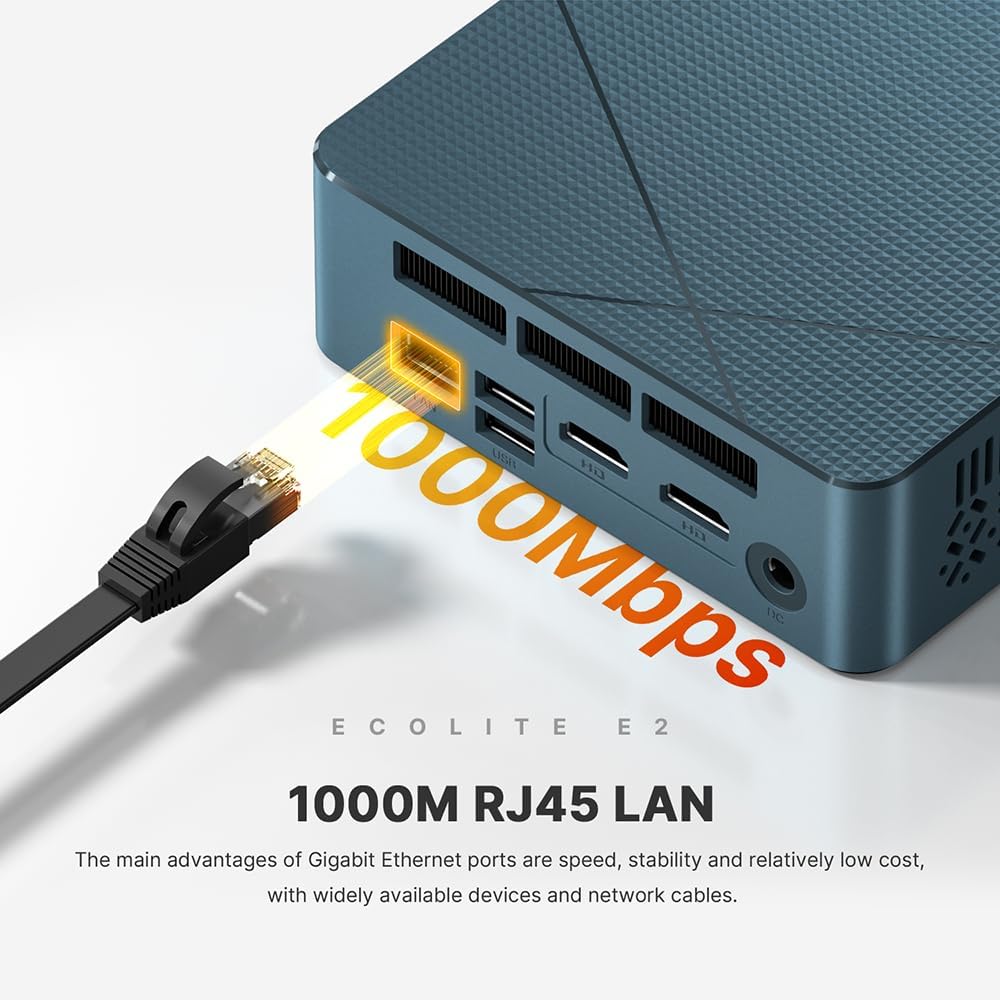
Image: A visual demonstrating the 1000Mbps RJ45 LAN port on the BOSGAME E2 Mini PC, emphasizing its high-speed wired network capability.

Image: The USB-C interface of the BOSGAME E2 Mini PC, illustrating its support for 10Gbps data transmission and 4K video output to a monitor.
6. Maintenance
Proper maintenance ensures the longevity and optimal performance of your Mini PC.
- Cleaning: Regularly clean the exterior of the Mini PC with a soft, dry cloth. Use compressed air to clear dust from ventilation holes to prevent overheating. Do not use liquid cleaners directly on the device.
- Software Updates: Keep your Windows operating system and drivers updated to ensure security and performance. Windows Update can be accessed via Settings > Windows Update.
- Storage Management: Periodically clear unnecessary files and applications to maintain sufficient free storage space for optimal performance.
- Environmental Conditions: Operate the Mini PC in a well-ventilated area, away from direct sunlight, heat sources, and excessive moisture.
7. Troubleshooting
If you encounter issues with your BOSGAME E2 Mini PC, refer to the following common troubleshooting steps.
| Problem | Possible Cause | Solution |
|---|---|---|
| No power/Does not turn on | Power adapter not connected properly; Power outlet issue; Faulty power adapter. | Ensure power adapter is securely connected to both the PC and the outlet. Try a different power outlet. Test with another compatible power adapter if available. |
| No display on monitor | Display cable loose or incorrect; Monitor input not selected; Monitor off or faulty. | Check HDMI/Type-C cable connections. Ensure monitor is powered on and set to the correct input source. Try a different display cable or monitor. |
| No Wi-Fi connection | Wi-Fi disabled; Incorrect password; Router issue; Driver issue. | Ensure Wi-Fi is enabled in Windows settings. Verify Wi-Fi password. Restart your router. Check device manager for Wi-Fi driver status. |
| Slow performance | Too many applications running; Low storage space; Overheating; Outdated drivers. | Close unnecessary applications. Free up disk space. Ensure proper ventilation. Update drivers and Windows. |
For issues not covered here, please refer to the Warranty and Support section.
8. Specifications
Detailed technical specifications for the BOSGAME E2 Mini PC.
| Feature | Detail |
|---|---|
| Brand | BOSGAME |
| Model Number | E2 |
| Processor | AMD Ryzen 5 3550H (4 Cores, 8 Threads, up to 3.7 GHz) |
| Graphics | Radeon Vega 8 Graphics (8 cores, 1200 MHz Frequency) |
| RAM | 16GB DDR4 2400MHz (2x8GB, Max 32GB) |
| Storage | 512GB M.2 2280 NVMe PCIe 3.0 x4 SSD |
| Operating System | Windows 11 Pro (pre-installed), supports Ubuntu |
| Wi-Fi | Wi-Fi 5 (M.2 KEY E 2230 card) |
| Bluetooth | Bluetooth 5.2 |
| LAN | 1000Mbps RJ45 Gigabit Ethernet |
| Video Output | 2x HDMI 2.0 (4K@60Hz), 1x Type-C (4K@60Hz) |
| USB Ports | 3x USB 3.2, 1x USB 2.0, 1x Type-C (10Gbps data) |
| Audio Port | 1x 3.5mm Audio Jack |
| Dimensions (L x W x H) | 12 x 11 x 4.5 cm |
| Weight | 550 grams |
9. Warranty and Support
BOSGAME is committed to providing high-quality products and excellent customer service.
- Warranty: All BOSGAME products, including the E2 Mini PC, come with a two-year warranty from the date of purchase. This warranty covers manufacturing defects and material faults under normal use.
- Customer Support: We offer 24/7 online assistance to help you with any questions or issues you may encounter. Please refer to the contact information provided with your purchase or visit the official BOSGAME website for support details.
- Returns and Replacements: Please refer to the retailer's return policy for details on returns and replacements.
Ask a question about this manual
Ask about setup, troubleshooting, compatibility, parts, safety, or missing instructions. Manuals+ will review the question and use this page’s manual context to help answer it.