1. Introduction
This manual provides essential information for the safe and efficient use of your Redodo Smart Bluetooth 12V 140Ah LiFePO4 Battery. Please read it thoroughly before installation and operation. This battery is designed for various applications including RVs, marine, solar systems, and off-grid power.

Image 1.1: Redodo Smart Bluetooth 12V 140Ah LiFePO4 Battery with a smartphone displaying the monitoring app.
2. Safety Information
Important Safety Instructions:
- Always wear appropriate personal protective equipment (PPE) such as safety glasses and gloves when handling batteries.
- Do not short-circuit the battery terminals.
- Ensure proper ventilation during charging and discharging.
- Do not expose the battery to fire or extreme heat.
- Do not immerse the battery in water or other liquids.
- Keep the battery away from children and pets.
- Use only compatible LiFePO4 chargers with 0V activation capability.
- Do not attempt to open or disassemble the battery. Internal components are not user-serviceable.
- This battery is not suitable for starter batteries or golf carts.
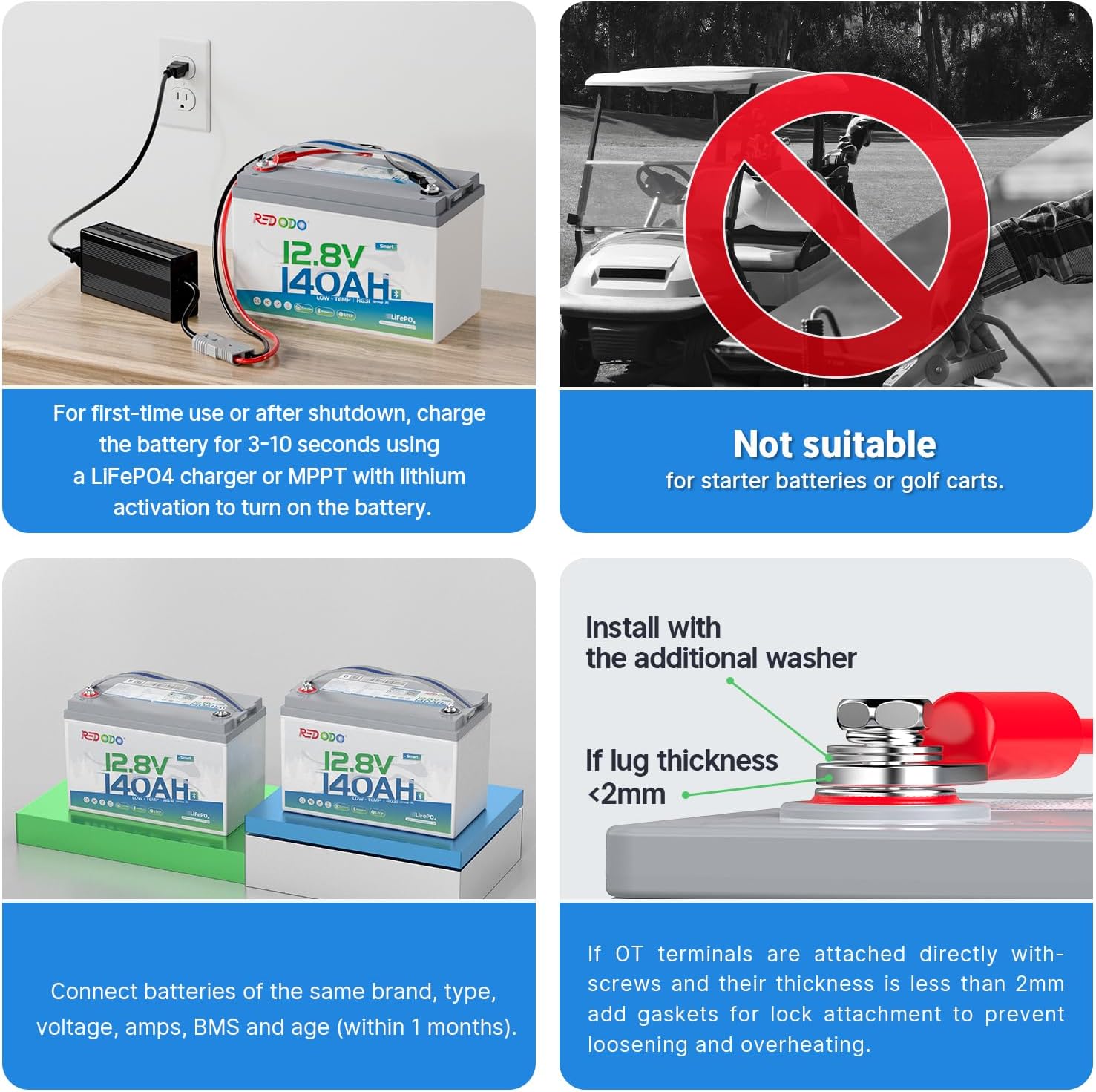
Image 2.1: Visual representation of important usage guidelines, including charging requirements and unsuitable applications like golf carts.
3. What's in the Box
Upon opening the package, verify that all components are present and undamaged:
- 1x Redodo Smart Bluetooth 12.8V 140Ah LiFePO4 Battery
- 2x M8 Terminal Bolts
- 1x Flat Washer
- 2x Insulation Caps for Bolts
- 1x Product Manual (this document)
- 1x Guide Card

Image 3.1: An exploded view showing the Redodo 12V 140Ah battery and its included accessories: M8 terminal bolts, flat washer, insulation caps, product manual, and guide card.
4. Specifications
| Feature | Detail |
|---|---|
| Brand | Redodo |
| Model | 12V 140Ah Bluetooth LiFePO4 Battery |
| Product Dimensions | 6.77"D x 13"W x 8.5"H |
| Item Weight | 23.1 pounds |
| Nominal Voltage | 12.8V |
| Capacity | 140Ah |
| BMS | 150A (Upgraded) |
| Bluetooth Version | 5.0 |
| Terminal Type | M8 |
| Max Continuous Discharge Current | 150A |
| Max Load Power | 1920W |
| Low Temperature Cut-off | Yes (Discharging below -4°F (-20°C), Charging off below 32°F (0°C)) |
| Max Extension | Up to 4P4S (48V 560Ah) |
| Lifetime | 10 Years (4000-15000 cycles) |

Image 4.1: Physical dimensions and capacity comparison between the 140Ah and 100Ah Group 31 batteries.
5. Setup and Installation
5.1 Initial Activation and Charging
Upon arrival or after a prolonged shutdown, the battery may be in a powered-off state. To activate and ensure normal function:
- Connect the battery to a dedicated LiFePO4 charger or an MPPT solar charge controller that features a lithium activation function.
- Charge the battery for 3-10 seconds. This will turn on the battery's internal systems.
- Ensure the charger is compatible with 12.8V LiFePO4 batteries and has a 0V activation capability.
5.2 Connecting Multiple Batteries
For increased capacity or voltage, multiple Redodo LiFePO4 batteries can be connected. Observe the following guidelines:
- Connect batteries of the same brand, type, voltage, amperage, BMS, and age (within 1 month).
- For parallel connections (increased capacity, same voltage), connect positive to positive and negative to negative terminals.
- For series connections (increased voltage, same capacity), connect the positive terminal of one battery to the negative terminal of the next.
- The battery supports a maximum extension of up to 4 series and 4 parallel connections (4P4S) to achieve a 48V (51.2V) 560Ah battery bank.
5.3 Terminal Connection
When attaching OT terminals directly with screws, if the lug thickness is less than 2mm, use additional washers or gaskets for lock attachment. This prevents loosening and overheating of the connection.
Image 5.1: Illustration of correct terminal installation, emphasizing the use of washers for lugs thinner than 2mm to ensure secure and safe connections.
6. Operating the Battery
6.1 Bluetooth Monitoring
The Redodo Smart Bluetooth 12V 140Ah LiFePO4 Battery features an upgraded smart BMS connected to a Bluetooth 5.0 module. This allows for real-time monitoring via a smartphone application.
- Download the official Redodo app from the App Store (iOS) or Google Play Store (Android).
- Ensure your phone's Bluetooth is enabled.
- Open the app and connect to your 140Ah LiFePO4 battery. The connection range is typically within 10 meters of the battery.
- Through the app, you can monitor important information such as:
- Battery Voltage
- Current (charge/discharge)
- Power (watts)
- State of Charge (SOC) / Battery Capacity
- Battery Health Diagnostics
- The app also allows for remote control functions, such as managing discharges or powering off the battery.

Image 6.1: A smartphone screen showing the Redodo app interface, displaying battery capacity, voltage, current, and state of charge, with download links for App Store and Google Play.
6.2 Low Temperature Operation
The battery is equipped with a low-temperature cut-off function for enhanced safety and longevity:
- Discharging: The battery will stop discharging if the temperature falls below -4°F (-20°C).
- Charging: Charging will be disabled if the temperature is below 32°F (0°C).
- Charging Recovery: Charging will resume when the temperature rises above 41°F (5°C).
These features protect the battery from damage in cold environments.

Image 6.2: Visual explanation of the low-temperature cut-off protection, detailing temperature thresholds for discharging, charging, and charging recovery.
7. Maintenance
- Regular Inspection: Periodically check battery terminals for corrosion or loose connections. Clean terminals as needed.
- Cleaning: Keep the battery clean and dry. Use a soft, damp cloth to wipe the exterior. Do not use solvents or abrasive cleaners.
- Storage: For long-term storage, ensure the battery is charged to approximately 50% State of Charge (SOC) and stored in a cool, dry place. Avoid extreme temperatures.
- Charging: Always use a compatible LiFePO4 charger. Overcharging or undercharging can reduce battery lifespan.
- BMS Protection: The integrated 150A BMS provides protection against overcharge, over-discharge, over-current, short-circuit, and low temperature. Allow the BMS to manage these protections; do not bypass them.
8. Troubleshooting
| Problem | Possible Cause | Solution |
|---|---|---|
| Battery not turning on/no power output. | Battery is in powered-off state (e.g., after shipping or deep discharge). | Connect to a compatible LiFePO4 charger with 0V activation for 3-10 seconds to activate the BMS. |
| Cannot connect via Bluetooth app. | Out of range, Bluetooth disabled on phone, or app issue. | Ensure you are within 10 meters of the battery. Check phone's Bluetooth settings. Restart the app or phone. Ensure battery is active. |
| Battery not charging in cold weather. | Low-temperature charging cut-off activated. | Move the battery to a warmer environment (above 32°F / 0°C) for charging. Charging will resume automatically when safe. |
| Battery stops discharging unexpectedly. | Over-discharge, over-current, or low-temperature discharging cut-off activated. | Check battery SOC via app. Reduce load. Move to warmer environment if below -4°F (-20°C). The BMS will automatically recover when conditions are safe. |
| Loose terminal connections. | Improper installation or vibration. | Tighten M8 terminal bolts. If lug thickness is less than 2mm, add washers/gaskets as described in Section 5.3. |
9. Warranty and Support
9.1 Product Lifespan and Warranty
The Redodo LiFePO4 battery is designed for a long lifespan of up to 10 years, with 4000-15000 deep cycles at 100% Depth of Discharge (DOD).
For specific warranty details, please refer to the official Redodo website or contact customer support directly. The product is backed by a commitment to quality and performance.
9.2 Customer Support
Redodo offers 24-hour one-on-one customer service. If you have any questions regarding the battery, its operation, or integration into your energy system, please contact us. We are available to assist you.
Contact Information: support@redodopower.com
For more information, visit the official Redodo Store: Redodo Store on Amazon


