
Introduction
This manual provides essential instructions for the safe operation, assembly, maintenance, and troubleshooting of your Vibekio 20V 12.2-Inch Cordless Snow Shovel. Please read this manual thoroughly before first use and retain it for future reference.

Image: The Vibekio 20V 12.2-Inch Cordless Snow Shovel, including the main unit, 20V lithium-ion battery, and quick charger.
Important Safety Instructions
To reduce the risk of injury, always follow these safety precautions:
- Always keep hands and other body parts away from moving parts.
- Wear appropriate safety gear, including gloves and eye protection, during operation.
- Store the snow shovel and battery pack in a cool, dry place when not in use.
- Always follow the manufacturer's instructions for operation and maintenance.
- Ensure the dual-safety start button is engaged correctly to prevent accidental startups.
Package Contents
Verify that all items are present and in good condition upon unpacking:
- Vibekio Cordless Snow Shovel Main Unit
- 20V Lithium-ion Battery Pack (4.0 Ah)
- Quick Charger
- Adjustable Handle
- Instruction Manual

Image: An illustration showing the Vibekio Cordless Snow Shovel, battery, charger, and instruction manual as included in the product packaging.
Assembly and Setup
1. Handle Assembly
The snow shovel features a 2-step quick assembly for the handle. Align the handle sections and secure them firmly. Ensure all connections are tight before use.

Image: Visual guide for the two-step quick assembly of the snow shovel's handle.
The handle is ergonomically designed and adjustable to reduce strain during operation. Adjust it to a comfortable height for your use.

Image: Close-up of the ergonomic adjustable handle, highlighting its design for user comfort.
2. Battery Charging and Installation
Before first use, fully charge the 20V Lithium-ion battery pack using the included quick charger. Insert the charged battery into the designated slot on the snow shovel handle until it clicks securely into place.
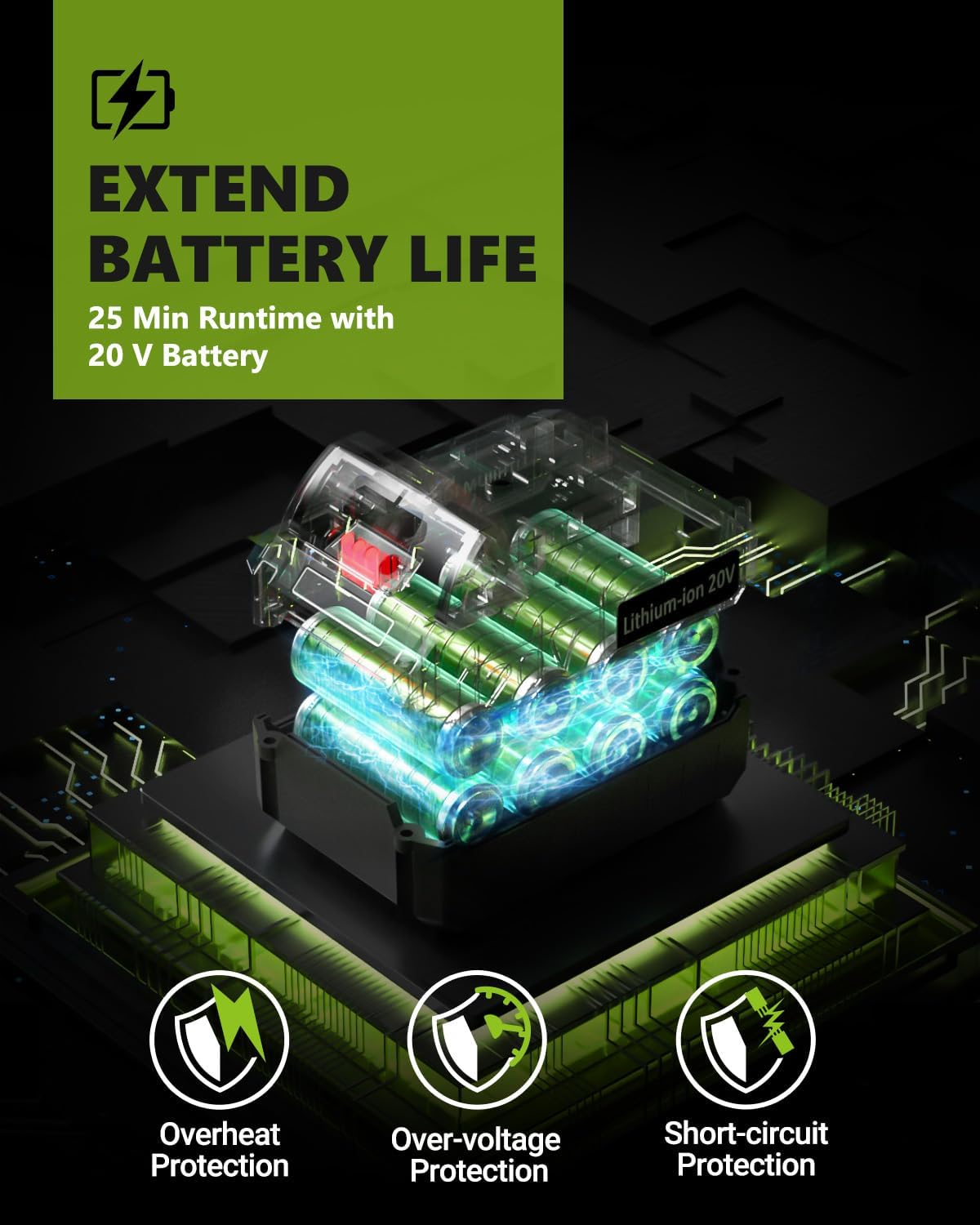
Image: Diagram detailing the internal structure and safety features of the 20V Lithium-ion battery, including overheat, over-voltage, and short-circuit protection.
Operation
1. Starting the Snow Shovel
To start the snow shovel, press the safety button (Step 1) and then hold the On/Off trigger (Step 2). Release the trigger to stop the unit.

Image: Instructions for the two-step safe start mechanism, indicating the safety button and On/Off trigger.
2. Clearing Snow
The Vibekio Cordless Snow Shovel is designed to clear a path 12.2 inches wide and up to 6 inches deep, throwing snow up to 17 feet. For optimal performance, push the shovel steadily through the snow.

Image: A visual representation of the snow shovel's 12-inch wide and 6-inch deep clearing capability.

Image: A user demonstrating the snow shovel's power, clearing snow and throwing it a significant distance.
3. Adjustable Directional Plate
Utilize the adjustable directional plate to control the direction of snow discharge. This allows for precise clearing and prevents snow from being thrown into unwanted areas.

Image: Illustration of the adjustable directional plate, indicating its range of motion for controlling snow discharge.
Maintenance
- Cleaning: After each use, ensure the unit is turned off and the battery is removed. Clean any snow or debris from the auger and housing using a damp cloth. Do not use harsh chemicals.
- Storage: Store the snow shovel in a cool, dry place. Its compact design allows for easy storage in tight spaces.
- Battery Care: Store the battery in a charged state. Avoid storing fully discharged batteries for extended periods.

Image: The snow shovel stored compactly, illustrating its space-saving design.
Troubleshooting
Refer to the table below for common issues and their solutions:
| Problem | Possible Cause | Solution |
|---|---|---|
| Unit does not start | Battery not charged or improperly installed. Safety button not pressed. | Ensure battery is fully charged and securely inserted. Press the safety button before engaging the trigger. |
| Reduced snow throwing distance | Wet, heavy snow. Excessive snow depth. | Clear smaller sections at a time. For wet snow, proceed at a slower pace. |
| Unit stops during operation | Battery depleted. Overload protection activated. | Recharge the battery. Reduce the load by clearing less snow per pass. |
Product Specifications
| Feature | Detail |
|---|---|
| Brand | Vibekio |
| Model Number | ZX-SS20E-X-fba |
| Power Source | 20V Lithium-ion Battery |
| Battery Capacity | 4.0 Ah |
| Clearing Width | 12.2 inches |
| Clearing Depth | Up to 6 inches |
| Max Snow Throwing Distance | 17 feet |
| Item Weight | 12.92 pounds (5.87 kg) |
| Product Dimensions (L x W x H) | 10 x 8.99 x 52 inches |
| Material | Metal (Blade), Plastic (Handle) |
| Color | Green and Black |
Warranty and Customer Support
For warranty information, technical assistance, or customer support, please refer to the contact details provided with your product packaging or visit the official Vibekio website. Keep your purchase receipt as proof of purchase for warranty claims.