
Introduction
Thank you for choosing the Minolta MND70 Digital Camera. This manual provides essential information for setting up, operating, and maintaining your camera. The MND70 combines classic design with modern digital imaging technology, offering 48-megapixel photos and 5K video capabilities. Please read this manual thoroughly to ensure optimal performance and longevity of your device.

The Minolta MND70 Digital Camera in Silver, showcasing its retro design.
Setup
1. Unboxing and Package Contents
Verify that all items are present in the package:
- Minolta MND70 Digital Camera
- Rechargeable Lithium-Ion Battery
- 32GB Memory Card
- USB-C Cable
- Wrist Strap
2. Battery Installation and Charging
- Open the battery compartment cover located on the bottom of the camera.
- Insert the rechargeable lithium-ion battery, ensuring the contacts align correctly. Close the cover securely.
- Connect the camera to a power source using the provided USB-C cable. The charging indicator light will illuminate.
- Charge the battery fully before first use. The indicator light will change or turn off when charging is complete.
3. Memory Card Installation
- Locate the memory card slot, typically near the battery compartment.
- Insert the 32GB SDXC memory card with the metal contacts facing the correct direction (refer to the diagram inside the compartment). Push until it clicks into place.
- To remove, push the card gently until it springs out.
4. Initial Power On
Press and hold the power button until the screen illuminates. Follow any on-screen prompts for initial setup, such as setting the date and time.
Operating the Camera
1. Basic Controls
- Power Button: Turns the camera on/off.
- Shutter Button: Press halfway to focus, fully to capture a photo or start/stop video recording.
- Mode Dial: Selects shooting modes (e.g., Auto, Video, Scene Modes).
- Navigation Buttons: Used to navigate menus and adjust settings.
2. Taking Photos
The MND70 captures 48-megapixel photos with autofocus. Use the digital zoom (up to 16x) to magnify distant subjects. Digital image stabilization helps reduce blur.

The Minolta MND70 captures high-resolution 48-megapixel images.
3. Recording Videos
Record stunning 5K Ultra HD videos. Select video mode using the mode dial and press the shutter button to start/stop recording.

The Minolta MND70 supports 5K video recording for clear, detailed footage.
4. Selfie Lens and Dual Screens
The camera features a rear-facing selfie lens and dual screens for easy self-portraits and vlogging. Switch between screens as needed for optimal framing.
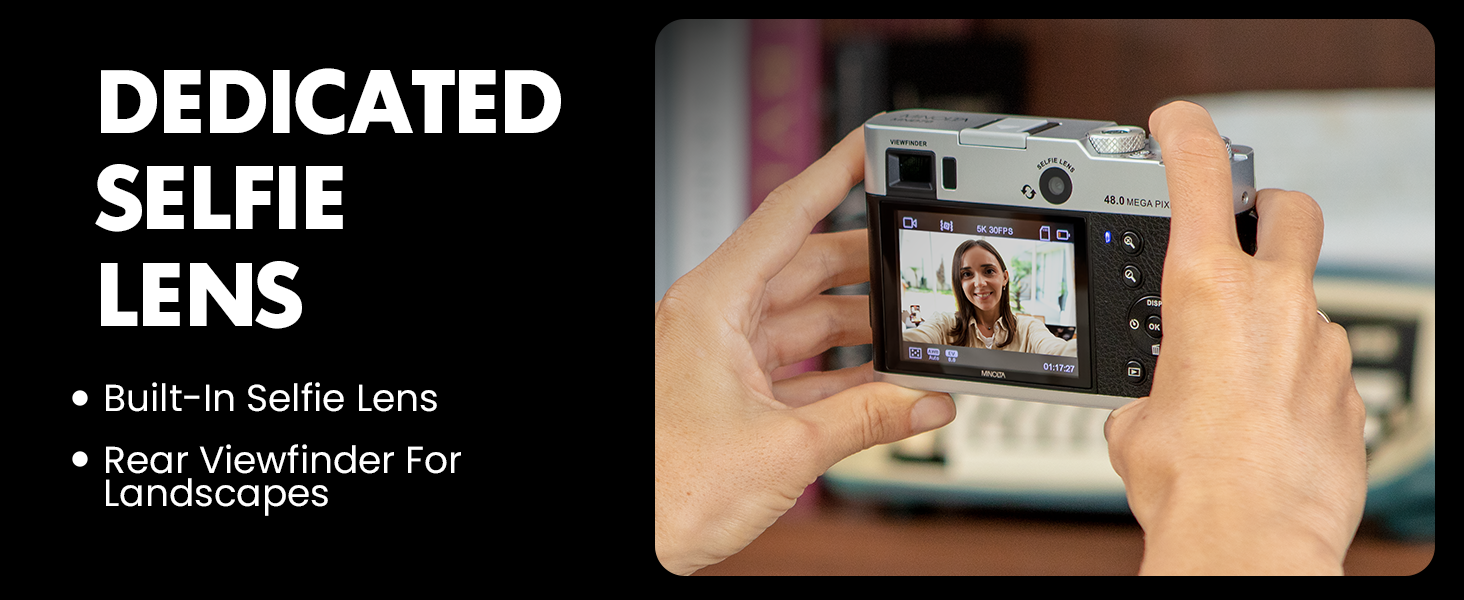
The Minolta MND70 features a dedicated selfie lens and a rear viewfinder for versatile shooting.
5. Creative Modes
Explore various creative modes to enhance your content:
- Time Lapse: Capture sequences of images over time to create a sped-up video.
- Slow Motion: Record videos at a higher frame rate for smooth slow-motion playback.
- Self Timer: Set a delay before the shutter fires, useful for group photos or self-portraits.
- Color Filters: Apply various color effects directly in-camera.
- Burst Mode: Capture a rapid sequence of photos.
- Portrait Mode: Optimizes settings for capturing portraits.
- Macro Shooting: For close-up photography of small subjects.
6. WiFi Connectivity and Sharing
Transfer images and videos to your smartphone instantly using the built-in WiFi. The compatible app allows for remote camera control and easy sharing.

The Minolta MND70 offers instant photo transfers to a smartphone via WiFi.
7. Viewfinder Usage
The optical viewfinder provides an alternative way to frame your shots, offering a traditional camera feel and aiding in bright light conditions.
8. Detailed Features and Performance Video
Watch this video for a detailed overview of the Minolta MND70's features and performance.
Video: Minolta MND70: A Detailed Look at Features & Performance. This video provides an in-depth review of the camera's capabilities and functions.
Maintenance
1. Cleaning the Camera
- Use a soft, lint-free cloth to clean the camera body.
- For the lens and screen, use a specialized lens cleaning cloth and solution. Avoid harsh chemicals.
- Use a blower brush to remove dust from the lens surface.
2. Battery Care
- Store batteries in a cool, dry place when not in use.
- Avoid fully discharging the battery frequently to prolong its lifespan.
- Do not expose batteries to extreme temperatures.
3. Storage
When storing the camera for extended periods, remove the battery and memory card. Store the camera in a dry environment, preferably in a protective case, to prevent dust and moisture damage.
Troubleshooting
| Problem | Possible Cause | Solution |
|---|---|---|
| Camera does not power on | Battery is depleted or incorrectly inserted. | Charge the battery fully. Reinsert the battery correctly. |
| Images are blurry/out of focus | Autofocus failed, subject too close, or camera shake. | Ensure autofocus locks before shooting. Maintain proper distance from subject. Use digital stabilization or a steady surface. |
| Memory card error | Card is full, corrupted, or incorrectly inserted. | Delete unnecessary files or use a new card. Reinsert the card. Format the card (this will erase all data). |
| WiFi connection issues | Incorrect password, out of range, or app issue. | Verify WiFi password. Ensure camera and device are close. Restart camera and app. |
Specifications
| Feature | Detail |
|---|---|
| Model Name | MND70 |
| Photo Sensor Resolution | 48 MP |
| Video Resolution | 5K (4320p) |
| Image Stabilization | Digital |
| Digital Zoom | 16x |
| Display Type | 2.8-inch IPS LCD |
| Viewfinder | Optical |
| Connectivity | Wi-Fi, USB |
| Memory Card Support | SDXC (up to 32GB included) |
| Battery Type | Rechargeable Lithium-Ion |
| Item Weight | 4.8 ounces |
| Focal Length | 3.37mm |
| Maximum Aperture | F/2.2 |
Warranty and Support
Warranty Information
The Minolta MND70 Digital Camera comes with a 1-year manufacturer's warranty. This warranty covers defects in materials and workmanship under normal use. It does not cover damage caused by misuse, accidents (such as dropping the camera), unauthorized repairs, or normal wear and tear.
Please retain your proof of purchase for warranty claims.
Customer Support
For technical assistance, troubleshooting not covered in this manual, or warranty inquiries, please contact Minolta customer support through their official website or the contact information provided with your product packaging.


