
Autel Autel EVO MAX 4T
Autel Robotics EVO MAX 4T V2 Instruction Manual
Brand: Autel | Model: Autel EVO MAX 4T
Introduction and Overview
The Autel Robotics EVO MAX 4T V2 is an advanced unmanned aerial vehicle designed for professional applications, integrating four powerful cameras (visible, zoom, thermal, and laser rangefinder) into a single, versatile payload. This drone features cutting-edge technologies such as 720° omnidirectional obstacle avoidance, A-Mesh 1.0 networking for multi-drone collaboration, and SkyLink 3.0 for extended transmission range and robust anti-interference capabilities. This manual provides essential information for the safe and effective operation of your EVO MAX 4T V2.
Key Features
Integrated Payload System
- Wide-Angle Camera: 48MP, 1/2" CMOS, f/2.8 Aperture, 83.4° DFVO, 24 mm Equivalent.
- Zoom Camera: 48MP, 8K 10x Optical Zoom, 160x Max. Hybrid Zoom, f/2.8-f/4.8 Aperture.
- Thermal Camera: 640x512 resolution, 9.1mm Aperture, 16x Digital Zoom, Temperature Measurement (-4 °F to 1022 °F range).
- Laser Rangefinder: 5 - 1200m Measuring Range, ±1m accuracy.


Advanced Obstacle Avoidance
- 720° ultimate obstacle avoidance combining traditional binocular vision systems with millimeter wave radar technology.
- Perceives objects down to 0.5 inches, eliminating blind spots and enabling operation in low light or rainy conditions.
- Refined fisheye lens placement and navigation lights for enhanced visual obstacle avoidance.


A-Mesh 1.0 Networking
- Enables machine-to-machine autonomous communication, connection, and collaboration.
- Multiple machines can be controlled autonomously by one pilot or a group, with or without LTE coverage.
- System independently self-organizes and relays critical information if one unit fails.

SkyLink 3.0 Transmission
- Features 6 antennas, 4 frequency bands, and AES-256 encryption.
- Supports 20KM (12.4 miles) Image Transmission Distance.
- Provides 1080P@60FPS Real-Time Image Quality with <150ms Latency.
- Operates on 900MHz/2.4GHz /5.2GHz/5.8GHz Frequency Bands.

Anti-Jamming and Anti-Interference
- Uses advanced flight control modules and algorithms to counter RFI, EMI, and GPS spoofing.
- Enables confident and safe flight near power lines, critical structures, and in complex areas.


Platform Capabilities and Durability
- Features side grooves for improved heat dissipation compared to previous models.
- Equipped with the new ABX41-D intelligent battery, supporting Battery In-Place Detection.
- Offers 42 minutes max flight time, 23,000 ft service ceiling, and 27 mph max wind resistance.
- Operates in temperatures from -4°F to 122°F (-20℃ to 50℃) with an IP43 protection rating.


Data Security and Live-View
- Supports simultaneous output of RGB/night vision, infrared, and Map.
- Geo-location data and ADS-B aircraft location info can overlay on real-time map.
- User data is physically accessed locally and encrypted using AES-256.


Autel Enterprise App Platform
- Built for industrial applications with a brand-new interface for simple, efficient operation.
- Additional features and semi-autonomous modes maximize mission capability.

Intelligent Flight Capabilities
- Auto Path Finding: Autel's Autonomy Engine collects environmental data and plans 3D flight paths through complex environments.
- Navigation in GPS Denied Environment: Advanced sensors allow navigation within hardened structures, underground, or without GPS.
- Accurate Object Identification and Tracking: AI recognition technology automatically identifies and tracks targets like heat sources, people, or vehicles.


Application Scenarios
- Firefighting: Scan vast areas, quickly identify fire lines, assess threats, and optimize response.
- Suspect Tracking: Helps track stowaways and fleeing suspects with greater efficiency.
- Power Line Inspection: Use 160x zoom and thermal sensor to detect potential issues and prevent blackouts.
- Search & Rescue: Pinpoint individuals in distress using high-resolution thermal and laser sensors.
- Mining Inspection: Provides accurate, clear positioning and imaging data for planning and monitoring.


Setup Guide
Activating the Aircraft
Follow these steps to activate your Autel EVO MAX 4T V2 aircraft:
- Turn on the remote controller by pressing and holding the power button for 3 seconds.
- Power on the aircraft by pressing and holding its power button for 3 seconds.
- Ensure the aircraft is connected to the internet via Wi-Fi.
- Fully read and consent to the Terms of Use and Privacy Policy within the app.
- Click 'Activate' to complete the activation process.
Pre-Flight Preparations
Before each flight, ensure your drone is properly prepared:
- Open the product case and carefully remove the drone and battery.
- Gently press the buckle of the gimbal cover to remove the protective cover.
- Unfold the front and rear arms of the aircraft, ensuring they are securely in place.
- Unfold all the propellers.
- Install the aircraft battery, verifying it is properly seated.
- Insert the microSD card into the card slot at the rear of the aircraft.
- Take out the remote controller and unfold its antenna. Ensure the aircraft is nearby for optimal connectivity.
Operating Instructions
First Flight and Controls
Before initiating flight, always keep a safe distance from the aircraft and face its tail. The joystick mode is set to Mode 1 by default.
- Starting the Aircraft: Move the control sticks of the remote controller inwards or outwards simultaneously to start the aircraft's propellers.
- Takeoff: After the propellers rotate, gently push the left control stick upward to manually take off the aircraft.
- Flight Control (Mode 1):
- Left Stick: Controls ascent/descent (vertical movement) and nose orientation (yaw).
- Right Stick: Controls the aircraft's lateral movement (forward, backward, left, and right).
- Landing:
- If the aircraft has not taken off, move the left command stick downward to turn off the motors.
- If the aircraft has taken off, move the left command stick downward, and the aircraft will land automatically.
Maintenance
Regular maintenance is crucial for the longevity and optimal performance of your Autel EVO MAX 4T V2. Always ensure the drone is powered off before performing any maintenance.
- Cleaning: Regularly wipe down the drone's body, propellers, and camera lenses with a soft, dry cloth. Avoid using harsh chemicals.
- Battery Care: Store batteries in a cool, dry place. Do not overcharge or over-discharge. If storing for extended periods, charge them to approximately 50-60%.
- Propeller Inspection: Check propellers for any cracks, bends, or damage before each flight. Replace damaged propellers immediately.
- Gimbal Protection: Always reattach the gimbal protective cover when transporting or storing the drone.
- Firmware Updates: Periodically check for and install the latest firmware updates for both the drone and the remote controller to ensure optimal performance and access to new features.
- Storage: After flight, power off both the aircraft and the remote controller. Cover the gimbal, fold the arms and propellers, and store all components in their corresponding slots within the rugged case. Close and fasten the lock of the box.
Troubleshooting
If you encounter issues with your Autel EVO MAX 4T V2, consider the following common troubleshooting steps:
- No Power: Ensure batteries are fully charged and properly inserted into both the drone and the remote controller. Press and hold power buttons for the specified duration (3 seconds).
- Connection Issues: Verify that both the drone and remote controller are powered on and within range. Check for any physical obstructions or signal interference. Re-pair the drone and controller if necessary.
- GPS Signal Loss: Move to an open area away from tall buildings or dense foliage. Ensure the drone has a clear view of the sky.
- App Malfunction: Close and restart the Autel Enterprise App. If the issue persists, try reinstalling the app.
- Unresponsive Controls: Check if the control sticks are properly calibrated in the app settings. Ensure no physical debris is obstructing stick movement.
- Flight Instability: Check for damaged propellers and replace them if necessary. Ensure the drone's arms are fully unfolded and locked. Perform IMU calibration if recommended by the app.
- Error Messages: Refer to the specific error code or message displayed on the smart controller's screen and consult the comprehensive user manual or Autel's online support for detailed solutions.
Technical Specifications
| Feature | Specification |
|---|---|
| Brand | Autel |
| Model Name | Autel EVO Max 4T |
| Special Feature | Thermal Camera: 640x512 | 16x Digital Zoom; Wide Camera: 48MP | 1/2" CMOS; Zoom Camera: 48MP | 8K 10x Optical Zoom (160x Max); Laser Rangefinder; Autel SkyLink 3.0 | 12.4 miles Transmission; 720° Obstacle Avoidance; 42 mins Max Flight Time; A-Mesh 1.0 | Mesh Networking Technology; 3D Map Planning | Multiple Mission Types | Data Security; Multi-channel Projection Screen; Autel SDK; Remote ID Supported; for Public Safety/Search & Rescue/Inspection/Firefighting |
| Age Range (Description) | Adult |
| Color | Grey |
| Video Capture Resolution | 8K |
| Connectivity Technology | USB |
| Battery Capacity | 8070 Milliamp Hours |
| Video Capture Format | MP4 |
| Control Type | App Control |
| Maximum Range | 12.4 Mile |
| Wireless Communication Technology | RF |
| Battery Cell Composition | Lithium Polymer |
| Are Batteries Included | Yes |
| Remote Control Included? | Yes |
| Optical Sensor Technology | CMOS |
| Rechargeable Battery Included | Yes |
| Product Dimensions | 5.7"L x 5.15"W x 10.11"H |
| UPC | 762917124889 |
| Manufacturer | Autel |
| Item Weight | 20.4 pounds |
| Country of Origin | China |
| Date First Available | October 30, 2024 |
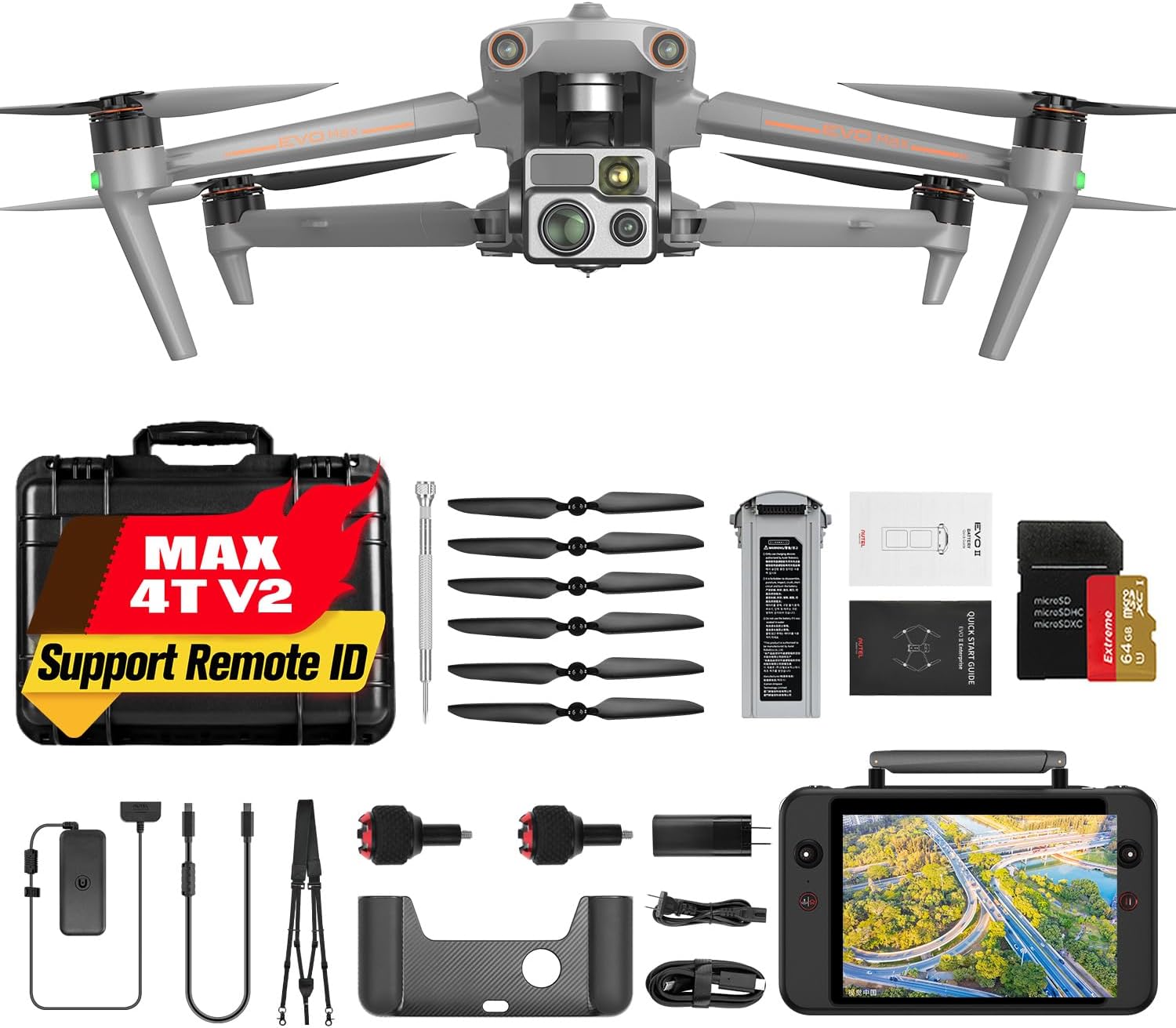
What's in the Box
The Autel EVO MAX 4T V2 bundle includes the following components:
- EVO Max 4T V2 Aircraft (x1)
- Battery (x1)
- Battery Charger (x1)
- Smart Controller V3 (x1)
- Power Cable (x1)
- Propellers (Total 3 pairs)
- Screwdriver (x1)
- Smart Controller Lanyard (x1)
- Smart Controller Cover (x1)
- Smart Controller Spare Joystick (x1)
- RC Charger (x1)
- RC Charging Cable (x1)
- Data Cable (x1)
- Rugged Case (x1)
- Manuals
Warranty and Support
Autel offers various protection plans for your EVO MAX 4T V2 to ensure peace of mind. For any questions or support needs, please refer to the contact information below:
- Protection Plans:
- 2-Year Protection Plan: $149.99
- 3-Year Protection Plan: $189.99
- Contact Support: For any other questions or assistance, please contact Autel Official support via email at autelofficial@outlook.com.
Ask a question about this manual
Ask about setup, troubleshooting, compatibility, parts, safety, or missing instructions. Manuals+ will review the question and use this page’s manual context to help answer it.