
1. Introduction
This manual provides detailed instructions for the installation, operation, and maintenance of your INQMEGA ST-598-6M-20X-WIFI-1021 Wireless Outdoor Solar Security Camera. Please read this manual thoroughly before using the product to ensure proper functionality and safety.
2. Product Overview
Key Features:
- Connectivity: 2.4G WiFi support (5G WiFi not supported). WiFi range up to 15 meters.
- Resolution & Night Vision: 6MP HD video with three night vision modes (infrared, full color, intelligent). Effective night vision distance up to 300 feet (approx. 91 meters).
- Optical Zoom & View: 20X optical zoom for clear close-ups. Dual screens offer 355° horizontal (pan) and 90° vertical (tilt) rotation, controllable via the application.
- Motion Detection: Supports PIR human detection wake-up (Max 12M). The camera sends object movement information to your phone.
- Power Source: Solar powered with a 6W solar board and a built-in 12000mAh battery.
- Storage: Supports Amazon Cloud storage and TF Card (MAX 128GB, not included).
- Audio: Features 2-Way Audio.
- Durability: IP66 International Protection Rating, waterproof metal material.
Package Contents:
- INQMEGA Wireless Outdoor Solar Security Camera (SOLAR CAMERA)
3. Setup
3.1 Mounting the Camera
The camera is designed for outdoor wall mounting. Choose a location with optimal sunlight exposure for the solar panel and a clear view of the area you wish to monitor. Ensure the mounting surface is sturdy enough to support the camera's weight.
- Mark the drilling points on the wall using the camera's mounting bracket as a template.
- Drill holes at the marked positions.
- Insert wall anchors if necessary.
- Secure the mounting bracket to the wall using the provided screws.
- Attach the camera to the mounting bracket, ensuring it is firmly in place.
3.2 Powering On
The camera is solar-powered and includes a built-in 12000mAh battery. Ensure the solar panel is exposed to direct sunlight for optimal charging. The camera will automatically power on once sufficient charge is detected or if it has been charged via USB (if applicable, refer to product packaging for USB charging details).
3.3 Connecting to Wi-Fi
This camera supports 2.4G WiFi networks only. It does not support 5G WiFi. The WiFi range is approximately 15 meters.
- Download the UBOX application on your smartphone (available for iOS and Android).
- Register an account and log in.
- Follow the in-app instructions to add your camera. This typically involves scanning a QR code on the camera or manually entering its ID.
- Connect the camera to your 2.4G WiFi network by entering your network credentials in the app.
- Once connected, the camera status indicator will confirm successful pairing.
4. Operating the Camera
4.1 Multi-Angle View and Control
The camera features a wide-angle lens that can be manually adjusted up to 350 degrees. Additionally, the PTZ (Pan-Tilt-Zoom) lens allows for remote control of its rotation via the UBOX application.
- Wide-angle Lens: Manual adjustment up to 350°.
- PTZ Zoom Lens: Control horizontal rotation (Pan) up to 355° and vertical rotation (Tilt) up to 90° using the application.
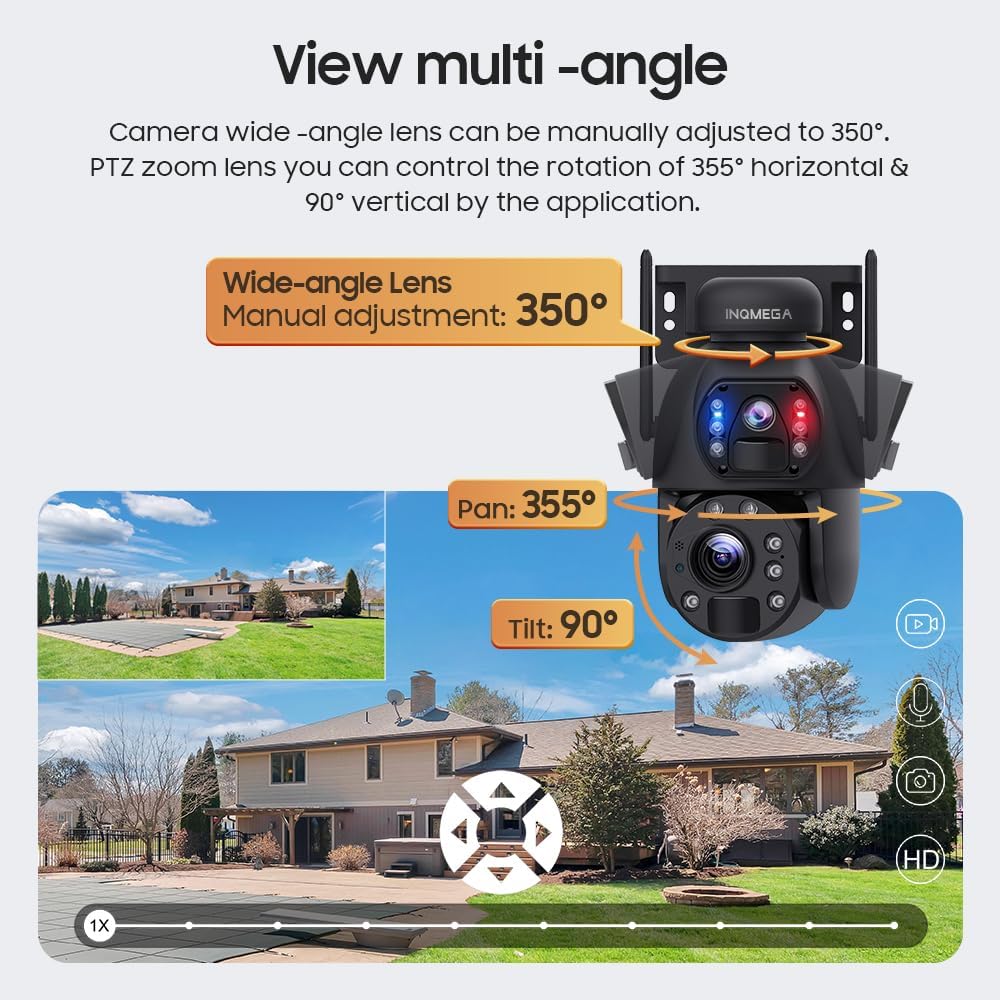
Image: Illustration of the camera's multi-angle viewing capabilities, including manual wide-angle adjustment and app-controlled pan/tilt for the PTZ lens.
4.2 Night Vision Modes
The camera offers three night vision modes to suit different monitoring needs:
- Infrared Night Vision: Provides clear black and white images in low light conditions.
- Full Color Night Vision: Utilizes built-in white lights to provide color images at night.
- Intelligent Night Vision: Automatically switches between infrared and full-color modes based on detected motion or specific settings.
4.3 Motion Detection and Recording
The camera supports PIR (Passive Infrared) human detection. When motion is detected, the camera will wake up, record video, take photos, and send notifications to your mobile phone via the UBOX app.
- Recording Policy: To conserve battery life, the camera does not support continuous video recording. It records only when motion is detected.
- Tracking: The camera does not support automatic tracking of moving objects. The camera angle can only be adjusted manually or through the app.
4.4 Two-Way Audio
Utilize the two-way audio feature through the UBOX app to communicate with individuals near the camera. This allows for real-time conversation.
5. Maintenance
5.1 Cleaning the Solar Panel
Regularly clean the solar panel to ensure optimal charging efficiency. Dust, dirt, and debris can reduce the panel's ability to absorb sunlight. Use a soft, damp cloth to gently wipe the surface.
5.2 General Camera Care
- Keep the camera lenses clean for clear image quality. Use a lens cleaning cloth if necessary.
- Ensure all cables and connections are secure and free from damage.
- Periodically check the mounting for stability, especially after strong winds or adverse weather conditions.
6. Troubleshooting
6.1 Camera Not Powering On
- Ensure the solar panel is receiving adequate sunlight.
- Check if the built-in battery has sufficient charge. Allow several hours of direct sunlight for initial charging.
6.2 Wi-Fi Connection Issues
- Verify that your router is broadcasting a 2.4G WiFi signal. The camera does not support 5G WiFi.
- Ensure the camera is within the 15-meter WiFi range of your router.
- Restart your router and the camera.
- Double-check your WiFi password in the UBOX app.
6.3 Poor Image Quality
- Clean the camera lenses with a soft cloth.
- Ensure there are no obstructions in the camera's field of view.
- Check your internet connection speed, as a slow connection can affect streaming quality.
6.4 Motion Detection Not Working
- Verify that motion detection is enabled in the UBOX app settings.
- Adjust the sensitivity settings for PIR detection in the app.
- Ensure there are no physical obstructions blocking the PIR sensor.
7. Specifications
| Feature | Detail |
|---|---|
| Model Number | ST-598-6M-20X-WIFI-1021 |
| Indoor/Outdoor Usage | Outdoor |
| Connectivity Technology | Wireless (2.4G WIFI) |
| Power Source | Solar Powered |
| Video Capture Resolution | 6MP |
| Optical Zoom | 20X |
| Night Vision Range | Up to 200 Feet (approx. 61 meters) |
| Pan/Tilt Rotation | Pan: 355°, Tilt: 90° |
| Wide-angle Lens Adjustment | Manual 350° |
| Battery | 12000mAh (built-in), 6 Lithium Ion batteries included |
| Battery Power | 9.36 Watt Hours |
| Storage | Amazon Cloud & TF Card (Max 128GB, not included) |
| Material | Metal |
| Water Resistance Level | Waterproof (IP66) |
| Control Method | App (UBOX) |
| Item Weight | 0.16 ounces (approx. 4.5 grams) |
8. Warranty Information
INQMEGA products are designed for reliability and performance. For specific warranty terms and conditions, please refer to the warranty card included with your product or contact INQMEGA customer support. Keep your purchase receipt as proof of purchase for warranty claims.
9. Customer Support
If you encounter any issues or have questions regarding your INQMEGA Wireless Outdoor Solar Security Camera, please contact our customer support team. Refer to the product packaging or the INQMEGA official website for contact details.