
VORGUT K8512-DQ02-2
Contents
VORGUT K8512-DQ02-2 Wireless Outdoor Security Camera System User Manual
Introduction
This manual provides detailed instructions for the VORGUT K8512-DQ02-2 Wireless Outdoor Security Camera System. This system offers advanced surveillance features including 4MP high-definition video, dual-band Wi-Fi connectivity, smart motion detection, two-way audio communication, and robust IP66 weather resistance. Designed for easy installation and comprehensive monitoring, it ensures the safety and security of your property.
What's Included
Please verify that all items listed below are included in your package:
- 1x Monitor
- 1x Japanese Instruction Manual
- 2x Solar Panels
- 2x Security Cameras
This image displays all the components included in the VORGUT Security Camera System package.
Setup
1. Initial Power-On and Connection
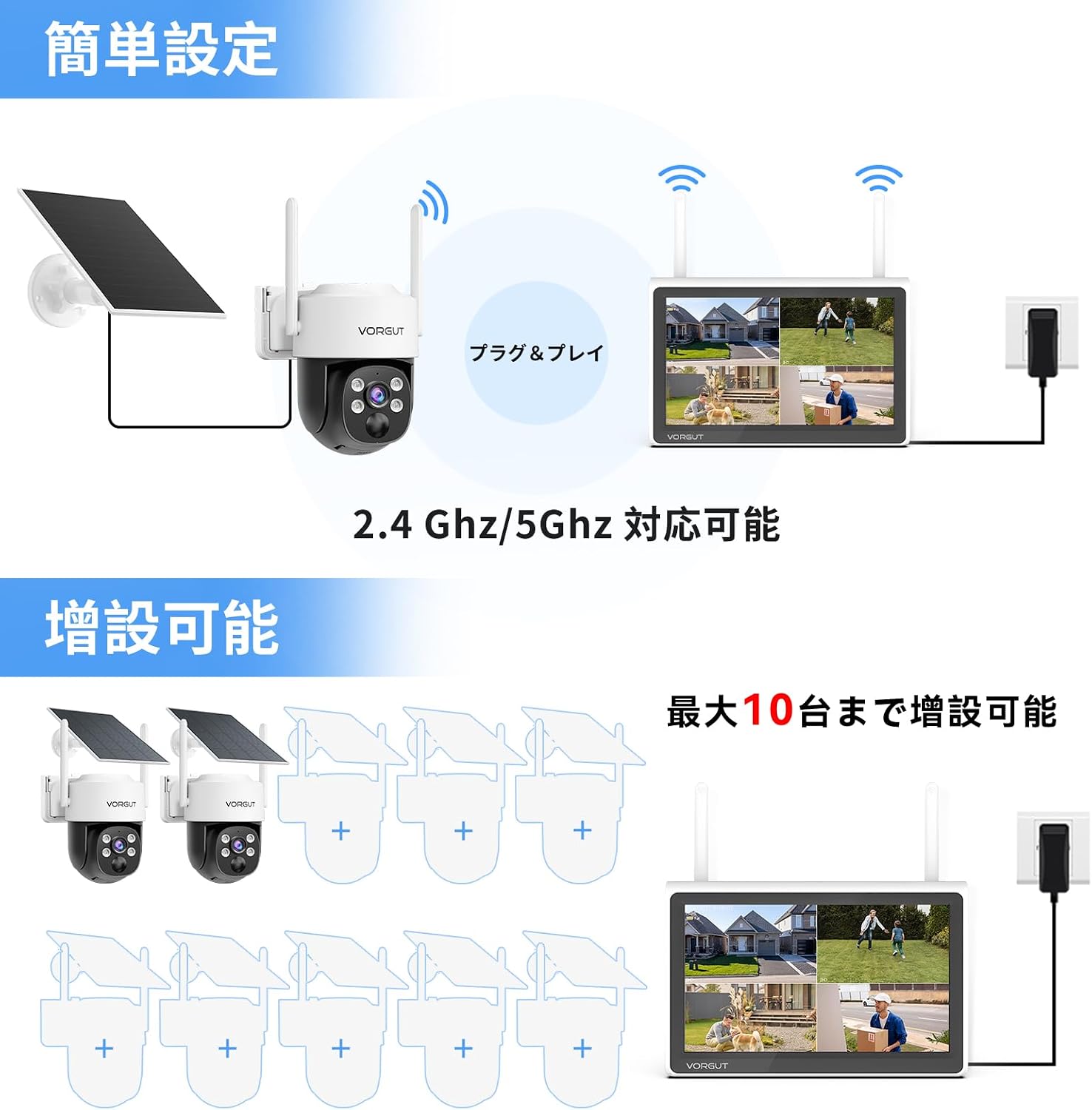
Before installation, connect the camera and the NVR (monitor unit) to their respective power sources. The system is designed for simple plug-and-play operation.

This video demonstrates the simple plug-and-play setup process for the VORGUT security camera system, showing how easily it can be installed and configured.

This operation guide video explains the connection method for the security camera, including how to link it with the mobile application for remote access and control.
2. Camera Installation
The VORGUT security camera and solar panel are integrated, eliminating the need for complex wiring or professional installation. You can mount the camera in various outdoor locations without requiring an electrical outlet nearby.

The image shows the VORGUT security camera connected to a solar panel, highlighting its solar power capability, compatibility with both 2.4GHz and 5GHz Wi-Fi networks, and standalone operation.

This video provides a step-by-step guide on how to physically install the security camera, ensuring proper mounting and positioning.
3. App Setup (EseeCloud)
Download the free "EseeCloud" app from your smartphone's App Store (iOS) or Play Store (Android). The camera is factory-matched with the base station. Simply scan the QR code on the base station to view videos on your mobile phone.

This infographic summarizes the main features of the VORGUT monitor set, including 4MP high-definition, PIR human detection, completely wireless solar power, dual-band Wi-Fi, IP66 waterproof/dustproof, 3-link alarm, 2 recording modes, and 5-year warranty support.
Operating Instructions
1. Pan/Tilt/Zoom (PTZ) Control
The camera features pan-tilt functionality, allowing you to remotely adjust the surveillance angle (up/down 0-90°, left/right 0-355°) directly from your smartphone app. This ensures comprehensive coverage without blind spots.

This image illustrates the VORGUT security camera's extensive 360-degree coverage, including 355-degree horizontal and 90-degree vertical rotation, controllable via a smartphone app. The camera is mounted on a house, with a phone displaying its live feed.

This video illustrates the security camera's night color shooting, pan-tilt-zoom (PTZ) capabilities, and alarm notification features, providing a comprehensive look at its advanced surveillance functions.
2. Motion Detection and Alerts
The camera utilizes PIR human detection to accurately identify human figures and trigger alerts. Upon detection, you will receive a push notification with a photo to your smartphone. The system can also activate an alarm sound and sensor light to deter intruders.
- Smart Detection: Reduces false alarms by focusing on human movement.
- Night Light Emission Deterrence: Alarm sound and sensor light activate simultaneously against intruders.
- Color Night Vision: Provides clear, full-color footage even in low-light conditions.

This image demonstrates the camera's smart detection feature, which sends real-time alerts to a smartphone when a person is detected, minimizing false alarms. A delivery person is shown at a doorstep, with a phone displaying a notification.

The image compares the camera's color night vision (with spotlight on) and infrared night vision (with spotlight off), showcasing its ability to capture clear footage in various low-light conditions.

This video demonstrates the AI human detection feature of the surveillance camera, showing how it accurately identifies human figures and triggers alerts.
3. Two-Way Audio Communication
The camera supports two-way audio, allowing you to communicate with people near the camera through your smartphone. This is useful for interacting with visitors, delivery personnel, or deterring unwanted individuals.

This image illustrates the two-way audio function, allowing users to communicate with visitors or delivery personnel through the camera and a smartphone app. A delivery person is shown interacting with a voice message from the camera.
4. Recording Modes
The system offers flexible recording options to suit your needs:
- Motion Detection Recording: Records only when motion is detected, saving storage space and power.
- Continuous Recording: Provides 24/7 surveillance.
Maintenance
Weather Resistance
The VORGUT security camera boasts an IP66 waterproof and dustproof rating, ensuring reliable operation in various weather conditions, including heavy rain and dust. Regular cleaning of the lens and solar panel is recommended to maintain optimal performance.

The image highlights the camera's IP66 waterproof rating, demonstrating its durability and ability to withstand harsh weather conditions like heavy rain.
Troubleshooting
If you encounter any issues with your VORGUT security camera system, please refer to the following common troubleshooting steps:
- No Power: Ensure all power adapters are securely connected to both the camera and the monitor. Verify that the power outlets are functional.
- No Video Feed: Check Wi-Fi connectivity for both the camera and the monitor. Ensure the camera is within range of the Wi-Fi signal. Restart both the camera and the monitor.
- Poor Video Quality: Ensure the camera lens is clean. Check your Wi-Fi signal strength; a weak signal can affect video quality.
- Motion Detection Issues: Verify that motion detection is enabled in the app settings. Adjust the sensitivity level and detection areas as needed.
- App Connectivity Problems: Ensure your smartphone has a stable internet connection. Restart the EseeCloud app and try reconnecting.
For further assistance, please contact customer support.
Specifications
| Feature | Detail |
|---|---|
| Brand | VORGUT |
| Product Model Number | K8512-DQ02-2-Black |
| Product Size | 30 x 10 x 20 cm |
| Item Weight | 3.31 Kilograms |
| Color | Black |
| Connectivity Technology | Wireless (2.4Ghz/5Ghz compatible) |
| Video Capture Resolution | 2592x1440P (4 Million Pixels) |
| Storage | 500GB HDD built-in |
| Weather Resistance | IP66 Waterproof/Dustproof |
| Audio Features | Two-way audio |
| Number of Channels | 10 |
| Batteries Included | Yes |
| Battery Type | Lithium |
Warranty and Support
All VORGUT products come with a 5-year quality warranty. If any product issues arise within this period, a free replacement will be provided.
For any inquiries or assistance before or during use, our customer support team is available 24 hours a day, 365 days a year. You can reach us via email at support@vorgut.online.
Documents and downloads
Ask a question about this manual
Ask about setup, troubleshooting, compatibility, parts, safety, or missing instructions. Manuals+ will review the question and use this page’s manual context to help answer it.