
Proscenic Q8-Blau
Contents
Proscenic Q8 Robot Vacuum and Mop User Manual
Model: Q8-Blau
Introduction
This manual provides essential information for the safe and efficient operation, maintenance, and troubleshooting of your Proscenic Q8 Robot Vacuum and Mop. Please read this manual thoroughly before using the appliance and retain it for future reference.

Image: The Proscenic Q8 Robot Vacuum and Mop, shown with its charging base and a smartphone displaying the companion application's interface. A mopping attachment is also visible, highlighting its dual functionality.
Setup
1. Unpacking
Carefully remove all components from the packaging. Ensure all parts listed in the packing list are present. Retain the packaging for future storage or transport.
2. Charging Dock Placement
Place the charging dock against a wall in an open area, ensuring there are no obstacles within 1 meter (3 feet) to the front and 0.5 meters (1.5 feet) to either side. Connect the power adapter to the charging dock and plug it into a power outlet.
3. Initial Charge
Place the robot onto the charging dock. The robot will automatically begin charging. For optimal battery life, fully charge the robot before its first use. A full charge typically takes approximately 5-6 hours.
4. App Installation and Connection
Download the ProscenicHome app from your mobile device's app store. Follow the in-app instructions to connect your robot vacuum to your home Wi-Fi network. This will enable advanced features such as scheduling, cleaning mode selection, and map management.

Image: The Proscenic Q8 Robot Vacuum operating in a room, with an overlay demonstrating its ability to create and manage multi-floor maps (up to 5 levels) via the companion mobile application. Various advanced settings like scheduling, zigzag/matrix cleaning, no-go zones, and suction/water level adjustments are also depicted.
Operating Instructions
1. Starting a Cleaning Cycle
Press the power button on the robot or use the ProscenicHome app to start a cleaning cycle. The robot will automatically begin cleaning and return to its charging dock when finished or when the battery is low.
2. Suction Power Adjustment
The Proscenic Q8 offers multiple suction modes: Eco, Standard, and Max. These can be adjusted via the mobile app to suit different cleaning needs and floor types. The robot features a powerful 4200 Pa suction for effective debris removal.

Image: The Proscenic Q8 Robot Vacuum cleaning a hard floor, demonstrating its strong 4200 Pa suction power by collecting pet hair. Icons for Eco, Standard, and Max suction modes are displayed, indicating adjustable cleaning intensity.
3. Mopping Function
To use the mopping function, fill the water tank (250ml capacity) and attach the mopping cloth. The robot supports three adjustable water levels for different floor types and cleaning requirements. The dustbin has a 350ml capacity.

Image: The Proscenic Q8 Robot Vacuum performing its mopping function on a hard floor, illustrating its 2-in-1 vacuuming and mopping capability. The image highlights the three adjustable water levels and the capacities of the 350ml dustbin and 250ml water tank.
4. Navigation and Mapping
The Q8 utilizes intelligent 360° LiDAR navigation for precise mapping and efficient cleaning paths. It can create and store multiple floor maps, allowing for customized cleaning plans, including setting no-go zones and virtual walls via the app.

Image: The Proscenic Q8 Robot Vacuum navigating a living room, with visual cues indicating its intelligent 360° LiDAR navigation system actively mapping the environment and avoiding obstacles like furniture and people.
5. Cleaning Modes
The robot supports various cleaning modes, including Zigzag and Matrix cleaning. Zigzag cleaning covers an area in a single pass, while Matrix cleaning performs two passes for a more thorough clean, ensuring no spots are missed.
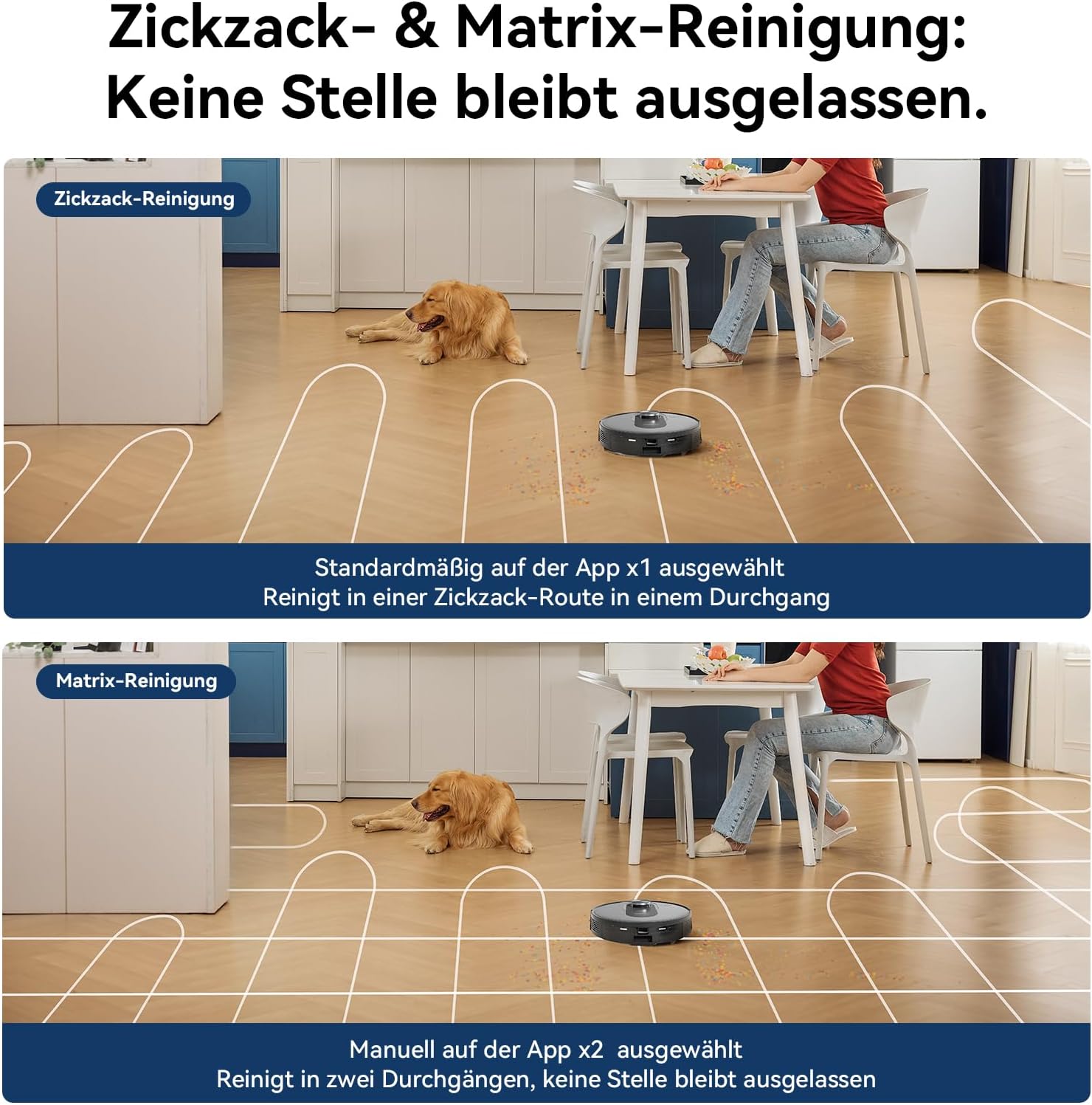
Image: A comparative diagram illustrating the Zigzag and Matrix cleaning patterns of the Proscenic Q8 Robot Vacuum. The Zigzag pattern shows a single-pass route, while the Matrix pattern depicts a double-pass route for enhanced cleaning coverage.
Maintenance
Regular maintenance is crucial for the optimal performance and longevity of your Proscenic Q8 robot vacuum.
1. Dustbin and Filter Cleaning
Empty the dustbin after each cleaning cycle. The HEPA filter should be cleaned weekly by tapping it gently to remove dust. Replace the HEPA filter every 3-6 months, depending on usage.
2. Main Brush and Side Brush Cleaning
Remove hair and debris from the main brush and side brushes weekly. Use the cleaning tool provided to cut and remove tangled hair. Replace brushes if they show signs of wear.
3. Sensor Cleaning
Wipe the cliff sensors, wall sensors, and charging contacts with a clean, dry cloth monthly to ensure proper navigation and charging.
4. Water Tank and Mopping Cloth Maintenance
After mopping, empty any remaining water from the tank and allow it to air dry. Wash the mopping cloth after each use. It is recommended to have spare mopping cloths for continuous use.
Troubleshooting
| Problem | Possible Cause | Solution |
|---|---|---|
| Robot does not turn on | Low battery; Power button not pressed | Place robot on charging dock; Press and hold power button for 3 seconds |
| Robot cannot find charging dock | Dock obstructed; Robot too far from dock | Ensure clear path to dock; Manually place robot closer to dock |
| Poor cleaning performance | Full dustbin; Clogged filter; Tangled brushes | Empty dustbin; Clean/replace filter; Clean main/side brushes |
| Robot gets stuck frequently | Obstacles; Dirty sensors | Clear obstacles; Clean cliff/wall sensors |
| Mopping function not working | Empty water tank; Clogged water outlet | Fill water tank; Clean water outlet |
For more detailed troubleshooting, refer to the ProscenicHome app or contact customer support.
Specifications
| Feature | Detail |
|---|---|
| Model Name | Proscenic Q8 Robot Vacuum Cleaner |
| Brand | Proscenic |
| Color | Blue |
| Product Dimensions | 12.59"L x 12.6"W x 3.8"H |
| Item Weight | 11 pounds |
| Filter Type | HEPA |
| Battery Life | Up to 200 minutes |
| Suction Power | 4200 Pa (Max Mode) |
| Dustbin Capacity | 350ml |
| Water Tank Capacity | 250ml |
| Navigation Type | 360° LiDAR |
| Manufacturer | Proscenic |
| Country of Origin | China |
Warranty and Support
Proscenic is committed to providing excellent customer support. For warranty information, technical assistance, or service inquiries, please contact us through the following channels:
- Website: www.proscenic.com
- Email Support: support@proscenic.com
- Social Media:
- Facebook: @Proscenic
- Instagram: @proscenic_official
- Twitter: @Proscenicglobal
- TikTok: @proscenic_official
Please have your model number (Q8-Blau) and purchase information ready when contacting support.

Image: Contact information for Proscenic, including manufacturer details, website, email support, and social media handles. It also displays various certifications and recycling information.
Documents and downloads
Ask a question about this manual
Ask about setup, troubleshooting, compatibility, parts, safety, or missing instructions. Manuals+ will review the question and use this page’s manual context to help answer it.