
Bobtot Small Surround Sound Systems
Bobtot Small Surround Sound Systems Home Theater Speakers & Portable Bluetooth Karaoke Machine User Manual
Model: Small Surround Sound Systems
Brand: Bobtot
1. Product Overview
The Bobtot B38 Home Theater System and ET29 Portable Bluetooth Karaoke Speaker combine to offer a comprehensive audio solution for both home entertainment and portable use. The B38 system provides 5.1 surround sound with a powerful subwoofer, designed for immersive audio experiences. The ET29 is a versatile, portable speaker with a built-in karaoke function and wireless microphone, offering high-quality sound on the go.
1.1. What's in the Box
Upon unpacking, please verify that all components listed below are present and in good condition:
- 5 Satellite Speakers
- 1 Subwoofer with Built-in Receiver
- 1 Full Function Remote Control
- 3 RCA Video Audio Cables
- 1 Quick Setup Guide
- 1 3.5mm to 2-Male RCA Audio Stereo Cable
- 1 Coaxial Cable
- 1 FM Antenna Cable
- 1 Optical Stereo Cable
- 1 TV ARC Cable
- 1 Portable Bluetooth Karaoke Speaker (ET29)
- 1 Wireless Microphone

Figure 1.1: Included Components of the Bobtot Home Theater System.

Figure 1.2: Bobtot B38 Home Theater System and ET29 Portable Karaoke Speaker.
2. System Setup
2.1. Speaker Placement (B38 Home Theater System)
Proper speaker placement is crucial for achieving optimal surround sound. The B38 system includes a subwoofer and five satellite speakers (center, two front, two rear). Each speaker is equipped with a long built-in cable for flexible placement.
- Subwoofer: Place the subwoofer on the floor, ideally in a corner or near a wall to enhance bass response. Experiment with different positions to find the best spot for your room's acoustics.
- Center Speaker: Position the center speaker directly above or below your television, centered with the screen. This speaker handles most dialogue.
- Front Speakers: Place the two front speakers to the left and right of your television, equidistant from the listening position and angled slightly towards it.
- Rear Speakers: Position the two rear speakers behind your main listening area, to the left and right. They should be slightly behind and to the sides of the listener, at or slightly above ear level.

Figure 2.1: Recommended Speaker Placement for 5.1 Surround Sound.

Figure 2.2: Dimensions of Satellite Speakers and Subwoofer.
2.2. Connecting the B38 Home Theater System
The B38 system supports multiple input modes for versatile connectivity. Ensure the system is powered off before making any connections.
- Connect Satellite Speakers: Connect the five satellite speakers to the corresponding output ports on the back of the subwoofer. Ensure correct polarity (positive to positive, negative to negative).
- Connect Audio Source: Choose one of the following input methods based on your device:
- TV ARC: Use the provided TV ARC cable to connect the system to your TV's ARC-enabled HDMI port.
- Optical (OPT): Use an optical cable to connect to your TV or other audio device's optical output.
- Coaxial (COA): Use a coaxial cable to connect to your TV or other audio device's coaxial output.
- AUX: Use the 3.5mm to 2-Male RCA Audio Stereo Cable to connect to devices with a 3.5mm headphone jack or RCA outputs.
- USB: Insert a USB drive with audio files into the USB port.
- Bluetooth (BT): For wireless connection, refer to the Bluetooth Pairing section.
- DVD: Use RCA cables to connect to a DVD player's audio outputs.
- Connect FM Antenna: Connect the FM antenna cable to the FM ANT port for radio reception.
- Power Connection: Connect the power cord to the subwoofer and then to a wall outlet.

Figure 2.3: Rear Panel Connections of the B38 Subwoofer.

Figure 2.4: Step-by-Step Setup Guide for the 5.1 Surround Sound System.
3. Operating Instructions
3.1. B38 Home Theater System Basic Operation
- Power On/Off: Use the power switch on the rear panel of the subwoofer or the remote control to turn the system on or off.
- Input Selection: Press the "Input" or "Source" button on the remote control or the front panel of the subwoofer to cycle through available input modes (TV ARC, OPT, COA, AUX, USB, BT, DVD).
- Volume Control: Adjust the master volume using the large knob on the subwoofer or the volume buttons on the remote control.
- Mode Selection: Ensure to press the ST.BY button before selecting the desired audio mode (5.1/2.1) every time you turn on the unit.
3.2. Bluetooth Pairing (B38 & ET29)
Both the B38 Home Theater System and the ET29 Portable Karaoke Speaker feature Bluetooth connectivity for wireless audio streaming.
- Enable Bluetooth: On the B38 system, select "BT" input mode. On the ET29 speaker, ensure it is powered on and in Bluetooth mode (usually indicated by a flashing LED).
- Activate Device Bluetooth: On your smartphone, tablet, or other Bluetooth-enabled device, go to the Bluetooth settings and turn on Bluetooth.
- Pairing: Look for "Bobtot B38" or "Bobtot ET29" (or similar name) in the list of available devices and select it to pair. A stable connection can be maintained up to 33 feet (10 meters).
- Confirmation: Once paired, the system or speaker will usually emit an audible confirmation tone, and the Bluetooth indicator light will become solid.
3.3. ET29 Portable Karaoke Speaker Operation
- Power On/Off: Use the power button on the speaker to turn it on or off.
- EQ Intelligent One-Click Switching: The ET29 features various sound effects including indoor mode, outdoor mode, McBa Sound, human voice effects, and KTV sound effects. Use the dedicated button to cycle through these modes for optimized audio.
- Wireless Microphone: The included wireless microphone automatically pairs with the ET29 speaker when both are powered on. Adjust microphone volume as needed.
- Battery Life: The built-in 8800mAH Li-ion battery provides approximately 24 hours of playback on a full charge.
- Waterproof and Dustproof: The ET29 is IP67 rated, offering protection against rain, dust, snow, and spills, making it suitable for outdoor use.
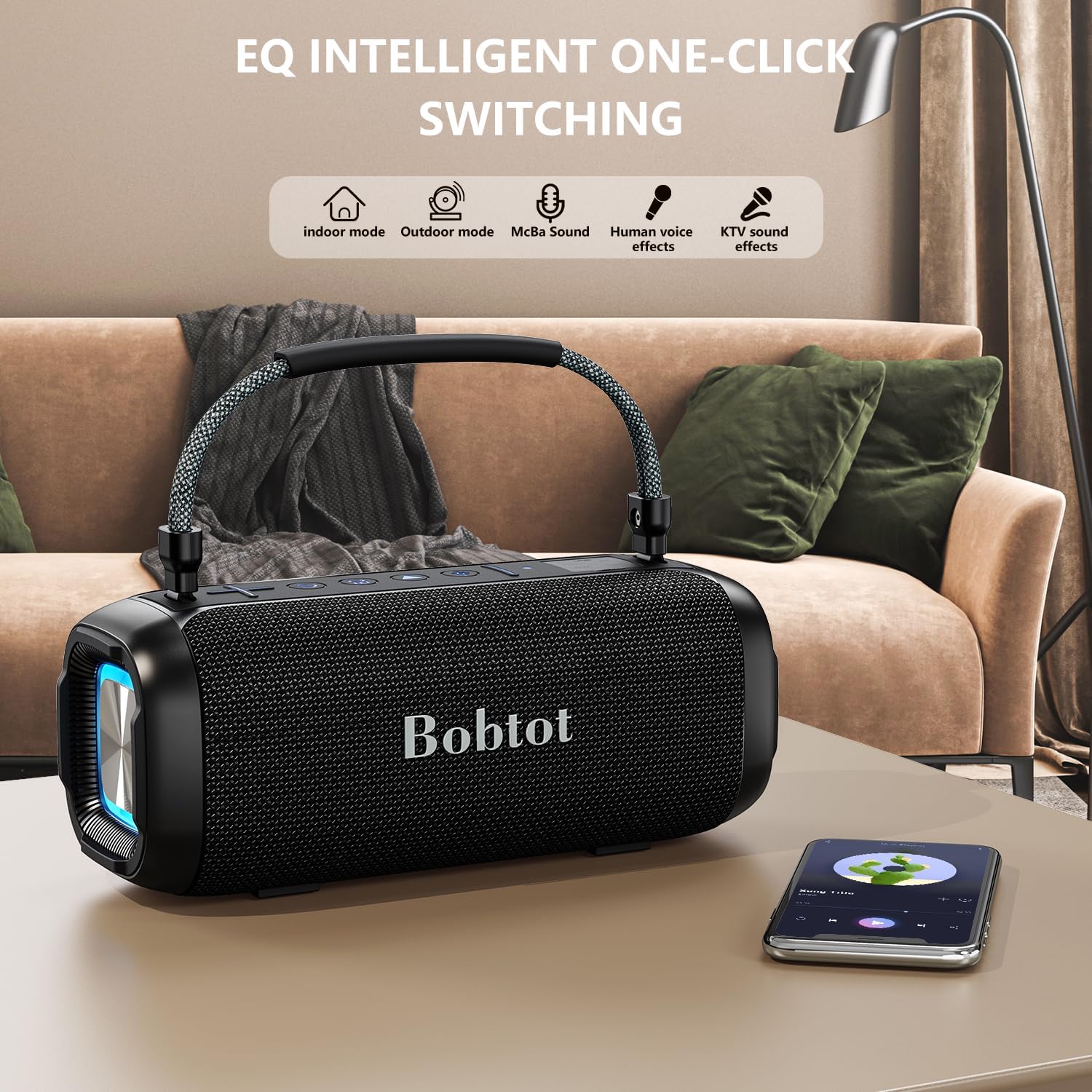
Figure 3.1: ET29 Portable Speaker EQ Modes.

Figure 3.2: ET29 Portable Karaoke Speaker in Use.
4. Care and Maintenance
To ensure the longevity and optimal performance of your Bobtot audio systems, follow these care guidelines:
- Cleaning: Use a soft, dry cloth to wipe down the surfaces of the speakers and subwoofer. Avoid using abrasive cleaners, waxes, or solvents as they may damage the finish.
- Placement: Keep the units away from direct sunlight, heat sources, and excessive moisture. Ensure adequate ventilation around the subwoofer to prevent overheating.
- Cable Management: Ensure all cables are neatly organized and not pinched or tangled to prevent damage.
- ET29 Specific: While the ET29 is IP67 waterproof, avoid submerging it in water for extended periods. Clean any dust or debris from the speaker grille regularly.
5. Troubleshooting
If you encounter issues with your Bobtot audio system, please refer to the following common problems and solutions:
| Problem | Possible Cause | Solution |
|---|---|---|
| No power | Power cord not connected; Power outlet not active; Power switch off. | Ensure power cord is securely plugged in. Check if the power outlet is working. Turn on the main power switch on the subwoofer. |
| No sound from speakers | Incorrect input mode selected; Volume too low; Speaker cables loose; Mute function active. | Select the correct input mode. Increase the volume. Check all speaker cable connections. Deactivate mute on the remote. |
| Distorted sound | Volume too high; Source audio quality poor; Speaker impedance mismatch. | Reduce the volume. Test with a different audio source. Ensure speaker connections are correct. |
| Bluetooth pairing failure | Device too far; Bluetooth not enabled on source; Speaker not in pairing mode. | Move device closer (within 33 ft). Ensure Bluetooth is enabled on your device. Put the speaker/system into Bluetooth pairing mode. |
| Karaoke microphone not working | Microphone battery low; Microphone not powered on; Microphone not paired. | Check microphone battery and replace if necessary. Ensure microphone is powered on. Verify microphone is paired with the ET29 speaker. |
6. Technical Specifications
| Feature | Specification |
|---|---|
| Model Name | Small Surround Sound Systems |
| Speaker Type | Surround Sound |
| Surround Sound Channel Configuration | 5.1 |
| Speaker Maximum Output Power | 200 Watts (B38 System) |
| Portable Speaker Output Power | 30 Watts (ET29 Speaker) |
| Subwoofer Size | 4 Inches |
| Connectivity Technology | Bluetooth, Wired |
| Connectivity Protocols | TV ARC, Optical, Coaxial, Auxiliary, USB, Bluetooth |
| Wireless Communication Technology | Bluetooth 5.1 |
| Bluetooth Range | 33 Feet (10 meters) |
| Power Source | AC Powered (B38), Battery Powered (ET29) |
| ET29 Battery Capacity | 8800mAH Li-ion |
| ET29 Waterproof Rating | IP67 |
| Control Method | Remote Control |
| Audio Output Mode | Stereo, Surround |
| Mounting Type | Tabletop Mount |
7. Warranty Information
This Bobtot product comes with a Limited Warranty. Please refer to the specific warranty terms provided at the time of purchase or contact customer support for detailed information regarding coverage and duration.
In general, products are eligible for a return or replacement within 30 days of purchase, subject to the retailer's return policy.
8. Customer Support
For technical assistance, troubleshooting beyond this manual, or warranty inquiries, please contact Bobtot customer support. Refer to your product packaging or the Bobtot official website for the most current contact information.
When contacting support, please have your product model name ("Small Surround Sound Systems") and purchase details ready to facilitate faster service.
Ask a question about this manual
Ask about setup, troubleshooting, compatibility, parts, safety, or missing instructions. Manuals+ will review the question and use this page’s manual context to help answer it.