
1. Introduction
The Fredorch Premium FR1 is an advanced sex machine designed for versatile use, featuring an Anti-Rotation System for stable operation. It offers multiple control options including a wired remote and an intelligent mobile application. This manual provides essential information for the safe and effective setup, operation, and maintenance of your device.

Image 1.1: The Fredorch Premium FR1 Sex Machine, showcasing its main unit, wired remote, and indicating app control capabilities.
2. Safety Information
- This product is intended for adult use only (18+).
- Always clean the device and any attachments thoroughly before and after each use with a mild soap and warm water, or a specialized toy cleaner. Ensure it is completely dry before storage.
- Do not immerse the main machine body in water or any liquids.
- Use only the provided power adapter. Ensure the power supply matches the specified voltage (100-240V, 50-60Hz).
- Keep the device away from children and pets.
- Avoid using the device if any part is damaged or appears to be malfunctioning. Contact customer support immediately.
- Discontinue use if you experience any discomfort or pain.
- Store the device in a cool, dry place, away from direct sunlight and extreme temperatures.
3. Package Contents
Verify that all components are present in your package:
- 1 x Main Machine Body with APP Function
- 2 x Solid T-Bar (Frame Support)
- 1 x Rod with Anti-Rotation Connector
- 1 x Power Supplier Set (with country-specific plug)
- 1 x Wired Control/Remote Controller 2-in-1 (1.5m wire version)
- 1 x Remote Controller USB Charging Cable
- 1 x Instruction Manual
4. Setup
4.1 Assembly
- Attach the two Solid T-Bars to the main machine body. Ensure they are securely fastened to provide a stable base.
- Insert the Rod with the Anti-Rotation Connector into the designated slot on the main machine body.
- Connect your desired attachment (e.g., dildo) to the Anti-Rotation Connector. Ensure it is firmly attached to prevent rotation during operation.
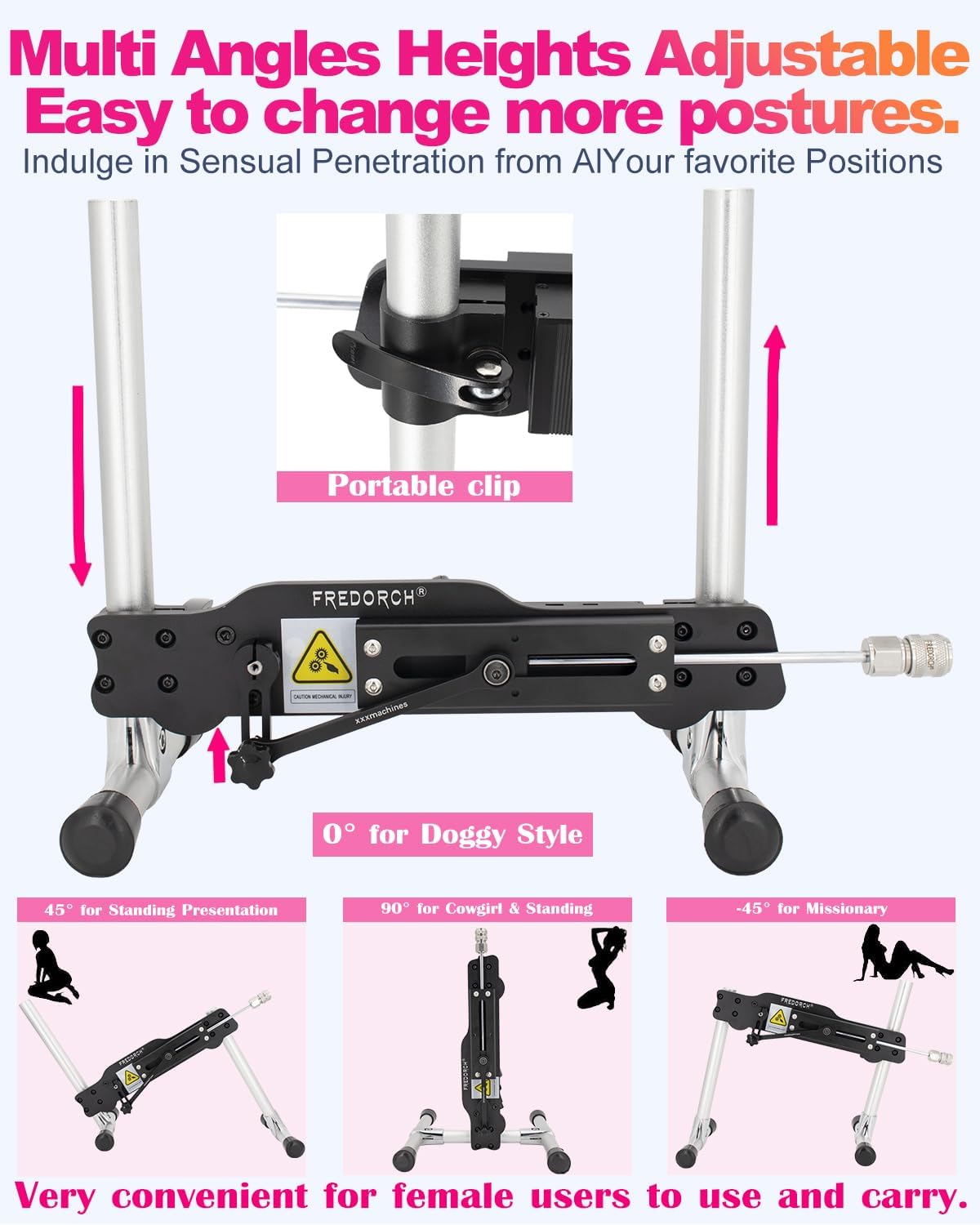
Image 4.1: The Fredorch Premium FR1 assembled, demonstrating adjustable angles and heights for various positions.
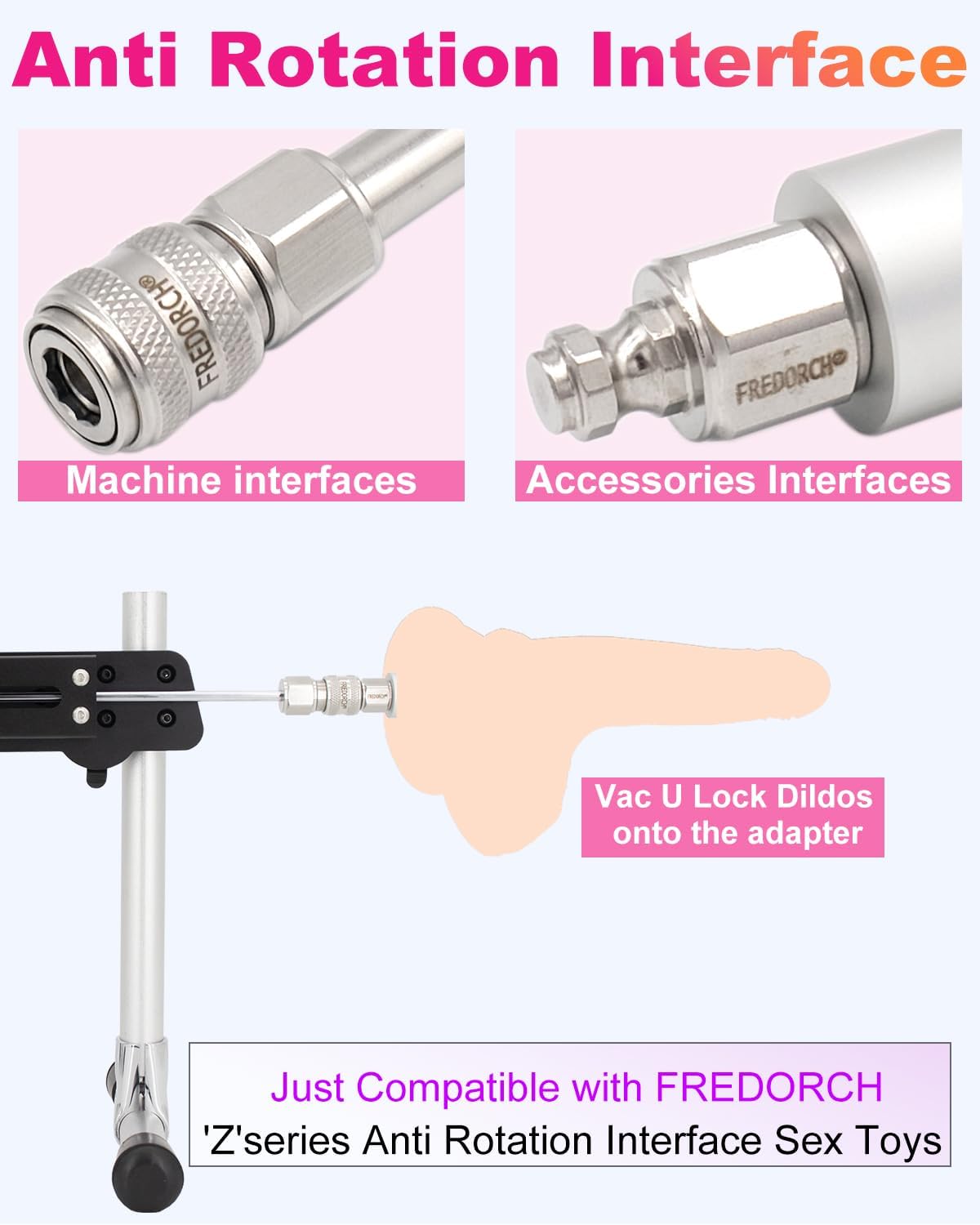
Image 4.2: Detailed view of the Anti-Rotation Interface, showing how attachments connect securely to the machine.
4.2 Power Connection
Connect the power supplier to the machine and then plug it into a suitable electrical outlet. The device is compatible with 100-240V, 50-60Hz power sources.
5. Operating Instructions
5.1 Wired Control
The device includes a 2-in-1 wired control/remote controller. Use the buttons on the controller to adjust the speed and frequency of the machine. It offers 18 speeds and 8 frequency conversion modes.
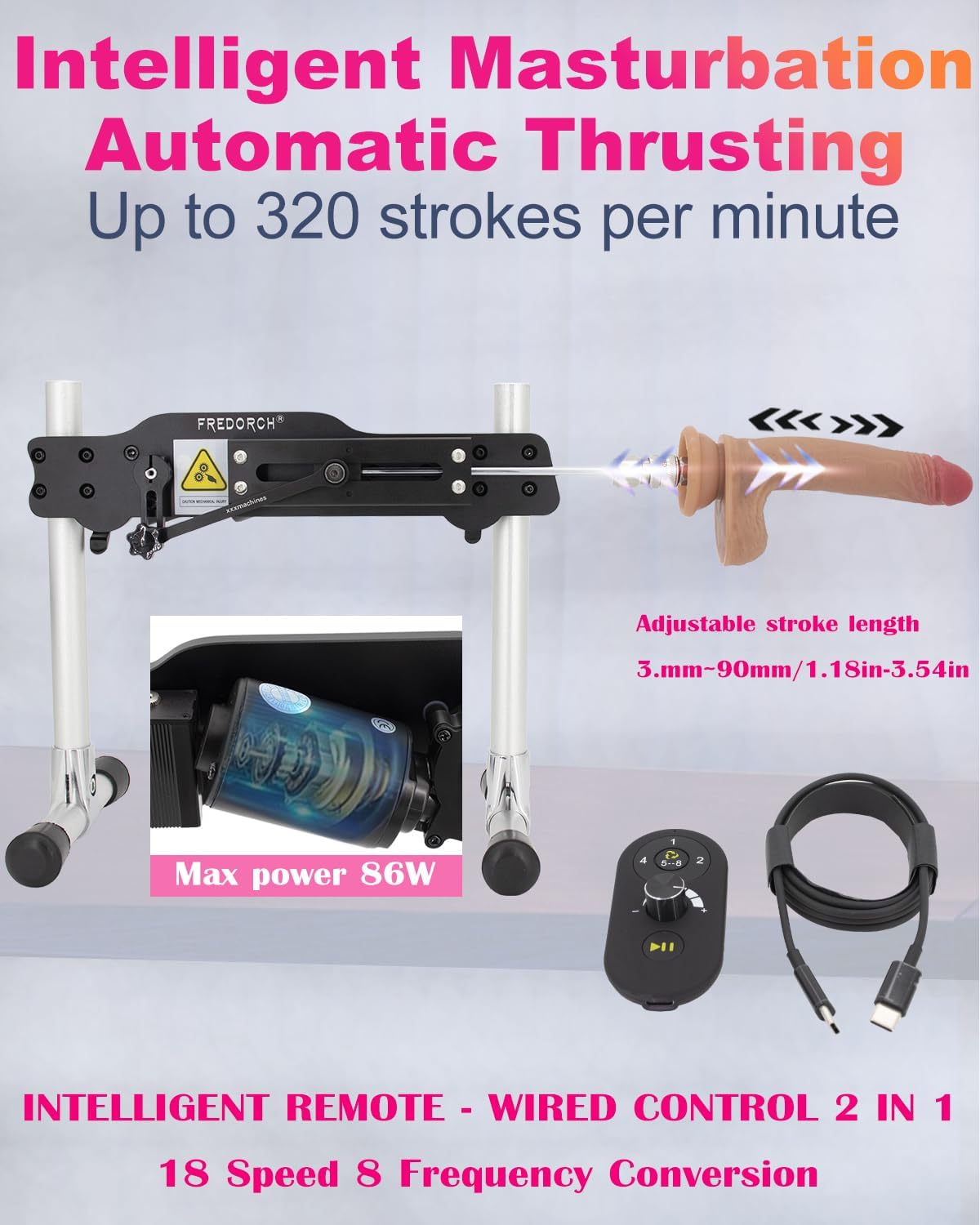
Image 5.1: The Fredorch Premium FR1 in operation, highlighting the powerful motor and the wired remote control for speed and frequency adjustments.
5.2 App Control
For enhanced control and interactive features, download the official Fredorch app on your Android or iOS device. The app allows for close-range and long-distance control, video chat integration, and custom mode creation.
- Download the Fredorch app from your device's app store.
- Turn on the Fredorch Premium FR1 machine.
- Open the app and follow the on-screen instructions to pair your device via Bluetooth.
- Explore various modes, create custom patterns, and share experiences within the app's community features.
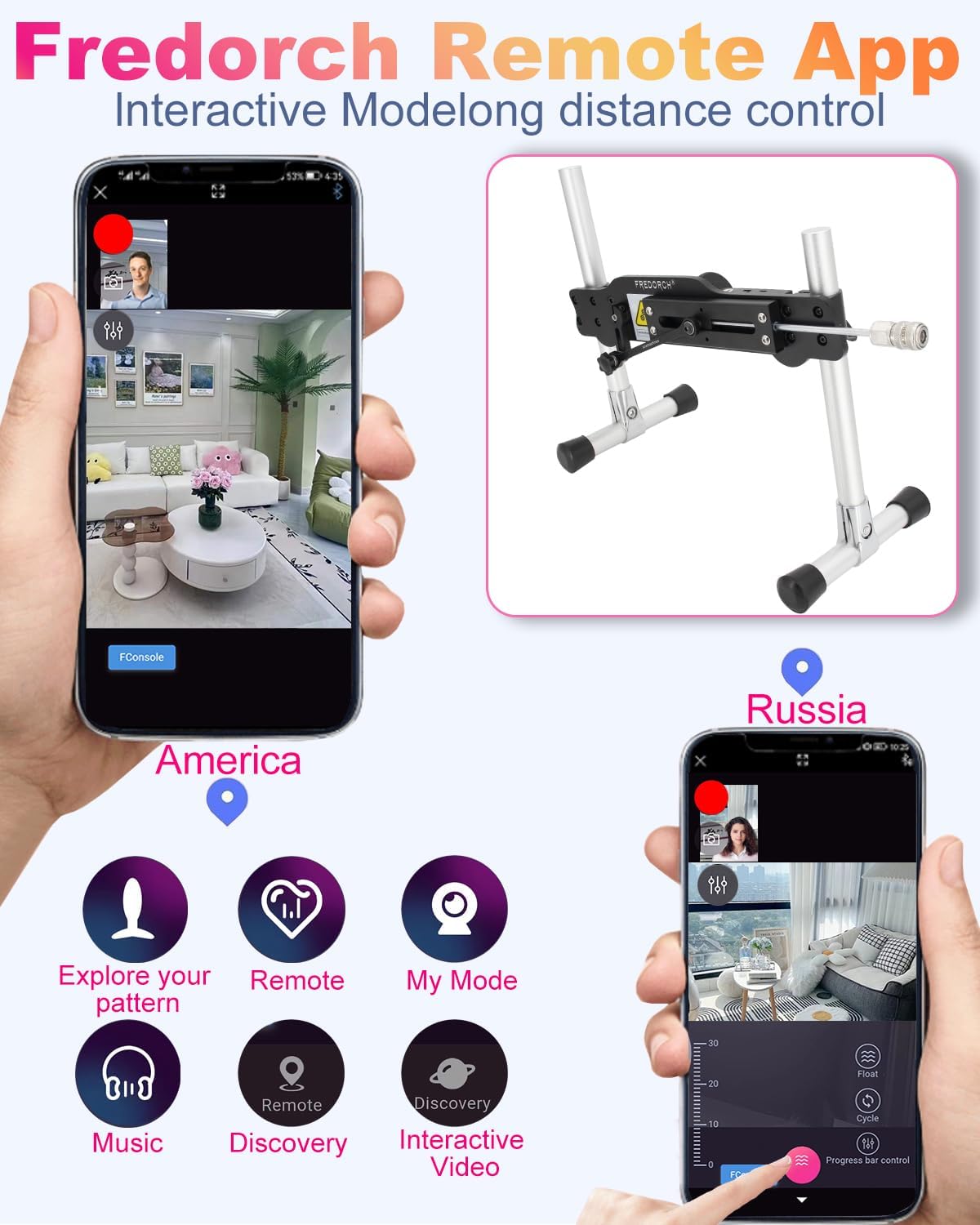
Image 5.2: Screenshots of the Fredorch app interface, illustrating remote control, interactive video chat, and various mode options.
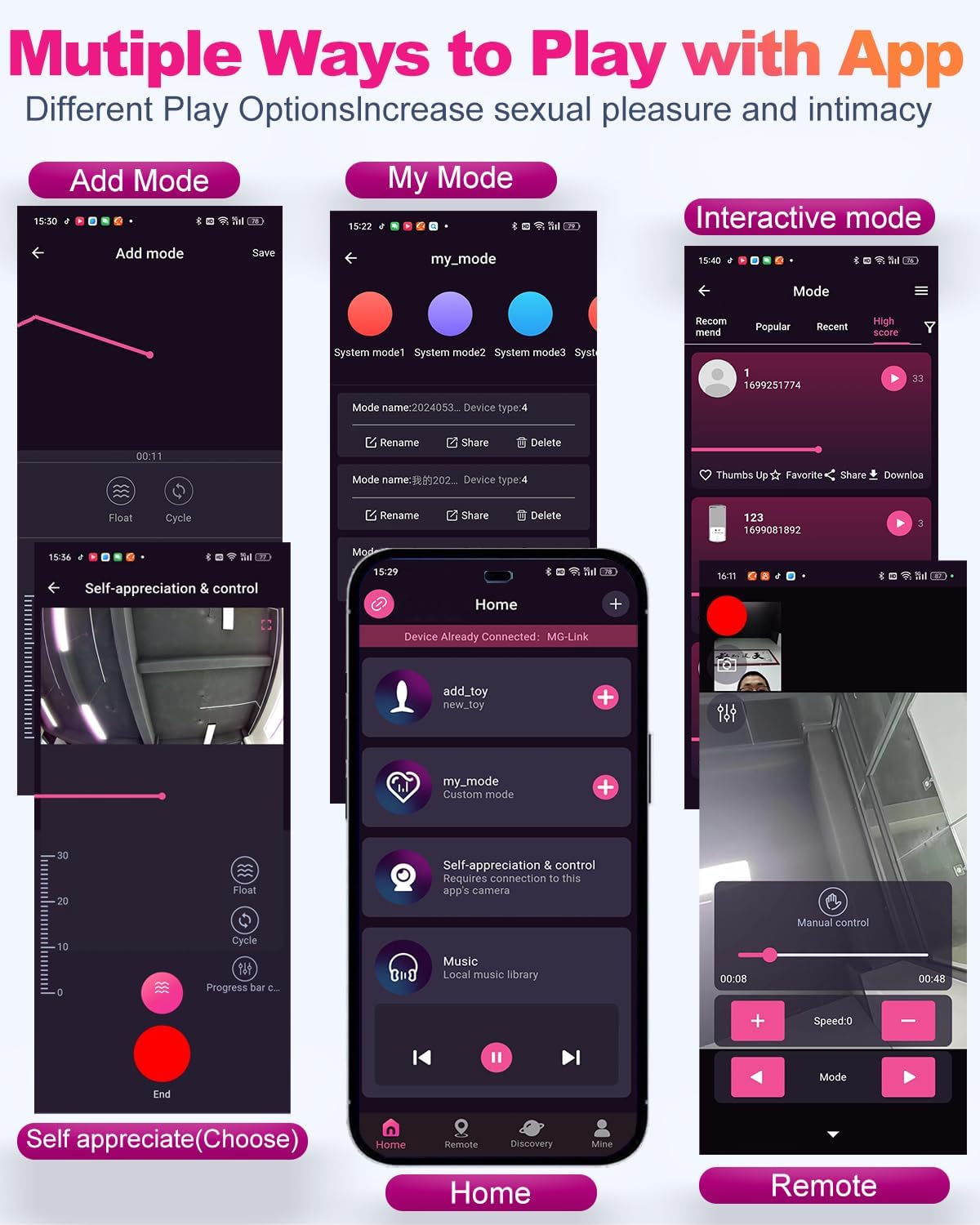
Image 5.3: The Fredorch app displaying options for 'Add Mode' to create new patterns, 'My Mode' for custom settings, and 'Interactive Mode' for shared experiences.
6. Maintenance
6.1 Cleaning
Regular cleaning is essential for hygiene and longevity. Disconnect the power before cleaning.
- Detach any accessories (dildos) and clean them separately with warm water and mild soap or a toy cleaner. Rinse thoroughly and air dry.
- Wipe down the main machine body and frame with a damp cloth. Do not use abrasive cleaners or immerse the unit in water.
- Ensure all parts are completely dry before reassembly or storage.
6.2 Storage
Store the Fredorch Premium FR1 in a clean, dry place, away from direct sunlight and extreme temperatures. The compact design allows for easy storage.
7. Troubleshooting
- Device not powering on: Ensure the power adapter is securely connected to both the machine and a working electrical outlet. Verify the outlet has power.
- Machine not moving: Check if the rod is properly inserted and secured. Ensure no obstructions are blocking the movement mechanism.
- App connection issues: Make sure Bluetooth is enabled on your mobile device and the machine is powered on. Try restarting both the app and the machine.
- Unusual noise: While the device operates quietly (under 35dB), excessive or unusual noise may indicate an issue. Ensure all parts are assembled correctly and lubricated if necessary. If the noise persists, discontinue use and contact support.
- Attachments rotating: Ensure the attachment is correctly secured to the Anti-Rotation Connector. Only use compatible Fredorch 'Z' series Anti-Rotation Interface attachments.
8. Specifications
| Model Name | Anti-Rotation Connector Sex Machine |
| Item Model Number | JJFR1-app |
| Electrical Input | 100-240V, 50-60Hz |
| Electrical Output | 24V DC 5A |
| Motor Type | Turbo Gear Motor, Continuous Duty |
| Max Power | 86W |
| Torque | 1.5nm |
| Stroke Length | 3 to 9 cm (1.18 to 3.54 inches) |
| Infinite Speed | 0 to 320 revolutions per minute |
| Noise Level | 0 to 35 dB |
| Assembled Dimensions | 47 x 13.5 x 30 cm (14 x 7 x 12 inches) |
| Assembled Weight | 5.2 kg (11.02 lbs) |
| Material | Aluminum, Metal |
| Color | Black |

Image 8.1: Diagram illustrating the dimensions of the Fredorch Premium FR1 and a chart comparing its low noise level (0-35dB) to common sounds.
9. Warranty and Support
For any product quality issues, technical support, or warranty inquiries, please contact Fredorch customer service. Refer to the packaging or the official Fredorch website for contact details.


