1. Introduction
This manual provides detailed instructions for the operation and maintenance of your LEMEGA CR9 Portable DAB/DAB+/FM Radio with Bluetooth 5.3. Please read this manual thoroughly before using the device to ensure proper functionality and to maximize your listening experience. Keep this manual for future reference.

Image 1.1: The LEMEGA CR9 Portable DAB/DAB+/FM Radio, showcasing its retro design and various color options.
2. Safety Information
Observe the following safety precautions to prevent damage to the device or injury to yourself.
- Power Source: Use only the provided USB-C power cable and a compatible 5V USB power adapter. Do not use damaged cables or adapters.
- Batteries: If using AA batteries (not included), ensure they are inserted with correct polarity. Do not mix old and new batteries, or different types of batteries. Remove batteries if the unit will not be used for an extended period.
- Water and Moisture: Do not expose the radio to rain, moisture, or dripping/splashing liquids. Do not place objects filled with liquids, such as vases, on the apparatus.
- Heat: Keep the radio away from heat sources such as radiators, heat registers, stoves, or other apparatus (including amplifiers) that produce heat.
- Ventilation: Ensure adequate ventilation. Do not block any ventilation openings.
- Cleaning: Unplug the radio from the power source before cleaning. Use a soft, dry cloth. Do not use liquid cleaners or aerosol cleaners.
- Servicing: Do not attempt to service this product yourself. Refer all servicing to qualified service personnel.
3. Package Contents
Verify that all items are present in the package:
- 1 x LEMEGA CR9 Radio
- 1 x USB-C Power Cable
- 1 x User Manual
4. Product Overview
4.1 Front Panel Controls
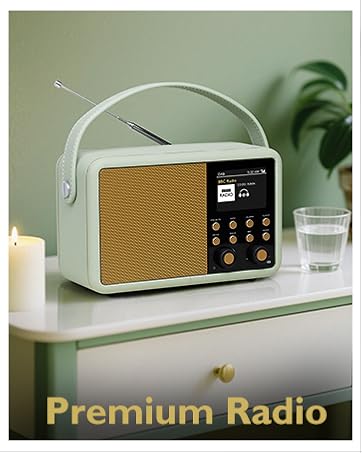
Image 4.1: Detailed view of the LEMEGA CR9 control panel.
- Display: Shows station information, time, date, and menu options.
- Left Rotary Knob (Volume/Power): Rotate to adjust volume. Press and hold to power on/off. Press briefly to mute/unmute.
- Right Rotary Knob (Tune/Select): Rotate to tune stations or navigate menus. Press to select an option.
- Preset Buttons (1-4): Quickly access saved favorite stations.
- Alarm Button: Set and manage alarms.
- Sleep Button: Set the sleep timer.
- Info Button: Display additional information about the current station or track.
- Menu/Mode Button: Access the main menu or switch between DAB, FM, and Bluetooth modes.
4.2 Rear Panel and Side Features
- Telescopic Antenna: Extend fully for optimal DAB/FM reception.
- USB-C Port: For connecting the power cable.
- Headphone Jack (3.5mm): For private listening.
- Carry Handle: For easy portability.
5. Setup
5.1 Powering the Radio
The LEMEGA CR9 can be powered by the included USB-C cable or by AA batteries (not included).
- AC Power: Connect the USB-C cable to the port on the back of the radio and plug the other end into a 5V USB power adapter (not included) connected to a wall outlet.
- Battery Power: Open the battery compartment on the bottom of the radio. Insert 4 x AA batteries, ensuring correct polarity. Close the compartment securely. The radio offers up to 20 hours of battery life.

Image 5.1: The LEMEGA CR9 radio in a portable outdoor setting, demonstrating its battery-powered functionality.
5.2 Initial Setup and Auto Scan
Upon first power-on, the radio will guide you through initial setup steps.
- Power On: Press and hold the Left Rotary Knob (Volume/Power) to turn on the radio.
- Language Selection: Use the Right Rotary Knob to select your preferred language and press to confirm.
- Time/Date: The radio will attempt to set the time and date automatically via DAB signal. If unsuccessful, you can set it manually through the menu.
- DAB/DAB+ Auto Scan: The radio will automatically perform a full scan for available DAB/DAB+ stations. Extend the telescopic antenna fully for best reception.
- FM Auto Scan: After DAB scan, you can initiate an FM auto scan if desired.
6. Operating Instructions
6.1 Power On/Off and Volume Control
- Power On: Press and hold the Left Rotary Knob.
- Power Off: Press and hold the Left Rotary Knob again.
- Volume Adjustment: Rotate the Left Rotary Knob.
- Mute: Press the Left Rotary Knob briefly. Press again to unmute.
6.2 Mode Selection
Press the Menu/Mode button repeatedly to cycle through available modes: DAB, FM, and Bluetooth.
6.3 DAB/DAB+ Radio Operation

Image 6.1: The LEMEGA CR9 radio highlighting its strong DAB/DAB+/FM reception capabilities.
- Station Selection: In DAB mode, rotate the Right Rotary Knob to browse available stations. Press to select a station.
- Full Scan: To perform a full scan for DAB stations, press the Menu/Mode button, navigate to 'Full Scan' using the Right Rotary Knob, and press to confirm.
- Station Information: Press the Info button to cycle through various information displays such as program type, signal strength, bit rate, frequency, and date/time.
6.4 FM Radio Operation
- Manual Tuning: In FM mode, rotate the Right Rotary Knob to tune to a specific frequency.
- Auto Scan: Press and hold the Right Rotary Knob to automatically scan for the next available FM station.
- Station Information: Press the Info button to display information like RDS (Radio Data System) text, program type, and frequency.
6.5 Saving and Recalling Presets
The LEMEGA CR9 allows you to save up to 60 favorite stations (DAB and FM combined).
- To Save a Preset: Tune to the desired station. Press and hold one of the Preset Buttons (1-4) until 'Preset Saved' appears on the display. For other preset slots, press and hold the Menu/Mode button, navigate to 'Save Preset', select a slot using the Right Rotary Knob, and press to confirm.
- To Recall a Preset: Briefly press one of the Preset Buttons (1-4) to recall the corresponding station. For other presets, briefly press the Menu/Mode button, navigate to 'Recall Preset', select a slot, and press to confirm.
6.6 Bluetooth 5.3 Operation

Image 6.2: The LEMEGA CR9 radio demonstrating its Bluetooth streaming capability with a smartphone.
- Enter Bluetooth Mode: Press the Menu/Mode button until 'Bluetooth' is selected. The display will show 'Pairing'.
- Pairing: On your Bluetooth-enabled device (smartphone, tablet, etc.), search for 'LEMEGA CR9' in the Bluetooth settings and select it to pair.
- Playback: Once paired, you can play audio from your device through the LEMEGA CR9. Use your device or the radio's volume knob to control playback volume.
6.7 Alarm Clock and Sleep Timer

Image 6.3: The LEMEGA CR9 radio on a bedside table, illustrating its alarm and sleep timer functions.
- Setting Alarms: Press the Alarm button. Use the Right Rotary Knob to select Alarm 1 or Alarm 2. Follow the on-screen prompts to set the time, duration, source (DAB, FM, or Buzzer), frequency (daily, weekday, weekend, once), and volume.
- Snooze: When an alarm sounds, press any button (except the power button) to activate snooze. The alarm will pause for a set period (usually 9 minutes) and then sound again.
- Stopping Alarm: To stop an alarm completely, press the Left Rotary Knob (Power/Volume).
- Sleep Timer: Press the Sleep button repeatedly to cycle through sleep timer options (e.g., 15, 30, 45, 60 minutes, Off). The radio will automatically turn off after the selected time.
6.8 Equalizer Settings

Image 6.4: The LEMEGA CR9 radio's controls, highlighting its sound performance features.
The radio offers various equalizer presets and custom adjustments to tailor the sound to your preference.
- Accessing EQ: Press the Menu/Mode button, navigate to 'Equalizer' or 'Sound Settings', and press to select.
- Presets: Choose from predefined sound modes like 'Music' or 'Speech'.
- Custom EQ: Adjust Bass and Treble levels manually for a personalized sound profile.
6.9 Headphone Use
Connect standard 3.5mm headphones to the headphone jack on the rear of the radio for private listening. The internal speaker will automatically mute when headphones are connected.
7. Maintenance
- Cleaning: Gently wipe the radio's surface with a soft, dry, lint-free cloth. Do not use abrasive cleaners, waxes, or solvents.
- Antenna Care: Handle the telescopic antenna with care. Do not force or bend it excessively.
- Storage: If storing the radio for an extended period, remove the batteries and store in a cool, dry place.
8. Troubleshooting
| Problem | Possible Cause | Solution |
|---|---|---|
| Radio does not power on. | No power from AC adapter or depleted/incorrectly inserted batteries. | Check AC power connection. Replace or correctly insert AA batteries. |
| Poor DAB/FM reception. | Antenna not fully extended or poor signal area. | Fully extend the telescopic antenna. Try repositioning the radio. Perform a full scan. |
| Bluetooth device cannot pair. | Radio not in Bluetooth pairing mode or device too far. | Ensure radio is in Bluetooth mode and displaying 'Pairing'. Move device closer to the radio. |
| Cannot save more than a few presets. | Incorrect procedure for saving presets beyond the quick access buttons. | Refer to section 6.5 for detailed instructions on saving presets using the menu. The radio supports up to 60 presets. |
| Display is blank or unreadable. | Brightness setting too low or power issue. | Check power connection. Adjust display brightness in the system settings menu. |
9. Specifications
| Feature | Specification |
|---|---|
| Brand | LEMEGA |
| Model Number | CR9 |
| Color | Black |
| Connectivity Technology | Bluetooth 5.3, 3.5 mm audio |
| Special Feature | Portable |
| Compatible Devices | Headphones, Laptop, Smartphone, Tablet |
| Product Dimensions | 13 cm (L) x 10 cm (W) x 18 cm (H) |
| Tuning Technology | DAB/DAB+/FM |
| Style | Retro |
| Power Source | Battery & Corded Electric |
| Supported Radio Bands | DAB, DAB+, FM |
| Weight | 960g |
10. Warranty and Support
Your LEMEGA CR9 radio comes with a 1-year manufacturer's warranty. For warranty claims, technical support, or further assistance, please contact LEMEGA customer service or visit the official LEMEGA brand store.
LEMEGA Brand Store: https://www.amazon.fr/stores/LEMEGA/page/0399901B-3071-401B-9786-66738A4B5F19


