1. Introduction
This manual provides detailed instructions for the assembly, operation, and maintenance of your HOOBRO 71" Pantry Cabinet with Charging Station, model WT10UDPC01. Please read this manual thoroughly before beginning assembly or use to ensure proper function and safety. This cabinet is designed to provide versatile storage and convenience in your kitchen, dining room, living room, or home office.
2. Safety Information
Adhering to these safety guidelines is crucial for preventing injury and damage to the product.
- Always follow the installation guide provided.
- Use appropriate safety gear when handling heavy parts.
- Be cautious of glass components during assembly and use.
- Ensure electrical parts (charging station, LED lights) are handled carefully and kept away from water.
- Do not overload the cabinet shelves or drawers. Refer to specifications for weight limits if available.
- Always unplug the cabinet from the power source when not in use or before cleaning.
- Assemble the cabinet on a soft, clean surface to prevent scratches.
- Ensure all screws and fasteners are tightened securely before use. Periodically check and re-tighten as needed.
- Keep small parts and packaging materials away from children.
3. Assembly Instructions
The HOOBRO Pantry Cabinet requires assembly. All necessary tools and a detailed, well-illustrated manual are included in the package. Parts are numbered for easy identification. We recommend assembling this unit with a partner to ensure stability and ease of construction.
3.1 Package Contents
Before starting, verify that all components and hardware listed in the included manual are present. Each part is clearly labeled with a number or letter.
3.2 Step-by-Step Assembly
Follow the step-by-step diagrams and instructions provided in the separate assembly manual. Ensure each connection is secure before proceeding to the next step.
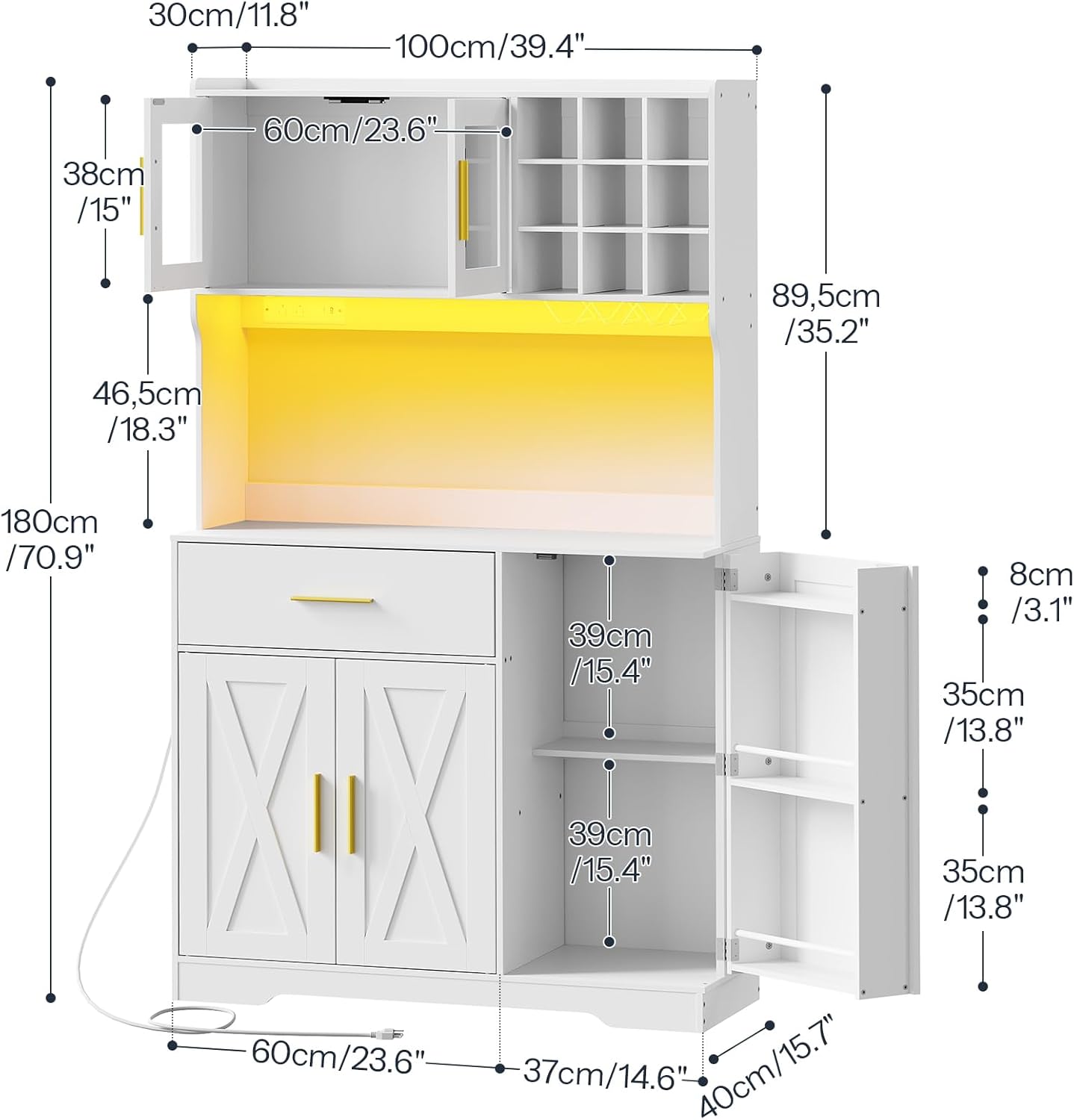
Figure 1: Overall dimensions and component layout of the pantry cabinet.
This image illustrates the overall dimensions and the arrangement of different sections of the cabinet, including the upper glass display, wine rack, microwave shelf, drawer, and lower storage compartments. It provides a visual guide to the completed structure.
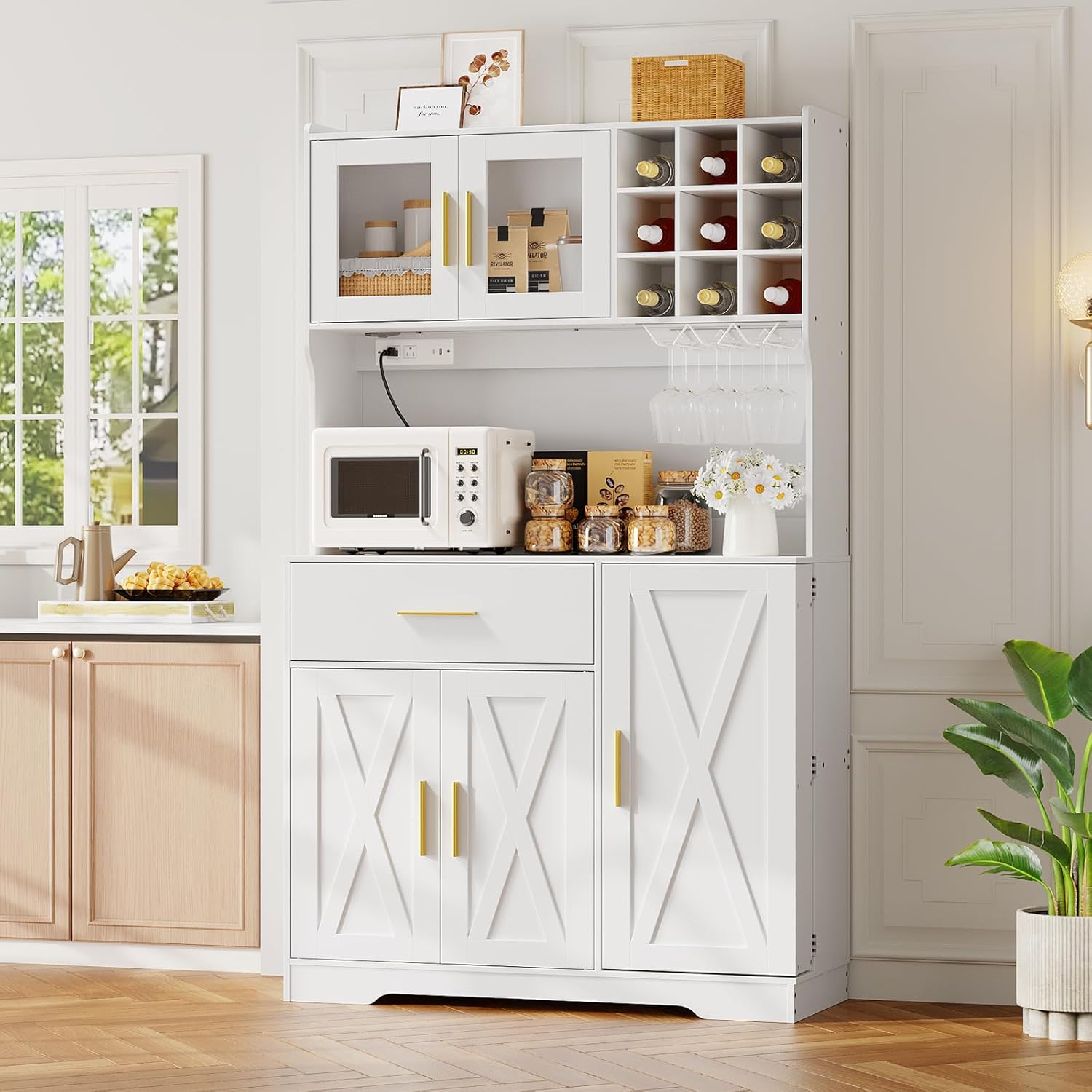
Figure 2: Fully assembled pantry cabinet in a kitchen environment.
This image shows the fully assembled HOOBRO pantry cabinet integrated into a kitchen setting, demonstrating its functional use with a microwave, coffee maker, and various storage items. It highlights the cabinet's aesthetic and practical application.
3.3 Assembly Tips
- Lay out all parts on a clean, soft surface to prevent scratches.
- Do not overtighten screws, as this can damage the particleboard.
- If you encounter any difficulties, refer to the detailed diagrams in the included manual or contact customer support.
4. Operating Instructions
4.1 Multi-Functional Charging Station
The cabinet is equipped with a built-in power strip for convenient appliance use. To operate:
- Plug the cabinet's power cord into a standard wall outlet.
- Utilize the 2 AC outlets for kitchen appliances such as microwaves or coffee makers.
- Use the 1 USB port and 1 Type-C port for charging compatible electronic devices.

Figure 3: Detail of the integrated charging station.
This image provides a close-up view of the charging station, highlighting its two AC outlets, one USB port, and one Type-C port, along with the power cord length. It demonstrates where to connect appliances and devices.
4.2 RGB LED Light Strip
The integrated RGB LED light strip offers customizable lighting options. To control the lights:
- Ensure the cabinet is plugged into a power source.
- Use the provided remote control or a compatible mobile application to adjust settings.
- Options include multiple colors, brightness adjustment, music-sync mode, and timer functions.

Figure 4: RGB LED light strip in operation with control options.
This image displays the pantry cabinet with its RGB LED light strip illuminated, showcasing various color options and the methods of control, including a remote and a mobile application. It illustrates the customizable ambiance feature.
4.3 Storage Compartments
The cabinet offers diverse storage solutions:
- Glass Display Case: Located at the top, suitable for displaying dishware or decorative items.
- Wine Rack: Designed to hold multiple wine bottles securely.
- Glass Holder: Racks beneath the upper section for hanging wine glasses.
- Drawer: A smooth-glide drawer for cutlery or smaller kitchen essentials.
- Bottom Storage Compartments: Enclosed sections for larger items, pots, pans, or pantry staples. Includes door shelves for additional organization.
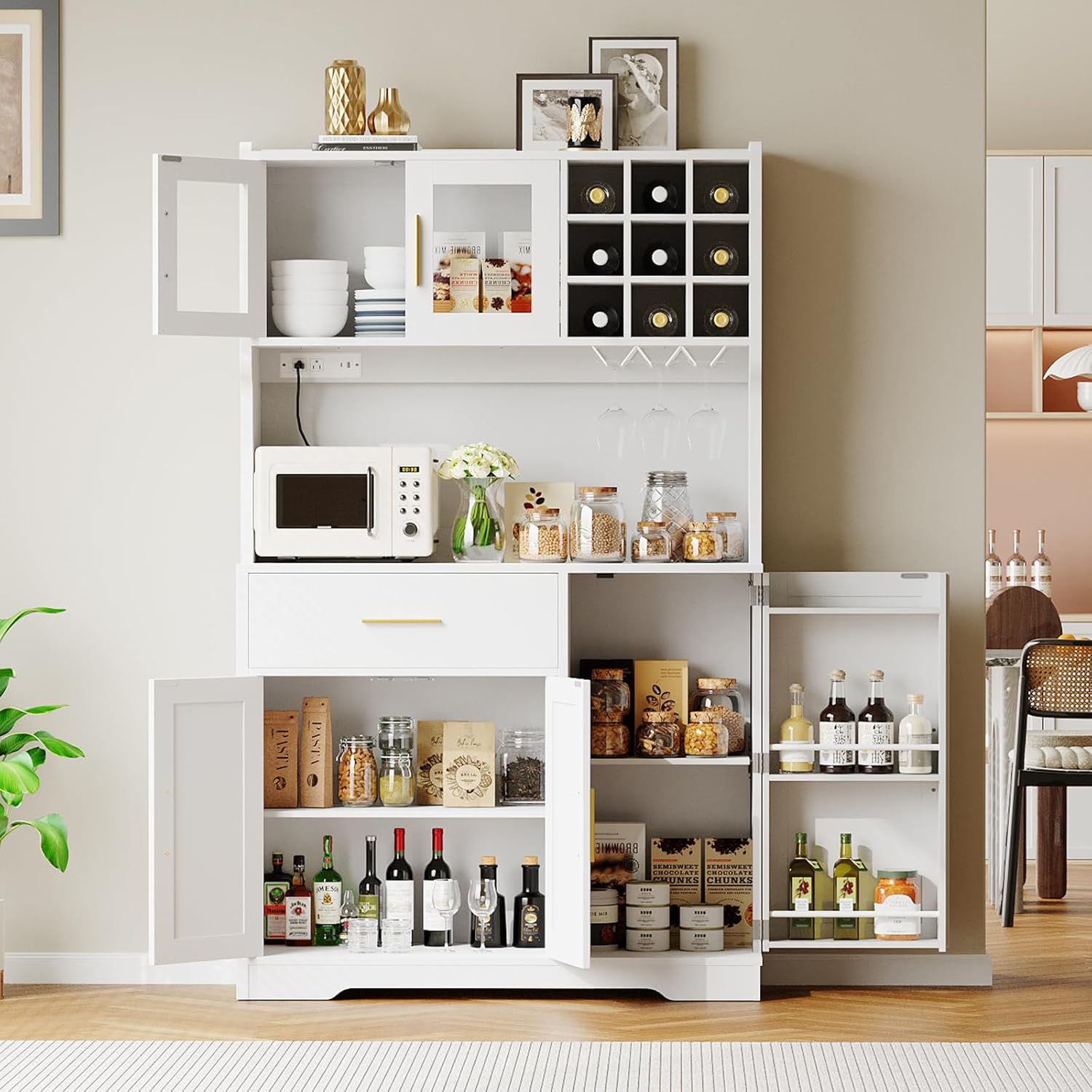
Figure 5: Interior view of the pantry cabinet's storage sections.
This image shows the pantry cabinet with its doors open, providing a clear view of the various storage compartments, including the wine rack, glass holder, and adjustable shelves. It demonstrates the cabinet's capacity for organizing kitchen items.

Figure 6: Detail of the smooth-glide drawer.
This image focuses on the smooth-glide drawer, illustrating its internal dimensions and capacity for storing various kitchen items like spices or cutlery. It highlights the drawer's practical design.

Figure 7: Detail of the wine rack and glass holder.
This image provides a detailed view of the wine rack, designed to hold nine bottles, and the three-row wine glass rack located beneath it. It showcases the dedicated storage for beverages and glassware.
4.4 Product Videos
Video 1: Product Overview (2:04). This video provides a comprehensive overview of the HOOBRO pantry cabinet, demonstrating its features, storage capabilities, and design in various settings.
Video 2: Feature Demonstration (1:26). This video highlights specific features of the pantry cabinet, such as the charging station, LED lighting, and various storage compartments, showing them in practical use.
5. Maintenance
Proper care will extend the life and appearance of your pantry cabinet.
- Cleaning: Wipe surfaces with a soft, damp cloth. Avoid harsh chemicals or abrasive cleaners that can damage the finish.
- Glass Care: Clean tempered glass panels with a glass cleaner and a soft cloth.
- Electrical Components: Ensure the charging station and LED lights are kept dry. Do not spray liquids directly onto electrical parts.
- Hardware: Periodically check all screws and fasteners to ensure they remain tight. Re-tighten if necessary.
- Avoid Overloading: Do not exceed the recommended weight capacity for shelves and drawers to prevent structural damage.
6. Troubleshooting
If you encounter issues with your HOOBRO Pantry Cabinet, refer to the following common solutions:
| Problem | Possible Cause | Solution |
|---|---|---|
| Cabinet is wobbly or unstable. | Loose fasteners or uneven assembly. | Check all screws and bolts and tighten them securely. Ensure the cabinet is on a level surface. |
| Charging station not working. | Cabinet not plugged in, power outlet issue, or device not compatible. | Verify the cabinet's power cord is securely plugged into a functional wall outlet. Test the outlet with another device. Ensure your device is compatible with the USB/Type-C ports. |
| LED lights not illuminating. | Power issue, remote control battery dead, or app connection problem. | Check power connection. Replace remote control batteries. Ensure the app is correctly paired and updated. |
| Drawer does not slide smoothly. | Rails misaligned or debris in the track. | Ensure drawer rails are correctly installed and aligned. Clear any obstructions from the tracks. |
7. Specifications
| Feature | Detail |
|---|---|
| Brand | HOOBRO |
| Model Number | WT10UDPC01 |
| Product Dimensions | 38.2"L x 15.7"W x 71"H (97cm L x 40cm W x 180cm H) |
| Item Weight | 115.7 Pounds (52.5 kg) |
| Material | Engineered Wood (Particleboard), Metal, Tempered Glass |
| Color | White with Gold hardware |
| Charging Station | 2 AC Outlets (120V/12A), 1 USB Port (5V/2A), 1 Type-C Port (5V/2A), 4.9-Foot Power Cord |
| LED Light Strip | RGB, Multi-color, Music-sync, Brightness Adjustment, Timer Function (Remote/App Control) |
| Storage Features | Glass display case, Wine rack (9 bottles), 3-Row Glass holder, Drawer, Door shelves, Bottom storage compartments |
| Assembly Required | Yes |
8. Warranty and Customer Support
For any questions, concerns, or assistance with your HOOBRO Pantry Cabinet, please contact HOOBRO customer support. Refer to your purchase documentation for specific warranty details and contact information.
You can typically find support contact information on the HOOBRO official website or through the retailer where the product was purchased.


