
Introduction
This manual provides detailed instructions for the assembly, operation, maintenance, and troubleshooting of your Realspace® Everton Ergonomic Vegan Leather High-Back Executive Chair. Please read this manual thoroughly before assembly and use to ensure proper function and safety.

Image: The Realspace Everton chair positioned at a desk in a modern office environment.
Safety Information
Maximum Weight Capacity: This chair has a maximum weight capacity of 350 lbs (158 kg). Do not exceed this limit to prevent damage to the chair or personal injury.
Assembly and Operation: Always assemble and operate the chair strictly according to the instructions provided in this manual. Improper assembly or use can lead to instability and potential hazards.
Regular Inspection: Periodically check all bolts and screws to ensure they are tight. Retighten as necessary.
Flammability Standard: This product meets/exceeds Flammability Standard TB117-2013.
Package Contents
Before beginning assembly, verify that all components are present and undamaged. If any parts are missing or damaged, do not proceed with assembly. Contact customer support for assistance.
- Chair Backrest
- Seat Cushion with Mechanism
- Armrests (2)
- Gas Lift Cylinder
- Star Base
- Casters (5)
- Hardware Pack (screws, washers, Allen wrench)
Setup and Assembly Instructions
Follow these steps carefully for proper assembly. It is recommended to assemble the chair on a soft, non-abrasive surface to prevent damage.
- Attach Casters to Star Base: Insert each of the five casters into the holes at the end of each leg of the star base. Push firmly until they click into place.
- Insert Gas Lift Cylinder: Place the gas lift cylinder into the center hole of the assembled star base. Ensure it is seated securely.
- Attach Armrests to Seat Cushion: Align the armrests with the pre-drilled holes on the underside of the seat cushion. Secure them using the provided screws and washers. Do not overtighten.
- Attach Backrest to Seat Cushion: Align the backrest with the mounting plate on the rear of the seat cushion. Secure with the remaining screws and washers.
- Connect Seat Assembly to Base: Carefully place the assembled seat and backrest onto the gas lift cylinder, ensuring the center hole of the seat mechanism aligns with the top of the cylinder. Press down firmly to secure.
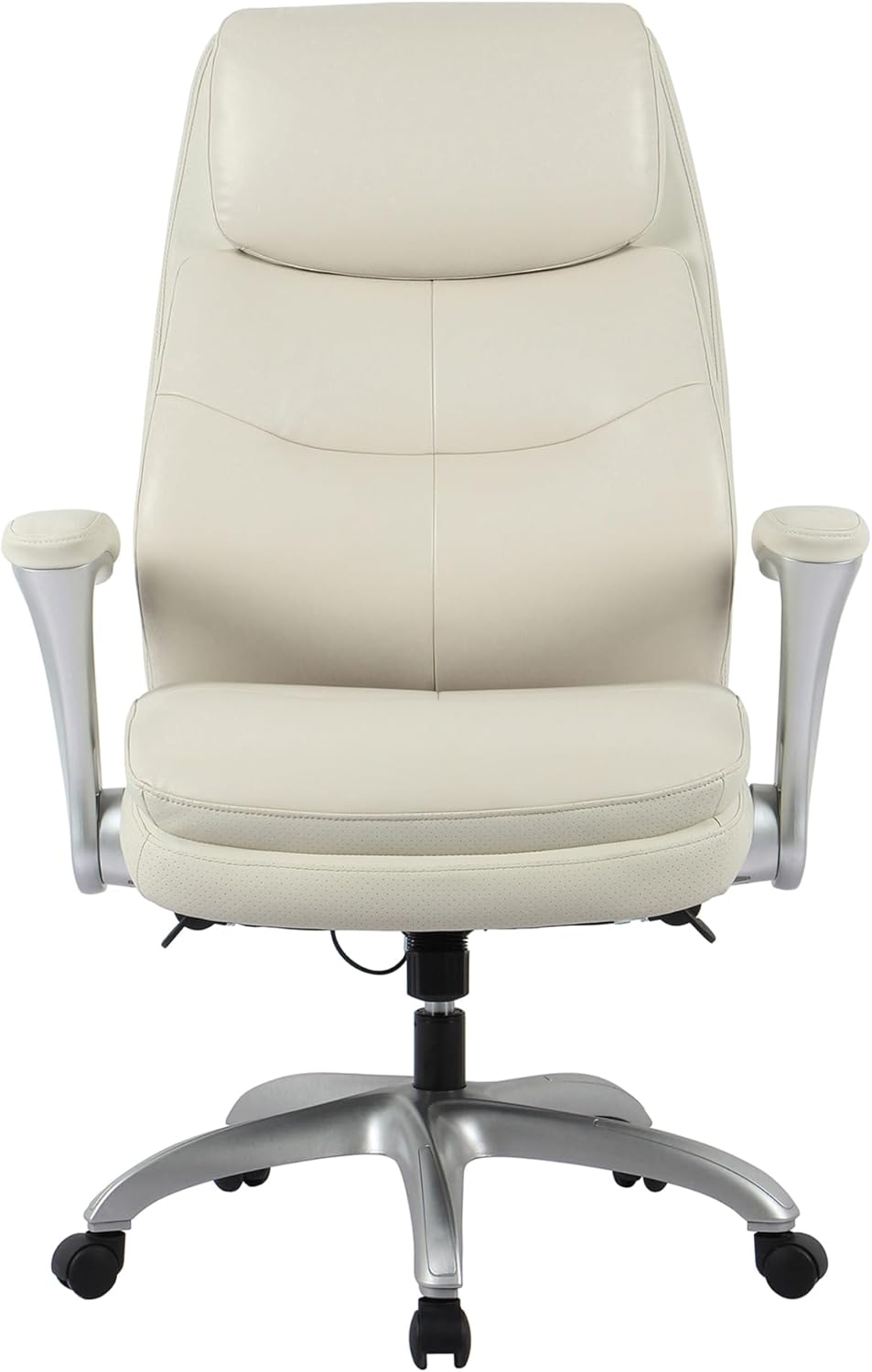
Image: Front view of the Realspace Everton chair, showing the seat, backrest, and armrests.
Operating Instructions
Your Realspace Everton chair offers several adjustment features to customize your seating experience.
- Seat Height Adjustment: Locate the lever on the right side, under the seat. To raise the seat, lift the lever while taking your weight off the chair. To lower the seat, lift the lever while remaining seated. Release the lever at the desired height.
- Flip-Up Armrests: The armrests can be flipped up and out of the way. Simply grasp an armrest and pivot it upwards until it locks into the vertical position. To return it, pull it down until it locks into the horizontal position.

Image: Close-up view demonstrating the flip-up armrest feature of the Realspace Everton chair.
- Recline Function: This chair features a single reclining position. To recline, pull the lever on the left side, under the seat, outwards. Lean back to the desired angle and push the lever inwards to lock the position. To return to an upright position, pull the lever outwards again and lean forward slightly.
- Lumbar Support: The chair includes built-in lumbar support designed to provide comfort and support to your lower back.
Maintenance
Proper care will extend the life and appearance of your chair.
- Cleaning Vegan Leather: Wipe the vegan leather surfaces with a soft, damp cloth. For tougher stains, use a mild soap solution and wipe dry immediately. Avoid harsh chemicals, abrasive cleaners, or solvents, as these can damage the material.
- Caster Maintenance: Periodically clean any debris (hair, dust) from the casters to ensure smooth movement.
- Hardware Check: Every six months, inspect all screws and bolts to ensure they are tight. Retighten any loose fasteners to maintain stability and safety.
Troubleshooting
If you encounter issues with your chair, refer to the following common problems and solutions:
| Problem | Possible Cause | Solution |
|---|---|---|
| Chair does not adjust height | Gas lift cylinder malfunction or lever not engaged. | Ensure the height adjustment lever is fully engaged. If the issue persists, the gas lift cylinder may need replacement. Contact customer support. |
| Chair is wobbly or unstable | Loose hardware or uneven floor. | Check and tighten all assembly screws. Ensure the chair is on a flat, even surface. |
| Squeaking noises | Loose connections or friction between parts. | Tighten all screws. A small amount of silicone lubricant can be applied to moving parts if necessary, avoiding contact with upholstery. |
| Casters do not roll smoothly | Debris caught in casters. | Remove any hair, dust, or debris from the caster wheels. |
Specifications
Detailed specifications for the Realspace Everton Executive Chair:

Image: Diagram illustrating the overall width, seat width, overall height range, seat height range, seat back height, seat depth, and base dimensions of the chair.
- Brand: Realspace
- Model Number: HLC-5327
- Color: Beige
- Material: Vegan Leather (Faux Leather)
- Frame Material: Metal
- Fill Material: Foam
- Item Weight: 59.97 Pounds (27.2 kg)
- Maximum Weight Recommendation: 350 Pounds (158 kg)
- Item Dimensions (Overall): 35.04 x 18.5 x 25.59 inches (Depth x Width x Height)
- Back Style: High-Back
- Arm Style: Flip-Back
- Assembly Required: No (Minimal assembly expected for base/seat attachment)
- Compliance: ANSI/BIFMA Compliant
Warranty and Support
For warranty information or technical support, please refer to the documentation included with your purchase or contact Realspace customer service. Contact details can typically be found on the manufacturer's official website or through your retailer.