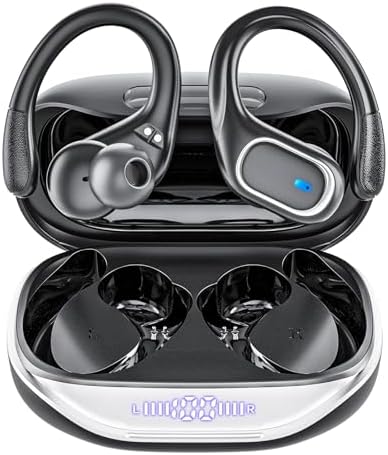
1. Product Overview
Thank you for choosing the KESIEME T16 Wireless Earbuds. This manual provides detailed instructions to help you set up, operate, and maintain your earbuds for optimal performance.
Package Contents
- KESIEME T16 Wireless Earbuds (Left and Right)
- Charging Case
- USB Type-C Charging Cable
- Multiple Sizes of Ear Tips (S, M, L)
2. Setup and First Use
2.1 Charging the Earbuds and Case
Before first use, fully charge both the earbuds and the charging case.
- Connect the provided USB Type-C cable to the charging port on the case and to a USB power source.
- The digital LED display on the charging case will show the battery level.
- Place the earbuds into the charging case. The earbuds will automatically begin charging.
A full charge for the case takes approximately 1.5 hours. The earbuds provide up to 8 hours of continuous use on a single charge, and the charging case extends the total playtime to approximately 80 hours.

Image: The KESIEME T16 charging case with an illuminated LED digital display showing battery levels for the case and individual earbuds.

Image: An illustration highlighting the 80 hours of total listening time with the charging case and 15 hours from a single earbud charge.
2.2 Fitting the Earbuds
The KESIEME T16 earbuds feature elastic ear hooks and come with three sizes of ear tips (S, M, L) to ensure a secure and comfortable fit, especially during sports activities.
- Choose the ear tip size that best seals your ear canal for optimal sound quality and comfort.
- Gently place the earbud into your ear, then adjust the flexible ear hook over your ear for a snug fit.

Image: A person running while wearing the KESIEME T16 earbuds, with insets showing the ergonomic design, flexible earhook, and different ear tip sizes (L, M, S).
2.3 Bluetooth Pairing
The earbuds utilize advanced Bluetooth 5.3 technology for fast and stable connections.
- Open the charging case lid. The earbuds will automatically enter pairing mode.
- On your device (smartphone, tablet, laptop, etc.), enable Bluetooth and search for available devices.
- Select "T16" from the list of devices to connect.
- Once successfully paired, the earbuds will automatically connect to your device when you open the charging case lid (after the first successful connection).

Image: A visual representation of Bluetooth 5.3 technology and the one-step pairing process, showing the earbuds connecting to a smartphone.
3. Operating Instructions
3.1 Touch Controls
The KESIEME T16 earbuds feature intuitive touch controls on each earbud for easy management of music and calls.
| Action | Left Earbud (L) | Right Earbud (R) |
|---|---|---|
| Play/Pause Music | One Tap | One Tap |
| Next Track | Long Press | Long Press |
| Previous Track | Long Press | Long Press |
| Volume Up | One Tap | |
| Volume Down | One Tap | |
| Answer/End Call | One Tap | One Tap |
| Reject Call | Long Press | Long Press |
| Activate Voice Assistant | Long Press | Long Press |

Image: A diagram illustrating the various touch control functions on the KESIEME T16 earbuds, including play/pause, volume, track skipping, and call management.
3.2 Audio Quality and Calls
The earbuds are equipped with 13mm dynamic drivers, delivering well-balanced and clear audio. For calls, the built-in microphone and snug fit design work to filter out ambient noise, ensuring clear conversations.

Image: An exploded view diagram showing the internal components of the earbud, highlighting the 14.2mm three-layer diaphragm drivers for high-quality stereo sound.
4. Maintenance
4.1 Cleaning
Regular cleaning helps maintain sound quality and hygiene.
- Use a soft, dry, lint-free cloth to wipe the earbuds and charging case.
- Gently remove any earwax or debris from the ear tips and speaker mesh using a small brush or cotton swab.
- Do not use abrasive cleaners or immerse the earbuds or case in liquid.
4.2 Water Resistance
The KESIEME T16 earbuds are rated IPX7 waterproof, meaning they can withstand splashes, sweat, and rain. They are suitable for sports and workouts but should not be submerged in water for extended periods.

Image: An earbud being splashed with water, illustrating its IPX7 waterproof and sweat-resistant capabilities.
5. Troubleshooting
If you encounter issues with your KESIEME T16 earbuds, please refer to the following common solutions:
- Earbuds not pairing: Ensure both earbuds are charged. Place them back in the case, close the lid, then open it again to re-enter pairing mode. Delete "T16" from your device's Bluetooth list and try pairing again.
- No sound from one earbud: Check if both earbuds are charged. Try resetting the earbuds by placing them in the charging case and then taking them out. Re-pair with your device.
- Charging issues: Ensure the charging cable is securely connected to both the case and the power source. Check the charging port for any debris. Try a different charging cable or power adapter.
- Poor sound quality: Ensure the ear tips provide a good seal in your ear canal. Clean the ear tips and speaker mesh. Move closer to your connected device to avoid interference.
6. Specifications
| Feature | Detail |
|---|---|
| Model Name | T16 |
| Brand | KESIEME |
| Connectivity Technology | Wireless (Bluetooth) |
| Bluetooth Version | 5.3 |
| Ear Placement | In Ear |
| Form Factor | In Ear |
| Earpiece Shape | Ear Hooks |
| Noise Control | Active Noise Cancellation (for listening), Noise Filtering (for calls) |
| Waterproof Rating | IPX7 |
| Earbud Battery Life | Up to 8 hours (at 50%-60% volume) |
| Total Playtime (with Case) | Approximately 80 hours |
| Charging Case Capacity | 600mAh |
| Control Type | Touch Control |
| Audio Driver Size | 13mm |
| Included Components | Cable |
| Item Weight | 4.9 ounces |
| Product Dimensions | 3.9 x 7 x 2.8 inches |
7. Warranty and Support
For warranty information, please refer to the documentation included with your product packaging. For further assistance or support, please visit the official KESIEME store on Amazon:


