
1. Introduction
Thank you for choosing the Silvergear Premium Infrared Heater Panel. This 720W panel provides efficient and comfortable radiant heat, ideal for various room sizes. Featuring advanced carbon crystal technology, it offers instant warmth and is designed for energy efficiency. The heater can be controlled via the Smart Life app or manually, and offers versatile installation options, including wall mounting or freestanding use. Please read this manual thoroughly before installation and operation to ensure safe and optimal performance.
2. Safety Instructions
WARNING: Failure to follow these safety instructions may result in fire, electric shock, or injury.
- Always ensure the heater is placed on a stable, level surface or securely mounted to a wall.
- Do not cover the heater. Covering the heater can cause overheating and fire.
- Keep flammable materials (e.g., curtains, furniture, clothing) at least 1 meter (3 feet) away from the heater.
- Do not operate the heater near water or in damp environments (e.g., bathrooms, laundry rooms).
- Ensure the power cord is not damaged, pinched, or run under carpets.
- Do not insert objects into any openings on the heater.
- Unplug the heater when not in use or before cleaning.
- This appliance is not intended for use by persons (including children) with reduced physical, sensory, or mental capabilities, or lack of experience and knowledge, unless they have been given supervision or instruction concerning use of the appliance by a person responsible for their safety.
- The heater is equipped with dual overheat protection. If it overheats, it will automatically shut off.
3. Package Contents
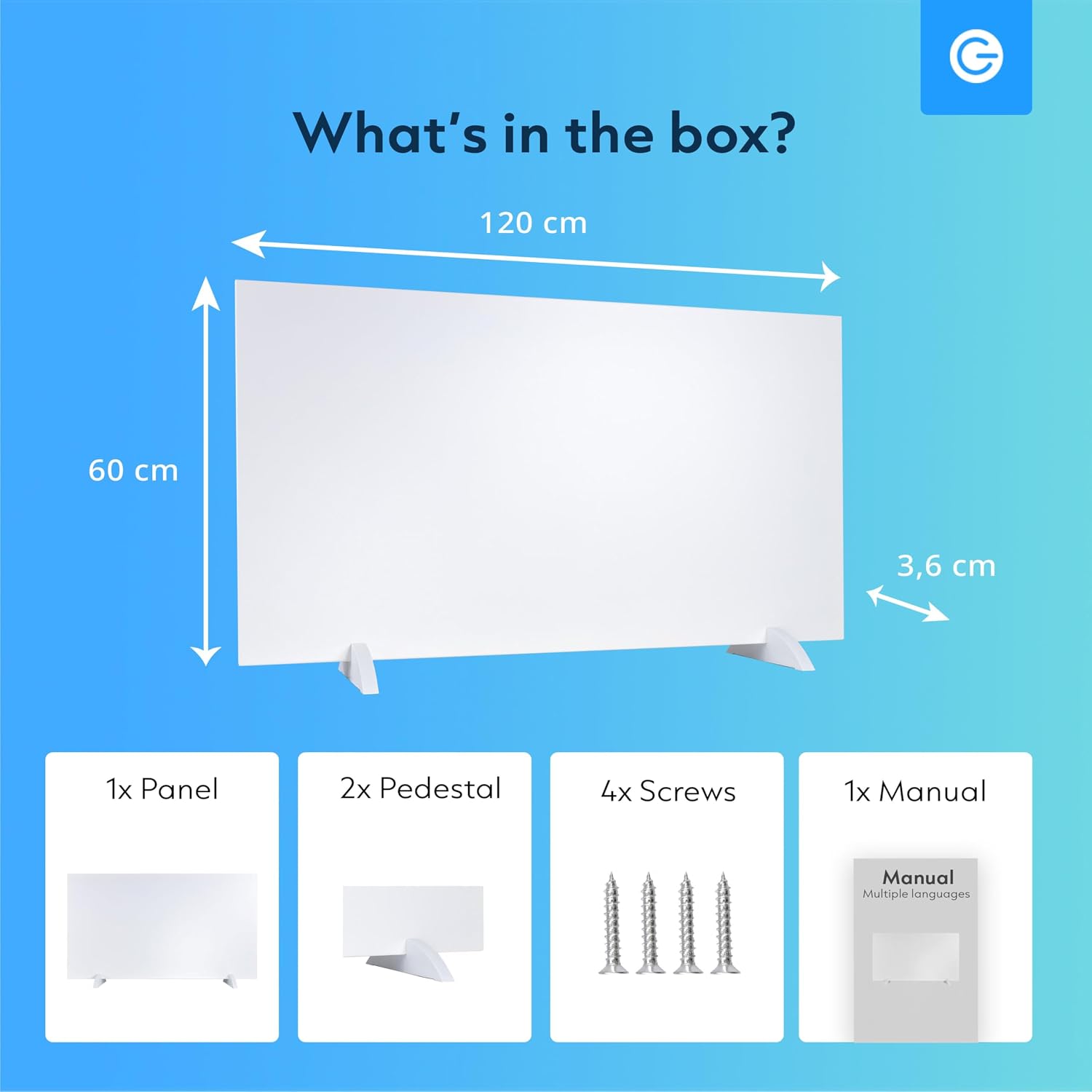
Verify that all components are present in the package:
- 1x Infrared Heater Panel
- 2x Pedestal (for freestanding use)
- 4x Screws (for wall mounting)
- 1x User Manual
4. Product Features
- 720 Watt Power: Provides rapid and effective heating for rooms up to 15m².
- Energy-Efficient: Utilizes advanced carbon crystal technology for direct heat, up to 50% more economical than traditional heating systems.
- Smart WiFi Control: Manage heating settings remotely via the Smart Life app.
- Manual Control: Adjust temperature directly using the buttons on the side of the panel.
- Versatile Installation: Designed for both wall mounting and freestanding use with included pedestals.
- Safe and Durable: Features dual overheat protection and a robust metal panel for extended service life.
- Slim and Modern Design: Aesthetically pleasing design that complements any interior.


5. Setup and Installation
The Silvergear Infrared Heater Panel offers flexible installation options:
5.1 Freestanding Installation
- Carefully unpack the heater panel and pedestals.
- Attach the two pedestals to the bottom of the heater panel using the provided screws. Ensure they are securely fastened.
- Place the heater on a stable, flat surface in your desired location, ensuring adequate clearance from walls and flammable objects (at least 1 meter / 3 feet).
5.2 Wall Mounting Installation
- Identify a suitable wall location, ensuring it is structurally sound and free from electrical wiring or plumbing. Maintain at least 1 meter (3 feet) clearance from flammable materials.
- Using the provided screws and appropriate wall anchors (not included, if needed for your wall type), securely mount the heater to the wall. Refer to the mounting points on the back of the panel.
- Ensure the heater is level and firmly attached to prevent accidental falls.


6. Operating Instructions
6.1 Manual Control
The heater panel features a control panel with an LED display on its side for manual operation:
- Power On/Off: Press the power button to turn the heater on or off.
- Temperature Adjustment: Use the '+' and '-' buttons to set your desired temperature between 16°C and 37°C. The LED display will show the current and target temperature.
- Timer Function: The built-in timer allows you to set a specific operating duration. Refer to the detailed instructions in the full manual for timer programming.
6.2 Smart Life App Control (WiFi)
For advanced control and remote operation, connect your heater to the Smart Life app:
- Download App: Download the "Smart Life" app from your smartphone's app store (iOS or Android).
- Register/Login: Create an account or log in to your existing Smart Life account.
- Add Device: Follow the in-app instructions to add a new device. Select "Heater" or "Infrared Heater" from the device list.
- Connect to WiFi: Put the heater into pairing mode (usually by holding a button on the control panel for a few seconds until an indicator light flashes). Connect the app to your home 2.4GHz WiFi network.
- Control: Once connected, you can control the heater's power, adjust temperature, set schedules, and access other smart features from anywhere.

7. Maintenance
Regular maintenance ensures the longevity and efficient operation of your heater:
- Cleaning: Before cleaning, always unplug the heater and allow it to cool completely. Wipe the exterior surfaces with a soft, damp cloth. Do not use abrasive cleaners or solvents.
- Storage: If storing the heater for an extended period, ensure it is clean and dry. Store it in a cool, dry place, preferably in its original packaging.
- Inspection: Periodically check the power cord and plug for any signs of damage. If damage is found, discontinue use and contact customer support.
8. Troubleshooting
If you encounter issues with your heater, refer to the following common problems and solutions:
| Problem | Possible Cause | Solution |
|---|---|---|
| Heater does not turn on. | No power supply; power button not pressed; overheat protection activated. | Check if plugged in and power outlet is working. Press power button. Allow heater to cool down if it was recently overheated. |
| Heater not heating effectively. | Temperature setting too low; room size exceeds heating capacity; obstructions. | Increase temperature setting. Ensure room size is within 15m². Remove any objects blocking the heat emission. |
| WiFi connection issues. | Incorrect WiFi password; router too far; 5GHz WiFi network used. | Verify WiFi password. Move heater closer to router. Ensure you are connecting to a 2.4GHz WiFi network. Reset heater's WiFi module if necessary. |
| Unusual noises or smells. | Dust accumulation; internal component issue. | Unplug immediately. Clean the heater. If problem persists, discontinue use and contact customer support. |
9. Specifications
| Feature | Detail |
|---|---|
| Brand | Silvergear |
| Model Number | 4622 |
| Power Source | Corded Electric |
| Heating Method | Radiant (Infrared) |
| Heat Output | 720 Watts |
| Voltage | 120 Volts |
| Minimum Temperature Setting | 16°C |
| Maximum Temperature Setting | 37°C |
| Mounting Type | Wall Mount / Floor Mount (with pedestals) |
| Item Weight | 13.8 kg |
| Special Features | Advanced Carbon Crystal Technology, WiFi Control, Instant Heat, Dual Overheat Protection |
| Manufacturer | Karsten International |
10. Warranty and Support
For warranty information and customer support, please refer to the warranty card included with your product or visit the official Silvergear website. You may also contact Karsten International for assistance.
Please retain your proof of purchase for any warranty claims.