
1. Introduction
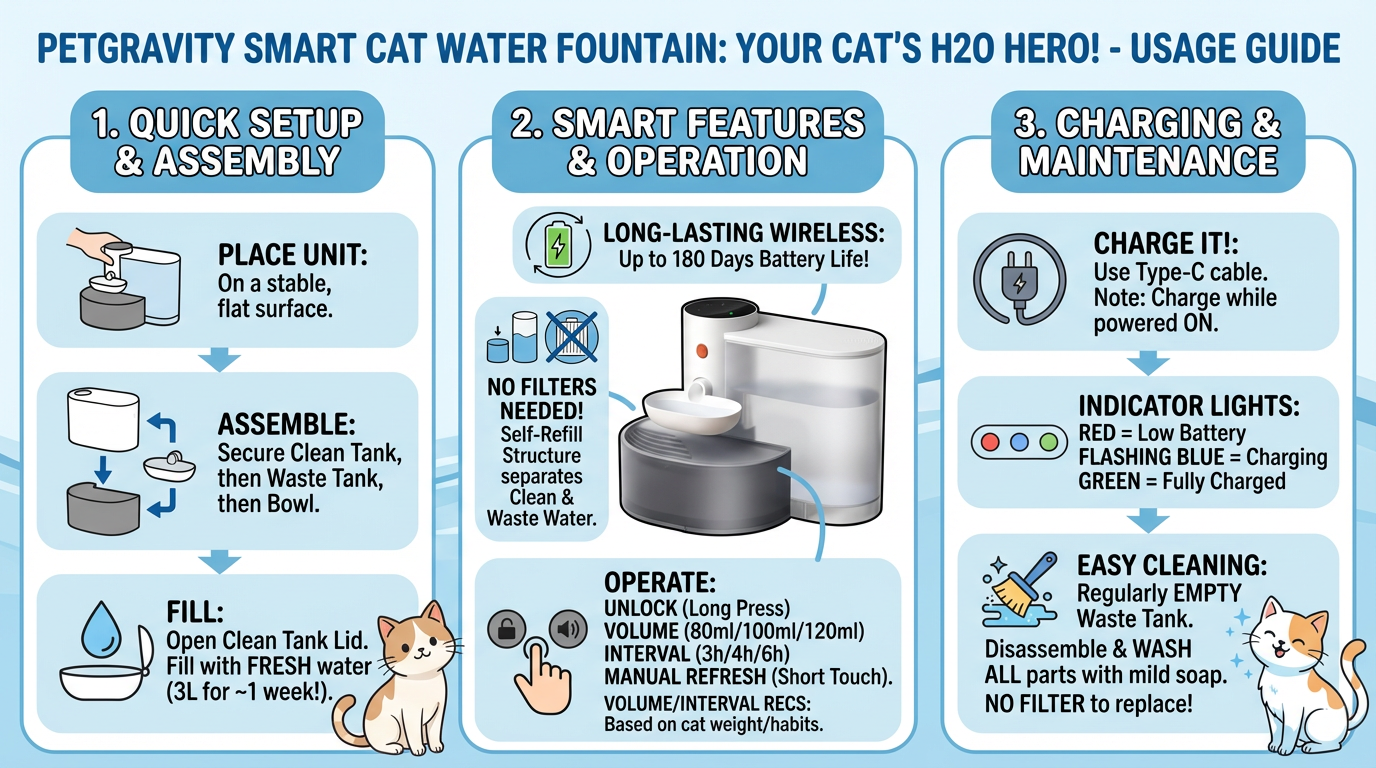
The Petgravity Smart Cat Water Fountain is designed to provide a continuous flow of fresh water for your pets, ensuring optimal hydration and health. This innovative fountain features a self-refill structure that separates clean and waste water, eliminating the need for traditional filters and simplifying maintenance. Its wireless operation and long-lasting battery offer flexible placement options within your home.

Figure 1: Petgravity Smart Cat Water Fountain in use with a cat.
2. Product Components
The Petgravity Smart Cat Water Fountain consists of several key components designed for easy assembly and maintenance:
- Main Unit: Houses the control panel and water dispensing mechanism.
- Clean Water Tank: 3-liter capacity for fresh water storage.
- Waste Water Tank: Collects used water, preventing recirculation.
- Water Bowl: The primary drinking area for your pet.
- Clean Water Tank Lid: Secures the clean water tank.
- Waste Water Tank Lid: Covers the waste water tank.

Figure 2: Exploded view of the fountain components, highlighting the separate clean and waste water tanks.

Figure 3: Illustration of the self-refill mechanism, demonstrating how waste water is emptied and fresh water is supplied.
3. Setup Instructions
- Unpack Components: Carefully remove all parts from the packaging.
- Assemble Main Unit:
- Place the main unit on a stable, flat surface.
- Gently press the clean water tank onto the main unit, ensuring it fits securely. Close the clean water tank lid tightly.
- Install the waste water tank by placing it under the main unit. Ensure the float valve on the bottom of the tank is correctly positioned. Cover the waste water tank with its lid, ensuring it is tightly covered. (Note: Incorrect installation of either tank or lid may cause indicator lights to blink.)
- Install the water bowl by aligning it with the dispensing spout on the main unit and pressing the unlock switch to secure it.
- Fill with Water: Open the clean water tank lid and fill the tank with fresh water. The 3-liter capacity provides approximately one week of hands-free operation.
- Initial Charge: Before first use, ensure the device is fully charged. Open the silicone cover on the main unit, switch on the power, and connect the Type-C charging cable. A full charge takes approximately 4 hours and provides up to 180 days of battery life (based on experimental data of pouring water 4 times a day).

Figure 4: Charging port and control panel details.
4. Operating Instructions
The Petgravity Smart Cat Water Fountain offers customizable settings for water volume and refresh intervals.
- Unlock Screen: Long press the "Unlock Refresh" button to activate the control panel.
- Set Water Volume: Press the "Volume" button to cycle through available water volumes: 80ml, 100ml, and 120ml. Select the volume appropriate for your pet's needs.
- Set Time Interval: Press the "Time Interval" button to choose how frequently the water refreshes: 6 hours, 4 hours, or 3 hours.
- Manual Refresh: Short touch the "Unlock Refresh" button to manually initiate a water refresh cycle. The fountain will empty the current water bowl into the waste tank and refill it with fresh water.

Figure 5: Control panel and recommended settings based on cat numbers.
Note: A cat needs to drink 40-60ml of water per kilogram of body weight per day.
Video 1: Official demonstration of the Petgravity Smart Cat Fountain's operation, including setup and water dispensing.
5. Maintenance and Cleaning
The Petgravity Smart Cat Water Fountain is designed for easy cleaning with its detachable components and filter-free system.
- Empty Waste Water: Regularly empty the waste water tank to prevent biofilm formation and ensure optimal hygiene.
- Disassemble for Cleaning: Unlock the water bowl and remove it. Then, remove the clean water tank and waste water tank from the main unit.
- Wash Components: All detachable units (water bowl, clean water tank, waste water tank, and their lids) can be easily washed with water and mild soap. Rinse thoroughly.
- No Filter Needed: This fountain operates without a filter, simplifying maintenance and reducing ongoing costs. The one-way flow system ensures that only clean water is dispensed for your pet.
- Reassemble: Once all parts are clean and dry, reassemble the fountain by following the setup instructions in reverse order.

Figure 6: The filter-free design offers a cost-effective and low-maintenance solution.
6. Charging
The Petgravity Smart Cat Water Fountain is equipped with a 2000mAh rechargeable battery, providing long-lasting wireless operation.
- Battery Life: A fully charged battery can last up to 180 days, based on experimental data of dispensing water 4 times a day. Actual usage time may vary depending on frequency of use.
- Charging Port: The fountain uses a Type-C charging port.
- Charging Indicator: Refer to the control panel for battery status indicators (Solid Red: Low battery; Flashing Blue: Charging; Solid Green: Charging completed).
- Charging Requirement: The water dispenser can only be charged when it is turned on.

Figure 7: Wireless operation powered by a long-lasting internal battery.
7. Safety Information
- Separated Water and Electric Design: The fountain features a separated water and electric design to ensure safe drinking for your pets.
- Food-Grade Materials: Made from food-grade Polycarbonate (PC) and Acrylonitrile Butadiene Styrene (ABS) materials, ensuring safety and durability.
- Indoor Use Only: This product is designed for indoor use only.
- Regular Cleaning: Regularly empty the waste water to inhibit biofilm formation and maintain a hygienic drinking environment.

Figure 8: Enhanced safety through water and electrical component separation.
8. Specifications
| Feature | Detail |
|---|---|
| Brand | Petgravity |
| Model Name | Petgravity Smart Cat Water Fountain |
| Model Number | YSJ241018USPC |
| Capacity | 3 Liters |
| Product Dimensions (L x W x H) | 12.99"L x 9.25"W x 9.84"H |
| Item Weight | 4.84 pounds |
| Material | Polycarbonate (PC), Acrylonitrile Butadiene Styrene (ABS) |
| Color | Gray |
| Battery | 2000mAh Lithium Polymer (included) |
| Charging Type | USB-C Rechargeable |
| Target Audience | Cats, Dogs, Birds |
| Specific Uses | Indoor |
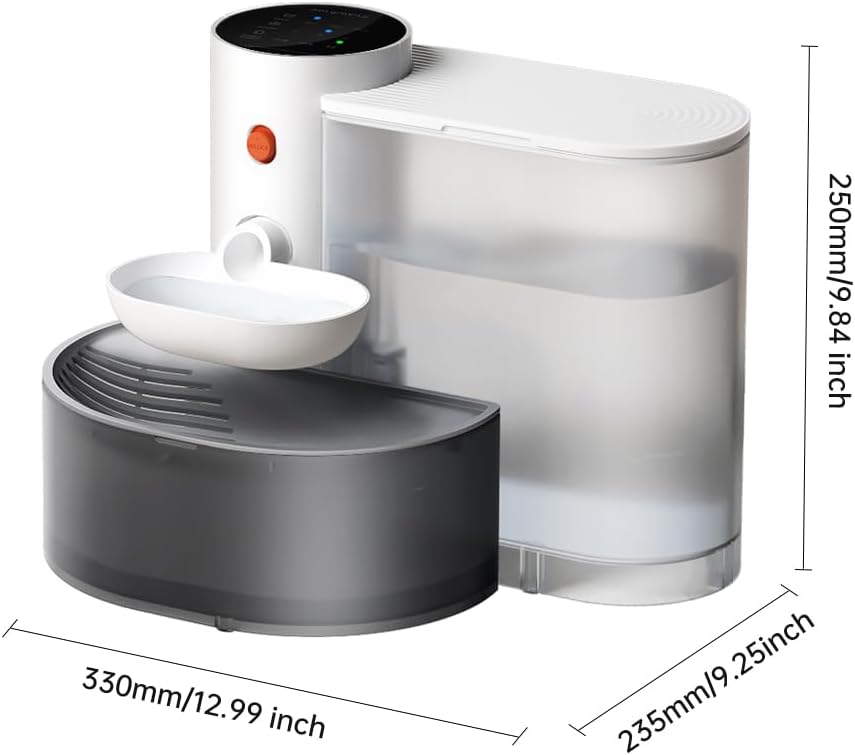
Figure 9: Product dimensions for placement consideration.
9. Troubleshooting
While the Petgravity Smart Cat Water Fountain is designed for reliable operation, here are some common issues and potential solutions:
- Light Blinking (Clean Water Tank): This indicates the clean water tank is not installed or insufficient water is left. Ensure the tank is properly seated and filled with water.
- Light Blinking (Waste Water Tank): This indicates the waste water tank is not installed or the waste water tank is full. Ensure the tank is properly seated and empty it if full.
- Light Blinking (Lid): If the lid is not tightly covered with the tank, the light may blink. Ensure all lids are securely closed.
- Abnormal Operation of Water Bowl: A solid yellow light indicates abnormal operation. Check for any obstructions in the water bowl or dispensing mechanism.
- Fountain Not Dispensing Water: Check if the clean water tank is empty or if the waste water tank is full. Ensure the battery has sufficient charge.
- Fountain Leaking: Ensure all components are correctly assembled and securely fitted. Check for any cracks or damage to the tanks or main unit.
10. Warranty and Support
For warranty information or technical support, please refer to the product packaging or contact Petgravity customer service directly. Keep your purchase receipt for any warranty claims.
