
1. Product Overview
The Treewell Wireless Wall Light Switch Kit (Model TWRS13A) provides a convenient and flexible solution for controlling lights and appliances wirelessly. This kit eliminates the need for complex wiring, offering easy installation and operation. It features a remote control switch and multiple receiver outlets, allowing for individual or simultaneous control of connected devices.
Key features include a 200-foot RF range, programmability, expandability, and a robust 15A/1875W capacity, suitable for a wide range of household devices. The product is ETL certified, ensuring safety and reliability.
2. Safety Information
- This product is ETL certified, indicating compliance with North American safety standards.
- Do not exceed the maximum load capacity of 15 Amperes or 1875 Watts (125V). Overloading can cause overheating and potential fire hazards.
- Ensure the product is used in dry indoor environments only. Avoid exposure to water or high humidity.
- Do not disassemble or modify the device. Refer all servicing to qualified personnel.
- The power outlet automatically turns off after a power outage to save power and protect your appliances.
3. Package Contents
Your Treewell Wireless Wall Light Switch Kit includes:
- 1 x Wireless Remote Control Wall Switch (with 3V/CR2032 battery installed)
- 3 x Wireless Receiver Outlets
- Mounting Hardware (screws and anchors)
- User Manual
4. Product Features
- Wireless Control: No wiring required for installation, offering flexibility in placement.
- Extended RF Range: Operates effectively up to 200 feet, even through walls and doors.
- Programmable & Expandable: Easily pair multiple switches to one outlet, or one switch to multiple outlets. Expand your system with additional Treewell components.
- High Power Rating: Supports up to 15A/1875W, suitable for various appliances and lighting.
- Compact Design: Receiver outlets are designed to occupy only one wall socket, leaving adjacent outlets free.
- Dual-Use Detachable Remote Switch: The remote can be mounted on a wall like a traditional switch or detached for portable handheld use.
- Safety Certified: ETL and FCC certified for quality and safety assurance.

The remote switch can be used as a wall switch or a portable handheld remote.
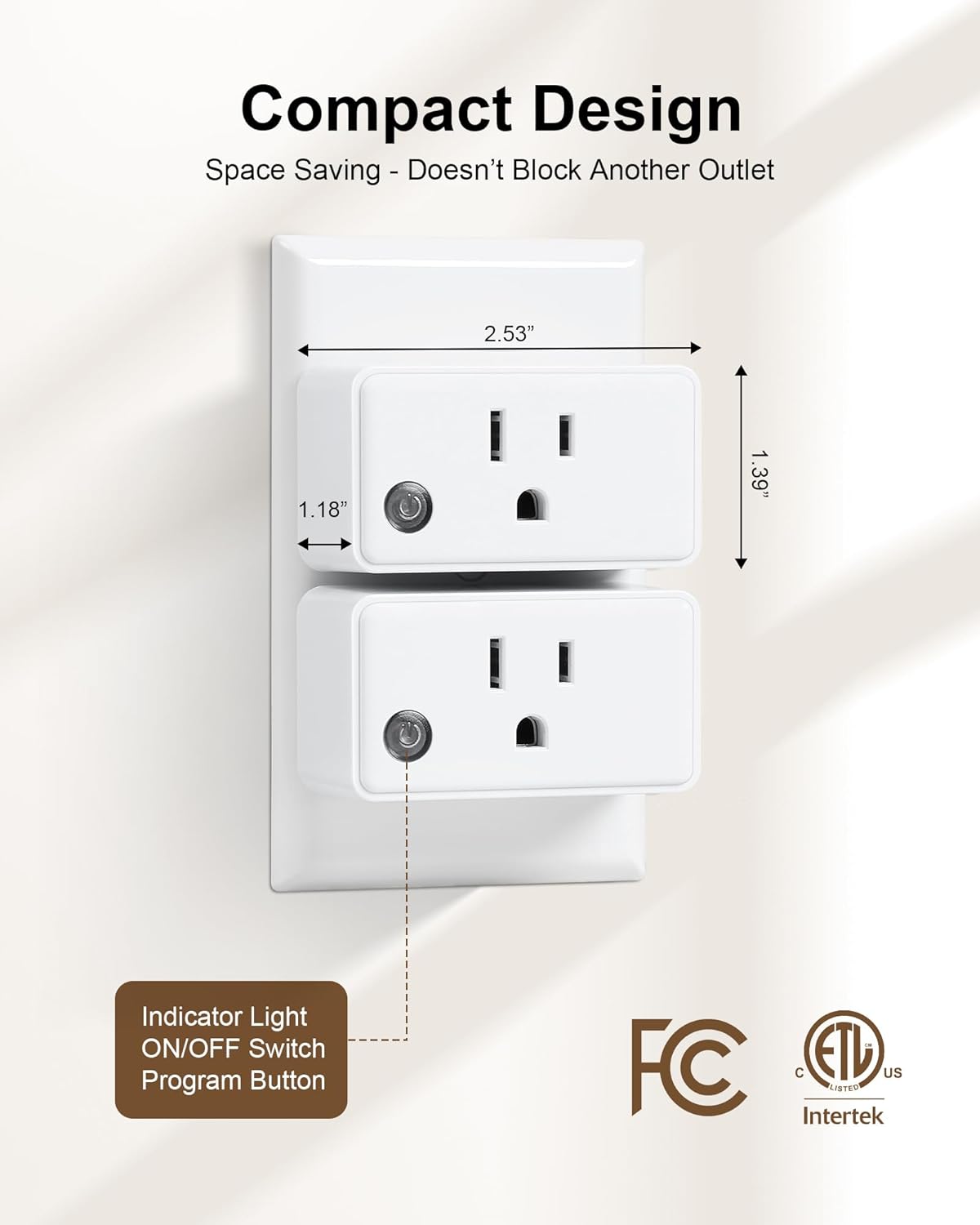
Compact design ensures the receiver outlet does not block adjacent sockets.

The 15A/1875W rating supports a wide range of devices.
5. Setup
5.1. Installing the Wall Switch
The remote control wall switch can be easily mounted on any flat surface using the provided hardware.
- Step 1: Choose a desired location for your wall switch.
- Step 2: Use a screwdriver to attach the mounting plate to the wall with the provided screws and anchors. Ensure the 'UP' arrow on the plate faces upwards.
- Step 3: Snap the remote control switch into the mounting plate. The magnetic buckle design will hold it securely.
- Step 4: Attach the decorative cover plate over the switch for a finished look.

Follow these steps for easy installation of the wall switch.
5.2. Pairing Outlets and Switches
The Treewell system allows for flexible pairing, enabling one switch to control one outlet, multiple switches to control one outlet, or one switch to control multiple outlets. The units are often pre-paired, but you can re-pair or add new pairings as needed.
- Step 1: Plug the receiver outlet into a standard wall socket. You do not need to connect an appliance to it for pairing.
- Step 2: Press and hold the small program button on the side of the receiver outlet until its indicator light begins to blink. Release the button.
- Step 3: Within 5 seconds, press any ON or OFF button on your remote control wall switch. For multi-button switches, you can select a specific button pair (e.g., ON/OFF for 'A', 'B', or 'C') to pair with that outlet.
- Step 4: The indicator light on the receiver outlet will stop blinking, confirming successful pairing.
- To Pair Multiple Switches to One Outlet: Repeat Steps 1-4 for each additional switch you wish to pair with the same outlet.
- To Pair One Switch to Multiple Outlets: Pair the switch with the first outlet, then repeat Steps 1-4 for each subsequent outlet, using the same button on the switch.

The system supports flexible pairing configurations without interference.

Expand your remote system freely with additional Treewell components.
6. Operating Instructions
Once paired, operating your Treewell Wireless Wall Light Switch Kit is straightforward.
- Individual Control: Press the specific 'ON' button on the remote switch corresponding to the paired outlet to turn on the connected device. Press the corresponding 'OFF' button to turn it off.
- All Control: If your remote switch has an 'ALL ON' or 'ALL OFF' button, pressing it will simultaneously control all outlets paired to that function.
- Portable Use: Detach the remote switch from its wall mount to use it as a handheld remote for convenience.

Control each outlet separately or all at once from the remote switch.
7. Maintenance
- Cleaning: Wipe the devices with a dry, soft cloth. Do not use liquid cleaners or solvents.
- Battery Replacement: The remote control wall switch uses a 3V/CR2032 coin cell battery. When the remote's performance degrades, replace the battery. Access to the battery compartment is typically on the back or side of the detachable remote.
- Storage: Store the devices in a cool, dry place when not in use for extended periods.
8. Troubleshooting
- Device Not Responding:
- Ensure the receiver outlet is securely plugged into a live power socket.
- Check the battery in the remote control switch. Replace if necessary.
- Re-pair the switch and outlet following the instructions in Section 5.2.
- If the switch occasionally becomes unresponsive, try turning the affected outlet OFF and then ON again using the switch. This often resets the connection.
- Limited Range:
- Ensure there are no major obstructions (e.g., large metal objects, thick concrete walls) between the remote and the receiver.
- Move the remote closer to the receiver outlet.
- Check for potential sources of RF interference (e.g., other wireless devices, strong electromagnetic fields).
- Interference with Other Devices: The system is designed for free pairing without interference. If you experience issues, ensure proper pairing as described in Section 5.2. Each pairing creates a unique code.
9. Specifications
| Brand | treewell |
| Model Number | TWRS13A |
| Operation Mode | ON-OFF |
| Connector Type | Plug In |
| Switch Type | Push Button |
| Mounting Type | Wall Mount (for remote) |
| Number of Positions | 3 (for individual control) |
| Wattage | 1875 Watts |
| Material Type | Polycarbonate |
| Contact Material | Copper |
| Certifications | ETL, FCC |
| Remote Battery | 3V/CR2032 (included) |
10. Warranty Information
Treewell products are designed and manufactured to the highest quality standards. This product comes with a limited warranty against defects in materials and workmanship from the date of purchase. Please retain your proof of purchase for warranty claims. The warranty does not cover damage caused by misuse, accident, unauthorized modification, or exceeding specified electrical ratings.
11. Customer Support
For technical assistance, troubleshooting, or warranty inquiries, please contact Treewell customer support through the retailer's platform or visit our official website. Please have your model number (TWRS13A) and purchase information ready when contacting support.
Website: www.treewell.com (Placeholder - please refer to actual product packaging or retailer for official website)
Email: support@treewell.com (Placeholder - please refer to actual product packaging or retailer for official email)